
Java and arrays
To practice examples from this blast, go to::The arrays in JAVA- examples.
Arrays variables are used when it is necessary to store more data of the same type in memory e.g. int.Consider the following task: You need to enter grades from n subjects and calculate the maximum.
We reserve memory for the grades data and then use n for a cycle to try to enter n grades(eg n = 5):
int grade, n = 5;
String gradeStr;
for( int i = 0; i < n; i++){
gradeStr=JOptionPane.showInputDialog(“Enter your rate”);
grade=Integer.parseInt(rateStr);
}
int [ ] grades= new int [5];
| 0 | 1 | 2 | 3 | 4 |
grades
grades[ 2 ] = 5;
| 5 | ||||
|---|---|---|---|---|
| 0 | 1 | 2 | 3 | 4 |
grades
int [] grades = new int [5];/*added row*/
for( int i = 0; i < 5; i++){
gradeStr=JOptionPane.showInputDialog(“Enter a grade”);
grades[ i ]=Integer.parseInt(gradeStr);/*changed row */
}
| 3 | 4 | 5 | 5 | 4 |
|---|---|---|---|---|
| 0 | 1 | 2 | 3 | 4 |
grades
Determining the maximum element of an array
Now that all grades are stored in memory, they could be used to determine Maximum grade.The maximum grade is determined as follows:
int max= grades[0];
for( int i = 0; i < n; i++)
{
if(grades[ i ] > max)
{
max=grades[i];
}
}
When the cycle is completed the max variable represents the highest grade. The complete code of this example is given in the figure{
if(grades[ i ] > max)
{
max=grades[i];
}
}
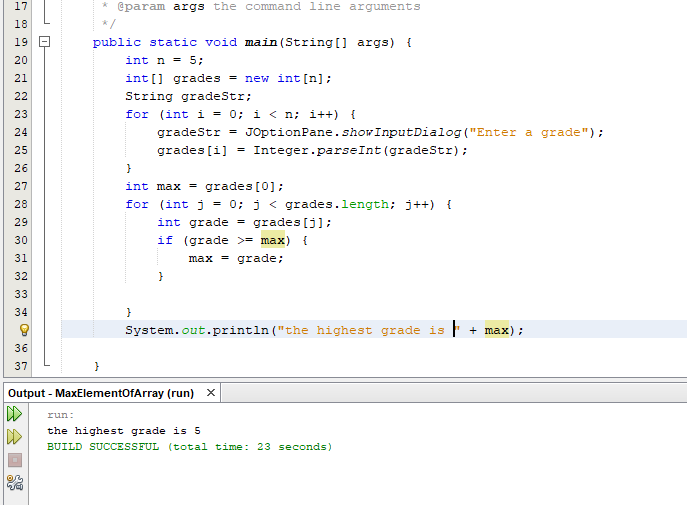
Figure 1: Arrays. Determination of maximum
Declaring and defining an array
The declaration of a series of 10 integers looks like:int [ ] A;
A = new int [10];
The disadvantage of arrays is that when we do not know in advance how many arrays the elements will contain, we have to reserve more places than we expect, just in case. Some of these places are likely to remain unused but will not be interrupted by the program.
The possibility to reserve the number of seats exactly as needed will be solved by the use of collections, but this is a subject of exposure at a higher course.
Defining an array with real numbers
One array of real numbers is defined similarly to an integer, with double or float instead of int.float [ ] B = new float[10];
double [ ] C= new double[10];
Giving value to array members
The elements of an array are accessed by indexes starting from 0. For example, for a series of real numbers of 5 elements, defining and assigning values to the elements would be:double [] A= new double[5];
niz[0]=1.1;niz[1]=2.0;
niz[2]=2.5;
niz[3]=-1.6;
niz[4]=3.3;
| 1.1 | 2.0 | 2.5 | -1.6 | 3.3 |
|---|---|---|---|---|
| 0 | 1 | 2 | 3 | 4 |
A
Giving value to array members when they are known in advance
If we know in advance the values of the array elements then the initialization of the array is done together with the definition of the array. The previous array is initialized as follows:double [ ] A= {1.1, 2.0, 2.5, -1.6, 3.3 };
EXAMPLE: Loading an array and determining the positive elements in it:
Task text: Enter value n and then enter n members of an integer array and determine how many positives there are.Solution: N must be entered first to be able to define a array because n is the dimension of that array:
int n;
String nStr;String elemenTofArrayStr;
nStr=JOptionPane.showInputDialog("Enter number of elements in the array");
n=Integer.parseInt(nStr);
//Defining a series of n elements
int [ ] A= new int[n];
//Entering array
for(int i = 0; i < n; i++)
{
elementOfArrayStr=JOptionPane.showInputDialog("Enter "+(i+1)+". element of array");
A[i]=Integer.parseInt(elementOfArrayStr);
}
The array is then printed as follows using the for command:for(int i = 0; i < n; i++)
{
elementOfArrayStr=JOptionPane.showInputDialog("Enter "+(i+1)+". element of array");
A[i]=Integer.parseInt(elementOfArrayStr);
}
//Printing elements of array
for(int i = 0; i < n; i++)
{
System.out.print(A[i]+" ");
}
In the second part, using a for cycle with the same parameters as when loading and printing array elements, we count the elements that are positive:for(int i = 0; i < n; i++)
{
System.out.print(A[i]+" ");
}
int nmbOfPositive=0;
for(int i = 0; i < n; i++)
{
if (A[i] > 0)
nmbOfPositive++;
}
The complete code is given in the figure below:for(int i = 0; i < n; i++)
{
if (A[i] > 0)
nmbOfPositive++;
}
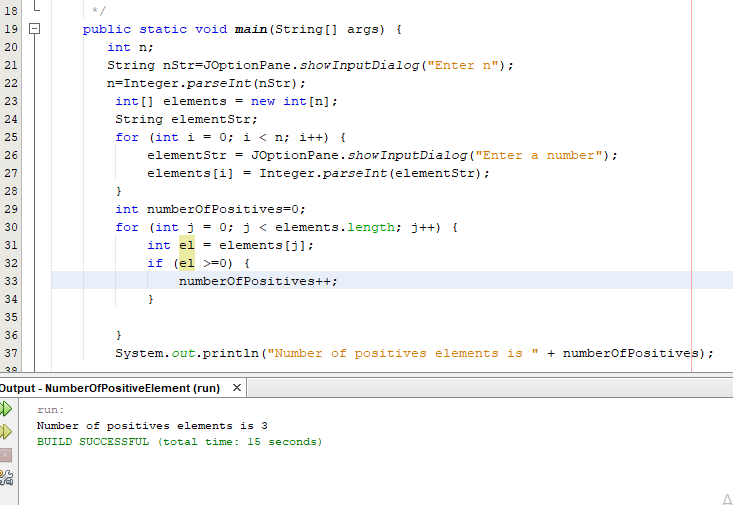
Figure 2: Arrays. Determining the number of positive elements of an array
Array and objects
Previous examples have shown the storage of a set of simple data. Arrays can also be made from objects of a particular class. For example. a series of 10 element balls (Ball class) would be:
Ball[ ]balls= new Ball[10];
Here are all the elements of the same type, ie the Ball class. If objects of different types are to be placed in a array, then this can be done by specifying the type in the array that the classes of those objects inherit. For example. If need be e.g. make a number of drawing objects: lines, circles, rectangles and all these classes belong to the same hierarchy of classes ie. inherit the Shape class, the array would look like:
Shape [ ] elements=new Shape[10];
In any case, all classes indirectly inherit the Object class, so it can always be written for a series of mixed-type objects:
Object[ ]elements=new Object[];
See more about class inheritance at: Inheritance of classes
Loops and arrays
Consider the following problem:- We want to simulate a change of position with [m] when moving steadily to change time.
- We observe position changes for every small increase in time from dt [s].
- Suppose this change is for dt = 0.05s
- Let the time change over 1s
- 20 changes per 0.05s = 1s
- Initial values are s = 0; t = 0; v is entered by the user
t=t+dt; //increase in time by 0.05s
s=s+v*dt; //changing position by 0.05s
System.out.println(“s=“+s);
So, as follows:s=s+v*dt; //changing position by 0.05s
System.out.println(“s=“+s);
t=t+dt; //increase in time by 0.05s
s=s+v*dt; //changing position by 0.05s
System.out.println(“s=“+s+”);
t=t+dt; //increase in time by 0.05s
s=s+v*dt; //changing position by 0.05s
System.out.println(“s=“+s+”);
t=t+dt; //increase in time by 0.05s
s=s+v*dt; //changing position by 0.05s
System.out.println(“s=“+s+”);
...
This way is not good.
We see that the 3 commands are repeated 20 times.
Instead, write 3 commands one time and then use another command that will repeat them cyclically as many times as we want
These are the commands we call cycles (loops):
- for
- while
- do-while
for(int i = 0; i < n; i++)
{
t=t+dt; //increase in time by 0.05s
s=s+v*dt; //changing position by 0.05s
System.out.println(“s=“+s);
}
{
t=t+dt; //increase in time by 0.05s
s=s+v*dt; //changing position by 0.05s
System.out.println(“s=“+s);
}
Example: Create 20 balls whose centers are arranged in a two-dimensional plane
on a random basis. The diameter of the balls is r.
Let's create 1 ball first.The position of the center in the plane is determined by the x and y coordinates, obtained on a random basis. To generate random numbers, we will use the Math class and its function random (). This function generates a random number between 0 and 1.
If we want x to be a random number in the range 10-290
a y in the range 0-400
x=10+Math.random()*280;
y=Math.random()*400;
The simulation was created using tools EJS(Easy Java Simulation). More about creating simulations using this tool can be seen on the site:y=Math.random()*400;
https://kosi-hitac.herokuapp.com/The ball whose coordinates were calculated using the Math.random () function is shown in the following figure:
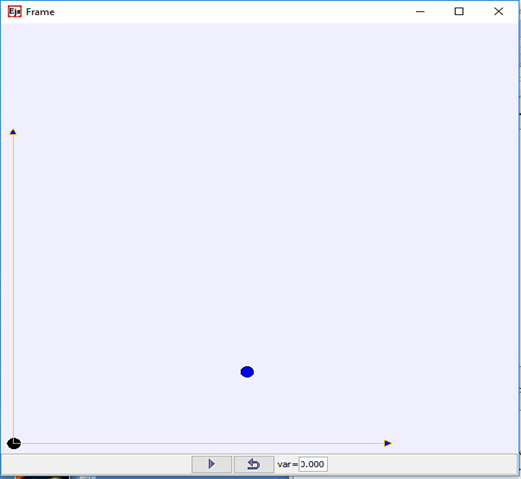
Figure 3: Cycles and arrays. View the created ball.
To create a ball, we create an object that will represent that ball:
x=10+Math.random()*280;
y=Math.random()*400;
Ball k=new Ball(x, y, 1);
To create an object of a class Ball, we must define a class:y=Math.random()*400;
Ball k=new Ball(x, y, 1);
public class Ball
{
double x,y,r;
public Ball(double x, double y,double r)
{
this.x = x;
this.y= y;
this.r = r;
}
Let's create 20 balls now.{
double x,y,r;
public Ball(double x, double y,double r)
{
this.x = x;
this.y= y;
this.r = r;
}
Coordinates should be created on a random basis. You need to remember those coordinates so that they can be used later.
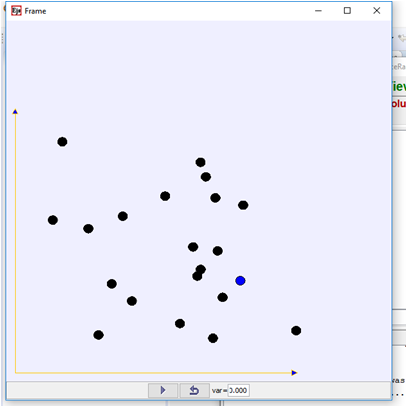
Figure 4: Cycles and arrays. View 20 balls created at random.
We create the coordinates as in 1 ball and put in a for cycle to get 20 reps. The problem is to remember the coordinates obtained. In order to memorize them we need to introduce a string according to the following syntax:
type_of_data[ ] name_of_array=new type_of_data[dimension];
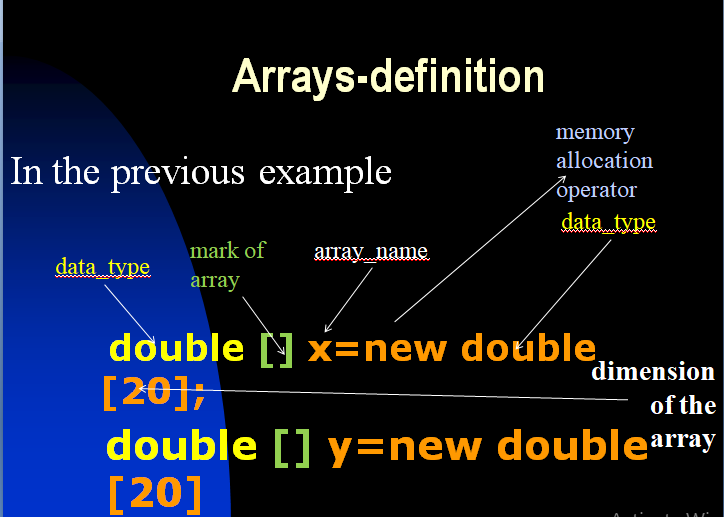
Figure 5: Cycles and arrays. Defining arrays
This will provide memory for 20 data in a row: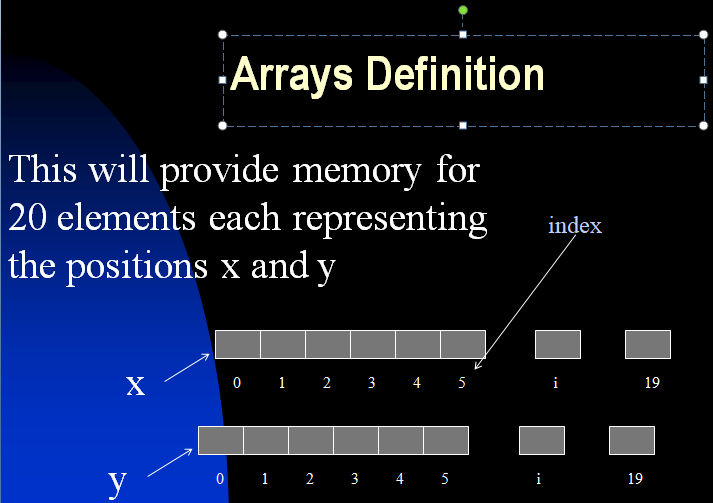
Figure 6: Loops and arrays. Defining arrays, displaying memory
To generate the coordinates of the centers of the balls, observed in the two-dimensional plane X0Y, we use the formulas mentioned above and place them in the body for cycles to provide 20 repetitions, as follows. The third dimension (z) is constant z = 0 because we only observe motion in a plane, so we will not write it;
for(int i = 0; i < n; i++)
{
x=10+Math.random()*280;
y=Math.random()*400;
}
To remember all the x and y coordinates, arrays should be introduced for later use instead of ordinary double-type variables.{
x=10+Math.random()*280;
y=Math.random()*400;
}
We use for to repeat a random function for random numbers:
for(int i = 0; i < n; i++)
{
x[i]=10+Math.random()*280;
y[i]=Math.random()*400;
}
where "i" is the position in the array. This will assign x values and y sequences with random numbers and fill the memory in a row:{
x[i]=10+Math.random()*280;
y[i]=Math.random()*400;
}
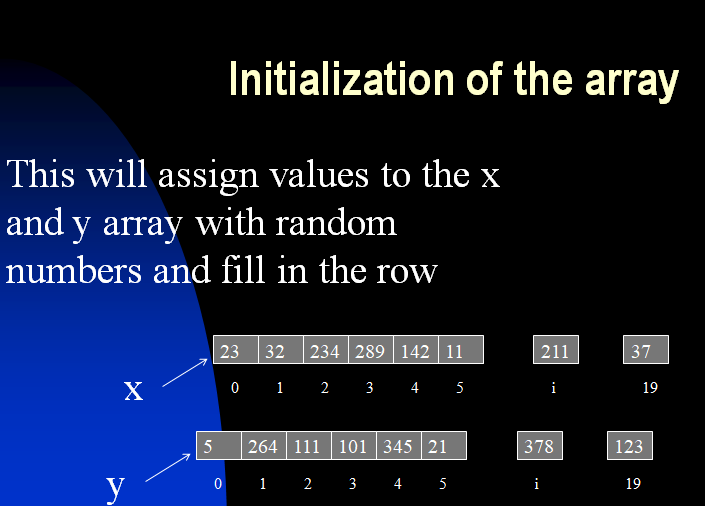
Figure 7: Loops and arrays. Defining Arrays, Initialization
In the previous example, we want to have a set of objects that represent balls:
Ball[] balls=new Ball[20];
Koristimo for za ponavljanje a random funkciju za slučajne brojeve.
for(int i = 0; i < n; i++)
{
x[i]=10+Math.random()*280;
y[i]=Math.random()*400;
Ball b = new Ball(x, y, 1);
balls[i] = b;
}
Last row in for loop:{
x[i]=10+Math.random()*280;
y[i]=Math.random()*400;
Ball b = new Ball(x, y, 1);
balls[i] = b;
}
balls [i] = k;
fills the memory of the string of objects with objects

Figure 8: Loops and arrays. Filling in the data
If we wanted to move all the balls in the x direction for some random size dx, we would use a series of objects memorized in memory, then extract 1 by 1 object from memory and move. We use for to repeat arandom function for random numbers
for(int i = 0; i < n; i++)
{
double dx=Math.random()*10;
Ball b=balls[i];
b.x=b.x+dx;
}
{
double dx=Math.random()*10;
Ball b=balls[i];
b.x=b.x+dx;
}
| Previous |< Loops in Java |
Next Classes and Objects>| |