
LOOPS IN THE PROGRAMMING LANGUAGE JAVA
Loops are a key element in programming that allow certain blocks of code to be executed repeatedly, as long as a certain condition is met. In Java, loops are a basic control structure that allows programmers to automate repetitive tasks, iterate through data, or manage complex algorithms. By using loops, programs become more efficient and easier to maintain. In this article, we'll explore the different types of loops in Java, how they work, and when to use them for best results.Instead of manually writing multiple lines of code for each iteration, loops allow us to repeat a block of code a specified number of times or until a condition becomes false. The most commonly used loops are for, while, and do-while loops, each adapted to different situations.Performance comparison between different loop types
In Java, the performance of different loops depends on the number of iterations and the logic itself:- for loop: Effective when we know the exact number of iterations in advance. It's a good choice for arrays and iterating through fixed data structures.
- while loop: Better for situations where the number of iterations is not known in advance. It can be less efficient if the condition remains true for a long time.
- do-while loop: Similar to the while loop, but the code will always be executed at least once, which can be important in certain cases.
In practice, the performance differences between these loops are minimal for most applications, except when dealing with very large data sets.Here we can also add a foreachloop.
The foreach loop is not considered a separate type of loop, but belongs to the group of iterative loops, similar to the for loop. While the classic for loop is used to iterate through an array with explicitly specified indices and control variables, the foreach loop simplifies iterating through collections (such as arrays, lists, or maps), automatically looping through each element without the need for explicit indexing. Although functionally different, it can be considered a specialized form of the for loop adapted to collections.
Algorithm for loop-diagram
This algorithm shows how to control the repetition of commands with three expressions: 1 - a variable is defined and initialized; 2 - a logical expression is set as a loop condition; 3 - defines the change in the value of the control variable during the cycle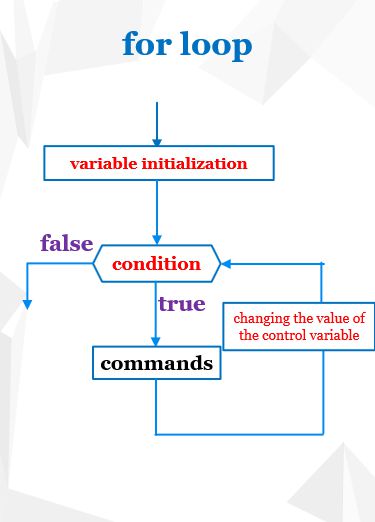
Figure 1: Algorithm for loops-diagram (general)
|
Here you can see a concrete example for 3 expressions used for flow control: 1 - the variable "i" is defined and initialized and initialized to the value zero; 2 - the logical expression i<n is set as a loop condition; 3 - defines the change of the control variable by "+1" during the cycle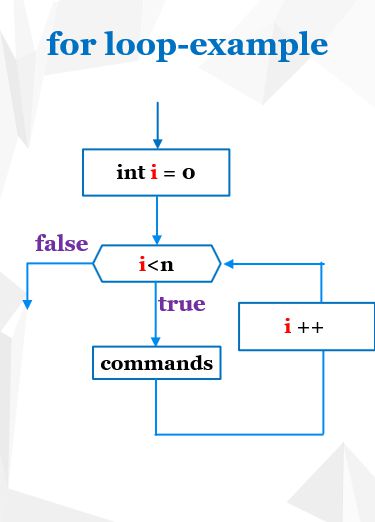
Figure 2. Algorithm for loop-diagram (example)
|
Algorithm while, as well as do-while loops, diagrams
| The repetition of a group of commands is defined as long as some set condition (logical expression) is satisfied. This loop is usually used when the number of cycle executions is not known in advance. It may happen that there is no repeat case. 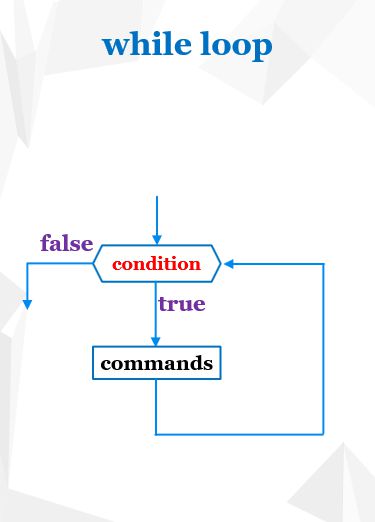
Figure 3: While loop algorithm-diagram (general)
|
Definiše se ponavljanje grupe naredbi sve dokle je zadovoljen neki postavljen uslov(logički izraz). Ova petlja se obično koristi kada unapred nije poznat broj izvršavanja ciklusa i kada nam je iz nekog razloga važno da postoji bar jedan ciklus. Mora se izvršiti bar jedan ciklus.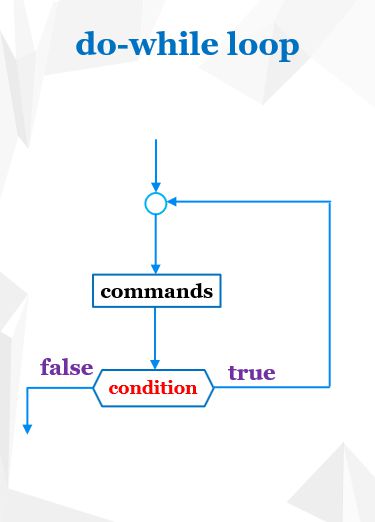
Figure 4: Algorithm do - while loop-diagram (general)
|
You can read this lesson in C / C ++ on the following page: Loops in C/C++
To practice examples from this topic, go to the webpage:Loops in JAVA-examples.
Where does the need for the loop command come from
Let's look at the next problem. We want to print a number of natural numbers. Now, in this case, there are a number of the first 10 natural numbers. The order to print number 1 is:
System.out.print ("1");
If we want to print other numbers, we could do this by repeating the previous command 10 times (we use Copy - Paste) and only change the value of the number that is displayed
System.out.print ("1,");
System.out.print ("2,");
System.out.print ("3,");
System.out.print ("4,");
System.out.print ("5,");
...
This could still be done in this way for a few numbers, but what if it is necessary to print a series of 100, 1000 numbers. Of course, this would not work in this way.System.out.print ("2,");
System.out.print ("3,");
System.out.print ("4,");
System.out.print ("5,");
...
The idea of using a cycle is to write repeating commands only once, and using the command to create a cycle, for example, command for, these commands repeatedly executed, i.e. as many times as necessary.
In this example, a repeating command is
System.out.print (..
So, we will write it only once and insert within the command for which represents the cycle:
In general, the command for is written:
for (initialization; condition_trap; expression_of_the_loop)
{
array_of_commands;
}
In our case, there is only one order and it is written inside the curly braces and it would look like:{
array_of_commands;
}
for (initialization; condition_trap; expression_of_the_loop)
{
System.out.print (..
}
The conditions to be written, which determine the number of repeated cycles, are written in small brackets, which are: initialization, query condition, expression_of_the_loop, and they are separated by a point-comma within this small bracket.{
System.out.print (..
}
Initialization means that we introduce (define) a control variable, for example, which means that we reserve for its memory and give it the initial value (initializing). In this example:
int i = 1;
The loop condition is a logical expression that can be either true or false.
i <= 10;
The cycle will be repeated as long as this condition is "true". When during a cycle they are variable and do not change, and we can change it through the loop, the condition would always be "true", i.e. the cycle would never be interrupted (the infinite cycle). In order to break it must be made that the condition is not satisfied (false). The control variable can be changed using:expression_of_the_loop and this is usually expression like:
i = i + step,
where the step is an integer that represents the value of how much it is variable and increases or decreases (if the negativ value is a value). In our example, the value i should be increased in each cycle by 1, so the loop expression will read:
i = i + 1,
This means that in the memory space and the new value is 1 higher than the previous one. For the cycle now looks like:
for (int i = 1; i <= 10; i = i+1)
{
System.out.print (..
}
The command will now be repeated 10 times, as long as <= 10. It remains to be seen what to put in the brackets of the print command. If you wrote "1", then "1,1,1,1,1,1" would be printed ...{
System.out.print (..
}
It is necessary to put a variable that will have a value of 1 in the first cycle, in the second 2, etc. It can be exactly variable and that serves to control the number of cycles. Now we can finally write:
for (int i = 1; i <= 10; i = i+1)
{
System.out.print( i+”, ”);
}
Of course, this task could be resolved with a command:{
System.out.print( i+”, ”);
}
System.out.print ("1,2,3,4,5,6,7,8,9,10");
but we just wanted to showcase the order for cycles and when and why they are used.The cycle for is normally used when we know in advance how many cycles will be, and if we do not know, then either the while or do-while cycle will be used, which will be discussed later.
For expression_frames, operator "++" can be used to increase the value of a variable and for a value of 1 instead of "i = i + 1"
for(int i = 1; i<=10; i++)
{
System.out.print( i+”, ”);
}
{
System.out.print( i+”, ”);
}
Example: Sum of natural numbers:
Text of the task: Summarize the first 10 natural numbers using the cycle.And this task could be solved by the order
System.out.print ("" + (1 + 2 + 3 + 4 + 5 + 6 + 7 + 8 + 9 + 10));
but we want to show how to use the cycle for a given sum (it is convenient when there are many numbers). The idea is to add in each cycle a natural number in a variable that represents a sum. These natural numbers would be marked with a variable in the cycle as in the previous case (it is convenient because this variable changes from 1 to 10 during the cycle with step 1, so that it through cycles actually represents those natural numbers to be added.
First, you need to introduce a variable that will represent a sum:
int sum = 0;
Then one should be added to the collection. Written without a cycle, it would look like:
sum = sum + 1;
sum = sum + 2;
sum = sum + 3;
sum = sum + 4;
...
sum = sum + i;
...
sum = sum + 10;
but instead we use a cycle:sum = sum + 2;
sum = sum + 3;
sum = sum + 4;
...
sum = sum + i;
...
sum = sum + 10;
for(int i = 1; i <= 10; i++)
{
sum= sum+ i;
}
The final sum will be formed only after the end of the cycle. A complete example is shown in the code below.{
sum= sum+ i;
}
class SumOfNumbers
{
public static void main(String[]args)
{
}{
int sum=0;
for(int i = 1; i<=10; i= i+1)
{
System.out.println("sum = "+ sum);
}for(int i = 1; i<=10; i= i+1)
{
sum = sum + i;
}System.out.println("sum = "+ sum);