
TWO-DIMENSIONAL ARRAYS - MATRICES IN C++ PROGRAMMING LANGUAGE
Page Contents
Welcome to the page dedicated to two-dimensional and multidimensional arrays in C++! This page provides all the key information, code examples, and practical tips for working with matrices and multidimensional data structures. Using the table of contents, you can quickly jump to interesting sections and find the content that interests you.
Introduction
Creating a matrix
Example 1: Printing by rows and columns
Suppose we want to print a sequence of the first 100 natural numbers, but they should be written in 10 rows and 10 columns, as in the image below: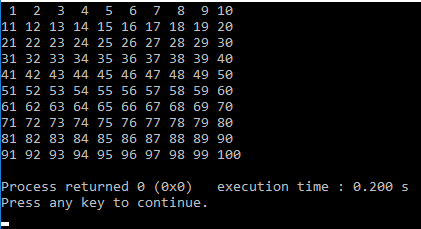 To write this we use a nested for loop:
using namespace std;
// Program to print the first 100 natural numbers in 10 rows and 10 columns
int main() {
for (int i = 0; i < 10; i++) {
for (int j = 0; j < 10; j++) {
int number = 10 * i + (j + 1); // Calculate the number based on the row and column
cout << number << " "; // Print the number on the same line
cout << endl; // Move to a new line after finishing the columns
return 0; // End of program
Memorizing Numbers Using a Two-Dimensional Array (Matrix)
To store these numbers in memory, we would need to either introduce 10 arrays of 10 elements each, or, if we want to store all the data in a single variable, we would use a two-dimensional array (matrix).
The following declaration creates an integer matrix with 10 rows and 10 columns:
int matrica[10][10]; // This is a matrix of integers with 10 rows and 10 columnsTo access a specific element, for instance, the one located in the 3rd row and 5th column, you would use:
matrica[3][5];
The previous example would be slightly modified.
using namespace std;
// Program for filling and printing a two-dimensional array (matrix)
int main() {
// Filling the matrix
for (int i = 0; i < 10; i++) {
// Printing the matrix
for (int i = 0; i < 10; i++) {
cout << endl; // New line after the row
return 0; // End of the program
Test your code in the editor below
Matrix initialization
If we already know the numbers to be placed in the matrix, we can define them in a similar way to how we initialize a one-dimensional array, but in this case it is an array of arrays. For example, the grades for several subjects for multiple students can be stored in a matrix:
intgrades[3][8] = { {2,3,2,2,4,5,5,4},
                                       {2,3,2,2,4,5,5,4},
                                       {2,3,2,2,4,5,5,4} };
In the square brackets, the dimensions must be specified even if they are implicitly determined by the arrays used for initializing the matrix – here, 3 rows and 8 columns. This indicates that the matrix is actually an array of elements, where those elements are also arrays, and each row and column has its own index to access individual elements (in this example, rows are indexed from 0 to 2, and columns from 0 to 7).
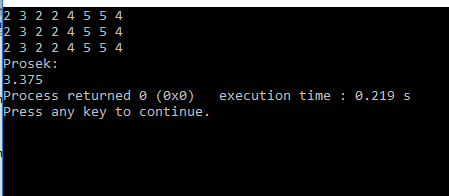
To calculate the average of all elements in the matrix, you first need to sum all the elements and then divide the total by the overall number of elements. A nested for loop is used for this purpose.
Example 2: Average grades of all students
using namespace std;
// Function to calculate the average grade of all students
void average() {
{2, 5, 2, 5, 4, 5, 5, 4}, // Grades of the second student
{2, 4, 4, 2, 4, 3, 5, 4} }; // Grades of the third student
int sum = 0; // Variable to accumulate the total of all grades
double avg; // Variable to store the average
// Loop to iterate through all grades in the matrix
for (int i = 0; i < 3; i++) {
cout << grades[i][j] << " "; // Print the current grade
cout << endl; // New line after each row of grades
cout << "Average: ";
avg = sum / (3.0 * 8.0); // Calculate the average (3 rows x 8 grades)
cout << avg; // Print the average
int main() {
return 0; // End of program
Explanation:
Steps to Calculate the Average Grade from a Matrix
- Matrix Declaration:
The matrix grades[3][8] contains the grades of three students, each with eight grades. - Matrix Traversal:
A nested for loop iterates through all rows and columns of the matrix.
Each grade is added to the variable sum. - Calculating the Average:
The average is calculated by dividing the total sum of grades by the number of all elements in the matrix (3 x 8). - Output:
The grades are printed row by row, and after traversing all the grades, the average grade is printed.
 |
|
Example 3: Average grades for each student
using namespace std;
// Function to calculate the average grade for each student
void calculateAverages() {
{2, 5, 2, 5, 4, 5, 5, 4}, // Grades of the second student
{2, 4, 4, 2, 4, 3, 5, 4} }; // Grades of the third student
double sum = 0; // Variable for summing the grades of one student
double average[3]; // Array to store the averages for each student
// Loop to iterate through each student's grades
for (int i = 0; i < 3; i++) {
for (int j = 0; j < 8; j++) {
cout << grades[i][j] << " "; // Printing the current grade
average[i] = sum / 8; // Calculating the average for the current student
sum = 0; // Resetting the sum for the next student
cout << endl; // New line after printing one student's grades
// Printing the averages for each student
cout << "Averages per student:" << endl;
for (int i = 0; i < 3; i++) {
int main() {
return 0; // End of the program
Explanation:
1. Declaration of the matrix and arrays:
- The matrix ocene[3][8] stores students' grades.
- The array prosek[3] holds the average grades of each student.
2. Calculating the average:
- The first for loop iterates through the students.
- The inner loop goes through the current student's grades and sums them into zbir.
- After calculating the average for one student, zbir is reset.
3. Displaying the averages:
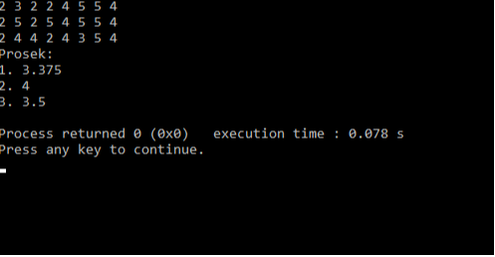
- At the end of the program, the averages of all students are displayed.
Entering the matrix
U prethodnom primeru, matrica ocena je bila zadata. Da bi korisnik mogao samostalno da unese matricu, potrebno je prvo učitati broj redova i kolona matrice. Ovaj proces se može postići sledećim koracima:
cin >> m >> n; // Učitavanje dimenzija matrice
for (int i = 0; i < m; i++) {
Complete solution:
using namespace std;
// Function for user input of a matrix
void ucitajMatricu() {
int m, n; // Number of rows and columns
cout << "Enter the number of rows and columns (maximum 10x10): ";
cin >> m >> n; // Reading matrix dimensions
if (m > 10 || n > 10 || m <= 0 || n <= 0) {
return; // Exit function if dimensions are invalid
cout << "Enter the matrix elements:" << endl;
for (int i = 0; i < m; i++) {
cout << "The entered matrix is:" << endl;
for (int i = 0; i < m; i++) {
cout << endl; // New line for the next row
int main() {
return 0; // End of the program
Example 5: Attacking jumper
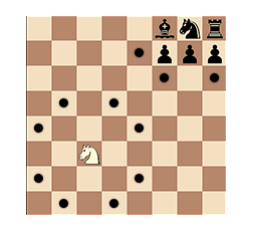
Problem: Knight in ChessRead the position of the knight in chess (m, n) and determine which squares the knight attacks. If the columns are labeled 1-8 and the rows A-H, mark the squares attacked by the knight with their respective codes. Mark all other squares with an asterisk, except for the square where the knight is located. Input:
Output:
Instructions
To display the appropriate text in the corresponding field, we will use a matrix whose elements are of type We need to iterate through all the elements of the matrix sequentially. Since the last row of the matrix corresponds to the first row of the chessboard, a nested for loop should be structured as follows:
When the position
|
 |
Input
4
4
Output
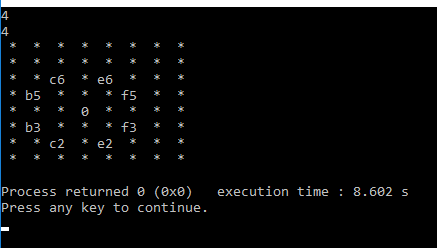
Solution:
#include <string>
using namespace std;
int main() {
string tabla[9][9]; // Matrix for the chessboard
cout << "Enter the knight's position (row and column): ";
cin >> m >> n;
for (int i = 8; i >= 1; i--) {
(i == m - 2 && (j == n - 1 || j == n + 1)) ||
(i == m + 1 && (j == n - 2 || j == n + 2)) ||
(i == m - 1 && (j == n - 2 || j == n + 2))) {
cout << "Chessboard:" << endl;
for (int i = 8; i >= 1; i--) {
cout << endl; // New line after each row of the board
return0;
Explanation
User Input: The user enters the row and column where the knight is located.
Chessboard Logic:
- The matrix
tablarepresents the chessboard. - Nested loops iterate through all rows and columns of the board.
- The squares attacked by the knight are determined using the rules of chess movement.
Output:
- " " for the square where the knight is located.
- "S" for the squares attacked by the knight.
- "*" for all other squares.
Practice tasks
1. Creating a table to record student grades
Task Description:
Create a program that uses a two-dimensional array to store the grades of students in several subjects. The array should have rows representing the students and columns representing the subjects.
The program should allow for the input of grades, display the grades of each student, and calculate the average grade for each student as well as for each subject.
Example output:
Student 1: 5 4 3 5
Student 2: 4 3 4 4
Student 3: 5 5 5 4
Average grade per student:
Student 1: 4.25
Student 2: 3.75
Student 3: 4.75
Average grade per subject:
Subject 1: 4.67
Subject 2: 4.00
Subject 3: 4.00
Subject 4: 4.33
2. Izračunavanje prosečne vrednosti elemenata u matrici
Opis zadatka:Napravite program koji koristi dvodimenzionalni niz za unos brojeva u matricu dimenzija N×MN \times MN×M.
- Program treba da izračuna prosečnu vrednost svih elemenata u matrici.
- Dodajte opciju za unos dimenzija matrice od strane korisnika.
Primer ulaza i izlaza:Unesite dimenzije matrice (redovi i kolone): 2 3
Unesite elemente matrice:
1 2 3
4 5 6
Prosečna vrednost elemenata matrice: 3.5
3. Implementacija igre "Iks-Oks" (Tic-Tac-Toe)
Opis zadatka:Kreirajte jednostavnu verziju igre "Iks-Oks" za dva igrača.
- Igra se odvija na matrici 3×3.
- Program treba da omogući igračima da naizmenično unose poteze, prikaže trenutni status table i proveri da li je neko pobedio ili je igra završena nerešeno.
Trenutno stanje table:
_ _ _
_ _ _
_ _ _
Igrač 1 (X) bira polje (red, kolona): 1 1
Trenutno stanje table:
X _ _
_ _ _
_ _ _
Igrač 2 (O) bira polje (red, kolona): 1 2
Trenutno stanje table:
X O _
_ _ _
_ _ _
Igrač 1 (X) bira polje (red, kolona): 2 2
...
Igrač 1 (X) je pobedio!
Višedimenzionalni nizovi – Proširenje koncepta
Dvodimenzionalni nizovi su korisni za predstavljanje matrica, tabela i sličnih struktura. Međutim, ponekad su potrebni složeniji modeli podataka, gde dolazimo do višedimenzionalnih nizova, poput trodimenzionalnih nizova.Šta su trodimenzionalni nizovi?Trodimenzionalni nizovi su nizovi sa tri indeksa. Možemo ih zamisliti kao niz "matrica" ili kao prostornu strukturu, poput kocke, gde svaki element ima:
- red,
- kolonu,
- "dubinu".
int niz[dim1][dim2][dim3];
Primer:int trodimenzionalniNiz[2][3][4];
Ovaj niz ima:
- 2 "sloja" (ili dubine),
- 3 reda po sloju,
- 4 kolone u svakom redu.
- Podataka o temperaturi u različitim gradovima (sloj = grad, red = dan, kolona = vreme).
- Boja piksela slike u RGB formatu (sloj = komponenta boje R, G, B).
usingnamespace std;
int main() {
float temperature[2][3][4] = {
{ {28.5, 27.9, 29.0, 28.7}, {26.5, 25.8, 27.0, 26.9}, {30.0, 31.2, 29.8, 30.5} }
// Prikaz temperature za drugi grad, prvi dan, drugo vreme
cout << "Temperatura u drugom gradu, prvog dana, u drugom vremenu: "
}
Temperatura u drugom gradu, prvog dana, u drugom vremenu: 27.9°C
Dalje učenje
Ako želite detaljnije da naučite o trodimenzionalnim i višedimenzionalnim nizovima u C++-u i njihovoj primeni, posetite sledeći resurs:
| Prethodno |<Rečnik podataka-mape u C++ |
Sledeće Dvodimenzioni dinamički nizovi u c++>| |
Srodni članci
Matrice-primeriNizovi-primeri
Matematički algoritmi
Klase i objekti
Grananje u programu u C/C++