
INTRODUCING IN ASP.NET CORE WEB APPLICATIONS
In this chapter you will find articles on what a web server (HTTP web server) is, how to create a simple web server, and how to create a web application. What is a web service and an example of creating a web service. You will also find articles about Web Api services that are simple and those that read data from the database, e.g. SQL Server Database. Through the example you can learn how to create a Web Api with a controller and a model.Introduction to ASP.NET Core Web Applications:
ASP.NET Core is a modern framework for the development of web applications that enables the creation of fast, scalable and secure web solutions. Developed by Microsoft, this framework offers a comprehensive set of tools and functionalities that allow developers to create high-performance applications. However, to better understand what ASP.NET Core can achieve, it's important to look at concrete real-world applications.For example, Stack Overflow, one of the most popular platforms for asking and answering questions about programming, uses ASP.NET Core for parts of its infrastructure. This platform leverages the power of ASP.NET Core to ensure fast responses and efficient management of large amounts of data and users.
Another example is Microsoft Teams, a tool for collaboration and communication within companies. Although Teams uses multiple technologies, ASP.NET Core was used to build certain parts of the application, allowing for the scalability and reliability that is crucial for these types of software solutions.
Reddit is another example of a web application that uses ASP.NET Core for its APIs. This platform uses ASP.NET Core to ensure speed and efficiency in handling large volumes of requests from users around the world.
These examples demonstrate the power and flexibility of ASP.NET Core in a variety of contexts and industries. By working with this framework, developers can build applications that are not only functional, but also highly optimized for working in the real world.
ASP.NET Core is a powerful and versatile framework for building modern, cloud-ready, and high-performance web applications. It has become a popular choice for developers due to its ability to handle web apps of any size and complexity while maintaining high performance. Some of the key advantages of ASP.NET Core include:
- Speed: ASP.NET Core is known for its fast request processing and optimized memory usage, making it ideal for creating high-performance applications.
- Cross-platform support: With ASP.NET Core, developers can build and run web apps on Windows, macOS, and Linux, providing flexibility for different environments.
- Modularity: It follows a modular framework structure, allowing developers to pick and choose the components they need, minimizing app bloat and complexity.
- DevOps-friendly: Seamless integration with modern DevOps practices, such as continuous integration and continuous deployment (CI/CD), makes it an excellent choice for agile development teams.
- Security: ASP.NET Core provides advanced features like built-in authentication, authorization, and data protection, which are crucial for modern web apps.
ASP.NET Core Architecture:
The following diagram illustrates the typical architecture of an ASP.NET Core application:
[Client] --> [Middleware] --> [Routing] --> [Controller] --> [View] or [Data Access] --> [Database]
- Client: The user sends a request through a web browser or an app.
- Middleware: The request passes through a series of middleware components that handle tasks such as logging, authentication, and exception handling.
- Routing: The framework routes the request to the appropriate controller.
- Controller: The controller processes the request and may return a view or fetch data from the database.
- Data Access: Entity Framework Core allows the controller to access and manipulate data in the database.
What is web server?
| A web server is a program that handles requests from a web browser and sends back responses. For example, when you enter a URL in the address bar, the web server processes this request and delivers the requested webpage or data. If using a Web client in this case a browser (eg Crome) and in its address bar we type a URL address e.g. http // localhost: 5000 and if there is an application or process that will respond to such a request and send back (to the browser) a message in response, we can say that it is a web server (http server). The location of that application can be anywhere on the web, ie. it can be on the same computer or on a remote computer, laptop, mobile phone or real web server, it is important that it (web application) can communicate with the web browser and respond to its requests. In order to create a website or application, we first need to download and install asp.net core on a local computer. It can be downloaded from the website: https://dotnet.microsoft.com/en-us/download/dotnet |
|
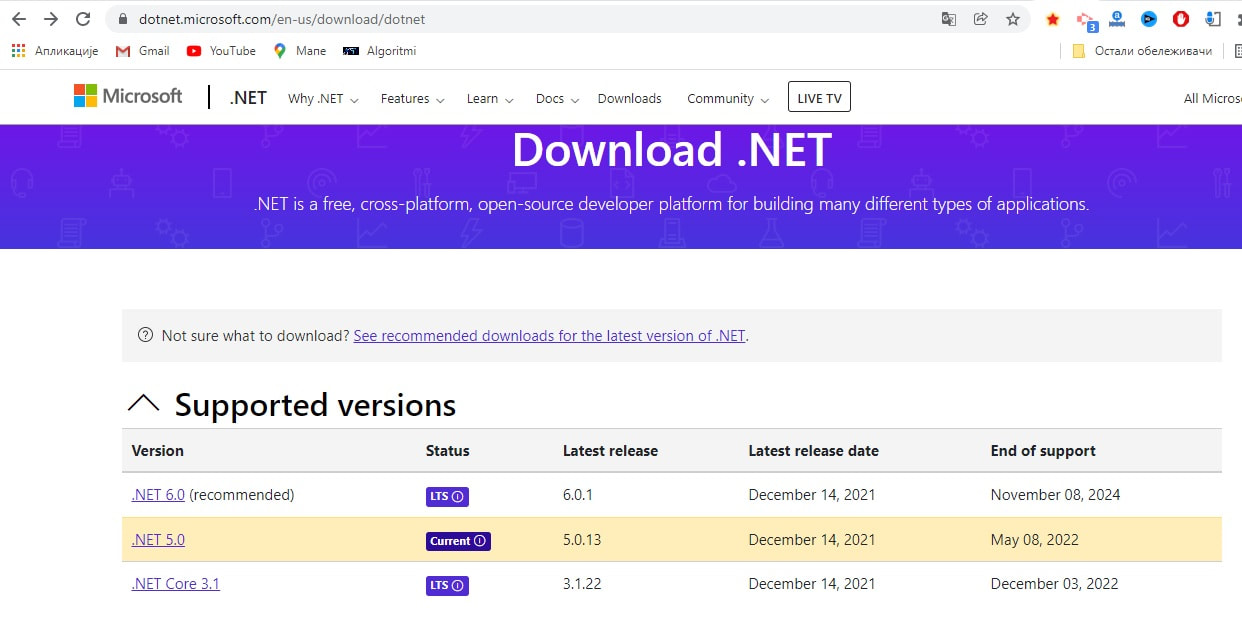
Figure 1. ASP.Net core download
What is needed is to download some of the offered, best recommended versions of the asp.net core framework from this website. It should be noted that after version 3.1, the "core" in the name was removed, but it is still the same technology.Asp.net core is multiplatform, unlike asp.net, which can be used to create web applications only on the Windows operating system.
The next thing that is desirable, but not necessary, is the installation of some of the auxiliary tools, e.g. "VS code" or "Microsoft Visual Studio".
VS Code will be used in this tutorial. It can be downloaded from the following link:
code.visualstudio.com/download
More about tools
In this section, we'll take a closer look at two popular ASP.NET Core development tools: Visual Studio Code and Visual Studio.These two tools, although similar in functionality, offer different features that make them suitable for different types of projects and needs.
Visual Studio Code:
Visual Studio Code (VS Code) is a lightweight, open source editor that is very popular among developers because of its speed and flexibility. Key features of VS Code include:
Light and Fast: As an editor, VS Code is designed to be fast and efficient. This makes it great for smaller projects and for quick coding.
Customizability: VS Code supports a number of extensions that you can add to customize the work environment to your needs. This includes support for different programming languages, debugging tools, and more.
Cross-platform: It is available for Windows, macOS and Linux, allowing it to work in different environments.
Integration with Git: It has built-in support for working with Git repositories, which makes it easier to manage code versions.
Recommended for smaller projects, quick code changes, and for those who prefer a minimalist work environment that can be easily customized.
Visual Studio
Visual Studio is a robust and comprehensive IDE (Integrated Development Environment) that offers much more functionality than Visual Studio Code.
Key features of Visual Studio include:
Complete Development Tools: Visual Studio provides comprehensive development tools, including advanced debugging capabilities, profiling tools, and a visual designer for user interfaces.
Integrated Tools: It has integration with numerous tools and technologies that facilitate work on large and complex projects, such as databases, servers and cloud services.
Multi-Language Support: In addition to C# and ASP.NET Core, Visual Studio supports many other programming languages and technologies, making it suitable for a variety of projects.
Professional Options: Visual Studio Professional and Enterprise editions come with additional tools and support that are useful for large teams and complex projects.
It is recommended for large projects, teamwork and for professionals who require comprehensive development tools and functionalities.
Conclusion Choosing between Visual Studio Code and Visual Studio depends on your needs and the type of project you are working on. If you're looking for a lightweight and customizable editor for rapid development, Visual Studio Code is a great choice. On the other hand, if you need a comprehensive IDE with advanced features, Visual Studio will provide you with everything you need.In order to create an application using the dotnet core, let's first create an application folder, e.g. on the path:
c://aspdotnetcore/Products

Figure 2: aspdotnet core-Command Prompt
To check which dotnet core version is installed: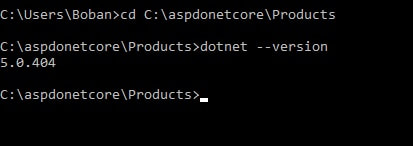
Figure 3: Asp.net core-Checking which dotnet core version is installed:
The figure shows that version 5.0 is installed, but in case none of them need to install one of the asp.net core versions.To create a website called Products, type in the folder of the same name:
dotnet new web
which can be seen in the following image:
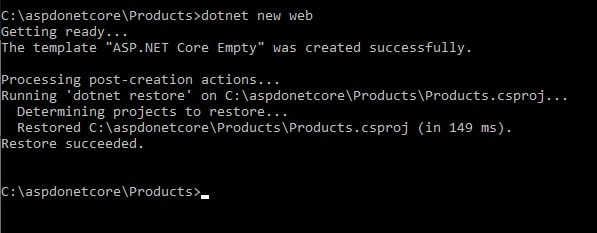
Figure 3: Aspdotnet core-Building new application
The structure of the required files within the application's root folder will be created: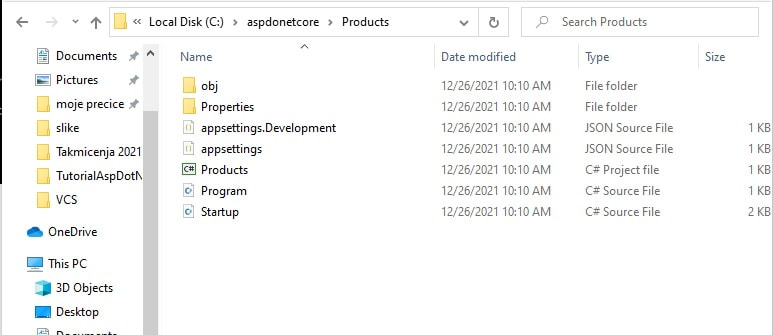
Figure 5: Aspdotnet core-Structure of required files in the root folder
In order to start the newly created application, it is necessary to type in the command prompt:dotnet run ,
as can be seen in the following figure:
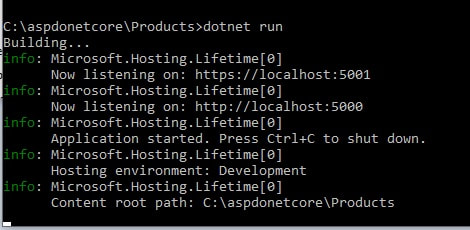
Figure 6: Building application
| The previous image also shows the URL that needs to be opened in the browser to launch the "Products" application. After launching, the message "Hello World" will be displayed in the browser: |
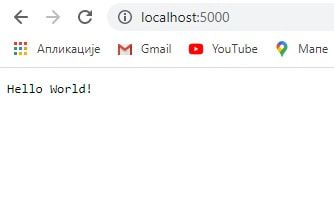
Figure 7: "hello world" message returned like response
|
code .
After starting the application, the content of the project will be visible in VS Code, as shown in the figure: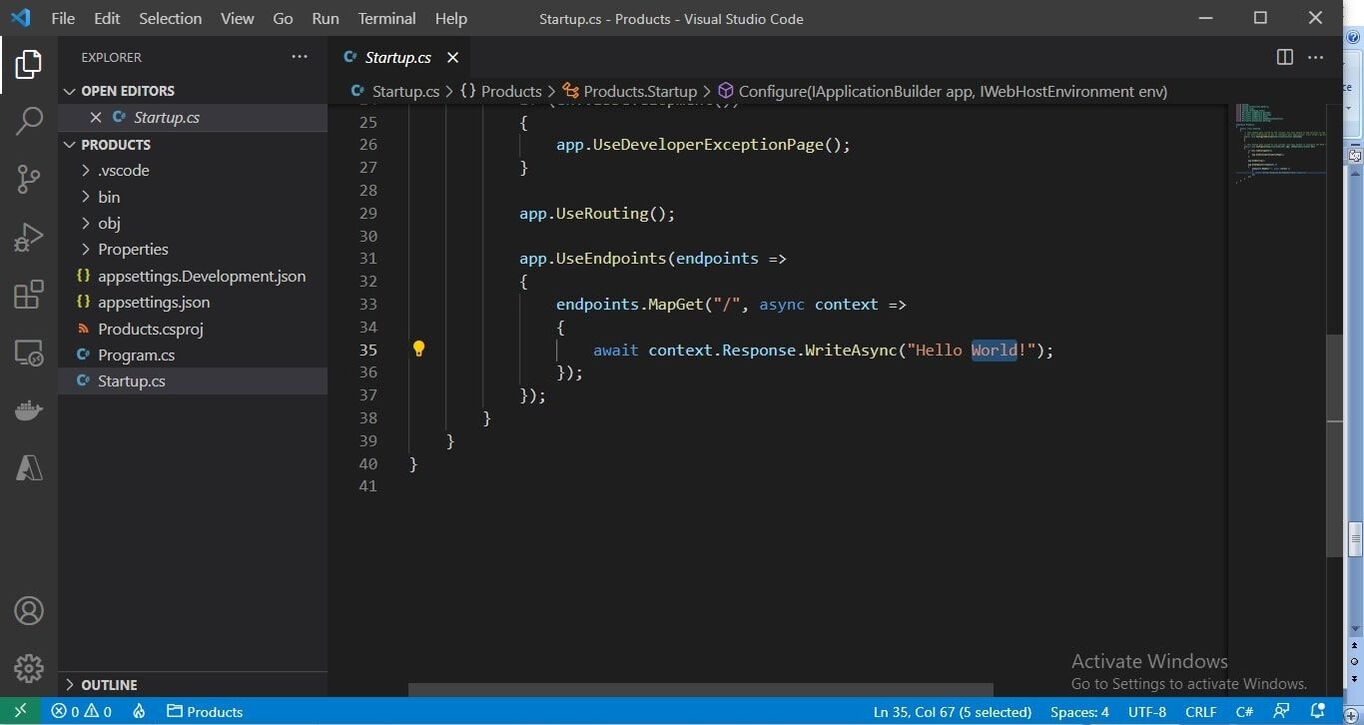
Figure 8: Aspdotnet core-Structure of required files in VS Code
In order to be e.g. display the system time instead of the "Hello World" message, you need to change the MapGet method: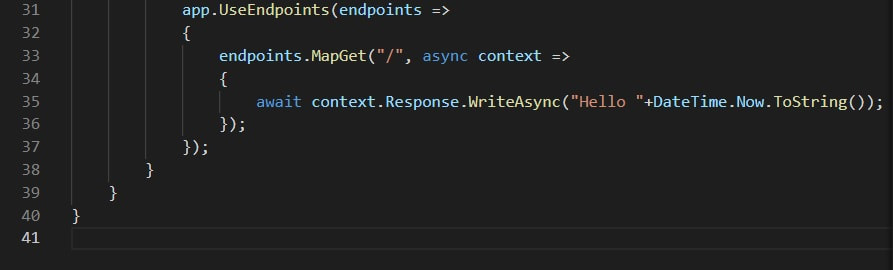
Figure 9: Aspdotnet core-MapGet() method for showing system time
After the call: http://localhost:5000/time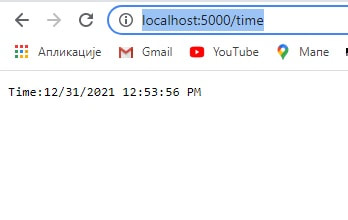
Figure 10: Aspdotnet core-Showing system time in web browser
A more detailed explanation of Web Api
ASP.NET Core provides a powerful framework for developing RESTful Web APIs, enabling the creation of applications that can communicate with other applications via the HTTP protocol. In this section, we'll take a closer look at how ASP.NET Core is used for Web API development, focusing on key components such as controllers, models, and CRUD operations.Controllers
In ASP.NET Core, controllers are central to handling HTTP requests. They serve as a bridge between the user interface and the data being processed. Controllers in ASP.NET Core are classes that inherit from the ControllerBase class and use attributes such as [ApiController] and [Route] to define the route and rules for processing requests.Example Controller:
using Microsoft.AspNetCore.Mvc;[ApiController]
[Route("api/[controller]")]
public classProductsController : ControllerBase
{
private readonly IProductService _productService;
public ProductsController(IProductService productService)
{
_productService = productService;
}
[HttpGet]
public IActionResult GetAll()
{
var products = _productService.GetAllProducts();
return Ok(products);
}
[HttpGet("{id}")]
public IActionResult GetById(int id)
{
var product = _productService.GetProductById(id);
if (product == null)
{
return NotFound();
}
return Ok(product);
}
[HttpPost]
public IActionResult Create(Product product)
{
varcreatedProduct = _productService.CreateProduct(product);
return CreatedAtAction(nameof(GetById), new { id = createdProduct.Id }, createdProduct);
}
[HttpPut("{id}")]
public IActionResult Update(int id, Product product)
{
if (id != product.Id)
{
return BadRequest();
}
_productService.UpdateProduct(product);
return NoContent();
}
[HttpDelete("{id}")]
public IActionResult Delete(int id)
{
_productService.DeleteProduct(id);
return NoContent();
}
}
Models
Models are classes that represent the data that your API uses. They often reflect the structure of the data in the database or other data that your application uses. Models are typically used to receive and send data between a client and a server.An example of a model
public class Product{
public int Id { get; set; }
public string Name { get; set; }
public decimal Price { get; set; }
public string Description { get; set; }
}
CRUD operacije
CRUD operations (Create, Read, Update, Delete) are basic functionalities that every Web API should support. These operations allow creating new records, reading existing records, updating and deleting data.Create (Post): Adds new data to the system.
Read (Get): Retrieves data from the system.
Update (Path): Updates existing data.
Delete: Deletes data from the system.
Each of these operations is mapped to HTTP methods and used in controllers to interact with models and services.
Conclusion
Using ASP.NET Core for Web API development enables efficient data management and allows applications to communicate over HTTP. Understanding how to properly use controllers and models, as well as how to implement CRUD operations, is critical to building robust and scalable Web APIs.Code examples: ToDo controller
// Example of user management controller[ApiController]
[Route("api/[controller]")]
public class UsersController : ControllerBase
{
private readonly ApplicationDbContext _context;
public UsersController(ApplicationDbContext context)
{
_context = context;
}
[HttpGet]
public async Task<ActionResult<IEnumerable<User>>> GetUsers()
{
return await _context.Users.ToListAsync();
}
[HttpPost]
public async Task<ActionResult<User>> PostUser(User user)
{
_context.Users.Add(user);
await _context.SaveChangesAsync();
return CreatedAtAction(nameof(GetUsers), new { id = user.Id }, user);
}
}TodoController Example
In this example, we use ASP.NET Core to create a simple API controller that manages a list of tasks (TodoItem). TodoController provides basic operations: read, add, update and delete tasks.
Detailed Explanation:
- [ApiController] Attribute: This attribute indicates that the class is an API controller and enables automatic model binding and validation. It also allows the results to be automatically formatted in JSON.
- [Route("api/[controller]")] Attribute: This attribute defines the URL path to access the controller. In this case, api/todo is the path to TodoController.
- GetTodos Method: This method returns all the tasks from the list. It uses IActionResult as a return type that allows various HTTP status codes to be returned.
- GetTodoById Method: This method returns a task with a specific id. If the task is not found, it returns the NotFound() status.
- CreateTodo Method: This method adds a new task to the list. It uses the Post attribute to indicate that it accepts POST requests. If the model is valid, a new task is added and returns CreatedAtAction with a status of 201 Created.
- UpdateTodo Method: This method updates an existing task. If the task with the given ID is not found, it returns the NotFound() status.
- DeleteTodo Method: This method deletes a task with a specific ID. If the task is not found, it returns the NotFound() status.
All code examples show how ASP.NET Core enables fast and efficient RESTful API creation, with easy access to basic data operations.
Recommendations for further study
At the bottom of the page, adding links to useful resources can help readers deepen their understanding of ASP.NET Core. Recommended resources include:- Official ASP.NET Core Documentation
- Courses on Udemy or Coursera
- Recommended books like Pro ASP.NET Core 6 by Apress
related articles
Creating web applicationsCreating web site simple
Creating a Python web application
JAVA Lessons