
ARRAYS IN C++ LANGUAGE
Introduction: What are arrays in C++ and why are they important?
Arrays are a basic type of data structure in the C++ language that allows storing and managing larger sets of data of the same type. You can think of them as a series of numbered compartments that store values in an organized manner, allowing quick and efficient access to each element.For example, if you want to store exam results for a group of 50 students, instead of creating 50 individual variables, you can use an array with 50 elements, which simplifies the code and makes it easier to manipulate the data.
Why are arrays important?
✅ Data Organization – Allows easy grouping of related data under a single name.✅ Fast Access – Thanks to indexing, accessing any element takes the same time, regardless of the array size.
✅ Code Efficiency – Enables more compact code and easier data manipulation compared to individual variables.
✅ Foundation for Advanced Structures – Many complex data structures, such as vectors, matrices, stacks, and queues, are based on the array concept.
In this article, we will explore the fundamental concepts of arrays in C++, including their declaration, initialization, element access, working with multidimensional arrays, and practical examples. We will also compare traditional C++ arrays with modern approaches such as std::array and std::vector from the Standard Library (STL).
Example of using an array in C++
Array variables are used when it is necessary to store multiple pieces of data of the same type in memory, such as int.Let's consider the following task: We need to input grades for n subjects and determine the highest grade.
We allocate memory for the grades data and then use a for loop to input n grades (e.g., n = 5):
intgrade, n = 5; // Array inputfor (inti = 0; i < n; i++) {cout << "Enter grade " << (i + 1) << ":"; cin >> grade;}
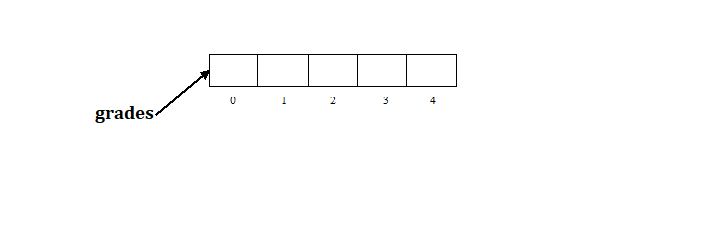
int grades[n];
…
The name of the array is: ratings. The preceding expression reserves memory for n integers, because the value in the square brackets is actually the dimension of the array.
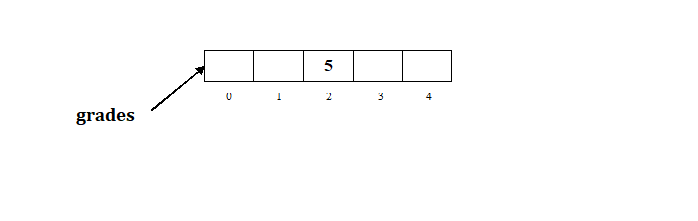
grades[2]=5;
Evo kako bi izgledalo stanje u memoriji u tom slučaju:
intgrades[5], n = 5; // Array inputfor (inti = 0; i < n; i++) {cout << "Enter grade " << (i + 1) << ":"; cin >> grades[i];}
Test your code in the editor!
Determining the maximum value of an array (maximum)
int max = grades[0];
First, an integer variable is defined to represent the maximum grade, and it is assumed to be equal to the first grade in the array, i.e., its initial value is `grades[0]`. Next, a `for` loop is used to iterate through the array, accessing each grade in order as `grades[i]`. In each iteration, we check if the new grade is greater than the current maximum, and if so, that value becomes the new maximum. This process looks like this:
for (inti = 0; i < n; i++) {if (grades[i] > max) {}max = grades[i];}
max represents the highest grade.
Određivanja maksimalne sume uzastopnog podniza
|
Within a one-dimensional array of numbers, it is necessary to find the subarray of consecutive numbers that has the highest sum.
For example, given the array:
3, 5, -10, -34, 16, 2
the subarray with the highest sum is 16, 2, which equals 18.
For a complete explanation and an animation illustrating the algorithm, visit the page:
Maximum Subarray Sum.
|
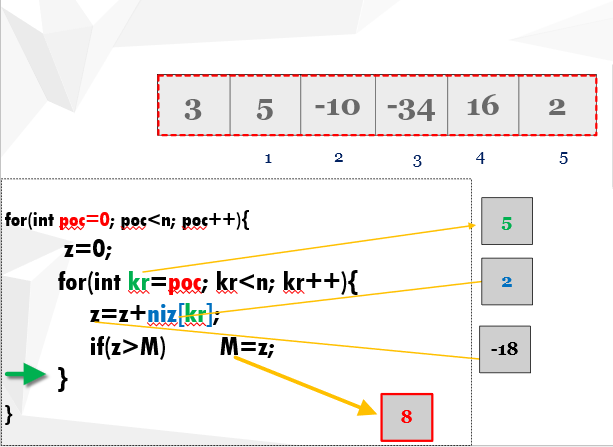
Figure 4: Determining the maximum sum of a consecutive subsequence
|
Declaring and defining arrays
Definition of an array of 10 integers (this also allocates memory for the array):
intarray[10];
This will allocate memory space for 10 integers. If we try to access the 11th element of the array, the program will terminate at that point due to an error.
A drawback of arrays is that when we do not know in advance how many elements the array will contain, we must allocate more space than expected, just in case. Some of that space will likely remain unused, but the program will not crash because of it.
The ability to allocate exactly as much space as needed is solved by using collections, but that topic is covered in an advanced course.
Defining a real sequence of numbers
An array of real numbers is defined similarly to an array of integers, except that instead of int you use double or float.
floatarray[10]; // ordoublearray[10];
Assigning values to the members of an array
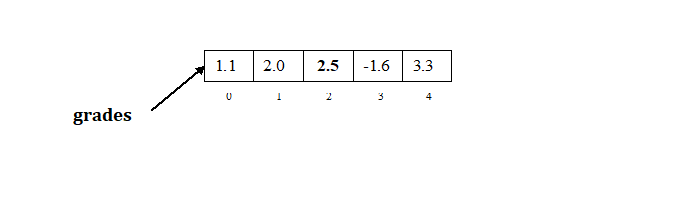
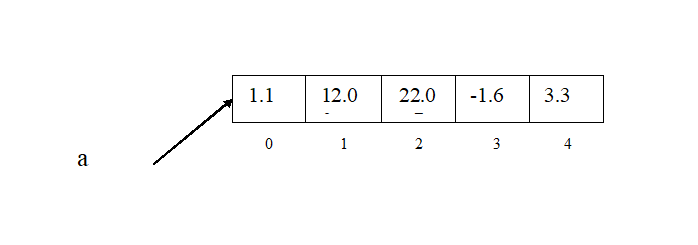
The elements of the array are accessed using indices starting from 0. For example, for an array of real numbers of 5 elements, defining and assigning values to the elements would be:doublea[5]; a[0] = 1.1; a[1] = 12.0; a[2] = 22.0; a[3] = -1.6; a[4] = 3.3;
Assigning values to the members of an array when they are known in advance
If we know the values of the array elements in advance, then the array is initialized together with its definition. The previous array is initialized as follows:
doublea[] = {1.1, 2.0, 2.5, -1.6, 3.3};
A more detailed explanation of array syntax in C++
In the C++ language, arrays are used to store multiple data of the same type under a single name. Here are the basic syntax elements to understand:1. Array declaration
An array is declared by first specifying the data type, then the name of the array, and then in square brackets [] the number of elements the array can contain.
Syntax:
data_typearray_name[size];
2. Array initialization
There are several ways to initialize an array with values:- Initialization during declaration:
intnumbers[5] = {1, 2, 3, 4, 5}; // All elements are explicitly defined
- Automatic array sizing:
If you specify all values explicitly, you can omit the size:
intbrojevi[] = {10, 20, 30}; // Veličina niza je automatski određena na 3
- Partial initialization:
If you specify a smaller number of values, the other elements will be set to 0 (for basic data types).
intnumbers[5] = {1, 2}; // The remaining elements will be 0
3. Accessing array elements
Array elements are accessed by their index (starting from 0).intnumbers[3] = {5, 10, 15}; cout << numbers[0]; // Prints 5
4. Entering and printing an array using a loop
Since arrays are sequential structures, they can easily be used with loops:intgrades[5]; // Array declarationfor (inti = 0; i < 5; i++) { cout << "Enter grade: "; cin >> grades[i]; } cout << "The entered grades are: "; for (inti = 0; i < 5; i++) { cout << grades[i] << " "; }
5. Common errors that appear when working with arrays
Access out of range:If you try to access an element that doesn't exist, you'll get unpredictable results.
intnumbers[3] = {1, 2, 3}; // Declaration and initialization of the arraycout << numbers[5]; // Error - index 5 does not exist
The array size must be a constant value at declaration.
intn;
    cin >> n;
    intnumbers[n]; // Error in older C++ versions (use `std::vector` instead)
Examples of using arrays:
Example 1: Inputting an array and determining the positive numbers.
Task description: Input the value of n, then input n elements of an integer array and determine how many of them are positive.Solution:First, the value of n needs to be input in order to define the array, as n represents the dimension of the array.
intn;
    cout << "Enter the number of elements in the array" << endl;
    cin >> n;
intarray[n]; // Defining an array of n elements
// Loading the arrayfor (inti = 0; i < n; i++) {cout << "Enter " << (i + 1) << ". element of the array"; cin >> array[i];}
// Printing the arrayfor (inti = 0; i < n; i++) {cout << array[i] << " ";}
// Determining the number of positive elementsintnumPositive = 0; for (inti = 0; i < n; i++) {if (array[i] > 0) {} cout << "Number of positive elements = " << numPositive << endl;numPositive++;}
Example 2: Inputing an array and determining the largest element
Task text: Input n, then Input n members of a real array and determine the largest element.Solution:First we need to define an array.
intn;
    cin >> n;
    inta[n];
- Suppose an array of 5 elements is loaded and the values are loaded as in the image below
Determining the maximum can be done as follows:
- Assume that the maximum is the first element of the array
doublemax;
    max = a[0];
- Then, through the for loop, the current element of the array is changed and checked if it is greater than the assumed maximum. If so, that element becomes the maximum.
for (inti = 0; i < n; i++) {if (a[i] > max) {} cout << "max=" << max << endl;max = a[i];}
doublemin; // Initialize min with the first element of the arraymin = a[0]; for (inti = 0; i < n; i++) {if (a[i] < min) {} // Output the minimum valuecout << "min=" << min << endl;// Update min if a smaller value is foundmin = a[i];}
Example 3: Reversing an array
Text: Display the elements of the entered array in reverse order#include <iostream>int main() { int numbers[] = {1, 2, 3, 4, 5}; // Declaration and initialization of the arraystd::cout << "Array in reverse order:"<< endl; // Prints the titlefor (int i = 4; i >= 0; i--) { // Loop to reverse the arraystd::cout << numbers[i] << " "; // Prints the elements of the array in reverse order } return0;// End of the function }
Reverse sequence:5 4 3 2 1
Example 4: Counting occurrences of an element
Text: How many times a certain number appears in a sequence.#include <iostream>int main() { int numbers[] = {1, 2, 3, 2, 4, 2, 5};// Array of numbersint number = 2;// Element to countint count = 0;// Counter to store the number of occurrencesfor (int i = 0; i < 7; i++) { // Loop through the arrayif (numbers[i] == number) { // Check if the current element is equal to the numbercount++;// If yes, increment the count } } std::cout << "Element " << number << " appears " << count << " times in the array.\\n"; // Print the resultreturn0;// End of the function }
Element 2 appears 3 times in the array.
Modern C++ concepts
Using std::vector instead of static arrays
While traditional C++ arrays are useful, they have limitations, such as fixed size. Modern C++ developers often use std::vector, which allows dynamic allocation and memory management.
#include<vector>#include<iostream>using namespace std;

int main() {
    vector<int> numbers = {1, 2, 3, 4, 5};
    numbers.push_back(6); // Adds a new element
    cout << "First element: " << numbers[0] << endl;
}
You can read more about std::vectorhere.
Two-dimensional arrays and matrices
Arrays can have multiple dimensions, which is useful for representing matrices and data tables.
int matrix[2][3] = {{1, 2, 3}, {4, 5, 6}};
cout << "Element matrix[1][2]: " << matrix[1][2] << endl; // Prints 6
For a detailed explanation of two-dimensional arrays, visit this page.
Passing arrays as function arguments
If we want to pass an array to a function, we use a pointer or reference.
void printArray(int array[], int size) {
    for (int i = 0; i < size; i++)
        cout << array[i] << " ";
    cout << endl;
}

int main() {
    int numbers[] = {10, 20, 30, 40};
    printArray(numbers, 4);
}
For more details on dynamic arrays and passing arrays through functions, check here.
Additional Resources:
- Pointers in C++ Programming - A detailed explanation of pointers and their application in programming.
- Array Examples in C++ - Specific examples demonstrating array manipulation in C++.
- Two-Dimensional Arrays in C++ Programming - Explanation and examples of working with two-dimensional arrays in C++.
- TutorialsPoint - C++ Programming - Detailed guides on basic and advanced C++ programming concepts.
- LearnCpp.com - Interactive online guide to learning C++ with examples and exercises.
- GeeksforGeeks - C++ Programming - Detailed explanations of C++ language with practical examples and code.
- Udemy - C++ Programming for Beginners - Online course for beginners who want to learn C++ programming.
- Stack Overflow - C++ Questions - Platform for solving problems and sharing knowledge related to C++ programming.
| Previous |<Nested loops in C++ |
Next Vectors in c++>| |