
Two-dimensional arrays - matrix in the programming language C and C++
A matrix in programming is a way to organize data in a grid format, making it easy to store values in rows and columns. In C and C++, we use two-dimensional arrays to represent matrices. For example, an array with dimensions [3][3] forms a 3x3 grid.Defining a Two-Dimensional Array
In C or C++, a matrix of integers with 3 rows and 3 columns is defined as:int matrix[3][3];
This creates a grid with space for 9 integers in total.
Example Code: Initializing and Printing a Matrix
Here’s an example to initialize and print a 3x3 matrix. Each line of code includes comments for clarity.#include <stdio.h>
int main() {
// Define a 3x3 matrix
int matrix[3][3] = {
{1, 2, 3},
{4, 5, 6},
{7, 8, 9}
};
// Nested loop to print each element
for(int i = 0; i < 3; i++) { // Loop over rows
for(int j = 0; j < 3; j++) { // Loop over columns
printf("%d ", matrix[i][j]); // Print element at row i, column j
}
printf("\n"); // New line after each row
}
return 0;
}Explanation of Key Parts
- Defining the matrix: int matrix[3][3] allocates space for 3 rows and 3 columns.
- Nested loops: The outer loop goes through each row, while the inner loop prints each column element within the row.
Suppose we want to print a series of the first 100 natural numbers, but to be printed in 10 rows and 10 columns, as in the picture below:
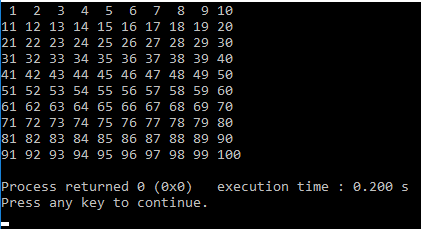
Figure 1: Matrix display of 100 numbers in 10 rows
In order to print this, we use the nested "for" loop: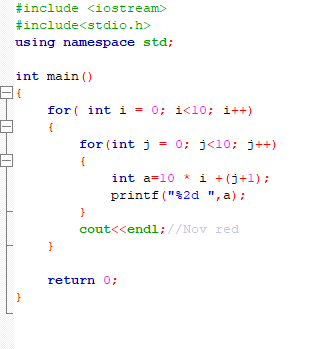
Figure 2: Matrix display of 100 numbers in 10 rows-code
To put these numbers in the memory, we should either introduce 10 sets of 10 elements or if we want to remember all the data in one variable, then we would use a two-dimensional array (matrix)int matrix [10] [10];
This is an integer matrix with 10 rows and 10 columns.
Access to a certain element that we say is in row 3 and column 5 would be:
matrix [3] [5]
The previous example would have been a little changed
C
int matrix[10][10];
for( int i = 0; i < 10; i++) {
for(int j = 0; j < 10; j++)
}{
int a=10 * i +(j+1);
}matrix[i][j]=a; printf("%2d ",a); printf("\n");//New row |
C++
int matrix[10][10];
for( int i = 0; i < 10; i++) {
for(int j = 0; j < 10; j++)
}{
int a=10 * i +(j+1);
}matrix[i][j]=a; cout<< a< cout << endl;//New row |
If we know in advance the numbers to be placed in the matrix
For example. grades from some subjects for more students could be placed in a matrix:
int estimates [3] [5] = {{2,3,2,2,4,5,5,4}, {2,3,2,2,4,5,5,4}, {2,3 , 2,2,4,5,5,4}}
Dimensions should be placed in square brackets, although they are determined by the series that we initialized in the matrix.
So, 3 rows and 8 columns. Here it can be concluded that the matrix is actually a series of elements where these elements are also arrays.
Each column and row have their index with which the matrix element can be accessed. In the previous example, rows are numbered with indexes 0-2, and columns indexes 0-7.
Example: Calculate the average grade for all students from the predefined sets
In order to calculate the average, we must first collect all the elements of the matrix and divide it with the number of elements. We need it ugly for the loop:
C
void average(){
int estimates[3][8]={ {2,3,2,2,4,5,5,4}, {2,5,2,5,4,5,5,4}, {2,4,4,2,4,3,5,4} };
}
int sum=0; double average; for(int i=0; i < 3; i++){
for(int j=0; j < 8; j++){
}
sum=sum + estimates[i][j];
}printf("%d ",estimates[i][j]); printf("\n"); printf("Average:\n"); average=sum/(3.0*8.0); printf("%.2f\n",average); |
C++
void average(){
int estimates[3][8]={ {2,3,2,2,4,5,5,4}, {2,5,2,5,4,5,5,4}, {2,4,4,2,4,3,5,4} };
}
int sum=0; double average; for(int i=0; i<3; i++){
for(int j=0; j<8; j++){
}
sum=sum + estimates[i][j];
}cout << estimates[i][j] << " "; cout << endl; cout << "Average:" << endl; average=sum/(3.0*8.0); cout << average; |
After starting: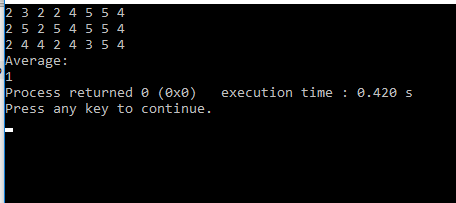
Figure 3: Calculating the average-execution of the console application
|
Suggested topic: Classes and objectsObject-oriented programming is based on the concept of objects. It is an approach that enables solving problems by mutual cooperation of facilities within the program. One of the most popular programming languages is JAVA. |
Example: Calculate the average grade for each student separately from the predefined sets
In order to calculate the average for each student, then we must separately compose each order of the grade and divide it with the number of elements of each inner string, because the rank each grade represents a student's grades. The average will now be a number of numbers:
C
int grades[3][8]={ {2,3,2,2,4,5,5,4}, {2,5,2,5,4,5,5,4}, {2,4,4,2,4,3,5,4} };
double sum=0; double average[3]; for(int i=0; i < 3; i++) {
for(int j=0; j<8; j++)
}{
sum=sum+grades[ i ][ j ];
}printf("%.2f ",grades[ i ][ j ]); average[ i ]=sum/8; sum=0; printf("\n"); printf("Average:\n"); for(int i=0; i < 3; i++)
printf("%d. %.2f"\n",(i + 1),average[ i ]);
|
C++
int grades[3][8]={ {2,3,2,2,4,5,5,4}, {2,5,2,5,4,5,5,4}, {2,4,4,2,4,3,5,4} };
double sum=0; double average[3]; for(int i=0; i<3; i++) {
for(int j=0; j<8; j++)
}{
sum=sum+grades[ i ][ j ];
}cout << grades[ i ][ j ] << " "; average[ i ]=sum/8; sum=0; cout << endl; cout << "Average:" << endl; for(int i=0; i < 3; i++)
cout << i + 1 << " . " << average[ i ] << endl;
|
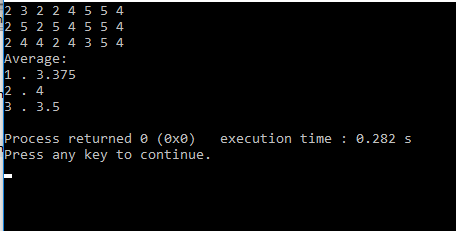
Figure 4: Calculating the average score of the individual execution of the program
|
One dimensional arrayA one-dimensional array, or simply an array, is a complex data type that contains several consecutive elements of the same type. Read more about it on the web page:Arrays in C/C++ 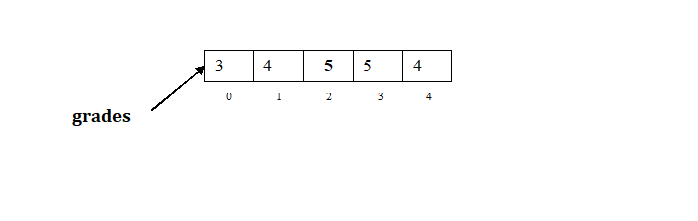
Figure 5: One dimensional array
|
Entering data and placement in the two dimensional array
In the previous example, the assessment matrix was assigned. In order for the user to load the matrix, the number of rows and columns should be pre-loaded.
C
int m,n;
scanf("%d%d",&m,&n); int matrix[m][n]; for( int i = 0; i < m; i++) {
for(int j = 0; j < n; j++)
}{
scanf("%d",matrix[i][j]);
} |
C++
int m,n;
cin >> m >> n; int matrix[m][n]; for( int i = 0; i < m; i++) {
for(int j = 0; j < n; j++)
}{
cin >> matrix[i][j];
} |
| Example: Attack jumper Load the position of the jumper in the chess m and n and determine which jumper field is attacking. If the columns are marked 1-8 and lines A-H, mark the field codes that the jumper attacks. Mark the remaining fields with an asterisk, except where the jumper is located. Input The lines and columns representing the jump position 1 <= m <= 8, 1 <= n <= 8 Output Field codes in those fields that jumpers attack, empty in the field where the jumper is, stars on the other |
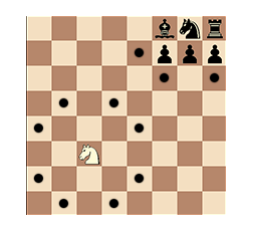
Figure 6: Example: Attack jumper
|
| Instruction: To print the corresponding text to the appropriate field, we will use a matrix whose elements are a string type. Since the chessboard is a dimension of 8 * 8, and the index in the matrix starts from zero, we will create a matrix of order 9 * 9. string board [9] [9]; It needs to go through all the matrix elements in a row. Since the last row in the matrix is the first row in the chessboard, it should be set up to nest for the loop as follows: for (int i = 8; i> = 1; and--) { for (int j = 1; j <= 8; j ++) { ... } } When it arrives at the position i = m, j = n, then it is necessary to print the codes in the fields that are attacked by the jumper. For example. position i = m + 2, j = n-1 and j = n + 1, etc. |
Example: Input 4 4 Output 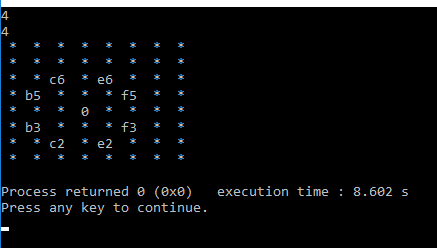
Figure 7: Example Jumper Attack - Execution
|
Interactive task
Goal of the ExerciseThe user can modify the values in the matrix or resize the matrix in code to better understand working with two-dimensional arrays.
Instructions for the user
Task: Create and populate a two-dimensional array in C++.Description: Initialize a matrix of 3 rows and 4 columns and enter user-modifiable values. Then display the array as a matrix on the console.
Example Code
Use the following code as a base. Modify the values in the matrix and run the code to see the changes:
Useful site Geek For Geeks:https://www.geeksforgeeks.org/multidimensional-arrays-c-cpp/
| Previous |<Dynamic array-vector |
Next Data dictionary - maps in C++>| |
Related articles
Matrix-examplesArray in C/C++ - examples
Mathematical algorithms
Classes and objectes
Selection statements in C/C++