
Objects and Methods in Java
The method is a set of commands, a part of a program that represents itself as a separate entity and performs a certain task, usually elementary.We distinguish:
- Defining the method
- Using the method
Using methods in java.
We can use:- a method already defined in an existing class
- the method we create (define)
Using the existing Methods
For example:System.out.println("A("+A.x+","+A.y+")");The println method for the object out here is called a space where the text will be printed. This is the standard output.
After the method name is always bracketed "()"
They serve to send the method, if necessary, one or more data, the parameter of the method.
In this example, the method is sent one parameter that represents the text to be printed.
-
This text is obtained by linking a number of smaller texts into which the values of the variables are inserted.
Defining Methods in JAVA.
The method consists of a headline and body of the method in which the program commands are executed in that method: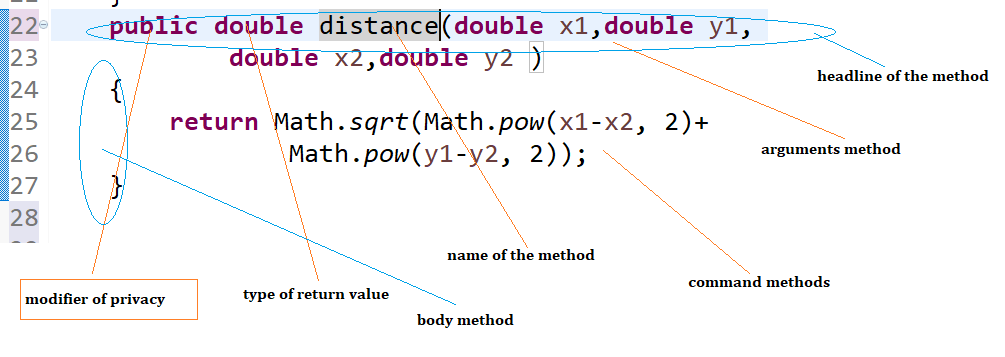
Figure 1: Method definition-details
Example defining Methods in java.
- In the previous example, we make a method that calculates the distance between the points
- The formula for calculating the distance between points 1 and 2, whose coordinates are x1, y1 and x2, y2
- d = Math.sqrt (Math.pow (x2-x1, 2) + Math.pow (y1-y2, 2))
sqrt - which calculates a square root where the subtracted size is sent as a parameter
pow - method that calculates the degree, the basis and the exhibitor are sent as parameters
- Commands that make up a method are written in the body of the method, between brackets "{}"
- There is also a method header
Example: Defining methods for computing the distance between two points.
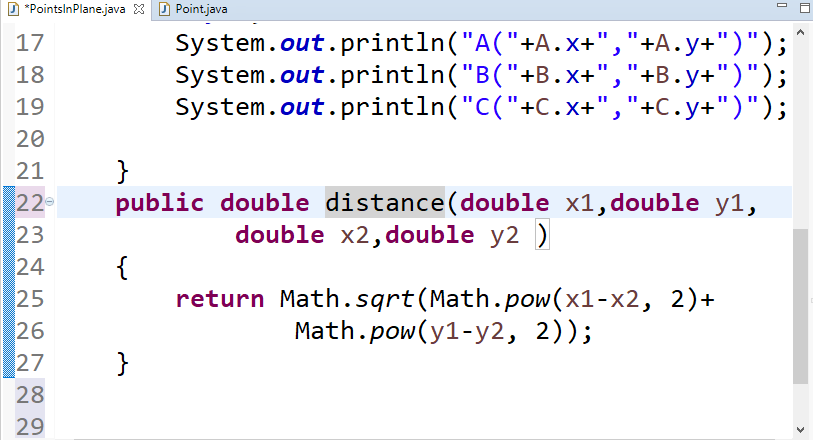
Figure 2: Methods for computing the distance between two points.
We see that the method is added to the main class because it does not apply to any point individually but to a set of pointsThis method calculates the distance and then calculates the value using the return command.
Method header
- public- modifikator privatnosti. Kad je public onda se metoda može pozvati iz druge klase
- double na drugom mestu. Ovo je tip povratne vrednosti. Vrednost koja se vraća iz metode je double rastojanje je naziv metode
Non-returning methods.
I say a void in another place. This is the type of return value. If there is a void at this point then the method does not return anything and no command return.Methods that print data
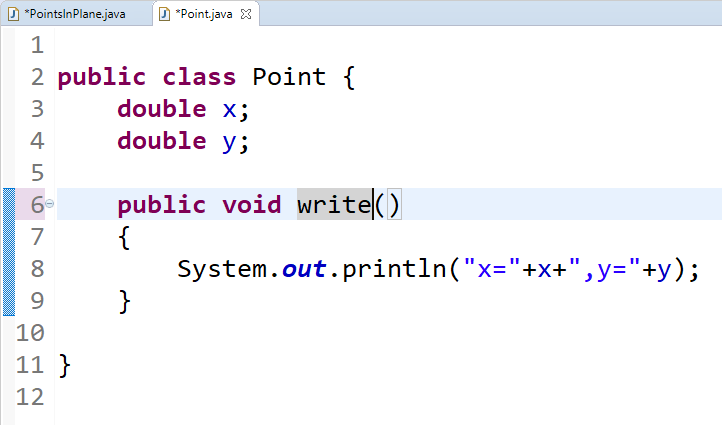
Figure 3: Write method
|
This method does not receive parameters and does not return anything from the method. When the printout of the coordinate values is prompted and finished, the program will continue in the place where it is called. |
Calling methods in Java
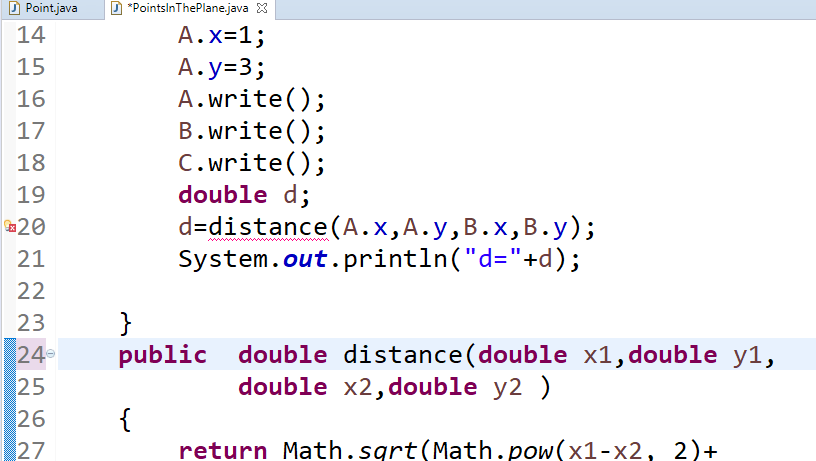
Figure 4: calling method "distance"
|
Here we see that the method of distance is underlined red (error). This is because the method should belong to the object and call over the object of the main class, and this object is not created. There is only a class and the method must then be bound to the class itself. This is achieved by adding the word static |
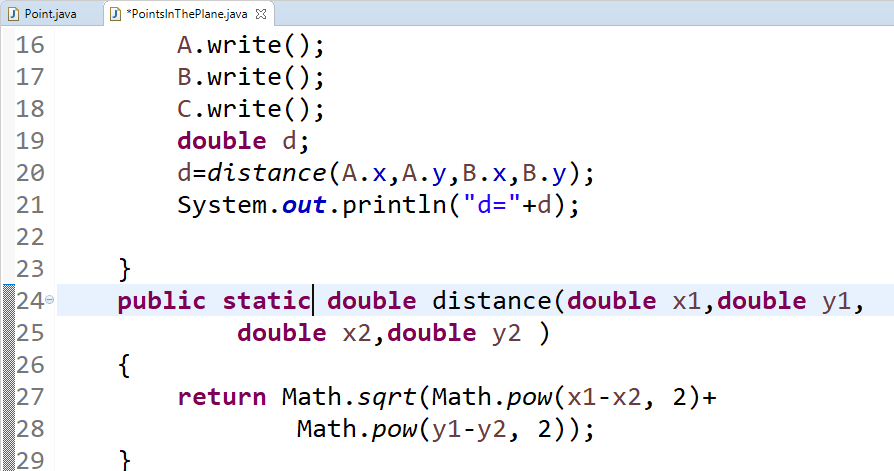
Figure 5: calling static method "distance"
|
The parameters sent in the call are copied in the parameters in the definition of the method in a row and in this way the methods are forwarded |
Constructors of the class
- These are the special methods that are called at the time of creation of the object. They have no return value and they do not write the word void elsewhere in the header. They serve to give the initial values to the properties of the object.
- They can be without parameters
- They are called the same as the class they are in
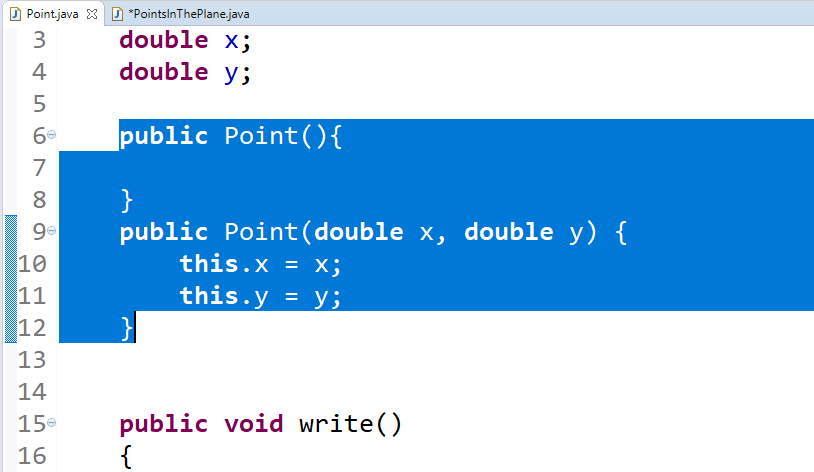
Figure 6: Constructor width parameters
Constructors with parameters
They are used when we know the object information in advance. Since we know here in advance, the coordinates of the points will be replaced with empty calls, with calls from the constructors with parameters.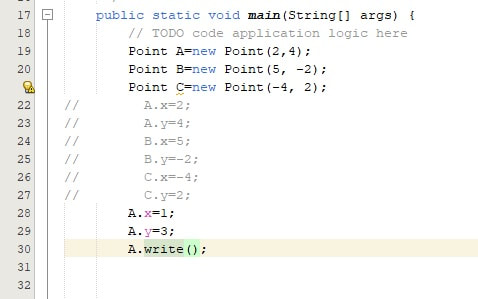
Figure 7: Objects and methods in JAVA: Using the constructor with parameters
|
Since we have set the coordinates now through the constructor, we have made comments on the coordinates directly because it is no longer necessary. There was only a subsequent change in the coordinates for point A. |
Finishing the "Points in the plane" app
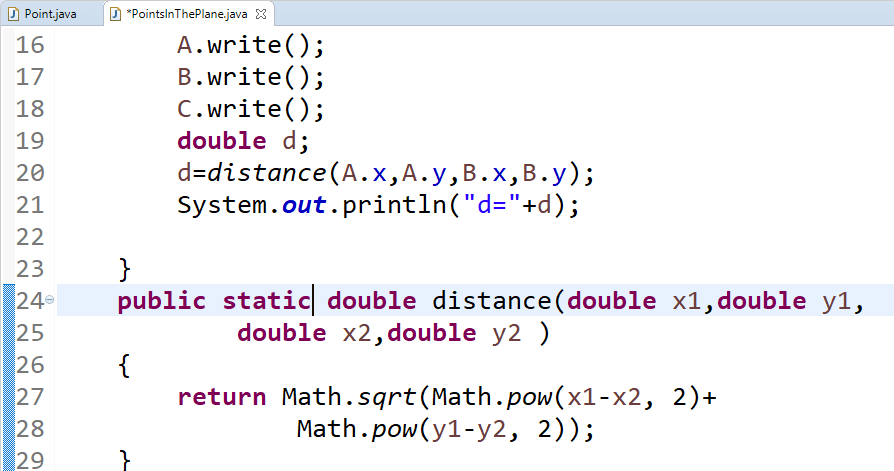
Figure 8: Objects and methods in JAVA: PiontsInPlane - finishing the application
|
It remains only to print the calculated distance d |
A Detailed Analysis of Methods in Java: Static vs. Instance Methods
Methods are a cornerstone of Java programming, enabling the execution of logic and facilitating interactions between classes and objects. Understanding the difference between static and instance methods is crucial for mastering object-oriented programming (OOP) concepts.Static Methods- Definition: Static methods belong to the class rather than any object instance. They are declared using the static keyword.
- Invocation: Static methods can be called directly using the class name without creating an instance of the class.
Example:public class MathHelper {
public static int add(int a, int b) {
return a + b;
}
}
public class Main {
public static void main(String[] args) {
int result = MathHelper.add(5, 3); // Calling without creating an object
System.out.println("Rezultat: " + result);
}
}
Typical application:
Static methods are often used for user functions such as mathematical operations (Math.sqrt()), creation of singleton objects, or helper functions.
Instance method
- Definition: Instance methods are tied to a specific object of the class. To call them, an object instance must be created.
- Invocation: These methods are called using an object reference.
Example:public class Calculator {
public int multiply(int a, int b) {
return a * b;
}
}
public class Main {
public static void main(String[] args) {
Calculator calc = new Calculator(); // Create an instance
int result = calc.multiply(4, 5); // Call instance method
System.out.println("Result: " + result);
}
}
Common Use Cases: Operations that depend on the object's state or involve its attributes.
Key Differences Between Static and Instance Methods
| Aspect | Static Methods | Instance Methods |
|---|---|---|
| Belonging | Belong to the class | Belong to an object |
| Access to Attributes | Can access only static attributes | Can access both static and non-static attributes |
| Invocation | Called directly using the class name | Called via an object instance |
| Use Case | Utility operations, class-level logic | Operations tied to the object's state |
Guidelines for Use
- When to Use Static Methods? If the method does not require access to instance-specific data, use static methods. For example, functions like Math.max() or utility functions that perform general tasks.
- When to Use Instance Methods? If the functionality depends on the specific state of an object (e.g., instance variables), use instance methods. For instance, methods like toString() or equals() are closely tied to an object's data.
Tasks for exercise
1.Car's uniform motion
The car moves evenly towards the place b. Create an object that represents the car, if the initial speed is 4 m / s and the starting position is 5 m from the starting point.
Show speed and position in the starting position.
Calculate the current position after 3 seconds and show the current data again.
In order to give in, the initial speed was 10 m / s.
2.Uniformly accelerated motion car
The car moves equally accelerated by acceleration a (enters the user) to place b. Create an object that represents a car, if its starting speed is 4 m / s and the starting position is 5 m from the starting point.Show speed and position in the starting position
calculate the current position after 3 s and show the current data again. In order to be informed, the initial speed was 10m / s
Example 2: Squares
Task: Create two objects that represent squares, enter their sides, then calculate their areas and print the result on the screen. To describe the square, create a class named square and in it create a method for calculating the area and printing the results.Solution:Let's create a new project called "Squares" and after going through the windows for creating a new project, a project called "Squares" will be created, which will have the package "squares" and the file Squares.java in the package. Inside this file you need to create the main class.
In order to be able to create objects, it is necessary to add a new class named "Square" to the project, in which we will put all the attributes for the square, as well as the necessary methods.
The procedure for creating a new project was explained in detail in the previous lesson, through the task "Geometric Shapes": Classes and objectsThe Square class will have the necessary attributes, the length of the side of the square "a" and area "P", constructors with and without parameters, as well as methods for calculating the area and a method for printing data on the screen. Below is a class that describes a square:
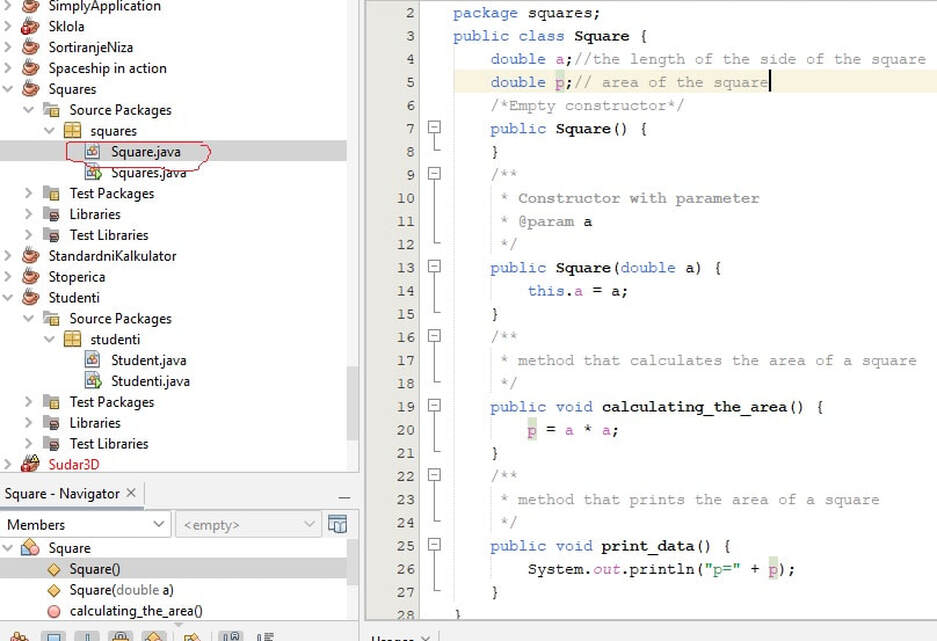
Figure 9: Objects and methods in JAVA. Task "Squares", class "Square"
In the class, first the attributes or "class fields", "a" and "P", are defined, which represent the length of the side of a square, and the area of a square.Two constructors are then created, an empty one and another, which takes a square page as a parameter. It should be noted that there can be several constructors in one class and they all have the same name as the class, so in this case "Square", but they must differ from each other either by type or by the number of parameters.
Furthermore, two methods are defined in the class that do not return any value (return value type void), the first one that calculates the area, and the second one that prints the result. As can be noticed, both methods access the class field "P" and this means that the class fields do not have to be passed to the method, via parameters, but are directly accessible to the method. Fields for the class are, by the way, an integral part of the memory of the object itself.The class created in this way will be used in the main class, named "Squares", when creating objects, which represent squares, as can be seen in the image shown below: So, the "Squares" class:
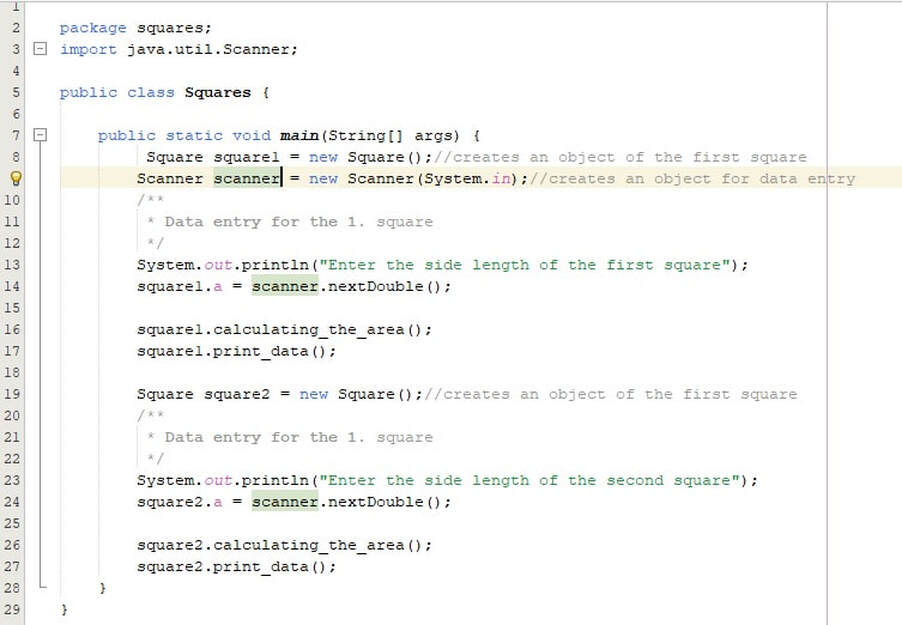
Figure 10: Objects and methods in JAVA. Task "Squares", class "Squares"(Main class)
In the main method of the main class, two objects are created in the first two operations, the first square and the object to load the Scanner class:
Square square1 = new Square(); //creates an object of the first square
Scanner scanner=new Scanner(System.in);//creates an object for data entry
Enter the side of the square below:Scanner scanner=new Scanner(System.in);//creates an object for data entry
System.out.println("Enter the side length of the first square");
square1.a = scanner.nextDouble(); //Entering the side length of the first square
Then the methods for calculating the area are called, as well as for printing the results for the first square.square1.a = scanner.nextDouble(); //Entering the side length of the first square
/**
*Calling the methods
*/
square1.calculating_the_area();
square1.print_data();
For the second object square2, the process is just repeated in a similar way.After starting the application and requesting input, in the example, a=23 was entered for the first square, and a=45 for the second square. The following results were obtained, which are shown in the following picture:*Calling the methods
*/
square1.calculating_the_area();
square1.print_data();

Figure 11: Objects and methods in JAVA. Task "Squares", execution of the application
| Previous |< Classes and Objects |
Next Inheritance of classes>| |