
Loops in programming language C++
Loops are one of the basic building blocks of any programming language, including C++. Their key role is to enable the repetition of certain actions until a given condition is met, which makes them an indispensable tool in solving a variety of programming problems.Imagine you want to print all the numbers from 1 to 100 on the screen. Without loops, you would have to write 100 lines of code by hand. However, with the help of a loop, this task is reduced to a few lines of code that automate the process.
Loops are not only useful for simple tasks like repetition, but are also used in more complex scenarios, such as:
Processing large amounts of data.
Finding solutions using an iterative approach, such as sorting or searching.
Manage user input until they enter the correct information.
By using loops, developers save time, reduce code errors, and improve the efficiency of their applications. On this page, you'll learn how to use different types of loops in C++, including for, while, and do-while loops, through clear explanations and practical examples. Often, programming requires one command or multiple commands to repeat a number of times. Let's imagine now that we should print out certain commands 100, 1000, or 10000 times. It would be a difficult, almost impossible job. The job would be made easier if these commands, which we want to repeat, were written only once, and with another command repeated.
These commands, for which we allow controlled repetition, are called cycles. In C++ language is used for, while, and the do-while command.
For example. Imagine that we want to print a star 20 times.
We can do this with a command cout that needs to be repeated 20 times, so:
cout << "*" << endl;
cout << "*" << endl;
. . .
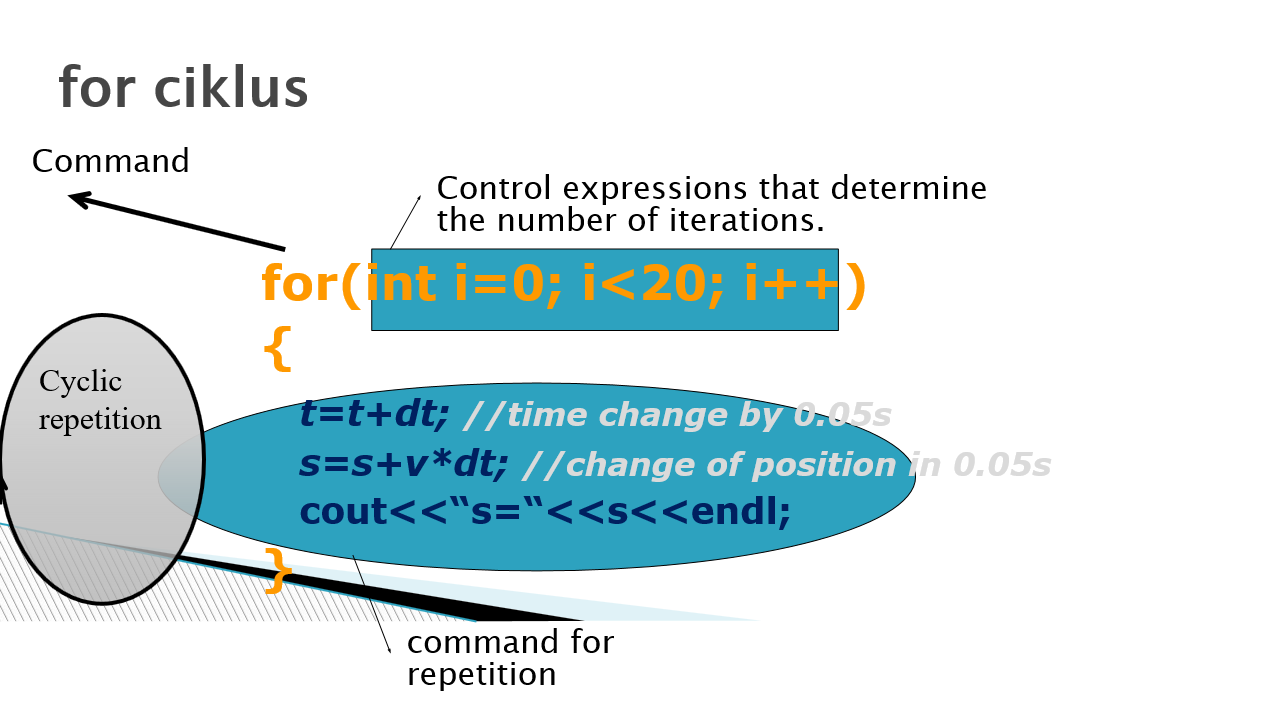
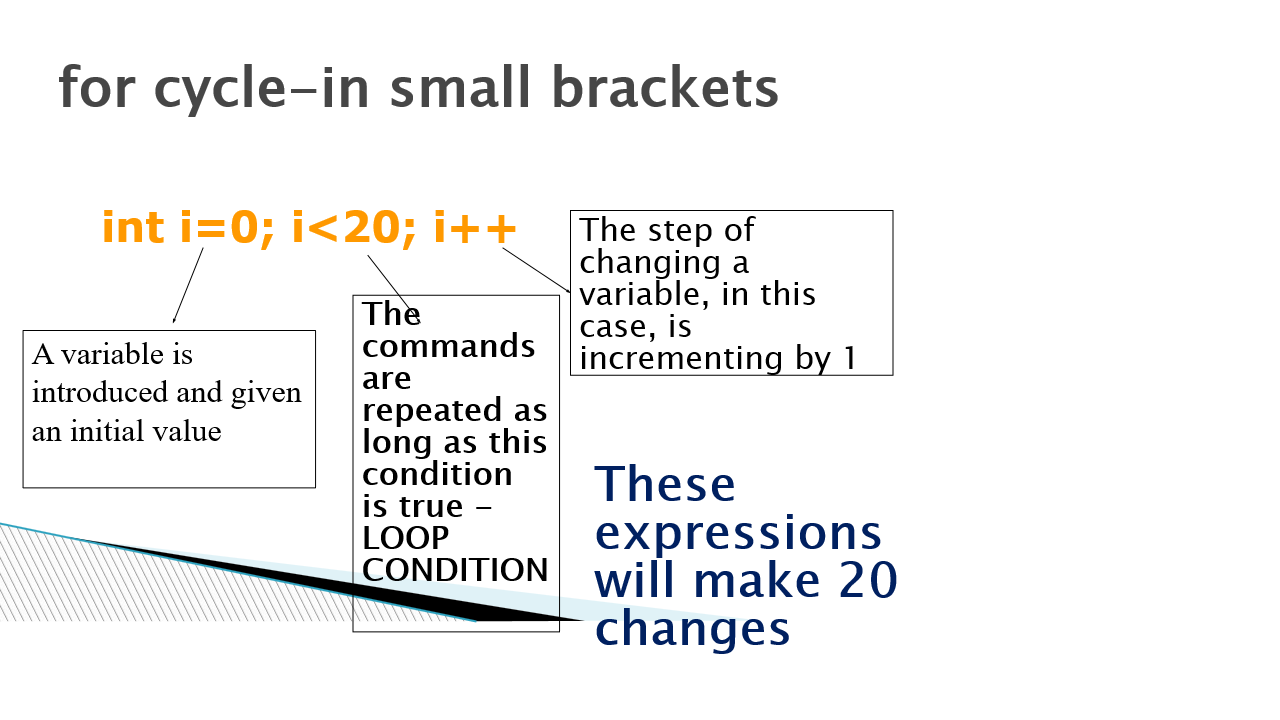
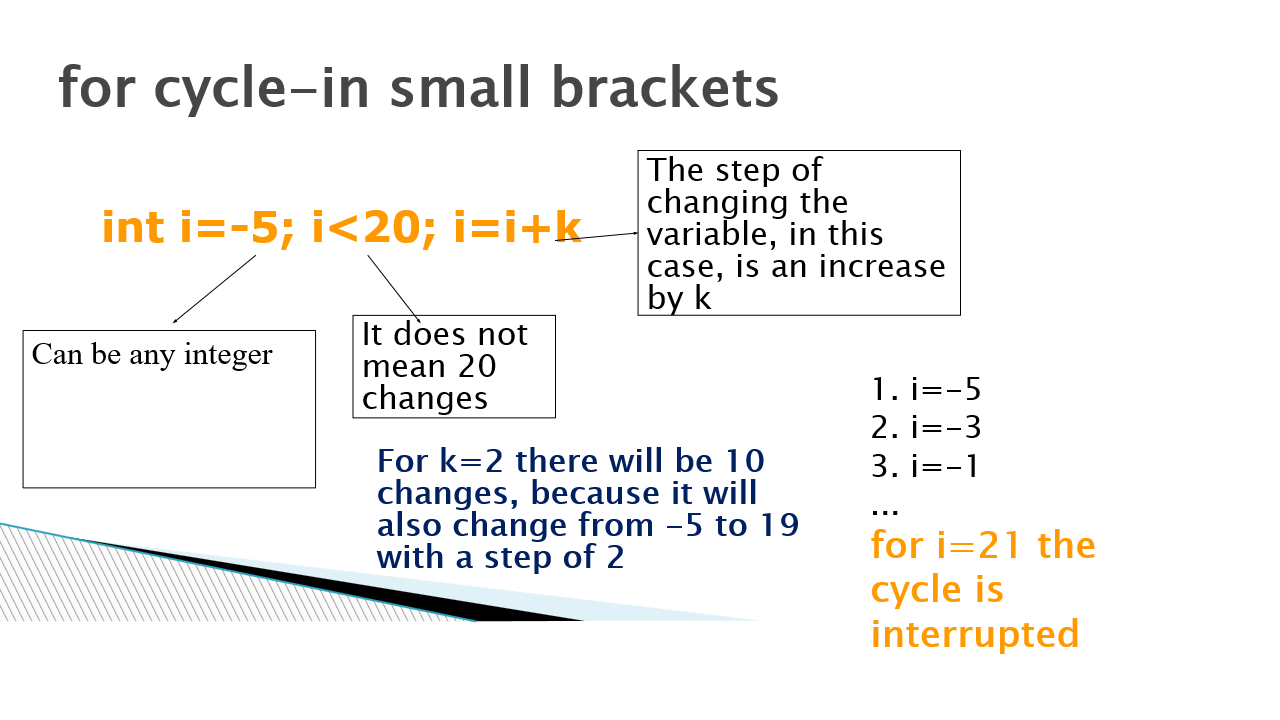
The terms in a small bracket serve to provide the appropriate number of repetitions, in this case 20.
The first term serves to introduce some variable to which some initial value is assigned and whose value will change during the cycle.
The second term is actually the condition of the loop from which it depends whether it goes to the next cycle or not. This is actually a logical expression whose value is a logical data type of bool, so it can have a value true, if the value of the expression is correct, or false, if it is incorrect. In case the value is true, the next cycle will be executed.
For example, if we introduced the variable "i" and set its initial value to zero in the first expression, and the second expression is <20, it means that the printing will be repeated until the expression is correct. If the variable "i" did not change during the cycle, it would mean that this condition will always be satisfied, which means that it will be infinite cycles (the program is continuously executed).
A third term is required to change the variable. It defines how much the variable that is introduced in the first expression is changed. In our case, i ++ means a change for 1 and an increase.
So, if i is starting at i = 0, increment step 1, and loop condition <20, this means that this condition will be satisfied until the value of the variable "i" reaches a value of 20. So 20 <20 is no longer true and the cycle is interrupted .
The phrase three could be written as i = i + 1. This means that the memory labeled with and assigns a value that was previously in that memory increased by 1.
In general, the syntax for commands would be
For loop in c++, syntax
{
Example 1: Print a sequence of numbers from -100 to 100 that are divisible by 3
To print 1 number, we will use the command printf for the C programming language, or cout if it is a c++ language. We will use a for loop to repeat the statement. We will mark the variable that we introduce inside the for to achieve the required number of cycles with a and use it to display the values of the numbers in the sequence.{
We will move the initial value of the number a to the first next number that is divisible by 3, i.e. at -99
The step of changing the variable a should be set to 3, because every third number, starting from -99, is also divisible by 3, so a=a+3
So the solution to the task now looks like:
{
-99,-96,-93, ....0,3,6,........99
The arrays in C and C++
Test your code in the editor!
Note: Enter or input data in text box below the code editor, put its in different rows, then click "run" button
How to get the sum of a series of natural numbers from 1 to 10
And this task could be solved with the command:cout<< "sum = %d" << sum << endl;
First, it is necessary to introduce a variable that will represent the sum:
int sum=0;
Then one number at a time should be added to the sum. Written without the cycle it would look like:
sum = sum + 1;
sum = sum + 2;
sum = sum + 3;
sum = sum + 4;
...
sum = sum + i;
...
sum = sum + 10;
but instead we use a loop:
{
for(inti = 1; i <= 10; i = i + 1)
{
cout << "sum = " << sum << endl; //Print the sum
Example 3: Determination of the average
Example: Enter 5 integers and find the mean value First you need to enter those numbers. In order to determine the average value (arithmetic mean), it is first necessary to add up those values, and the previous example can be used for that. Then the resulting sum is divided by the number of those numbers, which in the previous example is 5.In the general case, we can enter the number of numbers as some n and enter or set that value first. The average must be a variable of real type, double or float, because dividing two numbers, whether they are integer or real, can get a real number. Also, in order to get the exact value of the average, and not an integer, at least one of the divided numbers (sum or n) must be set or programmatically converted to a real type. For example. if the sum were 24 and n=5, dividing would give 24/5= 4.0, if the numbers 24 and 5 remained integer.
If, instead of 24, the value was real, such as 24.0, then as a result of division, 24.0/5= 24.0/5.0=4.8 would be obtained.
The solution to the previous example would be:
using namespace std;
int main() {
int number, sum = 0;
double average;
// Reading 5 numbers from the user
for (int i = 1; i <= 5; i++) {
cin >> number;
sum += number; // Adding number to the sum
// Calculating the average
average = sum / 5.0;
// Displaying the result
cout << "The average is: " << average << endl;
return0;
Declaration of variables:
- number: Stores the current user input.
- sum: Sum of all entered numbers, initially set to 0.
- average: The average value of the numbers, defined as a double for precision.
- The user enters 5 numbers in a row.
- Each entered number is added to the sum.
- The average is obtained by dividing the sum by 5.0 (a decimal value is used to make the result double).
- The average is displayed to the user using cout.
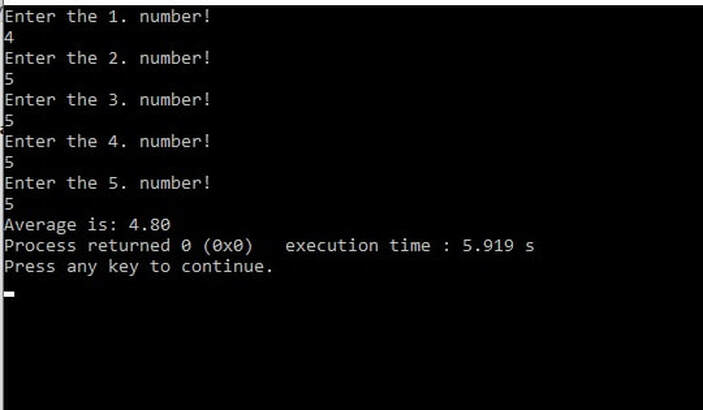
4, 5, 5, 5, 5,
an average of 4.8 is obtained, which represents the correct value. In the code in line 16, it should be noted that the data "sum", which is declared as an int data, is casted. Casting turns that data into a double, the number n will automatically be converted into a double, so that by dividing, a result of type double is obtained, and therefore the correct value is obtained. Otherwise, only the integer part would be obtained as a result, i.e. 4.0.
Introduction to cycles-simulation of uniform motion
Let's look at the following problem:
We want to simulate the change of position with [m] with uniform motion for time change. Hence, visual simulation will not be made, but only the printing of the current position of the body position for each time change for the dt interval.
We will observe the position changes for each small increase of time from dt [s]
Let's take this change for dt = 0.05sLet the time change during 1s 20 changes by 0.05s = 1s
The starting values are s = 0; t = 0; in the user input
So 20 times would repeat the following commands:
t=t+dt; //time change for 0.05s
s=s+v*dt; //change position for 0.05s
cout<< “s=“<<s<<endl; //Print the value of the traveled route. See more about the cout command in the lesson strings in C/C++
This code is not good:
t=t+dt; //time change for 0.05s
s=s+v*dt; //change position for 0.05s
cout<< “s=“<<s<<endl; //Print the value of the traveled route.
t=t+dt; //time change for 0.05s
s=s+v*dt; //change position for 0.05s
cout<< “s=“<<s<<endl; //Print the value of the traveled route.
t=t+dt; //time change for 0.05s
s=s+v*dt; //change position for 0.05s
cout<< “s=“<<s<<endl; //Print the value of the traveled route.
...
We see that 3 commands are repeated 20 times. Instead, you need to write 3 commands one time and then use some other command that will cyclically repeat them as many times as we want.
These are the commands we call cycles (loops):
- for
- while
- do-while
for loop
Now, the previous simulation would be solved in the following way:{
t = t + dt; // time change for 0.05s
s = s + v * dt; // change position for 0.05s
cout << "s=" << s << endl; // Print the value of the traveled route.
}
If we do not know the advance number of the cycle?
Then the number of cycles depends on some condition and then we use it
while the command or,
do-while
While command
This command, unlike for the command, is used when we do not know the advance number of the cycle.Note that in a small bracket, we only have one logical type or logical variable type bool. Commands in the body while the commands will be repeated as long as the term is correct, ie, while the value is true. Since the condition is at the beginning of the loop, it is examined before executing the command. It may happen that in the first test the value of the bool expression is false, which means that in this case, the commands would not be executed at any time.
If, for any reason, it is important for us to execute orders at least one time, then it is more convenient for the condition to be in the end, which is the case with the do-it-on order.
while, syntax
while( condition )
{
While algorithm
Figure 3 shows the while loop execution algorithm. The statements in the loop will be repeated as long as the set condition is true.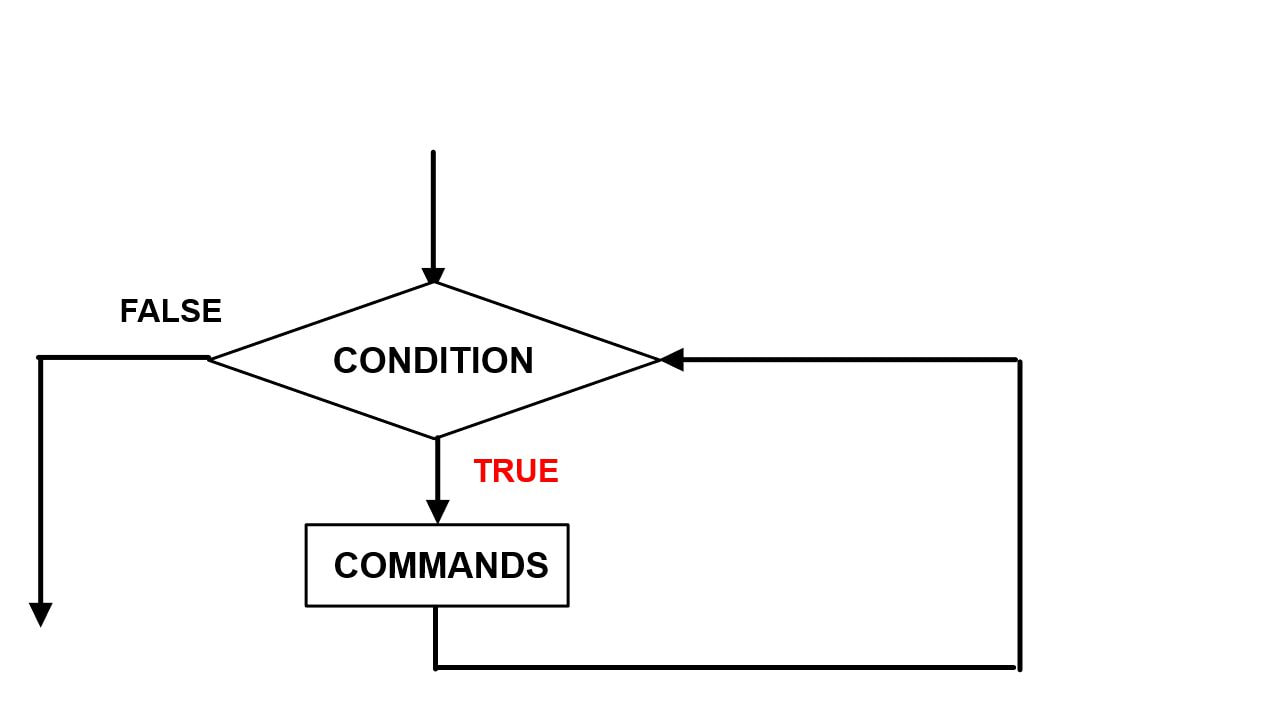
Example 5: Removing zeros from the right
Task: Enter the integer N. Remove the zero from the right. For example. for entering N = 12000, the input should be 12This task is suitable for the application of the cycle. Zero removal will be done by dividing by 10 times as long as the transformation number is divisible by 10. We do not know how many times this will be the path because it is not known in advance for entering the number. So it is not suitable for, but while the cycle where the execution will cyclically repeat until the delimitation condition is satisfied, the remainder of division N and number 10 is zero:cin >> N; //Input the whole number
while(N % 10 == 0)
{
cout << "N=" << N << endl;
Example 6: Cycle counting
Sometimes it is necessary to programmatically determine the number of cycles. With the while loop, it is usually not known in advance how many cycles will be executed, but it depends on the set condition of the loop.In order for the program to determine the number of cycles itself, we will introduce a cycle counter. It is an integer initialized to zero.
int number=0;
Let's look at an example that illustrates this:
Counting Loops in a while Loop
In C++, counting iterations in a while loop can be achieved using a counter. A counter is an integer variable initialized to zero, which increments with each pass through the loop.
The example below demonstrates this technique.
using namespace std;
int main() {
int number= 0; // Loop counter
int x = 10; // Initial value
// Loop that runs while x is greater than 0
while (x > 0) {
x -= 2; // Decrease x by 2
cout << "Value of x: " << x << ", Number of cycles: " << number<< endl;
// Output the total number of cycles
cout << "Total number of cycles: " << number<< endl;
return0;
Example 7: Training
An athlete wanted to create his training plan for running. Every day he entered for that day how much he ran (1-5 km). Create a program that helps an athlete determine after how many days he ran a total of 40 km.Solution:In this example, we use a while loop to simulate an athlete's training days. Every day, the user enters the number of kilometers run (in the range of 1 to 5). The loop is executed until the total number of kilometers run reaches or exceeds the value of 40. This is an ideal case for a while loop, because the exact number of iterations (training days) is not known in advance. The code includes input validation to ensure the correctness of the results. Finally, the program prints the number of days needed to run 40 kilometers.
#include<iostream>usingnamespacestd; intmain() {inttotal = 0; intday = 0; intkm; while (total < 40) {}cout << "Enter the kilometers run on day " << day + 1 << " (1-5): "; cin >> km; if (km >= 1 && km <= 5) { total += km; day++; } else { cout << "Invalid input! Please enter a number between 1 and 5." << endl; }} cout << "The athlete reached 40 km after " << day << " days." << endl; return0;
Code Explanation
This program calculates the number of days an athlete needs to run at least 40 kilometers, with a daily limit of 1 to 5 kilometers. The main loop (while) runs until the total distance (total) reaches 40 kilometers.
During each iteration:
- The user inputs the daily kilometers (
km). - A validation ensures the input is between 1 and 5. If valid, the
totalis updated, and the day counter (day) increments. - Invalid inputs trigger an error message.
Finally, the program outputs the total number of days required to achieve the target distance.
Example 8: Free Fall Simulation
Text: Enter the initial body height and make a free fall simulation by printing time, instantaneous speed and current height on each 0.05s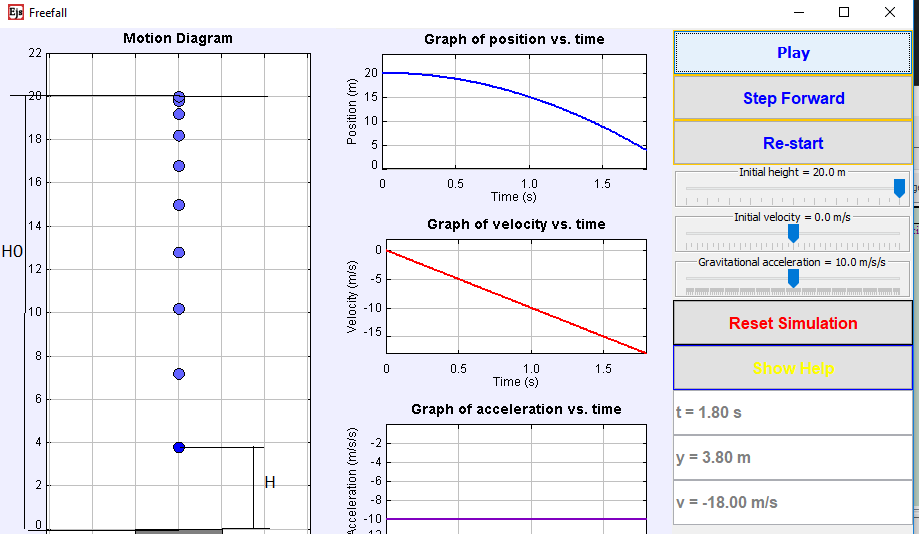
During this time, the height h and the velocity v are changed.
- Time changes for dt: t = t + dt;
- Height for v * dt + g * dt * dt / 2. Hence h = h- (v * dt + g * dt * dt / 2)
- Speed for g * dt. Thus, v = v + g * dt
cin >> h;
while(h>=0)
{
h=h-v*dt-g*dt*dt/2; //change position during 0.05s
v=v+g*dt; //change speed at 0.05s
cout << "h=" << h << "m" << endl;
do-while loops
We use instead of a cycle when commands have to be done at least once, and then, if the condition is satisfied, the commands are repeated, as long as the condition of the loop is satisfied, i.e. has the value true.The previous example could be done with do-while if you knew the initial conditions before we entered the cycle, e.g.
if we know it is safe h0> 0 and
Initial conditions:
h = h0; t = 0;
then it would look like:
do
{
h=h-v*dt-g*dt*dt/2; //change position during 0.05s
v=v+g*dt; //change speed at 0.05s
cout << "h=" << h << "m" << endl;
while(h>=0);
If we know it is safe h0> 0
Then the condition is set in the end, so we use the do-while command.
do - while , syntaks
do
{
while( condition );
The do-while loop algorithm
Figure 5 shows the do-while loop execution algorithm. The statements in the loop will be repeated as long as the set condition is true. Unlike the while loop, where it may happen that the condition encountered immediately at the beginning of the statement is not true even the first time, so the statement will not be executed even once, with the do-while loop the condition is set at the end, so commands must be executed at least once.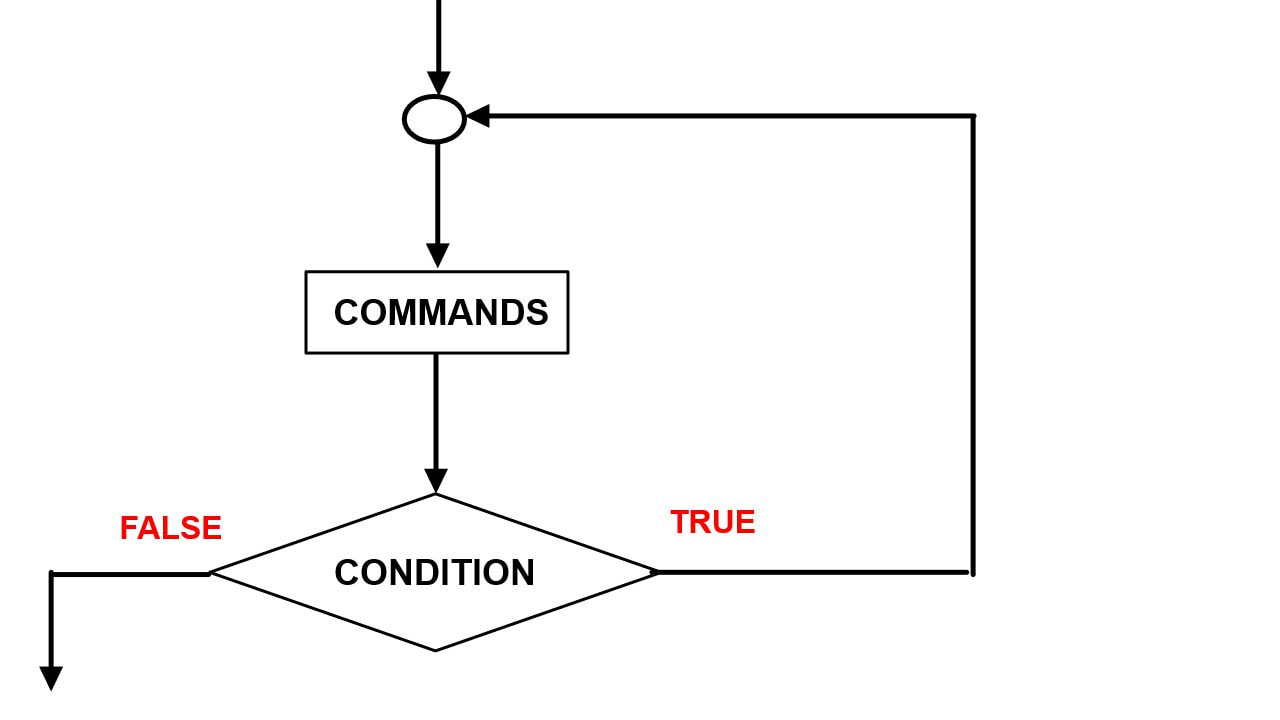
Examples using the do-while statement
Example 9: Entering numbers until the user enters 0
Task description:Write a program that prompts the user to enter numbers. The program should continue input until the user enters the number 0. After that, the program should print the sum of all the entered numbers (except zero).
Solution:
#include<iostream>// Including the library for standard I/O functionsintmain() {intnumber, sum = 0; // Declaring variables number (user input) and sum (initialized to 0)do {}cout << "Enter a number (0 to stop): "; // Prompting the user to enter a number. Entering 0 ends the loopcin >> number; // Reading the number entered from the keyboardsum += number; // Adding the entered number to the sum} while (number != 0); // Loop repeats as long as the user does not enter 0cout << "The sum of the entered numbers is: " << sum << endl; // Printing the final resultreturn0; // Ending the program
A do-while loop allows the user to enter numbers, and the entries are repeated until the number 0 is entered.
Since 0 is the end signal, the program adds the entered numbers to the sum and continues until zero is entered.
When the user enters 0, the loop ends and the program prints the sum of the numbers.
Example 10: Printing the numbers 1 to n, where n is entered by the user
Task description:Write a program that asks the user to enter the number n. The program should print all numbers from 1 to n. The program should restart if the user enters a number less than 1.
Solution:
#include<iostream>/* Including the library for standard I/O functions */intn, i; /* Declaration of variables n (the number to be entered) and i (loop counter) */do { /* Beginning of do-while loop that repeats until n is greater than 0 */cout << "Enter a number n (greater than 0): "; /* Prompting the user to enter number n */cin >> n; /* Input of number n from the keyboard */if (n <= 0) { /* Checking if the number is less than or equal to 0 */} while (n <= 0); /* The loop repeats until n is greater than 0 */cout << "Numbers from 1 to " << n << ":" << endl; /* Displaying the message with value n, which indicates how many numbers to print */for (i = 1; i <= n; i++) { /* For loop to print numbers from 1 to n */cout << "The number must be greater than 0. Try again." << endl; /* If the number is not greater than 0, an error message is displayed */}cout << i << " "; /* Printing number i in each loop iteration */} cout << endl; /* New line after printing all numbers */return0; /* Ending the program and returning value 0 for successful exit */
The do-while loop ensures that the user enters a number greater than 0.
If the user enters a number less than or equal to zero, the program will prompt for input again.
When the input is valid, the program uses a loop to print the numbers 1 through n.
Example 11: Validation of password input
Task description:Write a program that requires the user to enter a password in the form of a number. If the password is incorrect (eg "1234"), the program should prompt for re-entry until the user enters the correct password. The correct password is the number "1234".
Solution:
#include<iostream>using namespacestd; intpassword; do {cout << "Enter password (number): "; cin >> password; if (password != 1234) {} while (password != 1234); cout << "Password is correct!\n"; return0;cout << "Incorrect password. Try again.\n";}
- The program uses a do-while loop to allow the user to enter a password in the form of a number.
- If the user enters an incorrect password, the program asks for re-entry.
- When the user enters the correct password (in this case the number "1234"), the loop ends and a successful password entry message is printed.
Infinite Loops in C++
Infinite loops are loops that never stop executing. They typically occur when the loop condition is always true, which may be due to a coding error or intentional design for specific tasks.
Example of an Infinite Loop
while (true) {
                std::cout << "This is an infinite loop!" << std::endl;
            }
Common Causes
- Missing or incorrect exit condition.
- Variables controlling the loop are not updated correctly.
- Using
trueas a loop condition without an exit mechanism.
How to Avoid Infinite Loops
There are several steps to avoid infinite loops:
- Always check if the loop condition can become
false. - Ensure that loop-control variables are updated correctly.
- Add logic to break the loop with
breakif necessary.
Example of a Correct Loop
inti = 0;
            while (i < 5) {
                std::cout << "i = " << i << std::endl;
                i++;
            }
When Are Infinite Loops Useful?
Although infinite loops are often errors, there are situations where they are useful and even necessary:
- In server applications that continuously process requests.
- In games where the main loop controls the game flow.
- For creating menus that persist until the user selects an exit option.
Examples of Infinite Loops
Here are some examples of how infinite loops are used in practice:
for (;;) {
                std::cout << "This loop runs forever!" << std::endl;
            }
while (true) {
                std::stringinput;
                std::cout << "Type 'exit' to quit: ";
                std::cin >> input;
                if (input == "exit") {
                    break;
                }
            }
How to Avoid Infinite Loops
Here are several steps to avoid infinite loops:
- Always check if the loop condition can become
false. - Ensure loop-control variables are updated correctly.
- Add logic to break the loop using
breakwhen necessary.
Example of a Correct Loop
inti = 0;
            while (i < 5) {
                std::cout << "i = " << i << std::endl;
                i++;
            }
The break and continue commands
Using the break Statement in Loops
In programming, the break statement is used to immediately exit a loop, regardless of whether the loop condition is still true. This can be useful when you want to stop the loop execution after a certain condition is met.
Example of Using break in a for Loop
for (inti = 0; i < 10; i++) {
            std::cout << "i = " << i << std::endl;
            if (i == 5) {
                break; // Exit the loop when i reaches 5
            }
        }
Example of Using break in a while Loop
intnumber = 0;
        while (true) {
            std::cout << "Enter a number (enter -1 to exit): ";
            std::cin >> number;
            if (number == -1) {
                break; // Exit the loop when the user enters -1
            }
            std::cout << "You entered: " << number << std::endl;
        }
As seen in these examples, the break statement is a powerful tool that allows controlled interruption of loop execution.
Using the continue Statement in Loops
The continue statement is used in loops to skip the remaining part of the current iteration and move to the next iteration. This is useful when you want to ignore certain conditions during loop execution without breaking the entire loop.
Example of Using continue in a for Loop
for (inti = 0; i < 10; i++) {
            if (i % 2 == 0) {
                continue; // Skip printing if i is an even number
            }
            std::cout << "i = " << i << std::endl;
        }
Example of Using continue in a while Loop
intnumber = 0;
        while (number < 10) {
            number++;
            if (number == 5) {
                continue; // Skip printing when broj is 5
            }
            std::cout << "number = " << number << std::endl;
        }
The continue statement provides greater flexibility in controlling loop execution, especially when certain conditions need to be ignored without interrupting the entire iteration process.
More examples of continue
Besides simply skipping certain values, continue is often used in real situations
when we want to ignore "invalid" or unnecessary data while keeping the processing flow going.
Example 1: Skipping empty lines when entering strings
#include <iostream>#include <string>intmain() {std::string line; for (int i = 0; i < 5; i++) {}std::getline(std::cin, line); if (line.empty()) {} return0;continue; // Skip empty line} std::cout << "You entered: " << line << std::endl;
Example 2: Skipping negative numbers while processing
#include <iostream>intmain() {int arr[] = {3, -1, 7, -5, 10}; int n = 5; for (int i = 0; i < n; i++) {}if (arr[i] < 0) {} return0;continue; // Skip negative numbers} std::cout << "Processing number: " << arr[i] << std::endl;
Additional Resources for Practicing Loops in C++
-
Loops in C++ - Examples
Detailed loop examples with explanations for C++. -
LearnCpp.com - Introduction to Loops
A comprehensive guide to loops in C++ with practical examples. -
Preparation for Regional Competitions
Problems and examples for advanced algorithm practice. -
Additional Loop Examples
Extra examples and problems covering various types of loops. -
GeeksforGeeks - Loops in C++
A detailed article with diverse loop examples in C++.
For further questions and explanations, contact us via the contact form.
| Previous |<Selection statements in C/C++ |
Next Nested loops in C/C++>| |
Related articles
Loops in C/C++ examplesLoops in programming languages JAVA
Arrays - examples
Array of Fibonacci
Data in C/C++ languages