
SIMPLE GRAPHIC APPLICATIONS IN JAVA - EXAMPLES
Graphic applications that have their own visual part (GUI), event implementation and business logic. For some tasks you can download the explanation through the PPT presentation. We also recommend that you watch the attached video.1. The Inventory application
The bookstore at the faculty received textbook cards. Each shipment contains the same number of textbooks. The inventory manager wants to use a computer to calculate the total number of textbooks that arrive at the bookstore for each shipment. The inventory manager will enter the number of received cards and a fixed number of textbooks in each shipment card; the application should then calculate and display the total number of textbooks in the shipment.
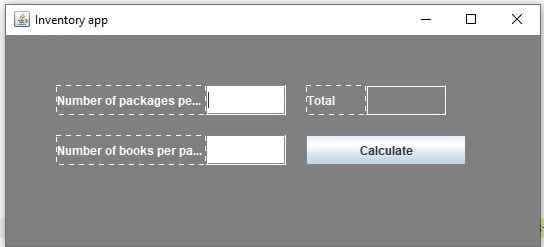 |
Solving-video |
||
2.the Car Payment Calculator Application
| Typically, banks offer car loans for periods ranging from two to five years (24 to 60 months). Borrowers repay the loans in fixed monthly payments. The amount of each monthly payment is based on the length of the loan, the amount borrowed and the interest rate. Create an application that allows the customer to enter the price of a car, the down payment amount and the annual interest rate of the loan. Your application should display the loan’s duration in months and the monthly payments for two-, three-, four- and five-year loans. | 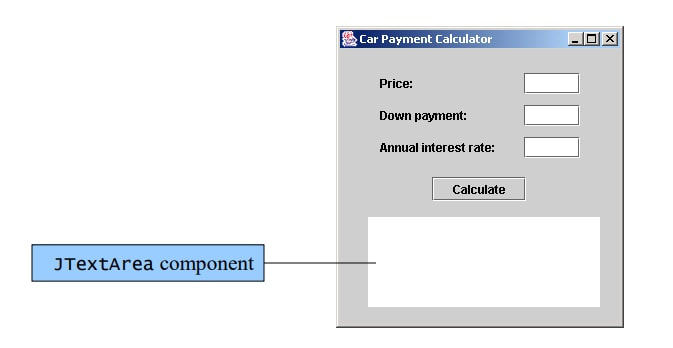 |
| Instruction: |

|
||
3. Class Average Application
| A teacher gives quizzes to a class of 10 students. The grades on these quizzes are integers in the range from 0 to 100, inclusive (0 and 100 are each valid grades). The teacher would like you to develop an application that computes the class average for a quiz. Your application should use an input dialog to enable the teacher to enter the grades. | 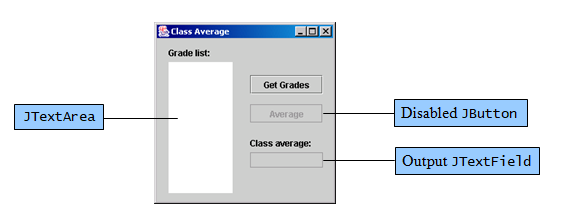 |
| simplyjava1_09-resenje.pdf |
4. Security Panel Application
| A pharmaceutical company wants to install a security panel outside its laboratory facility. Only authorized personnel may enter the lab, using their security codes. The following are the valid security codes (also called access codes) and the groups of employees they represent: Values Groups 1645 Technicians 8345 Custodians 9998, 1006–1008 Scientists When a security code is entered, it should not be visible to anyone standing near the security panel. For each security code, access is either granted or denied. All access attempts are displayed in a screen below the keypad. If access is granted, the date, time and group (scientists, custodians, etc.) are displayed on the screen. If access is denied, the date, the time and a message, “Access Denied,” are displayed on the screen. Furthermore, an employee can enter the access code 7, 8 or 9 to summon a security guard for assistance. The date, the time and a message, “Restricted Access,” are then displayed on the screen to indicate that the request has been received. | 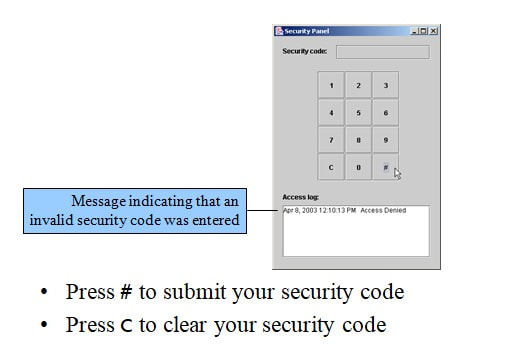 |
| Solving: |
|
||
5. Standard Calkulator Application
Previous
|<Animations in Java-example