
DATA IN C++
Introduction to C++
C++ is a programming language that extends the basic capabilities of the C language, keeping its syntax but introducing many advanced functionalities. One of the key aspects of this language is working with data, where the basics are similar to the C language, but with significant improvements.C++ provides flexibility and efficiency in data management through:
- Basic data types: Inherited from the C language (eg int, float, char) for working with basic values.
- Namespaces: Enable organization and avoidance of conflicts between function and variable names.
- New data types: Such as bool for logical values and string for working with text, which simplifies working with modern applications.
- Constants: Defined using the const keyword, which ensure that values cannot be changed during program execution.
- Variable declarations and initializations,
- Using constants,
- Code organization through namespaces.
int a;
data_type name_of_data;
To watch a video lesson for solving simple examples using the "Code Block" tool, as well as examples for independent work, click on the following link: Data-examples
C++ supports the same basic data types as C, with the addition of specific types and modern concepts. Data can be:
- Variables: Require memory reservation.
        int a; // Declaration of a variable of type int
        a = 5; // Value assignment
Constant data: Declared with const or constexpr:
This type is often used in conditional expressions:
Example of code using characters:
char c;
c='A';
cout << "ASCII character code " << c << " is " << c << endl;
Test your code in the editor!
Derived data types
In addition to arrays and pointers, C++ allows working with classes, objects, and standard libraries that simplify working with complex data structures.
Array type: If you need to define an array of numbers of the same type, for example, integers, use the following syntax:
int A[10];
Pointer type: If you need to define a pointer to data of type double, then the pointer is defined and initialized as follows:
double a;
double *pA;;//A pointer to data of type double
pA=&a;
From derived data types, classes and functions are also usedType void
In the C++ language, the void type is used when a function does not return any value:
Signed and unsigned data (signed and unsigned)
Signed data can have positive and negative values, while unsigned data are always positive. By default, data in the C++ language is signed.Examples:
int a;
signed int b;
unsigned int c;
- signed int: from -2,147,483,648 to 2,147,483,647
- unsigned int: from 0 to 4,294,967,295
Assigning value to data
Consider the following example:Example 1:
Enter two integers, calculate their product and display the result on the screen.Solution:
int a,b;// you can split it into two rows
int a;
int b;
See more about operators in the c++ language on the website: Operators in the C/C++ language
This does not mean equality and it is not true that the left of the “=” sign is the same as the right. Here on the left must be the memory that should receive a value and on the right is that value or some expression whose result will be stored in the memory on the left. For example let's assign some values to the variables a and b:
a=7;
b=22;
| 7 |
|---|
a
| 22 |
|---|
b
int c;
c = a * b;
| 154 |
|---|
c
It is c++ function cout from iostream header.
In the previous example, the programmer ordered a=7; and b=22; programmatically determined the value of a and b and the user of the program could not influence those values. In most cases, it is necessary to ensure that the user enters values as desired, and for this it is necessary to provide a command that temporarily remembers the number typed on the keyboard by the user as a string of characters and then converts it with the appropriate input conversion in binary form. See below reading data.
Complete code:
usingnamespace std;
int main() {
int a, b, c;
// Input values for a and b
cout << "Enter the first number: ";
cin >> a;
cout << "Enter another number: ";
cin >> b;
// Product calculation
c = a * b;
// Display results
cout << "The product of the numbers is: " << c << endl;
}
Constant data
If a variable does not change its value during the program, it is defined as a constant using the const keyword.Example:
const double e = 2.718281;
Constant
Constants are values that we use directly in the program, such as 2, 3.14 or 9.81. Although they have no reserved memory, they have their own type:Header files
Header files provide access to predefined functions.Example:
- #include <iostream> – for data input and output (cin, cout).
- #include <cmath> – for math functions like sqrt or pow.
More information about headers: C++ Reference.
Data types in the C++ language
In C++, the basic data types are similar to those in the C language, with extensions to the boolean type bool and classes used for complex data or objects. The following table illustrates this:The data type in C++ determines the set of values a variable can hold and the operations that can be performed on it.
| Data Type | Description | Memory [bits] |
|---|---|---|
| bool | Binary data (true or false) | 8 |
| char | Character data, used for storing a single character | 8 |
| wchar_t | Extended character data for Unicode characters | 16 or 32 |
| short | Short integer | 16 |
| int | Integer | 16 or 32 |
| long | Long integer | 32 |
| long long | Very long integer | 64 |
| float | Floating-point number with single precision | 32 |
| double | Floating-point number with double precision | 64 |
| long double | Floating-point number with extended precision | 80 or 128 |
C++ programming language: Introduces the type bool with the values true and false. It improves code readability and clarity.
An example of using a bool variable in C++
usingnamespace std;
int main() {
if (isValid) {
return 0;
which prints the text:"The value is true", and if the isValid variable has the value false, then the text "The value is false" is printed.The cout and cin commands will be described in the text below.
Difference between classes and objects in C and C++ programming languages
- C: Classes are not supported. Data and functions are organized using structs and functions.
- C++: Introduces classes, which enable object-oriented programming. Classes combine data and methods into a single unit, support encapsulation, inheritance and polymorphism.
An example with classes and objects in C++
#include<string>
usingnamespace std;
// Definition of the Student class
classStudent {
stringname;
intage;
// Method to introduce the student
voidintroduce() {
// Main function
int main() {
Students1;
// Assigning values to the object's fields
s1.name = "Mark";
s1.age = 20;
// Calling the introduce method
s1.introduce();
return 0;
I/O data streams in C++
Input conversion to C++ (cin):
The cin object is used to input data in the C++ language and comes from the <iostream> library. Input is accomplished using the extraction operator (>>), which takes values entered from the keyboard and stores them in variables.Example:
usingnamespace std;
// Main function
int main() {
intbroj;
// Print a message to the screen
cout << "Enter a number: " << endl;
// Input a number
cin >> broj;
// Display the entered number
cout << "You entered: " << broj << endl;
return 0;
Output conversion to C++ (cout):
The cout object, also from the <iostream> library, is used to print data. The insertion operator (<<) sends data to the standard output (usually the screen). Can be used chained to print multiple values.Example:
cout << "Hello, " << "world!" << endl;Dataflows in C++:
In C++, cin and cout work with data streams:- cin is the input stream for reading data.
- cout is the output stream for sending data.
Note: You can extend the explanation with examples with formatted input (getline) and output.
Read more about it in the articles: C Strings as well as Strings in C/C++When the command is executed:
cout << "Hello, " << "world!" << endl;
here's what happens:
- cout object: cout is an object of the ostream class, which is used to print data to the standard output (most often the screen).
- Operator <<: This is an overloaded insertion operator. It passes the values on the right-hand side into the data stream that cout handles.
- Data Stream: "Hello," is first sent to the data stream associated with cout. Then the operator << is applied again with "holy!", adding it to the existing stream.
- endl: This manipulator adds a newline character (\n) and immediately flushes the stream, ensuring that the data is displayed.
- "Hello," and "Holy!" are const char* type strings. The stream automatically recognizes their type and passes them to the ostream::operator<< method which knows how to process strings.
- If other data types were used (eg int or double), the << operator would call the appropriate function to convert those types to text.
Example with different types:cout << "Number: " << 42 << ", Real number: " << 3.14 << endl;The number 42 is converted to the text form "42", and 3.14 to "3.14" before inserting into the stream.Purpose:
Together, the << operator and flow cout enable flexible, type-safe data output in C++, relying on function overloading to support different data types.
Declaration and initialization of different data types
In the C and C++ programming languages, variables must be declared before we can use them. Declaration includes defining the data type and variable name, while initialization involves assigning an initial value to the variable.Example of declaration and initialization of basic data types
The following example illustrates the declaration and initialization of various data types in C++:#include<iomanip>// For output formatting
int main() {
inta = 10; // Declaration and initialization of an integer
shortb = 5; // Short type
longc = 1000000; // Long type
// Real numbers
floatpi = 3.14f; // Float type (shorter decimal precision)
doublee = 2.71828; // Double type (longer decimal precision)
// Characters
charch = 'A'; // A single character
// Boolean type
boolisValid = true; // Logical value
// Output results using std::cout
std::cout << "Integers: " << a << ", " << b << ", " << c << std::endl;
std::cout << "Real numbers: " << std::fixed << std::setprecision(2) << pi << ", " << std::setprecision(5) << e << std::endl;
std::cout << "Character: " << ch << std::endl;
std::cout << "Boolean value: " << std::boolalpha << isValid << std::endl;
return0;
Explanation:
#include <iostream>:
- Used for input/output via std::cout and std::cin.
- Allows control over formatting, such as decimal precision (std::setprecision) and fixed format (std::fixed).
- Displays boolean values (true/false) as textual representation instead of numeric (1/0).
- They are used to control the format of real numbers.
Difference between float and double
- float uses 4 bytes of memory and allows for lower precision (approximately 6 to 7 decimal places).
- double uses 8 bytes of memory and allows for higher precision (approximately 15 to 16 decimal digits).
Example
#include<iomanip>// Required for setprecision
int main() {
floatx = 0.123456789f; // Float type
doubley = 0.123456789; // Double type
// Set precision and print float value
std::cout << std::fixed << std::setprecision(9);
std::cout << "Float value: " << x << std::endl;
// Set precision and print double value
std::cout << std::fixed << std::setprecision(16);
std::cout << "Double value: " << y << std::endl;
return0;
- #include <iomanip>
This header allows using functions like std::setprecision to set the number of significant digits when printing. - std::fixed
Sets the output of numbers to fixed decimal format, thus preventing scientific notation. - std::setprecision(9) and std::setprecision(16)
Specifies the number of digits after the decimal point. - Difference between float and double
float: Displays 6-7 significant digits.
double: Displays 15-16 significant digits.
The result of program execution:
float value: 0.123456791
double value: 0.1234567890000000
Practical use of different types
- Use float when you need less precision and want to save memory (eg in graphics applications or games).
- Use double when you need high precision (eg in scientific or financial applications).
This table shows the basic data types, the memory size they occupy, and their value ranges.
| Data Type | Memory [bytes] | Value Range |
|---|---|---|
| char | 1 | -128 to 127 (or 0 to 255 for unsigned) |
| int | 4 | -2,147,483,648 to 2,147,483,647 |
| float | 4 | ±3.4e−38 to ±3.4e+38 |
| double | 8 | ±2.2e−308 to ±1.7e+308 |
| short | 2 | -32,768 to 32,767 |
| long | 8 | -9,223,372,036,854,775,808 to 9,223,372,036,854,775,807 |
Namespace in C++
In C++, a namespace is a mechanism that enables code organization and prevents conflicts between identifiers (eg names of functions, classes, or variables) that have the same name but are used in different contexts.A namespace is defined using the namespace keyword. Everything declared within a namespace belongs to that space and can only be called with the appropriate qualifier (namespace name as a prefix).
Example:
// Definition of two namespaces
namespaceMySpace {
namespaceAnotherSpace {
intmain() {
MySpace::display();
AnotherSpace::display();
return0;
Function in MySpace
Function in AnotherSpace
The official word using
The official word using is used for:- Introducing a namespace into the current environment, which simplifies access to the members of that space.
- Declaration of individual namespace members.
Example 1: Using the entire contents of the namespace
usingnamespaceMySpace;
namespaceMySpace {
intmain() {
display();
return0;
Example 2: Introducing only one function from a namespace
usingnamespaceMyNamespace;
namespaceMyNamespace {
voidfunction2() {
intmain() {
function1();
// Direct call for function2() must use namespace
MyNamespace::function2();
return0;
Examples for practice
- Enter the radius of the circle and calculate the area
- Load the sides of the trapezoid and calculate the area.
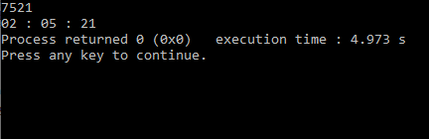
- Load time in seconds and print in hh:mm:ss format
Solutions:
Solution of example 1:
We solve the task in 4 steps:
First we need to define the data we need: The program needs the user to enter the radius, and the program needs to calculate the area of the circle. In order to define these data, we will give them names and set the data type for real numbers (double). So the first command:
double r,P;
With this, we reserved memory for two data of type double which we marked with r and with P
The second step is to allow the user to enter the radius. For input, we use the cin method found in the file iostream
We will include this file using the directive #include for including files and write this at the top of the document
#include <iostream>This file also contains the cout method for printing data and text to the console.
Before entering, we print a message to the console so that the user knows what to enter. For printing, we use the cout method, which actually represents the output conversion. Input conversion is achieved using the cin method. This second step is:
usingnamespace std;
int main() {
double r;
// Prompt the user to enter the radius
cout << "Please enter the radius of the circle: " << endl;
cin >> r;
}
In the 4th step, a message with the value of the area is printed on the screen, which is read from the memory marked in this program with P. For the output conversion, the %f format is used for data of type double.
usingnamespace std;
int main() {
double r, surface;
// Input value for radius
cout << "Enter the radius of the circle: " << endl;
cin >> r;
// Calculating the area of a circle
area = 3.14159 * r * r;
// Print the results
cout << "The area of the circle is: " << area << endl;
}
Solution to Example 3:
We solve the task in 4 steps:Here the user enters the time in seconds which should be an integer
int totalSeconds;
// Input value for time in secondscout << "Enter time in seconds: " << endl;
cin >> vrSec;
time in seconds and 3600, vrSek/3600, and to get how many seconds are left we use "%", so vrSek % 3600.
Code that does this:
int hh, totalSeconds;
hh = vrSec / 3600;
totalSeconds=totalSeconds% 3600;
In a similar way, they would get minutes from the remaining number of seconds (ostSek), but in this case they would take 60 as the divisor because 1min=60sec;
int mm;
mm = totalSeconds/ 60;
totalSeconds = totalSeconds% 60;
cout << hh << mm << totalSeconds<< endl;
usingnamespace std;
int main() {
int totalSeconds, hh, mm, ss;
// Input time in seconds
cout << "Enter time in seconds: " << endl;
cin >> totalSeconds;
// Calculate hours, minutes, and seconds
hh = totalSeconds / 3600;
totalSeconds = totalSeconds % 3600;
mm = totalSeconds / 60;
ss = totalSeconds % 60;
// Output result in hh:mm:ss format
cout << "Time: " << hh << ":" << mm << ":" << ss << endl;
}
| Previous |<Introduction to C++ |
Next Operators in C++>| |