
Functions in the C programming language
Programs in the c programming language can have a large number of commands, and if they were written one after the other in a single file, developers would find it difficult to navigate in such a code, i.e. it would be difficult to maintain it. On the other hand, it often happens that one algorithm, part of the commands that solves a small or large problem inside an application, repeats itself many times. It can be concluded that it would be much better to extract this set of commands (part of the program) as one whole only once as a subroutine or function, and then call this function as necessary whenever necessary. Subprograms are a mechanism for breaking up complex problems into subproblems.The programming language C knows only one type of routines called functions.
There are two things to distinguish about functions:
- Defining Functions
- Call functions
Function declaration
A function declaration (also called a function prototype) informs the compiler about the existence of a function: its return type and its parameter types. Declarations are useful when a function is called before its actual definition appears in the source file.
Syntax (declaration / prototype):
return_typefunction_name(type1arg1, type2arg2, ...);
The declaration only tells the compiler what the function looks like — the actual body (definition) can be provided later.
This allows you to call the function from main even if the full implementation appears after main.
#include <stdio.h>// Function declaration (prototype): declares a function that returns an int and takes two intsintsum(int a, int b); intmain() {int result = sum(5, 7); // Call the function declared aboveprintf("Sum is: %d\n", result); return0;} // Function definition: the actual implementation can appear after main()intsum(int a, int b) {return a + b; // returns the sum of the two parameters}
Note: Function declarations are typically placed near the top of the file (or in a header file) so that any code that calls the function can see its prototype. If you omit the declaration and call a function that is defined later, older C compilers may produce implicit-declaration warnings or errors — modern practice is to always declare functions (or include the proper header).
Defining Functions
Defining means that these commands that make up the function and who need to specify a specific task in an application (program) are written somewhere in the program, to sort them in some way, give a name and determine which data should be delivered to the function as input parameters and what kind of data the function returns back as a return value. So the definition of a function should include:- Functions of the function
- function header
- body function
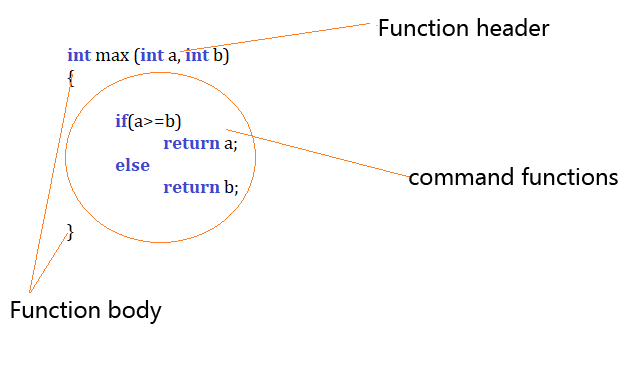
The first, in this case int, is a type of return data. This function, which counts a larger number between two integers, returns that integer type. This is the type of return value.
The second one is the name of the function that the programmer chooses himself and who should suggest the purpose of the function.
The body of the function is represented by curly braces. The body contains function commands.
In the header of the function (s), after the name, the parameters (arguments) of the function are written within ordinary brackets. These are the data to be delivered to the function so that it can complete the task set. In the previous example, the task that the function needs to perform is to determine the maximum between the two integers, and the data that the function needs to deliver through the parameter are the two numbers, in this case marked as a and b. The following figure shows more detailed this function.
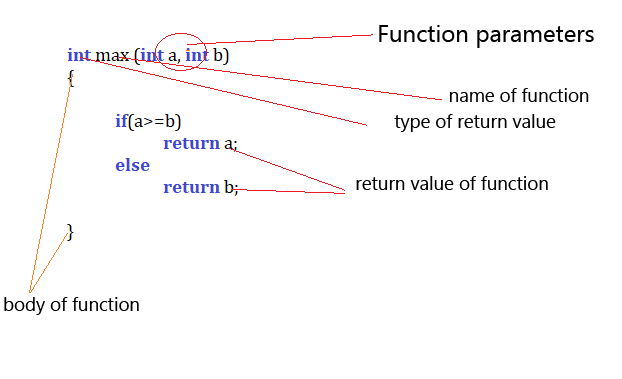
If the function does not return the value, it will not have the return statement in the body, but it can only have a return. In this case the word void is written as the type of return value.
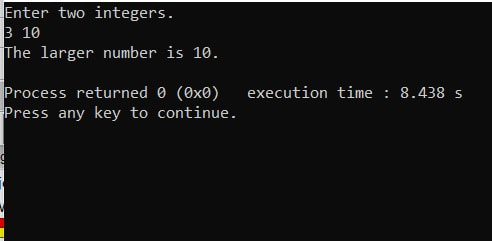
The program must have at least one function and this is the main function. An example of the main function of the previous example is shown in the picture below.

Calling functions
The only function that is automatically called when the application starts is the main function.
The statements inside main are executed sequentially, from top to bottom, and when the last statement is executed, the program ends. If there are other functions defined in the project, they will not be executed on their own. For the program in main to continue execution in another function, one of the statements inside main must be a call to that function.
In the example shown in Figure 3, the function max is called:
printf("The larger number is %d\n", max(A, B));The general form of a function call looks like this:
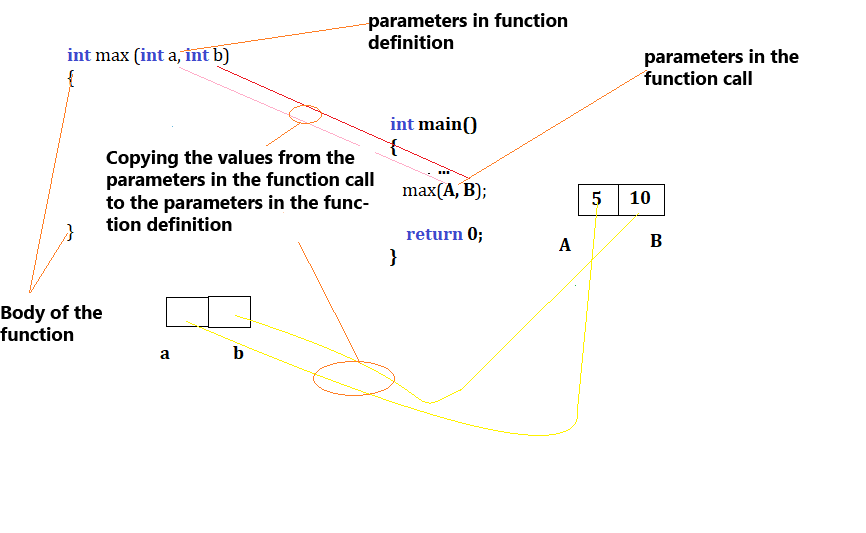
function_name(parameter1, parameter2, ...);The parameters passed to the function are copied in order into the parameters defined in the function (see Figure 2). In the function definition, the data type is written before the parameter name.
int max(int a, int b)Here, new memory is actually reserved, labeled as a and b, which stores the copies of the values of the parameters from the function call:
max(A, B);In the function call, the data type is not specified in front of the parameter. The parameter copying process is illustrated in Figure 5.
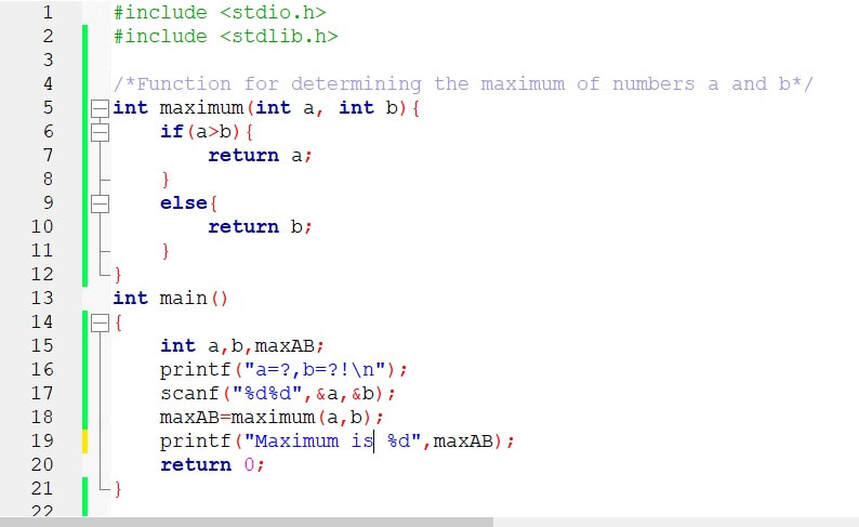
Function for determining the maximum of numbers a and b.
Task: Create a function that determines the maximum of two integers that are passed as function parameters.Enter two integers and determine their maximum using the previously defined function.
Forwarding a parameter by value and by pointer
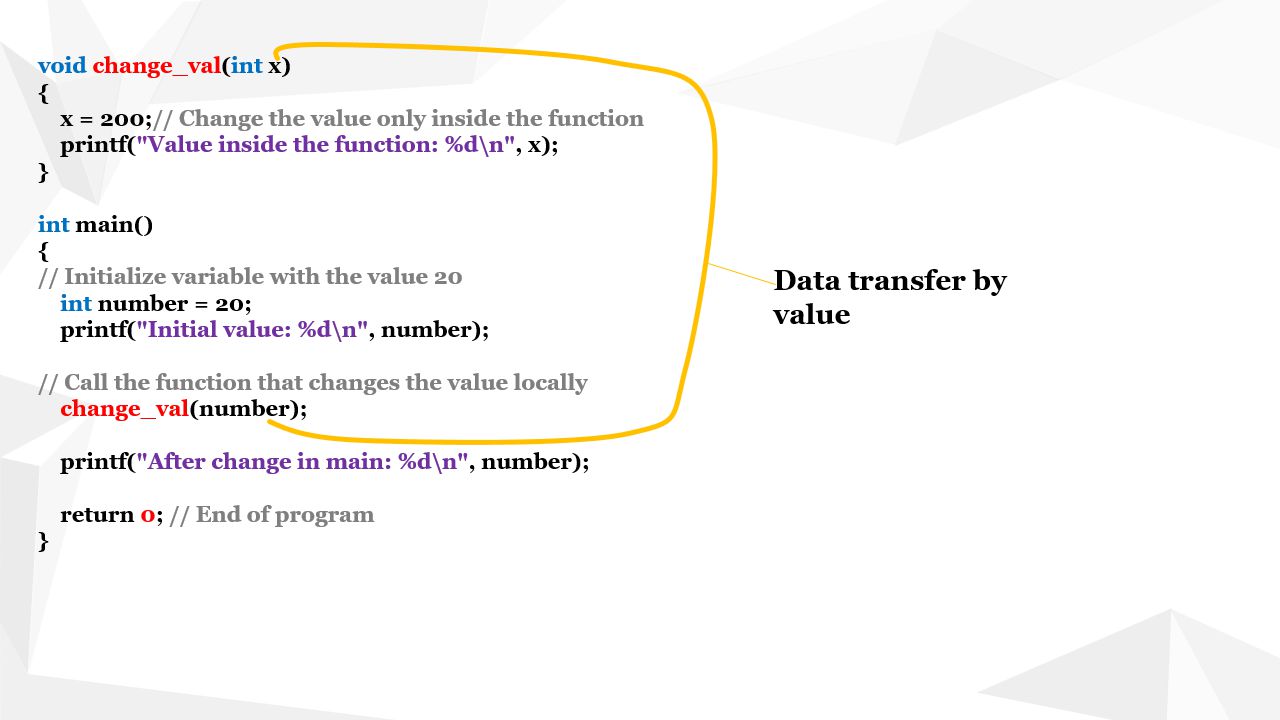
In the previous example, the parameter is forwarded by value. Since the parameters in the second function represent a new memory that obtains copies of the values from the memory of the main function only, any possible change in values within the other function will not affect the data defined in the first one.This can be illustrated by the following example:
Example 2: Replace data values
Set the integer value to 20, then make a method that changes this value to 100.Let's create a function that will change the value of the data sent to:
// Function declaration that changes the value locally
void change_val(int x);
int main() {
int number = 20;
printf("Initial value: %d\n", number);
// Call the function that changes the value locally
change_val(number);
printf("After change in main: %d\n", number);
return 0; // End of program
// Function definition that changes the value locally
void change_val(int x) {
x = 200;
printf("Value inside the function: %d\n", x);
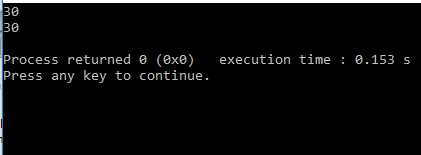
This value is changed within the function change_val, but this change does not reflect the data in the main function.
In order for this to be correct, the parameters must be transmitted by pointer.
Using pointers to modify data from a function
In C you can pass the address of a variable to a function using a pointer. When a function receives a pointer, it can access and modify the original variable by dereferencing that pointer. This is a common C idiom that effectively allows a function to update caller-owned data (similar in effect to "pass by reference" in other languages, but implemented explicitly with pointers in C).
Key points:
- The function parameter must be a pointer type (for example
int *p). - Call the function with the address of the variable using the address operator:
&variable. - Inside the function use the dereference operator
*to read or write the pointed-to value. - Always ensure the pointer is valid (not
NULL) before dereferencing to avoid undefined behaviour.
For a deeper discussion and more examples, see the Pointers in C lesson on this site.
#include <stdio.h>/* Function definition that changes the value via a pointer */voidchange_val(int *x) {// Check for NULL for safety (simple defensive programming)if (x == NULL) {} intmain() {printf("Error: NULL pointer\\n"); return;} // Dereference pointer to change the original variable *x = 200; printf("Value inside the function: %d\n", *x);// Initialize variable with the value 20int number = 20; printf("Initial value: %d\n", number); // Call the function with the address of 'number'change_val(&number); printf("After change in main: %d\n", number); return0; // End of program}
After starting, we get the output:
Initial value: 20
Value inside the function: 200
After change in main: 200
Explanation of the output
Initial value: 20
Program first prints the original value of the variable number defined in main.
Value inside the function: 200
The function change_val receives the address of number.
By dereferencing the pointer, it changes the value of number to 200,
so the message printed inside the function shows the updated value.
After change in main: 200
When control returns to main, the variable number has already been changed
(because the function modified the original variable via pointer).
Therefore, this final print also shows 200.
Function declaration
Under the declaration of a data or function in programming it is called determining the identifier and describing the properties of the data or function, without allocating a memory space for storing data or function. In the case of a function, the type of function values and the number and types of arguments are determined. In general, the declaration looks like:label_type function_name (array_argument);
The function declaration is also called the function prototype as well as the signature of the function.
If the function is located in the file above the main function, as in the previous examples then it is not necessary to specify the declaration separately. On the contrary, the declaration should be written above the main function. For example. the prototype of the max function would be:
int max (int a, int b); or only
int max (int, int);
The prototype of change_ref looks like:
void change_ref (int *);
Examples of functions with different return types and arguments
1. Function without a return value (void)
Functions that do not return a value use the return type void.
They are used to perform actions, such as printing on the screen.
// Function to print a welcome messagevoidgreet() {
    printf("Welcome to the world of programming!\n");
}

intmain() {
    greet(); // Function callreturn 0;
}
Explanation:
The function greet has no return value because it uses the void return type.
It only performs one action – printing a message to the screen.
2. Function with return value of type int
A function can return numeric values that are used later in the program.
// Function that returns the sum of two numbersintsum(int a, int b) {
    return a + b;
}

intmain() {
    int result = sum(5, 7); // Function callprintf("The sum is: %d\n", result);
    return 0;
}
Explanation:
The function sum takes two arguments (a and b)
and returns their sum as an int value.
3. Function with return value of type double
This is used when decimal numbers are needed, for example in mathematical calculations.
// Function that calculates the area of a circledoublecircleArea(double r) {
    return 3.14159 * r * r;
}

intmain() {
    double r = 5.0;
    double area = circleArea(r);
    printf("The area of the circle is: %.2lf\n", area);
    return 0;
}
Explanation:
The function circleArea calculates the area of a circle using the formula π · r²
and returns the result as a double.
4. Function with string return (using char[])
In C, strings are handled as arrays of characters. A function can return a message through an array parameter.
// Function that creates a greeting messagevoidgreetMessage(char name[], char result[]) {
    sprintf(result, "Hello, %s!", name);
}

intmain() {
    char name[] = "Anna";
    char result[50]; // Space for the result
    greetMessage(name, result);
    printf("%s\n", result);
    return 0;
}
Explanation:
The function greetMessage takes a text argument (name)
and formats a personalized message into the result array.
Recursive functions
Recursive functions are functions that call themselves, either directly or indirectly. This approach allows solving problems that can naturally be divided into smaller subproblems.
For a more detailed explanation and practical examples, visit our page: Recursive algorithms.
#include<stdio.h>int factorial(int n) {
    if (n == 0)
        return 1;
    elsereturn n * factorial(n - 1);
}

int main() {
    int num = 5;
    printf("Factorial of %d is %d\n", num, factorial(num));
    return 0;
}
Explanation:
- The function
factorialcalls itself until the base case (n == 0) is reached. - Each recursive call multiplies the current number
nwith the factorial ofn - 1. - For
n = 5, the calculation is:5 * 4 * 3 * 2 * 1 = 120.
Program output:
Factorial of 5 is 120
Examples with functions
Example 1: Printing an array
Write a program in C that uses a function to print the elements of an array.
Create a function print_array that takes the entire array and its length,
and prints the elements in a single line. In the main function:
- Read an integer n (the size of the array) from input.
- Create an array of length n and fill it with user input.
- Call the function
print_arrayto display the entered elements.
Short explanation of the task:
The goal is to practice declaring and defining a function, the way arrays are passed in C (look at the argument A[]),
and calling a function from main. Pay attention to the order of operations:
first read the size, then read the elements, and finally call the function to print them.
#include <stdio.h>#include <stdlib.h>/* Function that takes an array and its length and prints the elements */voidprint_array(int A[], int n) {// Print a header for clarityprintf("print_array:\n"); // Iterate through all elements and print themfor(int i = 0; i < n; i++){} intmain() {printf("%d ", A[i]);} printf("\n"); // Move to a new line after printingint n; // Read array sizescanf("%d", &n); // Variable Length Array (C99 and later)int arr[n]; // Input array elementsfor(int i = 0; i < n; i++){}printf("Enter element %d\n", (i+1)); scanf("%d", &arr[i]);} // Call the function that prints the arrayprint_array(arr, n); return0;
Explanation (continued)
- accepts parametersint A[] and int n (the array and its length). Note: in C, A[] in the declaration actually becomes a pointer to the first element, i.e. A is equivalent to int *.
- returns no value (hence the void type) — its only purpose is to display (print) data to the standard output.
- What does "%d" mean? — it marks the place in the format string where printf will insert an integer value given as the next argument.
- What does A[i] mean? — it is the i-th element of the array; semantically, A[i] is the same as *(A + i) (pointer arithmetic).
- Always pass the array length — the function cannot determine the number of elements by itself.
- Safety: always ensure n is valid (e.g., non-negative) before accessing A[i], to avoid going out of bounds.
- Alternative for older C standards: if you do not use VLAs (variable length arrays), instead of int array[n]; use dynamic allocation (malloc) or a fixed-size array.
- Possible task extension: write additional functions, e.g., int sum(int A[], int n) or int max(int A[], int n), and test them from main.
Example 2 Rotate array elements to the left
Write a function in the C language that shifts all elements of an array one position to the left (cyclic rotation). The function should modify the array in-place, so that the first element becomes the last one.
- Create a function
rotate_leftthat takes parametersint A[]andint n. - In the main function: read the size n, input n array elements, call
rotate_left, and then display the result using a helper functionprint_array. - Pay attention to edge cases: n <= 1 (the array remains unchanged).
Short explanation of the task:
The goal is to demonstrate how an array can be modified directly inside a function (by passing a pointer to its first element) and to understand a simple algorithmic operation of shifting elements (O(n) time complexity).
#include <stdio.h>#include <stdlib.h>/* Function for cyclic left rotation of an array by one position */voidrotate_left(int A[], int n) {// If n is less than or equal to 1, nothing to rotateif (n <= 1) {} voidprint_array(int A[], int n) {return;} // Save the first element in a temporary variableint b = A[0]; // Shift each element one step to the left: A[i-1] = A[i]for (int i = 1; i < n; i++) {A[i - 1] = A[i];} // Place the saved first element at the end A[n - 1] = b;printf("print_array:\n"); for (int i = 0; i < n; i++) {} intmain() {printf("%d ", A[i]);} printf("\n");int n; // Read array sizescanf("%d", &n); // Note: this uses VLA (C99). For older standards, use malloc.int arr[n]; for (int i = 0; i < n; i++) {}printf("Enter %d. array element\n", (i + 1)); scanf("%d", &arr[i]);} // Call the rotation functionrotate_left(arr, n); // Print the resultprint_array(arr, n); return0;
Solution explanation
-
The function
rotate_leftis of type void — it does not return a value, but modifies the array passed as an argument (in C, arrays are passed as pointers to their first element). - First, we check if (n <= 1) — for arrays of length 0 or 1 there is nothing to rotate, so we exit early.
-
We save the first element into a variable
b, since it will be overwritten during shifting. -
Using a for loop, we iterate from index 1 to n-1, assigning
A[i-1] = A[i]— this shifts each element one position to the left. -
After the loop, we place the previously saved first element into the last position
A[n-1], completing the rotation. -
The algorithm works in-place, uses only one extra variable (
b), and has a time complexity of O(n). - Safety notes: always validate
nbefore accessing array elements (ensure it is not negative), and in production code consider using dynamic allocation instead of VLA for broader compatibility with older C standards.
Optional extension: Write a function rotate_right that rotates an array one step to the right,
or a generic function rotate(int A[], int n, int k) that rotates an array by k positions
(positive = left, negative = right).
Example 3: Function to Count Characters in a C String
Write a function in C that takes a C-style string (an array of type char) and returns the number of characters in that array (excluding the terminating null character).
The function should count the characters and return the value as an int.
In main, read the string from input, call the function, and print the result.
- Create a function
lengthwith the signatureintlength(constchar s[]). - In main, read a line of text (using fgets) and remove a possible trailing newline before calling the function.
- Test with an empty string (should return 0) and with strings containing spaces.
Short explanation of the task:
The goal is to demonstrate how in C a function receives an array (which in the function is actually a pointer to the first element),
how strings are terminated with the special character '\0', and how iteration can be used to count elements until the first null character.
#include <stdio.h>#include <stdlib.h>/* Function that counts characters in a C string (excluding '\\0') */intlength(constchar s[]) {int i = 0; while (s[i] != '\0') {} intmain() {i++;} return i;char s[256]; // Read a line from standard input (up to 255 chars + '\\0')if (fgets(s, sizeof(s), stdin) == NULL) {}return0;} // Remove a possible '\\n' that fgets appendsint j = 0; while (s[j] != '\0') {if (s[j] == '\n') {} // Call the function that returns the lengthint len = length(s); printf("Length: %d\n", len); return0;s[j] = '\0'; break;} j++;
Solution Explanation
-
The function
lengthtakes the parameterconst char s[]. In the declaration this is equivalent toconst char * s— meaning the function works with a pointer to the first character of the array. -
A C string is an array of characters terminated by a null character
'\0'. The function counts characters until this terminator is encountered. Eachs[i]represents a single character. -
In main we use fgets to safely read a line (instead of scanf with
%s, which stops at the first space). Since fgets includes the newline character if present, we remove it before callinglength. - The function returns an int representing the number of characters (0 for an empty string). Its time complexity is O(n), where n is the string length.
- Important: do not try to use
sizeofin the function to determine string length —sizeof(s)inside the function will give the size of the pointer, not the array. That’s why iterative counting or using the standard strlen from <string.h> is necessary. - Edge cases: If the input line is empty (just enter), the function returns 0. If the string is longer than the buffer (255 chars), fgets will only read the first part — for full support use dynamic allocation and a loop for reading.
Extension (optional): Implement a variant that returns size_t and uses const unsigned char * to correctly count bytes/characters in extended ASCII/UTF-8 scenarios, or simply call strlen from <string.h>.
Learn more about text processing in C in the article: Strings in C
Advanced functions
1) Function that returns a pointer
Example of a function that creates a dynamically allocated array and returns a pointer to it.
This demonstrates dynamic memory allocation with malloc, basic error checking,
filling the array with values and returning ownership of the allocated buffer to the caller.
Ownership note: The function create_array allocates memory on the heap and returns a pointer to the first element.
The main function receives that pointer, uses it to access and print the array contents,
and must call free(arr) after use to avoid a memory leak.
#include<stdio.h>
#include<stdlib.h>
int*create_array(int n) {
if (arr == NULL) {
returnNULL;
for (int i = 0; i < n; i++) {
return arr;
intmain() {
int* arr = create_array(n);
if (arr != NULL) {
for (int i = 0; i < n; i++) {
printf("\n");
free(arr); // Free the allocated memory (ownership returned to caller)
return0;
2) Using function pointers
Function pointers let you pass functions as arguments to other functions. This is useful for implementing callbacks, strategies or simple higher-order functions in C.
// Function that adds two numbers
intadd(int a, int b) {
// Function that subtracts two numbers
intsubtract(int a, int b) {
// Function that accepts a pointer to a function
intprocess(int x, int y, int (*operation)(int, int)) {
intmain() {
printf("Addition: %d\n", process(a, b, add));
printf("Subtraction: %d\n", process(a, b, subtract));
return0;
3) Function that sorts an array using a function pointer
This enables flexible sorting of an array using different comparison criteria. The sorting routine receives a pointer to a comparison function and uses it to decide element order, so you can change sorting order (ascending/descending) without modifying the sorting code itself.
// Comparison function for ascending order
intascending(int a, int b) {
// Comparison function for descending order
intdescending(int a, int b) {
// Bubble sort implementation that accepts a function pointer for comparison
voidbubbleSort(int arr[], int n, int (*compare)(int, int)) {
arr[j] = arr[j + 1];
arr[j + 1] = temp;
// Print array
voidprint_array(int arr[], int n) {
printf("\n");
intmain() {
int n = sizeof(arr) / sizeof(arr[0]);
printf("Original array: ");
print_array(arr, n);
bubbleSort(arr, n, ascending);
printf("Sorted ascending: ");
print_array(arr, n);
bubbleSort(arr, n, descending);
printf("Sorted descending: ");
print_array(arr, n);
return0;
Explanation
The bubbleSort function receives a pointer to a comparison function compare,
which allows changing the sorting criterion without modifying the sorting algorithm itself.
In main, the array is first sorted in ascending order, then in descending order,
by passing the appropriate comparison function (ascending or descending).
- The comparison functions return a positive value if the first argument should come after the second, zero if equal, and negative if it should come before — this is the same convention used by standard C library comparators.
- Using function pointers for comparison makes your sorting routine flexible and reusable for different criteria (e.g., sort by absolute value, by a struct field, etc.).
Examples with functions and their memory organization
1. Basic example: function and memory layout
In this example a function receives two integers, adds them and returns the result. We will look at how data is passed and organized in memory when calling the function.
#include<stdio.h>// Function that takes two integers and returns their sumintsum(inta, intb) {intresult = a + b; // 'result' is allocated in the function's stack framereturnresult; // return value is placed in a register or on the stack (ABI dependent)} intmain() {intx = 5, y = 10; // x and y live in main's stack frameinttotal = sum(x, y); // call — arguments passed via registers or pushed on the stackprintf("Sum: %d\n", total); return0;}
What happens in memory when calling sum(x, y)?
Stack allocation
- x and y are variables in main and reside in main's stack frame.
- When sum(x, y) is called, the values of x and y are placed either on the stack or passed via CPU registers, depending on the compiler and calling convention.
Function execution
- sum receives copies of x and y as parameters a and b.
- A new local variable result is created on the function's stack frame and assigned the value a + b.
Returning the result
- The return value is typically placed in a designated CPU register (for example EAX on x86) or, in some ABIs, stored on the stack.
- After returning, the variable total in main receives this value.
Stack cleanup
- Memory used for the function parameters and the local variable result is released when the function returns and its stack frame is popped.
2. Function with pointers — changing values in memory
In this example we use pointers to directly modify variables that live outside the function's stack frame. The function swaps the values pointed to by the two pointer parameters.
#include<stdio.h>// Function that swaps two integers via pointersvoidswap(int *a, int *b) {inttemp = *a; // read value at address a *a = *b; // write value at address a *b = temp; // write value at address b} intmain() {intx = 5, y = 10; printf("Before swap: x = %d, y = %d\n", x, y); // Pass addresses of variables to the functionswap(&x, &y); printf("After swap: x = %d, y = %d\n", x, y); return0;}
What happens in memory when calling swap(&x, &y)?
Stack allocation
x and y are variables stored in the main function's stack frame.
When we call swap(&x, &y), the stack frame for swap contains two pointer parameters that hold the addresses of x and y.
Manipulation through pointers
*a dereferences the address of x, and *b dereferences the address of y.
The swap is performed directly in memory, so the original variables x and y in main are modified.
Returning from the function
After swap finishes, the memory used by its parameters and the local temp variable is freed.
Because the values of x and y were changed at their original addresses, the change persists after the function returns.
3. Function with dynamic memory allocation
We use malloc to create a dynamic array on the heap. The function allocates memory,
initializes the array contents, and returns a pointer to the newly created block.
#include<stdio.h>#include<stdlib.h>// Function that creates a dynamic array and returns a pointer to itint* createArray(int n) {int* arr = (int*)malloc(n * sizeof(int)); // allocate memory on the HEAPif (arr == NULL) {} intmain() {printf("Memory allocation error!\n"); returnNULL;} for (int i = 0; i < n; i++) {arr[i] = i + 1;} returnarr; // return pointer to the first elementint n = 5; int* arr = createArray(n); if (arr != NULL) {}printf("Generated array: "); for (int i = 0; i < n; i++) {} return0;printf("%d ", arr[i]);} printf("\n"); free(arr); // free allocated memory
What happens in memory?
Call createArray(5)
- Memory is allocated on the heap for
nintegers. - The pointer
arrinsidecreateArraypoints to the start of that memory block.
Returning the pointer
- The pointer
arris returned tomain, where it is used to access the allocated array and print values.
Freeing memory (free(arr))
- The heap memory remains allocated until we explicitly call
free(arr). - If
freeis not called, the program would leak memory (a memory leak).
Advanced Topics for Experienced Users
1. How arrays interact with functions
In C, arrays passed to functions decay to pointers to their first element. The function receives a pointer and can use it to read or modify the original elements; however the array size is not known automatically, so you must pass it separately (or use a sentinel).
Example signature: voidmodify_array(int *arr, intsize);
#include<stdio.h>/* double every element of the array (C) */voidmodify_array(int *arr, intsize) {/* defensive: check pointer validity if caller may pass NULL */if (arr == NULL) {} intmain(void) {return;} for (inti = 0; i < size; ++i) {arr[i] *= 2; /* modifies original array */}intnumbers[] = {1,2,3,4,5}; modify_array(numbers, 5); /* arrays decay to pointer */for (inti = 0; i < 5; ++i) {}printf("%d ", numbers[i]);} puts(""); return0;
Note: emphasize pointer safety — if your function may receive invalid pointers, check for NULL before dereferencing.
When using array lengths, prefer size_t for sizes and indexing in portable code.
Difference between pointers and arrays (C)
Arrays and pointers are closely related in C but they are not identical.
Understanding their differences is important when passing arrays to functions, using sizeof,
and managing dynamic memory.
| Aspect | Pointers (C) | Arrays (C) |
|---|---|---|
| Definition | A variable that stores an address to an object (e.g. int *). |
A contiguous sequence of elements declared as an object (e.g. int a[10]). |
| Memory allocation | Can point to memory allocated dynamically (malloc) or to existing objects. |
Declared arrays may be static, automatic (stack or VLA) or allocated indirectly via malloc (in which case you work with a pointer to the block). |
| Flexibility | Pointer value can change to point to different locations during its lifetime. | The array name denotes a fixed base address — you cannot assign a new value to the array name. |
| Arithmetic | Pointer arithmetic is allowed (e.g. p + 1, *(p + i)). |
You can perform pointer arithmetic on expressions derived from the array, but the array identifier itself cannot be incremented (a++ is invalid). |
| Passing to functions | Pass the pointer directly (e.g. int *p). |
When passed, an array decays to a pointer to its first element; a parameter declared as int arr[] is equivalent to int *arr in the function signature. |
| sizeof behavior | sizeof(p) yields the size of the pointer type (e.g. 8 bytes on a 64-bit machine). |
sizeof(a) in the defining scope yields the total size of the array (e.g. 10 * sizeof(int)), but inside a function where the parameter is declared as int a[] it decays to a pointer and sizeof yields the pointer size. |
| Null handling | A pointer can be NULL. Always check before dereferencing if NULL is possible. |
An array name cannot be NULL; however a pointer that points to an array can be NULL. |
Practical note: when passing arrays to functions always pass their size too (prefer size_t for sizes). If you need resizable storage use dynamic allocation with malloc and manage ownership and free rules explicitly.
#include<stdio.h>#include<stddef.h>/* Demonstrates sizeof difference and decay */voidprint_info(intarr[], size_tn) {/* here arr is actually an int* */printf("inside function: sizeof(arr) = %zu (pointer), n = %zu\n", sizeof(arr), n);} intmain(void) {inta[10]; printf("in main: sizeof(a) = %zu (array total bytes)\n", sizeof(a)); print_info(a, (size_t)10); return0;}
3. Working with constant arrays
In C, const increases safety by preventing modification through a pointer.
The declaration constint *p means "pointer to const int"
(you cannot change the pointee via p), while
int *constp means "const pointer to int"
(the pointer value cannot change, but the pointee may).
#include<stdio.h>/* print an array without modifying it (prints read-only data) */voidprint_array(constint *arr, intsize) {for (inti = 0; i < size; ++i)} intmain(void) {printf("%d ", arr[i]); /* cannot modify arr[i] here */puts("");constintnumbers[] = {1,2,3,4,5}; print_array(numbers, 5); return0;}
Note: `const` applies to the type it precedes (or follows). Use `const` liberally for function parameters where the function should not modify caller data — it documents intent and allows the compiler to catch accidental writes. When returning pointers to internal data consider whether the caller must not modify the data (return `const` pointer) or whether ownership/modify-rights are transferred.
Pointers to const vs. const pointers (C)
In C the placement of const matters and expresses different intent:
constint *p— pointer to const int: you cannot change the integer value throughp, but you can change the pointer to point elsewhere.int *constp— const pointer to int: the pointer value (the address stored inp) cannot change after initialization, but you may modify the integer throughp.-
You can combine both:
constint *constp— a constant pointer to a constant integer (neither the pointer nor the pointee can be modified throughp).
Use const for function parameters when you want to promise the caller that your function will not modify the data — this both documents intent and lets the compiler catch accidental writes.
#include<stdio.h>/* Examples of pointer const placement */void demo_const_variants(void) {int x = 10; int y = 20; constint *p_to_const = &x; /* cannot do *p_to_const = ... */int *constconst_ptr = &x; /* cannot do const_ptr = &y */constint *constboth_const = &x; /* allowed: change where p_to_const points */p_to_const = &y; /* not allowed (would be compile error): *p_to_const = 5; *//* not allowed (would be compile error): const_ptr = &y; */printf("p_to_const -> %d, const_ptr -> %d\\n", *p_to_const, *const_ptr);}
Parameter passing in C — value vs pointer
In C there are two commonly used ways to give data to a function: pass-by-value and pass-by-pointer. (C does not have C++ references.)
/* 1) Pass-by-value: function receives a copy of the argument */voidincrement_value(intx) {x++; /* modifies local copy only */} /* 2) Pass-by-pointer: function receives address and may modify caller data */voidincrement_pointer(int *x) {if (x == NULL) return; /* defensive check */ (*x)++; /* modifies caller's variable */} /* usage */ intmain(void) {inta = 5; /* pass-by-value */increment_value(a); /* a remains 5 *//* pass-by-pointer */increment_pointer(&a); /* a becomes 6 */printf("a = %d\\n", a); return0;}
Performance and safety considerations
- Pass-by-value is simple and safe for small scalar types (ints, chars, floats). For large structures copying can be costly.
- Pass-by-pointer avoids copying large objects and enables modification of caller data, but requires careful handling (check for
NULL, document ownership and lifetimes to avoid dangling pointers). - Prefer
size_tfor sizes and indexing when dealing with buffers/arrays to avoid signed/unsigned mistakes and to express that values represent sizes. - Use
constin parameter types to convey intent and enable compiler checks (e.g.void f(const int *arr)for read-only arrays).
Summary: In C, use pass-by-value for small, independent data; use pass-by-pointer for large data or when the callee must modify the caller's object. Always document and check pointer validity.
Advanced topics to explore (C)
To deepen the understanding of parameter passing and modular design in C, consider the following topics and practical techniques that are relevant for production code:
- const discipline: Use
conston pointer parameters to express intent (e.g.void f(const int *p)) and let the compiler catch accidental writes. - Function pointers: Useful for callbacks and small plugin architectures in C.
- Ownership and lifetime: Explicitly document who allocates and who frees dynamic memory (caller vs callee).
- Namespace avoidance in C: C has no namespaces — use consistent name prefixes (e.g.
mu_add,mu_subtract) to avoid collisions.
Example: Modularization and libraries in C
Below is a minimal example showing how to split code into a header (.h) and an implementation (.c),
then compile and link with gcc. This pattern helps organize code into reusable units.
/* math_utils.h */#ifndefMATH_UTILS_H#defineMATH_UTILS_H
/* Function prototypes (use a prefix to avoid global name collisions) */intmu_add(inta, intb);
intmu_subtract(inta, intb);

#endif/* MATH_UTILS_H */
/* math_utils.c */#include<stdio.h>#include"math_utils.h"intmu_add(inta, intb) {returna + b;} intmu_subtract(inta, intb) {returna - b;}
/* main.c */#include<stdio.h>#include"math_utils.h"intmain(void) {intx = 10, y = 5; printf("Add: %d\n", mu_add(x, y)); printf("Sub: %d\n", mu_subtract(x, y)); return0;}
Build and run:
/* compile and link in one step */gccmain.cmath_utils.c -o program/* run */./program
Output:
Add: 15Sub: 5
Explanation and best practices
- Header files (
.h) declare the API (function prototypes, public types, macros). Use include guards to prevent double inclusion. - Implementation files (
.c) contain definitions. Keep internal helper functionsstaticif they are not part of the public API. - Naming: use consistent prefixes (e.g.
mu_) to avoid global symbol collisions in C. - Documentation: document ownership rules (who must call
free()), thread-safety, and expected ranges for parameters.
Extensions — packaging as libraries
You can package your module as a static or shared library:
/* static library */gcc -c math_utils.c
  ar rcs libmathutils.a math_utils.o
  gcc main.c -L. -lmathutils -o program

  /* shared library (Linux) */gcc -fPIC -c math_utils.c
  gcc -shared -o libmathutils.so math_utils.o
  gcc main.c -L. -lmathutils -Wl,-rpath=. -o program
In constrained environments or for public APIs, prefer careful symbol naming, clear documentation of memory ownership, and a simple versioning scheme (for example, via file names or configure-time defines).
Advanced examples: functions with pointers and structures (C)
1. Using pointers in functions
Pointers are essential in C for passing large data efficiently or for enabling a function to modify variables in the caller. A common example is swapping two integers by passing their addresses.
#include<stdio.h>/* Swap two integers via pointers */voidswap(int *a, int *b) {inttmp = *a; *a = *b; *b = tmp;} intmain(void) {intx = 10, y = 20; printf("Before swap: x = %d, y = %d\n", x, y); /* calling swap by passing addresses */swap(&x, &y); printf("After swap: x = %d, y = %d\n", x, y); return0;}
Explanation: the swap function receives two pointers; by dereferencing them it directly modifies the caller's variables. This avoids copying and is efficient for small scalar types. Always ensure pointers passed are valid (or check for NULL if appropriate).
2. Passing structures to functions
In C, struct groups related data. For larger structures prefer passing a pointer
(often a const pointer for read-only use) to avoid expensive copying.
#include<stdio.h>#include<string.h>/* Student structure grouping related fields */structStudent {charname[64]; intage; floatgrade;}; /* print student info without modifying it */voiddisplay_student(conststructStudent *s) {printf("Name: %s\nAge: %d\nGrade: %.1f\n", s->name, s->age, s->grade);} intmain(void) {structStudents1; strncpy(s1.name, "Alice", sizeof s1.name); /* ensure null-termination */s1.name[sizeof s1.name - 1] = '\0'; s1.age = 20; s1.grade = 89.5f; /* pass a pointer to avoid copying the whole struct */display_student(&s1); return0;}
Explanation: the Student struct groups related fields. Passing a const struct Student * avoids copying (more efficient) and prevents the function from modifying the original data. When copying strings into fixed-size char arrays use strncpy and ensure explicit null termination to avoid buffer overrun/unterminated strings.
Practical tips:
- Prefer passing pointers (`struct T *`) when the structure is large or when the callee modifies the object.
- Use `const` for read-only parameters to document intent and enable compiler checks.
- Clearly document ownership rules: who allocates and who frees dynamically allocated members (if any).
Related topics
To deepen your understanding of functions in the C language, we recommend reading the following related topics:
- Pointers in C – Core pointer concepts, their role in functions, and working with dynamic memory.
- Two-dimensional arrays in C – Learn how to declare, initialize, and use two-dimensional arrays in C with practical examples.
- Recursion in C – How functions call themselves and when recursion is appropriate.
- Arrays in C – Passing arrays to functions and the differences between value semantics and pointer semantics.
These topics are closely linked to functions and will help you better understand how functions manage data and memory in C.
| Previous |< Pointers in C/C++ |