
Operators in C++ languages
IIn the C++ programming language, operators are the basic tools for data manipulation, enabling various mathematical, logical and bitwise operations to be performed. An operator is a symbol that indicates an action on one or more operands, where the result can be a value change, a comparison, or a logical evaluation.Operators are classified according to the number of operands into:
- Unary operators – act on one operand (eg ++, --).
- Binary operators – apply to two operands (eg +, -, *).
- Ternary operators – use three operands, such as the conditional operator (?:).
- Arithmetic operators like +, - and * are used for basic mathematical operations.
- Relational operators (==, !=, >, <) allow comparing values.
Operator characteristics
- Operators are actions that run over operands, giving a particular result.
- Expressions are arbitrarily complex compositions of operand and operator.
- Operators can be applied to one operand (unary operator) or to two operands (binary operators).
- There is also one operator with three operands, which is ? : (explained later).
Example:
int a = 10, b = 20;int result = (a < b) ? a : b; // the ternary operator returns 10 because a is less than b
Aritmetics operators
They are used for expressions with basic computational operations. The table below gives an overview of arithmetic operators| Operator | Using | Description |
|---|---|---|
| + | op1+op2 | addition of two numbers |
| - | op1-op2 | subtraction two numbers |
| * | op1*op2 | Multiple op1 width op2 |
| / | op1/op2 | Division two numbers |
| % | op1%op2 | Calculates the rest of division of two numbers |

Solution:
intmain()() {
std::cout<<"Enter values for R1 and R2: ";
std::cin>>R1>>R2; // User inputs R1 and R2
Re = R1*R2/ (R1+R2); // Calculated solution for the given equation
std::cout<<"Solution: "<<Re<<std::endl;
}
Test your code in the editor!
The remainder of the division of two numbers: The "%" operator
Suppose we want to divide two integer values: 7 and 3.
If we write 7 / 3, we get the result 2. This is an integer result because we divided two integer values.
If we want to get the remainder of the division, we would use the % operator.
For example, 7 % 3 = 1.
Example:
Input the time in seconds and display it as mm:ss.
Example: Input the time in minutes and print as mm: ss
Solution: From the data we need the time in seconds (Vr), and at the output for printing minutes (mm) and seconds (ss)intmain()() {
std::cout<<"Enter time in seconds: ";
std::cin>>time; // User enters time in seconds
/* Let's assume the user enters 132 seconds. Since one minute has 60 seconds,
we can convert 2*60s to two minutes, and the remaining seconds will be 132-(2*60)=12s.
This can be calculated using the division and modulo operators, "/" and "%". */
minutes = time/60; // minutes=132/60=2
seconds = time%60; // seconds=132%60=12
std::cout<<"Time: "<<minutes<<" : "<<seconds<<std::endl;
When the values in an arithmetic operation use an integer value and a real number, the result is a real number. The integer is implicitly converted to a real number before the calculation itself. The table below shows the types of data that are returned from arithmetic operations, based on the types of values. The necessary conversions are made before the operation is performed.
| The data type for the result | Data type for values |
|---|---|
| long | None of the values is float or double (whole number artifacts), a At least one of the operators is long type |
| int | None of the values is float or double (integer arithmetic). No operand is long. |
| double | At least one value is double type |
| float | At least one value is a float type. None is double type |
Unary operators "++", "-"
There are also two operators that allow for a short calculation. These are the operator ++ (increment) that increases the operand by 1 and the operator (decrement) which operand decreases by 1. Both operators can appear in front of the operand (prefix) and behind the operand (postfix). For version prefix, ++ op / - op, the first operand increases by 1, so this result is used further in the expressions. For the postfix version, the first operand is applied to the expression (old value), and only after that value is changed.Relational and conditional operators
The relational operator compares two values and determines the value between them. For example,!! = Returns exactly if two operands are not equal. The following table lists the relational operators:| Operator | Using | Return true if |
|---|---|---|
| > | op1>op2 | op1 greater then op2 |
| >= | op1 >= op2 | op2 greater then or equal to op1 |
| < | op1 < op2 | op1 Less then op2 |
| <= | op1 <= op2 | op1 less then or equal to op2 |
| == | op1 == op2 | op1 equal to op2 |
| != | op1 != op2 | op1 different to op2 |
An example of relational operators
intmain()() {
std::cout<<"Enter the value for a: ";
std::cin>>a;
std::cout<<"Enter the value for b: ";
std::cin>>b;
if (a>b) {
}
| Operator | using | return true if |
|---|---|---|
| && | op1 && op2 | both op1 and op2 are true. op2 is calculated only if necessary |
| || | op1 || op2 | either op1 or op2 are true or both. op2 is calculated only if necessary |
| ! | !op | op is false |
| & | op1 & op2 | both op1 and op2 are true. Always calculate op1 and op2 |
| | | op1 | op2 | either op1 or op2 are true or both. Always calculate op1 and op2. |
| ^ | op1 ^ op2 | if op1 and op2 are different, or if one has the value true, but not both |
Examples of logical operators
bool x = true;
bool y = false;
bool result = (x && y); // result is false because both expressions are not true
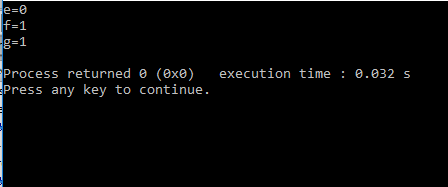
Example: For the set values of integer variables a, b, c, determine the values of logical expressions:
a=4,b=7, c=11- a>b
- ! a > b && !(b<c)
- a !=0 || !(a>(b>c))
Solution:
The values of logical expressions in C++ are also of type bool. A logical expression has the value true if the condition is satisfied (true), and false if the condition is not satisfied (false). This differs from C language, where logical values are represented as integers (1 for true and 0 for false). If we define three integers with values 4, 7, and 11, the values of the logical expressions will be as follows:
1. Expression a > b
It gives the value false because 4 is not greater than 7.
a > b
4 > 7
false
2. Expression !(a > b && !(b < c))
It gives the value true. When we substitute the values for a, b, and c, we get:
!(4 > 7 && !(7 < 11))
= !((false) && !(true))
= !((false) && (false))
= !(false)
= true
First, the operators > and < are processed because they have higher precedence than logical operators. Thus, 4 > 7 is false, and 7 < 11 is true. Then, the &&& operator combines these values: false && true gives false. Finally, the negation ! turns false into true.
3. Expression a != 0 || !(a > (b > c))
It gives the value true. When we substitute the values for a, b, and c, we get:
4 != 0 || !(4 > (7 > 11))
= true || !(4 > false)
= true || !(4 > 0)
= true || !(true)
= true || false
= true
Explanation:
4 != 0is true, because4is not equal to0.- The expression
(7 > 11)is false, because7is not greater than11. - Then,
4 > falsetreatsfalseas0, so the result is4 > 0, which gives true. - Finally, the negation
!givesfalse, but the operator||combines it with the first part (true || false), resulting in true.
Conclusion:
The order of execution of operators in C++ follows precedence, where comparison operators (>, <, !=) are executed before logical operators such as && and ||. Just like in mathematics, parentheses are used to clearly define the order of execution.
usingnamespacestd;
intmain(){
boole, f, g;
a = 4;// Assigning value to variable a
b = 7;// Assigning value to variable b
c = 11;// Assigning value to variable c
// Calculating logical expressions
e = a > b;// e is true if a is greater than b, otherwise false
f = !(a > b && !(b < c));// Combination of AND and NOT operators
g = a != 0 || !(a > (b > c));// Combination of OR and NOT operators
// Printing the values of expressions
cout<<"e="<<e<<endl;
cout<<"f="<<f<<endl;
cout<<"g="<<g<<endl;
}
Operators by bit
Bitwise operators allow the execution of bits-level operations within integer data. There are two groups of operators per bits:- operators to perform logical operations between pairs of bits on the same positions within their operands
- shift operators
- ~It performs complementing (negating) the value of its operand by bit. Thus, it converts from state 0 to state 1 and vice versa
- &Logical "and" for bit operations.
- |Logic included "or" for bit operations.
- ^Logic exclusively "or" for bit operations.
- <<It moves the left operand for as many binary places as the right-hand value of the right operand
- >>Moving the left operand for as many binary places to the right is the value of the right operand. Moving to the right of the n position is equivalent to dividing the number with 2 ^ n
Examples for operators by bits
For example. for data type int having 16 bits of memory:- 25 & 5 = 1 0000000000011001 &
0000000000000001
- 25 | 5 = 29 0000000000011001 |
0000000000011101
- 25 ^ 5 = 28 0000000000011001 ^
0000000000011100
- 25 << 2 = 100 0000000000011001 <<2 =
- 25 >> 3 = 3 0000000000011001 &
0000000000000011
Assignmentoperator
The basic operator is the operator =, by which one value is assigned to another. In C, C ++ there are also allocation operators that perform multiple operations at once. Suppose you want to assemble the value of a variable with a number and assign the result to the same variable. You would write: i = i + 2; Abbreviated this can be written using the operator + = as follows: i + = 2; The two previous terms are equivalent. The following table provides some of the operators of this type:| Operator | Using | Equivalent to: |
|---|---|---|
| += | op1 += op2 | op1 = op1 + op2 |
| -= | op1 -= op2 | op1 = op1 - op2 |
| *= | op1 *= op2 | op1 = op1 * op2 |
| /= | op1 /= op2 | op1 = op1 / op2 |
| %= | op1 %= op2 | op1 = op1 % op2 |
| &= | op1 &= op2 | op1 = op1 & op2 |
| |= | op1 |= op2 | op1 = op1 | op2 |
| ^= | op1 ^= op2 | op1 = op1 ^ op2 |
For instance:
int N=28;
N=N<<3;
The starting number 28 will be transformed to number 224 and this value is assigned to the same memory N.
- 28 << 3 = 224 0000000000011100 <<2 =
Difference between relational and logical operators
- Relational operators perform a comparison between two values, and the result of the comparison is a logical value (true or false). For example, is the number a greater than b.
- Logical operators combine or negate logical values. They do not work directly on numeric values like relational operators, but on results that are already true or false.
int b = 20;
int c = 15;
// First we use relational operators to get boolean values
bool condition1= (a < b); // true because 10 is less than 20
bool condition2= (c == 15); // true because c is equal to 15
// We then use logical operators to combine the results
bool finalResult = condition1 && condition2; // true because both conditions are true
The other operators in C++
Conditional expression: ? :
Let's look at the following problem:For entered integers a and b, specify a greater number.
We reserve the memory for 3 data, and b and larger than the two will be placed in the new variable maxAB.
int a,b,maxAB;
The user then enters a and b from the console:
cin>>a>>b;
To assign a value of maxAB, two variants are possible:
maxAB = a; if a >= b or
maxAB = b, if a < b
If you put both variants, the first value of the maxAB would be, and later it would change to b and it would always be b.
It is first necessary to ask whether a> b, and if it is true then maxAB = a is executed, otherwise maxAB = b;
For this, the conditional expression is used:
maxAB=(a>b) ? a : b;
Finally, this value should be displayed:
cout<< "maxAB="<<maxAB<<endl;
SIZEOF operator
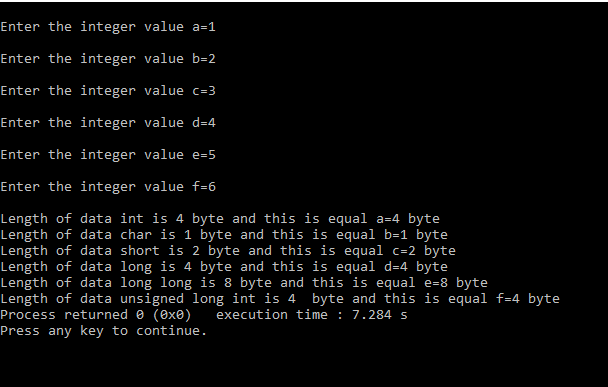
With this operator, the size of the data in bytes can be determined. The following example demonstrates:#include <iomanip>
using namespace std;
int main() {
int a;
char b;
short c;
long d;
long long e;
unsigned long int f;
cout << "\nEnter integer a: ";
cin >> a;
cout << "\nEnter integer b: ";
cin >> b;
cout << "\nEnter integer c: ";
cin >> c;
cout << "\nEnter integer d: ";
cin >> d;
cout << "\nEnter integer e: ";
cin >> e;
cout << "\nEnter integer f: ";
cin >> f;
cout << "\nSize of int is " << sizeof(int) << " bytes, and it is equal to the size of a=" << sizeof(a) << " bytes";
cout << "\nSize of char is " << sizeof(char) << " bytes, and it is equal to the size of b=" << sizeof(b) << " bytes";
cout << "\nSize of short is " << sizeof(short) << " bytes, and it is equal to the size of c=" << sizeof(c) << " bytes";
cout << "\nSize of long is " << sizeof(long) << " bytes, and it is equal to the size of d=" << sizeof(d) << " bytes";
cout << "\nSize of long long is " << sizeof(long long) << " bytes, and it is equal to the size of e=" << sizeof(e) << " bytes";
cout << "\nSize of unsigned long int is " << sizeof(unsigned long int) << " bytes, and it is equal to the size of f=" << sizeof(f) << " bytes";
return 0;
}
Comma operator ","
Is a binary operator that evaluates its first operand and rejects the result, then estimates another operand and returns this value (and type). The notch operator has the lowest priority of any C operator. Comma acts as an operator and a separatorOther operators
Other operators in the C / C ++ language are given in the following table:| Operator | Operator Description |
|---|---|
| [] | Indexing |
| () | Function Call |
| & | Address of variable |
| . | Access member of class or structure |
| -> | Access member of class or structure via pointer |
| :: | Scope resolution (used to access static members of a class or to resolve names within a namespace) |
| * | Dereferencing pointer |
| .* | Access member of class or structure via pointer to member |
| ->* | Access member of class or structure via pointer to member using pointer to object |
| sizeof | Returns size of an object or type in bytes |
| typeid | Returns the type of an object at runtime |
| dynamic_cast | Dynamic casting between classes within the same hierarchy |
| static_cast | Compile-time casting without runtime check |
| const_cast | Removes or adds `const` qualifier to a type |
| reinterpret_cast | Reinterprets the bits of an object for casting between unrelated types |
Operator Priority Table
When there are multiple operators in the expression then higher priority operations are performed first. If operators are of the same priority, then the execution will be left-to-right in most cases (See the column Grouping direction in the table below).The table below describes the order of priorities and association of operators in C / C ++. The advantage of the operator decreases from top to bottom.
| Priority | Number of Operands | Grouping Direction: | Operators: |
|---|---|---|---|
| 15 | 1 or 2 | left | [] () . -> |
| 14 | 1 | right | ++ -- ~ ! + - * & sizeof typeid new delete |
| 13 | 2 | left | * / % |
| 12 | 2 | left | + - |
| 11 | 2 | left | << >> |
| 10 | 2 | left | < <= > >= |
| 9 | 2 | left | == != |
| 8 | 2 | left | & |
| 7 | 2 | left | ^ |
| 6 | 2 | left | | |
| 5 | 2 | left | && |
| 4 | 2 | left | || |
| 3 | 2 | right | ?: |
| 2 | 2 | right | = += -= *= /= %= &= ^= |= <<= >>= |
| 1 | 2 | left | , |
Suggested Content for "Adding Additional Explanations"
Operator Overloading in C++
Operator overloading allows developers to redefine the behavior of operators for user-defined types, making custom types behave like built-in types. For example, you can overload the + operator for a class representing complex numbers to enable arithmetic operations.Example:
usingnamespacestd;
classComplex{
public:
// Overloading the + operator to add two Complex numbers
Complexoperator+(constComplex& other) {
// Displaying the complex number in the form "real + imag i"
voiddisplay() {
intmain(){
Complex c1(1.2, 2.3), c2(3.4, 4.5);
// Adding two Complex numbers using the overloaded + operator
Complex c3 = c1 + c2;
// Displaying the result
c3.display();
return0;
Prefix vs. Postfix Unary Operators
Unary operators like ++ and -- have two forms: prefix and postfix.- Prefix (++x): Increments the value first and then evaluates it.
- Postfix (x++): Evaluates the current value first and then increments it.
Example
usingnamespacestd;
intmain(){
intx = 5;
// Demonstrate prefix increment: ++x increments x first and then returns the value
cout<<"Prefix: "<<++x<<endl; // Output: 6
// Reset the value of x back to 5 for the next demonstration
x = 5;
// Demonstrate postfix increment: x++ returns the value first and then increments x
cout<<"Postfix: "<<x++<<endl; // Output: 5 (x becomes 6 after this line)
return0;
- Prefiks (++x): Kada se koristi prefiksni inkrement, vrednost promenljive se prvo poveća za 1, a zatim se koristi u izrazu. U ovom primeru, kada je
xinicijalizovano sa 5,++xprvo povećavaxna 6 i zatim štampa tu novu vrednost. Rezultat je6. - Postfiks (x++): Kada se koristi postfiksni inkrement, trenutna vrednost promenljive se koristi u izrazu, a zatim se promenljiva povećava za 1. U ovom primeru,
xje inicijalizovano sa 5,x++štampa trenutnu vrednost (5), a tek nakon toga povećavaxna 6.
Razlika između ova dva operatora je važna u složenijim izrazima i algoritmima, gde redosled operacija može uticati na rezultat.
Implementation in the class
classCounter{
intvalue;
// Public constructor with default value (0)
public:
Counter(intv = 0) :value(v){}
// Prefix increment operator overload
Counter&operator++(){
++value;
return*this;
// Postfix increment operator overload
Counteroperator++(int){
Countertemp = *this;
// Increment the value after saving the current state
++value;
returntemp;
// Display the current value of the counter
voiddisplay()const{
Klasa Counter: Ova klasa predstavlja brojač koji čuva vrednost i omogućava povećanje te vrednosti pomoću operatora inkrementa. Klasa sadrži privatnu promenljivu value koja predstavlja trenutnu vrednost brojača.
- Konstruktor: Konstruktor klase
Counterprima argumentv(podrazumevana vrednost je 0) koji inicijalizuje vrednost brojača. - Prefix inkrement (
++x): U preklopljenoj verziji prefix inkrementa (operator++()), vrednostvaluese prvo povećava, a zatim se vraća referenca na trenutni objekat (*this). - Postfix inkrement (
x++): U preklopljenoj verziji postfix inkrementa (operator++(int)), prvo se čuva trenutni objekat (da bi mogao biti vraćen), zatim se vrednost povećava, i na kraju se vraća kopija objekta pre inkrementa. - Metod
display: Ovaj metod jednostavno štampa trenutnu vrednost brojača koristećicout.
Napomena: Razlika između prefix i postfix inkrementa je u tome što prefix inkrement vraća ažurirani objekat odmah, dok postfix inkrement vraća objekat pre nego što je inkrementiran (pre povećanja vrednosti).
| Previous |<Data in C++ language |
Next Selection statements>| |
Related articles
Data examplesJava lessons
Mathematical algoritms
Training for test
Matrix