
Control(Selection) statements in c
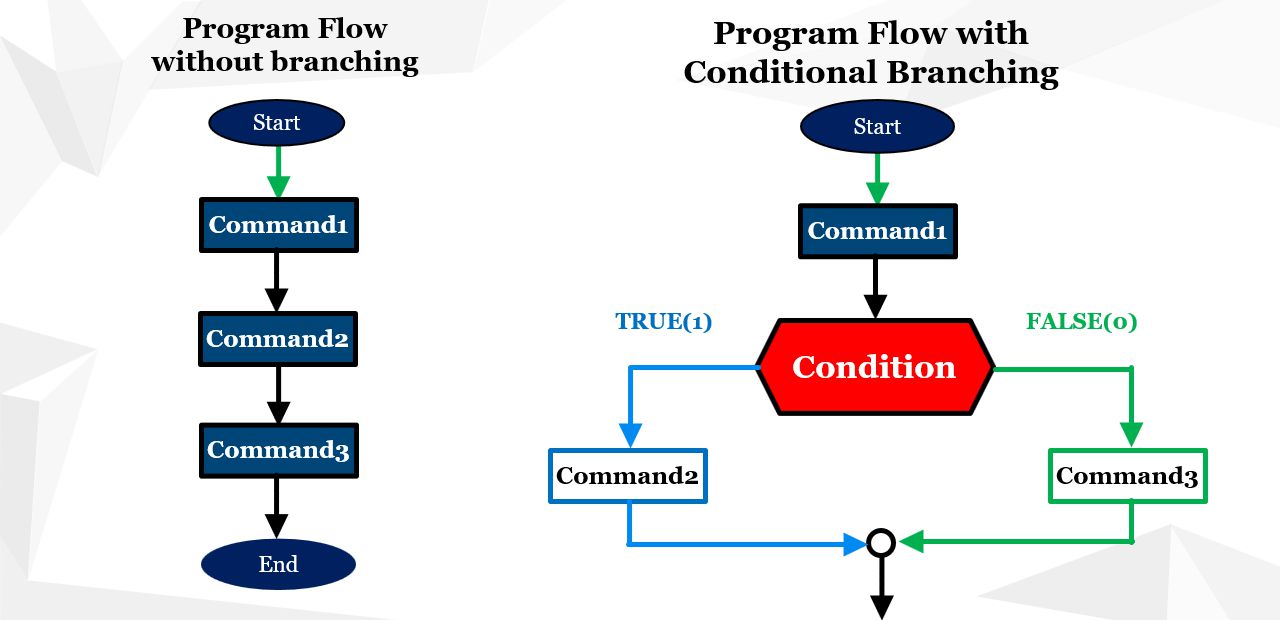
A condition is actually a logical variable or expression that can have two values:
- Value 1, which represents logical truth (TRUE)
- Value 0, which represents logical falsehood (FALSE)
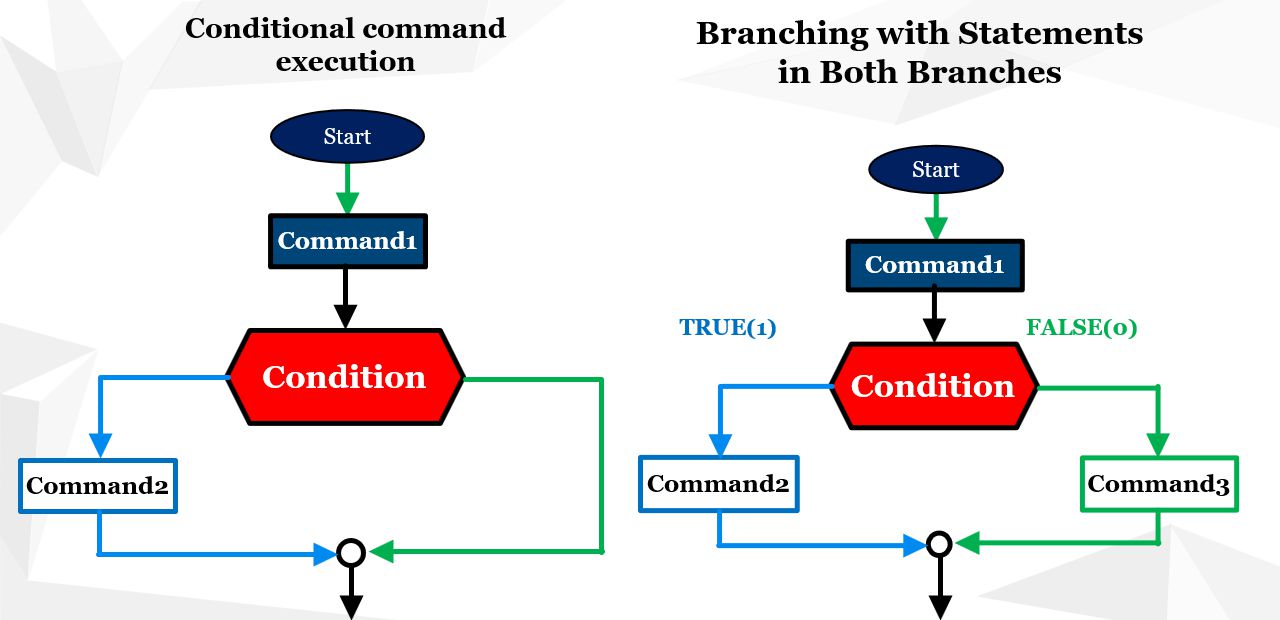
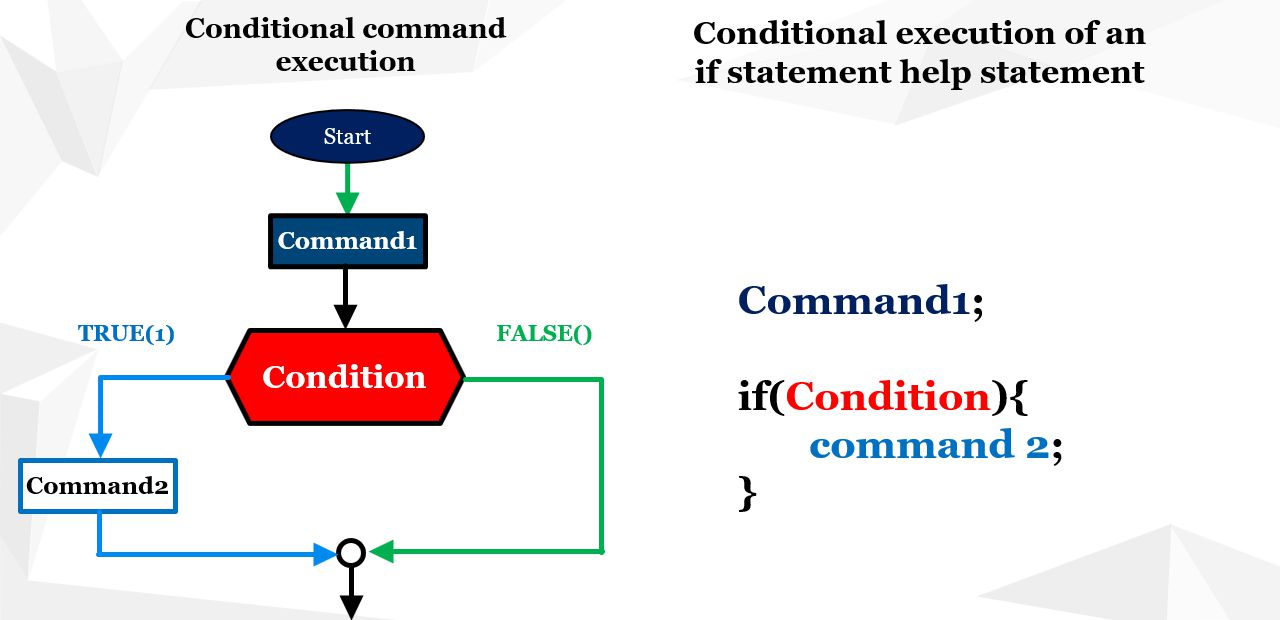
if (condition) {
// statement 2 is executed
} else {
// statement 3 is executed
}
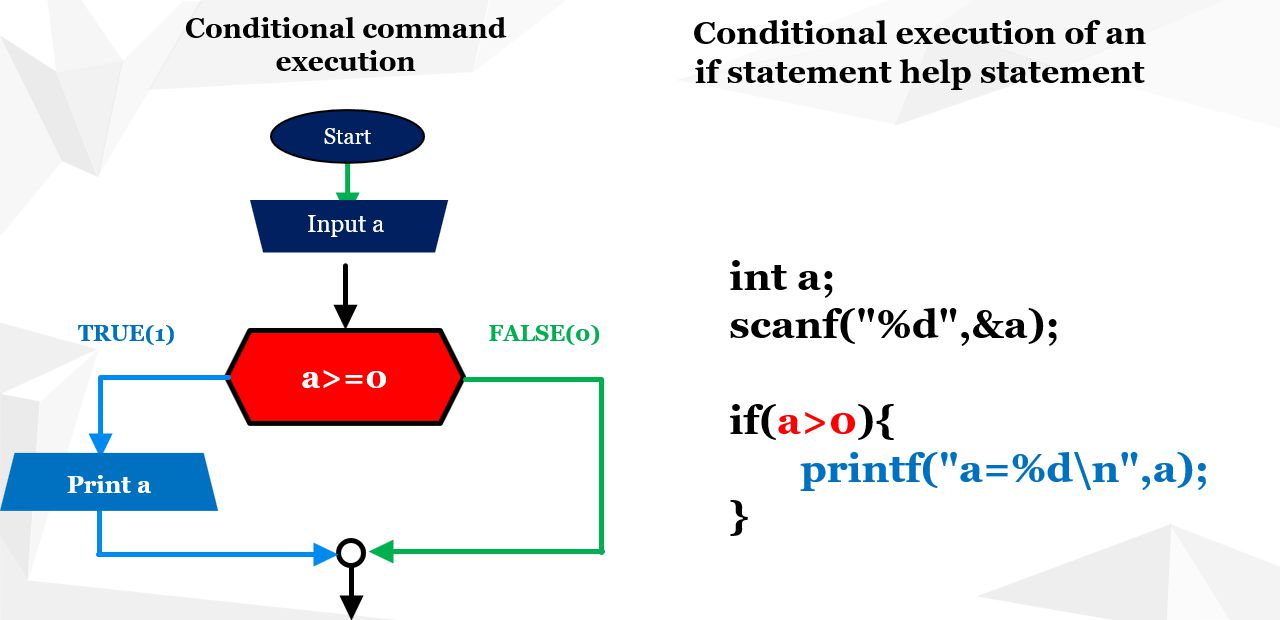
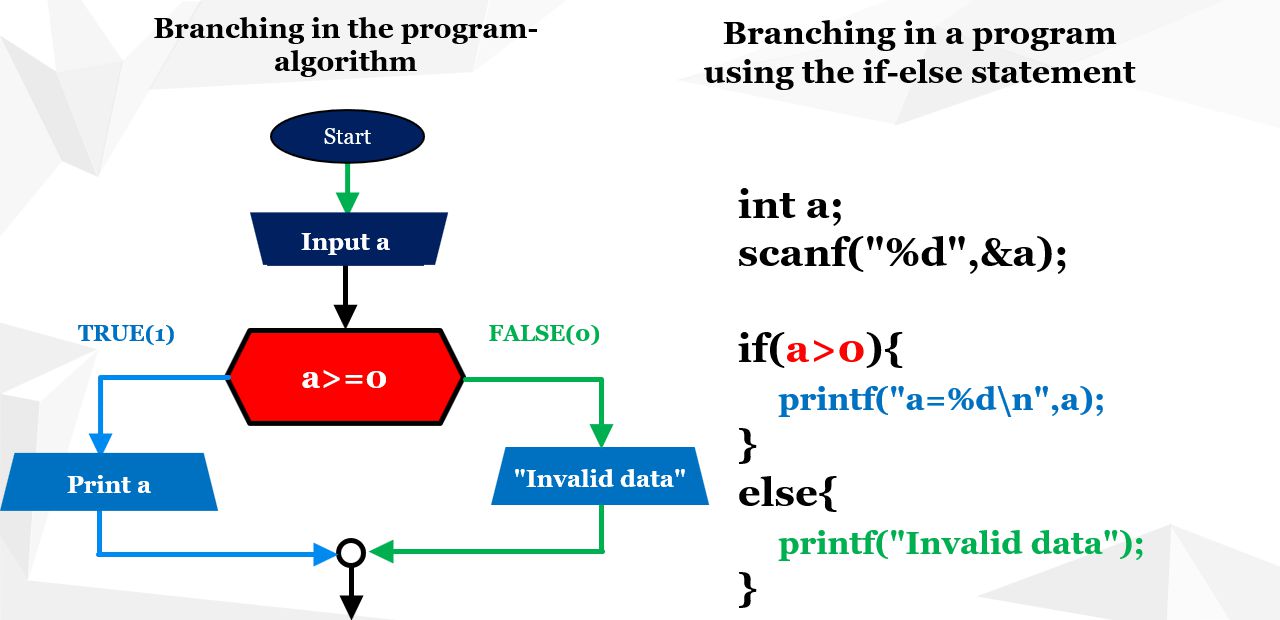
Task: Enter the value of the square's side a and check whether the input is valid, i.e., whether it is a positive number.
Explanation:
For the side length to be valid, it must be positive, since the side of a square cannot be a negative number. The value zero also makes no sense, because in that case the square would be just a single point.
Let's now look at the algorithm and the use of the if statement for this task, as shown in the following figure (figure 4).
scanf("%d", &a);
if (a > 0) {
printf("Valid side length.");
} else {
printf("Invalid input!");
}
scanf("%d", &a);
printf("a=%d\n", a);
}
inta;
// Input of the variable a from the user
scanf("%d", &a);
// Check if a is greater than 0
if(a > 0) {
// Print the value of a if the condition is satisfied
printf("a=%d\n", a);
}
Task: Enter the value of the square's side a and check whether the input is valid, i.e., whether it is a positive number. If not, print the message: "Invalid input".
Explanation:
To obtain alternative execution of another statement in case the condition is not satisfied, the if statement must be extended with the else clause, as shown in figure 5.
scanf("%d", &a); /* Input value for variable a */
if(a > 0) { /* Check if a is positive */
printf("a=%d\n", a); /* Print value of a if condition is true */
} else { /* Alternative branch - condition not met */
printf("Condition not satisfied\n"); /* Message when the condition is false */
}
printf("a=%d\n", a);
else/* Alternative branch */
printf("a=%d\n", a); /* Print when the condition is false */
Task: For the entered numbers a and b, calculate the value of the fraction a/b. Before computing, check whether b is not zero, since division by zero is not allowed.
Explanation:
After declaring variables and reading a and b, we compute the fraction. Before writing the formula c = a / b, we must verify that b is not zero. If it is not zero, the fraction is calculated and the result printed. Otherwise, an error message is displayed.
This example shows that branching depends on the value of the variable b.
Note: The float type is used for the fraction result to preserve decimal values. Dividing two integers would otherwise return a rounded integer result without the fractional part.
intmain() {
inta, b; /* Integer input variables */
floatc; /* Result of the fraction */
printf("Enter number a: ");
scanf("%d", &a);
printf("Enter number b: ");
scanf("%d", &b);
if(b != 0) {
c = (float)a / b;
printf("The value of the fraction is: %.2f\n", c);
} else {
printf("Division by zero is not allowed.\n");
}
return0;
}
Logical Data
These are data whose value is the result of a logical expression and can have two states: true – correct false – incorrect
In C, logical values are typically represented using the int type, where zero means false (logical falsehood) and any non-zero value means true (logical truth).
In modern C (C99 and later) you can use the _Bool type or include <stdbool.h> to use bool, true, and false.
Logical Data and Expressions
Logical relations (expressions) are results of comparisons and use the following operators:
<, >, <=, >=, !, !=, ==
Meaning: “less than”, “greater than”, “less than or equal to”, “greater than or equal to”, “negation”, “not equal”, “equal”.
Example of Logical Expressions in C
The int type is used in C to represent logical values. The rules are:
- zero represents logical falsehood,
- any non-zero value represents logical truth (often 1 for clarity).
int d; // logical variable
c = a+b; // arithmetic expression
c = a>b; // c=1 (true)
d = a>b; // valid, d=1 (true)
d = !(a>b); // d=!(1), d=0 (false)
Logical Data and Complex Expressions
To combine multiple logical expressions, we use the operators: && – Logical AND || – Logical OR
Suppose we have the following code:
a=10, b=4; c=2;
int d,e; // variables to store results of logical expressions
d = (a==0) && (b>c); /* d=0 && 1 → d=0 (false) */
e = (a==0) || (b>c); /* e=0 || 1 → e=1 (true) */
inta, x, condition;
// Reading the value of variable x from standard input
scanf("%d", &x);
// Reading the value of variable a from standard input
scanf("%d", &a);
// Checking the condition: is a greater than x
condition = a>x;
// Reading the values of variables x and a from standard input
scanf("%d", &x);
scanf("%d", &a);
condition = a>x;
if(condition)
{
else
{
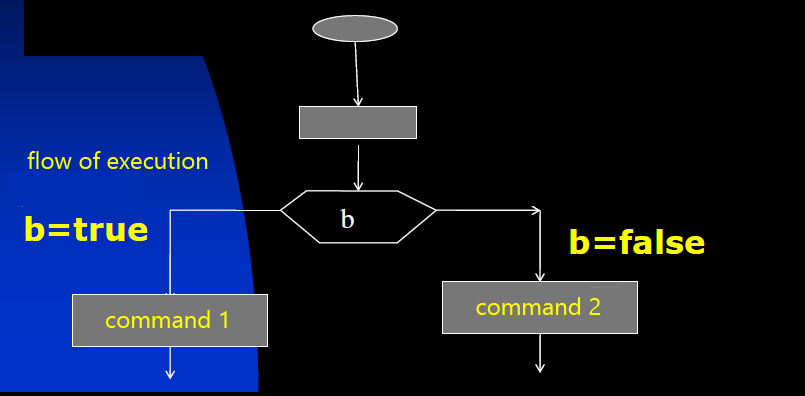
Conditional branching in a program
The logical expression a > x in the following example evaluates to false,
so statement1 will not be executed.
A logical expression can be written directly inside the parentheses of an if
statement without introducing an additional variable to store its value.
int a = 3, x = 5;
if (a > x) {
    statement1;
}
Here, a > x is false, so statement1 will not be executed.
Example: Enter an integer and check if it is divisible by 3
A number is divisible by 3 if the remainder of its division by 3 is equal to zero.
To calculate the remainder, the operator % is used.
Therefore, the condition for branching is: a % 3 == 0.
If the condition is true, the message "The number is divisible by 3" is printed; otherwise, the message "The number is not divisible by 3" is printed.
/* Enter an integer and check if it is divisible by 3 */
intmain() {
inta;
printf("Enter an integer:\n");
scanf("%d", &a);
if((a % 3) == 0)
printf("The number %d is divisible by 3\n", a);
else
printf("The number %d is not divisible by 3\n", a);
return0;
}
Example execution (input: 9)
Enter an integer:
9
The number 9 is divisible by 3
Note
The condition inside an if statement can be any logical expression
(for example, a combination of comparisons and logical operators).
If the expression evaluates to true (non-zero), the first block is executed;
if it is false (zero), the else block (if present) is executed.
Branching in a 3-branch program
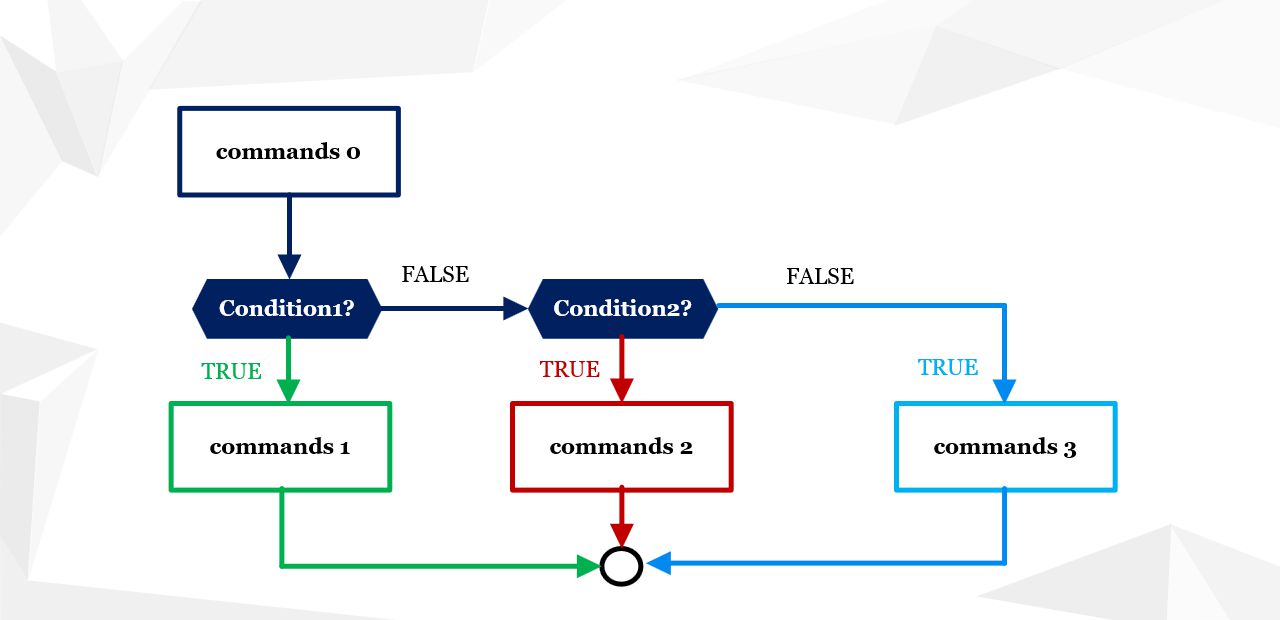
Branching in a program when we have 3 branches or more is achieved using the if-else if-else or if-else if-else if statement. In the first case, 2 conditions are required, and in the second case, 3 conditions.Figure 7 shows the first case where branching is achieved with 2 conditions:
if(condition1)
{
else if(condition2)
{
else
{
This code represents a branching structure with three branches using if, else if, and else clauses:
- First branch (if): When
condition1is true, statements 1 (marked in green) are executed. - Second branch (else if): If the first condition is false but
condition2is true, statements 2 (marked in red) are executed. - Third branch (else): If both previous conditions are false, statements 3 (marked in blue) are executed.
Statements before branching (Statements 0): These statements are independent of the branching and are executed before any condition is checked.
Such a branching structure is useful when there is a precise logic that depends on multiple mutually exclusive conditions. The else clause is used when none of the previous conditions are met, which is helpful for handling the "remaining" scenarios.
If we create 3 branches with 3 conditions
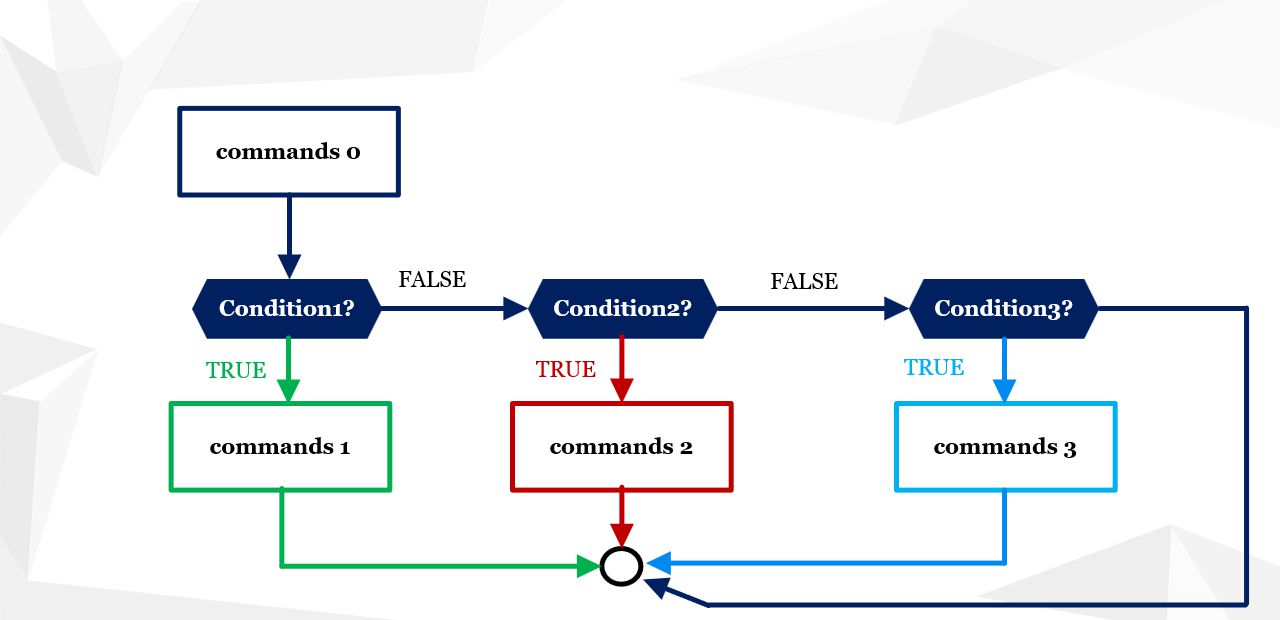
In some cases, it is useful to explicitly define the condition for the third branch. This means that instead of using a final else clause, we use else if, followed by an explicit condition. This is shown in the following diagram:
Branching in a C program with 3 branches, implemented using 3 conditions – algorithm
Figure 8: Branching in a C program with 3 branches, implemented using 3 conditions – algorithm
Figure 8 illustrates the program flow when a single flow splits into three branches. To branch a program into 3 or more paths, more than one condition is required, because with only one condition the program can split into just 2 branches depending on whether the condition evaluates to 1 (true) or 0 (false).
Therefore, to split a program into 3 branches, at least 2 conditions are needed, and in some cases even 3. In the diagram, the program actually splits into 4 branches, where the fourth branch contains no statements.
Diagram description
First, the statements are executed in the initial flow (statements 0). Then condition 1 is checked. If it is true, statements 1 are executed (branch 1). If condition 1 is false, then condition 2 is checked. If it is true, statements 2 are executed (branch 2). If condition 2 is also false, then condition 3 is checked. If condition 3 is true, statements 3 are executed (branch 3). If it is not true, all statements are skipped.
The small circle in the diagram represents the point where all flows merge back into a single execution flow.
"a is equal to b"
"a is less than b"
First check whether a > b. If true, print the first message; otherwise check a == b with an else if. The final case is handled by else.
intmain() {
floata, b;
printf("Enter two real numbers: ");
scanf("%f %f", &a, &b);
if (a > b)
printf("a is greater than b ");
else if (a == b)
printf("a is equal to b ");
else
printf("a is less than b ");
return0;
}
#define PI 3.14159
intchoice;
floatside, radius, base, height, area;
printf("Choose a figure: 1 - Square 2 - Circle 3 - Parallelogram ");
scanf("%d", &choice);
switch (choice) {
case1:
printf("Enter the side of the square: ");
scanf("%f", &side);
area = side * side;
printf("Area of the square = %.2f ", area);
break;
case2:
printf("Enter the radius of the circle: ");
scanf("%f", &radius);
area = PI * radius * radius;
printf("Area of the circle = %.2f ", area);
break;
case3:
printf("Enter the base and height of the parallelogram: ");
scanf("%f %f", &base, &height);
area = base * height;
printf("Area of the parallelogram = %.2f ", area);
break;
default:
printf("Invalid choice. ");
}
return0;
}
You can find examples of branching in the program on the webpage Selection statements - examples
| Previous |<Operators in C/C++ languages |
Next Loops in C/C++>| |
Related articles
Selection statements-examplesData in C/C++
Selection statements in JAVA
Arrays-examples
Algoritms