
POINTERS IN C++
Lesson Content: Pointers in C++
Welcome to the lesson dedicated to pointers in the C++ language! In this lesson, we will explain in detail what pointers are, how they work, and what their advantages and disadvantages are. You will learn about basic concepts, pointer arithmetic, the relationship between pointers and arrays, and methods of dynamic memory allocation. We will also cover more modern approaches, such as smart pointers, which allow for safer memory management.
Introduction to pointers
Every piece of data used in a program must be defined, meaning memory must be allocated for it. Assigning a value to a variable means that the value, in binary form, is stored at a specific memory location. The amount of memory allocated depends on the data type. For example, an int type variable in C/C++ typically occupies 16 or 32 bits.
Each memory location has its own address, which is a number assigned to that location. The smallest independently addressable memory unit is usually one byte. A pointer is a simple data type that can store the address of a location in memory. The data to which pointers refer can be of different types. When a variable occupies multiple bytes, the memory address of the variable is considered to be the address of the byte with the smallest index.
The address of a variable in memory can be obtained using the prefix unary operator &.
Learn more about operators on the page Operators in C++.
Defining pointers
Consider the following code:
|
inta = 1; int*pint; pint = &a; cout << a << endl; cout << pint << endl; |
On standard output: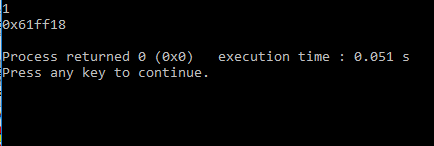
Figure 1: Displaying data via pointer-example-execution
|
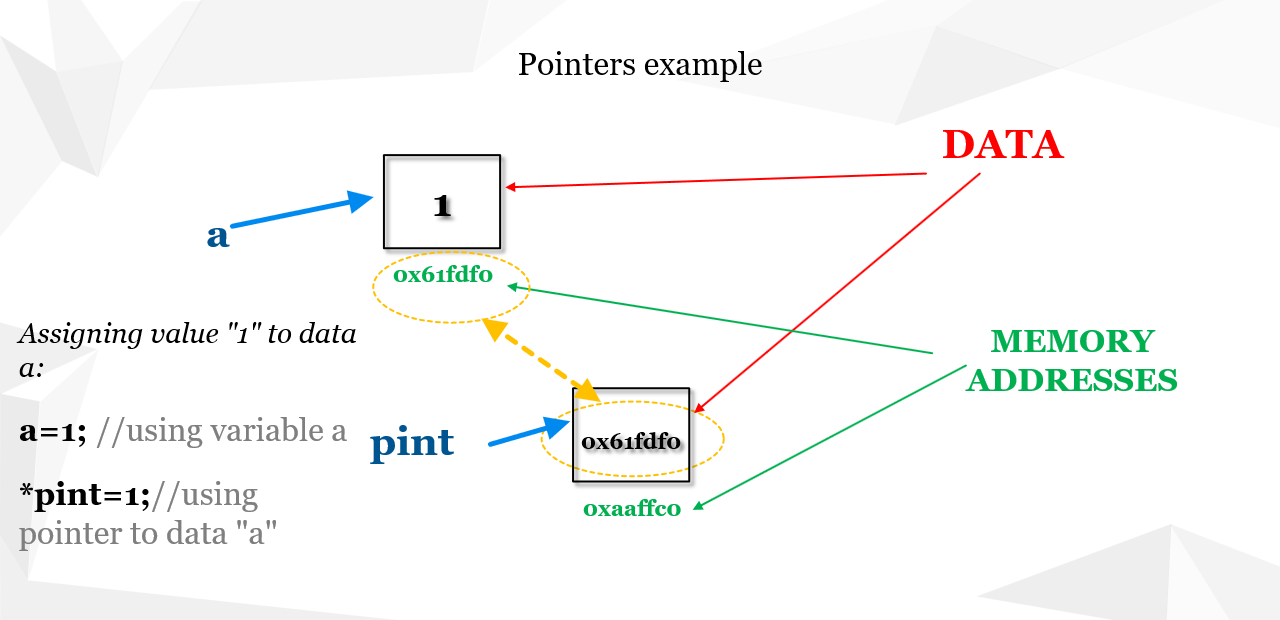
An integer variable a is declared and initialized to the value 1. Also, a pointer pint to an integer is declared and initialized with the memory address of the variable a. Notice that when printing the pointer’s value, a large hexadecimal number is displayed. Memory addresses are usually such values.
The data type specified at the beginning of a declaration indicates the type of the data the pointer points to. In the previous example, it is int, meaning the pointer points to an integer. If the data were of type double, then a pointer to a double would be defined and initialized as follows:
Example:
double x = 2;double *pdb;pdb = &x;
Assigning a value to a variable using a pointer to another variable:
If we want to introduce another double variable, for example y, and initialize its value using the pointer to x, we would add the following code:
Example:
double x = 2;double *pdb;pdb = &x;double y;y = *pdb; // y is now 2
Example in C++: Integer and Pointer
inta = 1;
int*pint;
pint = &a;
cout << pint << endl;
Example in C++: Double Pointer and Value Assignment
doublex = 2;
double*pdb;
pdb = &x;
doubley;
y = *pdb; // y is now 2
Address arithmetic
In C++, the following operations on pointers are allowed:
- Assignment of one pointer to another.
- Addition of an integer to a pointer and subtraction of an integer from a pointer. // These operations are permitted if the pointer points to an element of an array.
- Subtraction and comparison of two pointers. // These operations are defined only when both pointers refer to elements of the same array (or one past the last element).
- Comparison of a pointer with zero. // Comparing a pointer with a null pointer constant is allowed.
Pointers and arrays
Assume that the following array of integers is defined:
intA[7] = {5, -2, 3, 8, 11, 0, 25};
To print the elements of the array using pointers, we introduce a pointer pA and initialize it with the memory address of the first element of the array:
int*pA = A;
To print the value of the array element that the pointer points to, we use *pA:
std::cout << *pA << endl;
In order for the pointer to change the element it points to during the execution of a loop, it must be incremented—that is, its value is increased by 1:
pA++;
std::cout << *(pA) << endl;
or:
std::cout << *(pA + i) << endl;
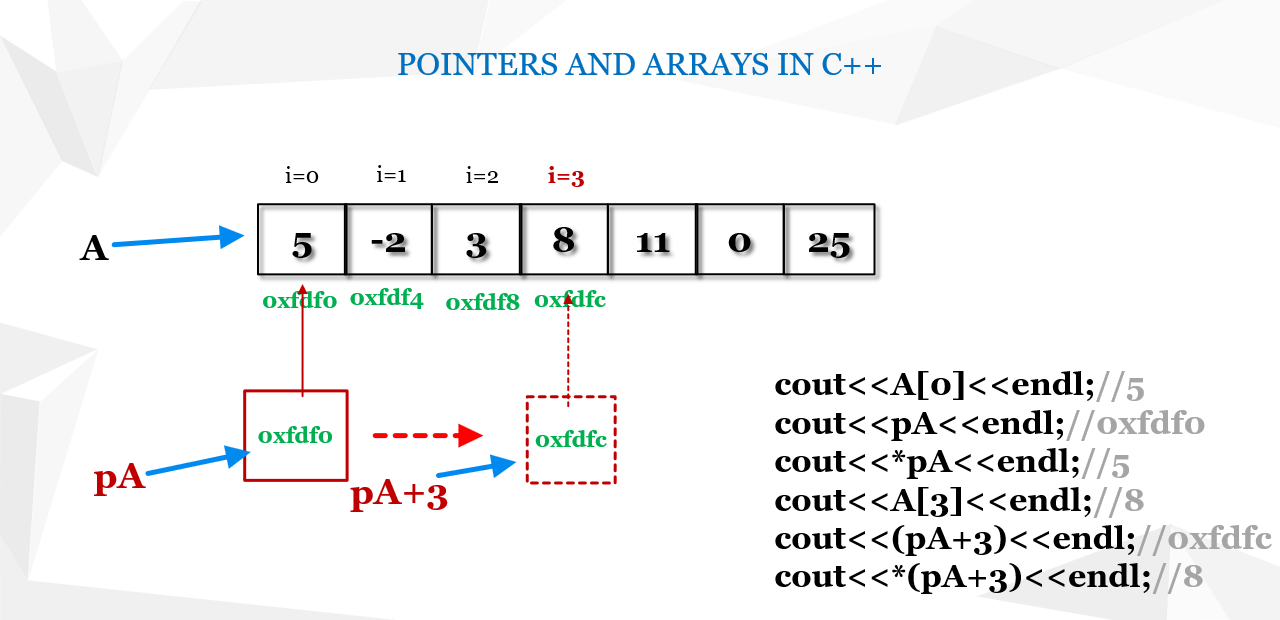
In the first iteration, for i = 0, the pointer value—that is, the address of the first element of the array—might be, for example, 0xfdf0 (a hexadecimal number, as shown in Figure 3). In each iteration the pointer’s value is moved by 1 (using pA++), which means that the new address increases by the size (in bytes) of the data type to which the pointer points. In this case, the size is 4 (since an int occupies 4 bytes). This value can also be obtained with sizeof(int).
For example, in the 4th iteration (i.e. for i = 3), the memory address increases by 3 * 4 = 12 bytes, where the variable i changes during the loop, as also illustrated in the figure.
Example Code:
#include <iostream>using namespace std;
int main() {
int*pA = A;
for (inti = 0; i < 7; i++) {
cout << *(pA + i) << endl; // prints the value
return0;
If we run the debugger and pause the program within the loop, we can analyze how the address value (to which the pointer points) changes during each iteration when the pointer’s value is incremented by 1. For i = 3, the pointer moves so that it points to the 4th element in the array, meaning that the address increases by 3 * 4 bytes—that is, from a value such as 0x61fdf0 (with 0 as the ending) it changes to 0x61fdfc (ending in c, which represents 12 in hexadecimal).

Pointers and strings
Assume that a string, i.e., an array of char data, is defined as follows:
char text[25] = "Today is a beautiful day.";
The elements of this array are characters, with the last character being '\0'. Read more about C strings in the article: C Strings.
To print these characters on the screen, we will use a loop and access the characters using a pointer. We define a pointer to char and initialize it with the memory address of the first element of the array text:
char* ptr = text;
We will use a while loop to access the characters using the pointer. The complete code is shown below.
Example Code:
#include <iostream>using namespace std;
int main() {
char*pText = text;
while (*pText != '\0') {
pText++; // Moves the pointer to the next character
return0;
The condition checked in the while loop is that the value of the current character (its code) is different from that of the last character, i.e. different from '\0'.
Incrementing the pointer to point to the next character is achieved by increasing its value by 1. In this case, since a char occupies 1 byte, the address pointed to by the pointer changes by 1 byte in each iteration (unlike an int, where it would change by 4 bytes).
After executing the program, the following will be displayed:
Program Output:
T
o
d
a
y

i
s

a

b
e
a
u
t
i
f
u
l

d
a
y
.
Test your code in the editor below
Practical Examples: Dynamic Memory Allocation
Dynamic memory allocation is a key concept in programming that enables efficient management of memory resources during program execution. This technique allows for the creation of variables and structures whose size is not known in advance, which is especially useful for working with large datasets, matrices, and dynamic structures such as lists or trees. In this section, we explore practical examples that include memory allocation, initialization, and deallocation, along with explanations on how to avoid common mistakes like memory leaks. Master the basics through clearly explained code and step-by-step instructions!
1. Creating and Releasing a Dynamic Array
The example demonstrates basic dynamic allocation and deallocation of memory for an array, including printing its elements.
Example Code: Dynamic Array
#include <iostream>using namespacestd;
int main() {
/* Fill the array with values and print each element */
for (inti = 0; i < 10; ++i) {
cout << array[i] << " ";
/* Release the allocated memory to prevent memory leaks */
delete[] array;
return0;
2. Dynamic Objects with Constructor and Destructor
This example illustrates working with a dynamically allocated object, including proper use of a constructor and a destructor.
Example Code: Dynamic Object
#include <iostream>using namespace std;
// Definition of the Student class
class Student {
public:
~Student() {
int main() {
cout << s->name << endl; // Print the student's name
deletes; // Calls destructor and frees memory
return0;
3. Matrix as a Pointer to Pointers
This example shows how to dynamically allocate memory for a matrix using a pointer to pointers. It demonstrates flexible memory management for two-dimensional structures, while ensuring proper deallocation to avoid memory leaks.
Example Code: Dynamic Matrix
#include <iostream>using namespace std;
int main() {
for (int i = 0; i < 3; ++i) {
for (int j = 0; j < 4; ++j) {
for (int i = 0; i < 3; ++i) {
cout << endl;
/* Free allocated memory */
for (int i = 0; i < 3; ++i) {
delete[] matrix;
return0;
4. Working with a Pointer in a Function
This example shows how a function can manipulate dynamically allocated memory using pointers. The function accepts a pointer as a parameter, enabling direct modification of the value at the memory location.
Example Code: Pointer in a Function
#include <iostream>using namespace std;
// Function to initialize the value
void initialize(int* p, int value) {
int main() {
initialize(number, 42); // Initialize the value at the allocated memory
cout << *number << " "; // Output: 42
delete number;
return0;
5. Dynamic Memory Allocation for a Vector
This example illustrates the use of dynamic memory allocation for a vector and demonstrates operations such as adding elements and printing the contents. This approach is useful when the size of the data structure is not known in advance.
Example Code: Dynamic Vector
#include <iostream>#include <vector>
using namespace std;
int main() {
for (int i = 0; i < 5; ++i) {
for (int i : vec) {
return0;
6. Dynamic Allocation for a Data Structure
The final example demonstrates how to use dynamic memory allocation for a data structure. Structures are useful for grouping related data, and dynamic allocation provides flexible memory management.
Example Code: Dynamic Structure
#include <iostream>using namespace std;
// Definition of the Person structure
struct Person {
intage; // Person's age
int main() {
p->name = "Mark";
p->age = 25;
cout << "Name: " << p->name << "Age: " << p->age << endl;
deletep;
return0;
Comparison with references
Pointers and references are key concepts in C++ that enable indirect manipulation of variables, yet they have significant differences in syntax, functionality, and usage. A pointer stores a memory address and can be changed to point to a different object, whereas a reference represents an alias for an existing object and cannot be reassigned. References are simpler to use and safer, while pointers offer greater flexibility, especially for dynamic memory allocation. In the following, we explain these differences in detail through practical examples.
Example Code: Pointers vs. References
#include <iostream>using namespace std;
voidmodifyWithPointer(int* ptr) {
*ptr = 10;
voidmodifyWithReference(int& ref) {
ref = 20;
intmain() {
cout << "Initial value: " << number << endl;
// Using a pointer
modifyWithPointer(&number); // Pass the address of the variable
cout << "After modification with pointer: " << number << endl;
// Using a reference
modifyWithReference(number); // Pass the variable by reference
cout << "After modification with reference: " << number << endl;
return0;
Explanation:
modifyWithPointer takes the address of a variable (int* ptr) and uses dereferencing (*ptr) to change the value at that address.
modifyWithReference uses a reference (int& ref) that acts as an alias for the variable, allowing the value to be changed directly.
Difference in usage: Pointers require explicit passing of the address (using &) and dereferencing (using *), while references behave like regular variables with simpler syntax.
Modern C++ Standards: Smart Pointers and RAII
Since the C++11 standard, smart pointers such as std::unique_ptr and std::shared_ptr have been introduced, which greatly simplify the management of dynamically allocated memory. They apply the RAII (Resource Acquisition Is Initialization) principle, meaning that resources are automatically released when an object goes out of scope. This approach reduces the risk of memory leaks and other errors related to manual memory management (using new and delete).
Advantages of using smart pointers:
- Automatic memory deallocation: You do not have to manually call delete or delete[].
- Safety: Errors such as double deletion of memory are avoided.
- Code simplicity: The code becomes more readable and maintainable, as resource management is handled automatically.
- Exception safety: Objects are properly destroyed even if an exception is thrown.
Types of Smart Pointers:
- std::unique_ptr: Ensures exclusive ownership of an object.
- std::shared_ptr: Allows multiple shared owners of an object.
- std::weak_ptr: A non-owning reference to an object managed by std::shared_ptr, preventing circular dependencies.
The following example demonstrates how to use std::unique_ptr and std::shared_ptr in practice:
// Example class used for demonstrationclass Example {
public:
    void display() {
        std::cout << "This is an example of a smart pointer." << std::endl;
    }
};

// Main functionint main() {
    // Using std::unique_ptr: Guarantees unique ownership of the object
    std::unique_ptr<Example> uniquePointer = std::make_unique<Example>();
    uniquePointer->display();

    // Using std::shared_ptr: Multiple pointers share ownership of the same object
    std::shared_ptr<Example> sharedPointer1 = std::make_shared<Example>();
    std::shared_ptr<Example> sharedPointer2 = sharedPointer1; // Both pointers share the same object
    sharedPointer2->display();

    // Using std::weak_ptr: Non-owning reference to avoid circular dependencies
    std::weak_ptr<Example> weakPointer = sharedPointer1;
    // Before using weakPointer, we need to lock it to check if object is still available
    if (auto lockedPointer = weakPointer.lock()) {
        lockedPointer->display();
    }

    return 0;
}
As seen, std::unique_ptr guarantees unique ownership, while std::shared_ptr allows ownership to be shared among multiple pointers. Additionally, std::weak_ptr provides a safe way to reference shared objects without affecting their lifetime, preventing circular dependencies that can cause memory leaks.
Additional Explanation:
Smart pointers and RAII principles are key elements of modern C++ programming, so it is recommended to include such sections in existing documentation to acquaint readers with the latest practices and standards.
Detailed Analysis of Errors When Working with Pointers
When working with pointers in C++ errors often occur that can lead to serious issues in a program, such as memory leaks and dangling pointers. Below are examples of common errors along with suggested solutions and preventive measures.
Memory Leak
Memory leak occurs when dynamically allocated memory is not properly deallocated, which can result in a gradual decrease in available memory and a drop in program performance.
// Example of a memory leakint* leak() {
    int* p = newint[10];
    return p; // Memory is not deallocated, which may lead to a memory leak
}

int main() {
    int* arr = leak();
    /* Use the array */delete[] arr; // If this delete is omitted, a memory leak will occurreturn 0;
}
Solution: Use smart pointers, such as std::unique_ptr or std::shared_ptr, which automatically release memory when the object is no longer in use.
// Solution using std::unique_ptr#include<memory>#include<iostream>std::unique_ptr<int[]> fixedLeak() {
    return std::make_unique<int[]>( 10 );
}

int main() {
    auto arr = fixedLeak();
    // The array will be automatically deallocated when it goes out of scopestd::cout << "Smart pointers prevent memory leaks." << std::endl;
    return 0;
}
Dangling Pointers
Dangling pointers occur when a pointer references a memory area that has been deallocated or no longer exists. Using such pointers may lead to unpredictable behavior and program crashes.
// Example of a dangling pointerint* dangling() {
    int a = 42;
    return &a; // Returns the address of a local variable, which will be destroyed after the function exits
}

int main() {
    int* p = dangling();
    // Attempt to access deallocated memorystd::cout << *p; // Unreliable: p points to an invalid memory locationreturn 0;
}
Preventive Measures:
- Never return the address of a local variable from a function.
- If a function needs to return a pointer, use dynamic allocation or smart pointers.
- After deallocating memory, set the pointer to nullptr to prevent unintended access.
Implementing these preventive measures and using modern memory management techniques significantly reduces the possibility of errors when working with pointers in C++.
Additional Documentation
For those who want to deepen their knowledge of modern C++ techniques and practices, we recommend reviewing the following resources. These resources include books, blogs, and forums that are regularly updated and provide real-world examples.
- Books:
- Effective Modern C++ – Scott Meyers
- C++ Primer (5th Edition) – Stanley B. Lippman, Josée Lajoie and Barbara E. Moo
- Modern C++ Programming Cookbook – Marius Bancila
- Blogs:
- ISO C++ – The official blog on standards and news in the C++ community.
- Fluent C++ – A blog with tips, tricks and detailed analyses of modern C++ programming.
- Bartosz Filipek's Blog – A resource with tutorials and analyses of contemporary C++ techniques.
- Forums:
- Stack Overflow – C++ tag – A place where you can ask questions and learn from other programmers’ experiences.
- Reddit /r/cpp – An active community discussing all aspects of C++ programming.
- C++ Forum – A forum for discussions, advice and problem-solving in C++.
These resources offer a wide range of information – from the fundamentals of the language to advanced techniques and practices. We recommend them to everyone who wants to stay up-to-date with the latest standards and enhance their C++ programming skills.
| Previous |<Strings in C++ |
Next Function in C++>| |