
Data in languages C
Learning Objectives
Understand basic data types, when to use fixed-width types, and how to group data with structs, unions, and enums.Programming in C enables computers to process a variety of data, such as numbers, text, and more complex types. To handle data effectively, memory must first be allocated, and data types like int, float, or char define the size and nature of this memory allocation. Each type specifies how much space is required and which operations are valid. By clearly defining data and its type, a program efficiently manages memory, enabling complex data manipulation and processing.Writing a program (application) aims to perform some minor or major task set as a request to the programmer. It can be an application for processing text, music, games, complex programs for managing processes in industry, medicine, applications that are used in scientific research, etc. All these applications have some kind of data processing in their background to a greater or lesser extent. In order for the created application to be able to process the data, it must be connected to the memory in some way. So, for that data, it is necessary to first reserve the memory through the compiler, and then access that memory one or more times in order to enter the data, either by the programmer or by the user of the program. After processing the data, using expressions and formulas, it may be necessary to reinsert the processed data into the same or different memory.In order to manage these processes through program commands, it is necessary to mark that data in some way (give it a name). It is also necessary to define a data type for each data. For example the compiler needs to know what kind of data it is, whether it is an integer or a real number, a letter, a logical type, a text or perhaps some complex data type. This is necessary in order to know, based on the type, how much memory should be reserved, which set of operations is allowed on such data. The official "C" language words given later in the table are usually used to represent data types, e.g. int, float, double etc.
In order to reserve memory (defined data) for e.g. an integer should be written command:int a;where the first word represents the data type, and the second the data name. Therefore, the definition of the data is required according to the following template, with the note that it is about simple data.data_type data_name;
Data types
The data type is determined by a set of values that the data can take and a set of operations that can be performed on the data.
| Data type | Description | Memory (bits) | Typical Size (bytes) |
|---|---|---|---|
| char | Short integer data. Used to store characters | 8 | 1 |
| short | Short integer data | 16 | 2 |
| int | Integer data | 16 or 32 | 2 or 4 |
| long | Long integer data | 32 | 4 |
| float | Single precision floating point | 32 | 4 |
| double | Double precision floating point | 64 | 8 |
| int8_t | Fixed-width 8-bit signed integer (C99/C11) | 8 | 1 |
| uint32_t | Fixed-width 32-bit unsigned integer (C99/C11) | 32 | 4 |
| _Bool / bool | Boolean type (C99 ` |
8 | 1 |
Types of Data
Variables
- They can change the value during the program
- Memory must be reserved
- Example:
int a; // the memory for integer data is allocated
Constants
- No memory is saved
- They are used in expressions
- Example:
Y = 2 * X; // 2 is a constant
Symbolic Constants
- Constants represented by an identifier
- Example:
#define PI 3.14
P = r * r * PI;
Constant Data
- Memory is allocated
- Data must be initialized
- The value does not change during the program
- Example:
const double e = 2.71828;
There are several categories of data types:
- Primitive data types
- Derived data types
- Void type
- Enumeration types
Primitive data types
The following data types are used in the C and C++ programming language:Integer data type:- short 16 bits short integer data
- int 16 or 32 bits integer data Note: It depends on the architecture and the compiler
- long 32 bits long integer data
- long long 64 bits long long integer data
Longer integer data may contain larger numbers because it uses more memory to store values. It is easy to calculate the maximum number that can be placed in eg long long. This would be in binary form a number containing 64 times 1. Eg. 111111 ....
so that would be a number 263+262 +...+20 =18446744073709551615
Example:
int a;
int b;
Reading and Writing a Serial Number with uint32_t
Use a 32-bit unsigned integer to store device serial numbers that may exceed the range of a default int. Below is a minimal example showing how to read a serial number from EEPROM and send it over Serial.
// Include EEPROM library to store persistent data#include <EEPROM.h>

constintSERIAL_ADDR = 0;           // EEPROM address for the serial numberuint32_tdeviceSerial = 0;

voidsetup() {
  Serial.begin(9600);

  // Read four bytes from EEPROM into the 32-bit serialdeviceSerial = 0;
  for (inti = 0; i < 4; i++) {
    deviceSerial |= (uint32_t(EEPROM.read(SERIAL_ADDR + i)) << (8 * i));
  }

  // Print the retrieved serial numberSerial.print("Device Serial: ");
  Serial.println(deviceSerial);

  // Example: increment and store a new serialdeviceSerial++;
  for (inti = 0; i < 4; i++) {
    EEPROM.write(SERIAL_ADDR + i, (deviceSerial >> (8 * i)) & 0xFF);
  }
}

voidloop() {
  // Application code here...
}
Warning: Mixing fixed-width types like uint32_t with default int can lead to unexpected conversions or overflow. Always match literal constants (e.g., use 0xFFUL) and cast appropriately when shifting or combining bytes.
Floating point data:
- float 32byts single floating point
- double 64 bits double floating point
Boolean Usage: Modern vs. Legacy Style
In modern C99/C++ code, bool can be tested directly. Legacy code often compared an integer to zero.
// Modern style using boolboolflag=true;if(flag){// executes when flag == true}// Legacy style using intintvalue=1;if(value!=0){// executes when value is non-zero}
Note that when printed with printf or Serial.println, a bool value appears as 1 (true) or 0 (false) unless formatted otherwise.
Example code using character:
char c;
c='A';
printf(“ASCII code of character %c iznosi %d\n”,c,c);
Derived data types
The following derived types of data are used in C programming language:
Arrays : If a series of numbers of the same type is to be defined, e.g. We then define the integers as follows:
int A[10];
Pointers type: If a pointer to a double data type is to be defined, then the pointer is defined and initialized as follows:
double a;
double *pA;;//Pokazivač na podatak tipa double
pA=&a;
Of the derived data types, structures, unions, and functions are also used.void type.
The C programming language uses the type void code of functions, when the function does not return any value. Then the official word c of the void language is used for the return value type.
Signed i unsigned data
Signed data can have both positive and negative values while unsigned data is positive or zero. In C, the data is signed by default, and if you want to define the data as unsigned in front of the type, the official word unsigned must be added. Examples of defining signed and unsigned integers:int a;
signed int b;
unsigned int c;
The integer signed data, if int occupies 32 bits of memory are in the range from -231 to 231 or from -32767 to 32767,
but
unmarked one are in the rank of 0-232 tj od 0-65535.
The first digit of the highlighted integers is used to specify the character (0-positive, 1-negative) while the remaining digits are used to show the value of the number. Therefore, the highest value of numbered numbers is 231 not 232. Other types, float, double, char can be signed and unsigned:
unsigned float x;
signed double y;
unsigned char z;
Data type addendum
// Modern fixed-width integer types (C99/C11)#include<stdint.h>int8_tsmallNumber;   // exactly 8 bitsuint32_tlargeNumber;  // exactly 32 bits// Boolean type (C99 and later)#include<stdbool.h>boolflag;      // true or false_BoolrawFlag;   // underlying type// Structure exampletypedefstruct {
    intid;
    floatvalue;
} Example;

// Union exampleunionData {
    inti;
    floatf;
};

// Enumeration example with auto-incrementenumColor {
    RED,       // 0GREEN,     // 1BLUE = 5, // explicitly set to 5YELLOW// 6 (auto-incremented)
};
Structures, Alignment & Unions
1. Struct Example & Array Usage
Define a simple Point struct and create an array of points:
// Define a 2D pointstructPoint {
    intx;
    inty;
};

// Create and initialize an array of pointsPointpolygon[3] = {
    {0, 0},
    {10, 0},
    {5,  5}
};

// Accessing elementsfor (inti = 0; i < 3; i++) {
    printf("Point %d: (%d, %d)\n", i, polygon[i].x, polygon[i].y);
}
2. Padding & Alignment
By default, compilers may insert padding so each member aligns on its natural boundary. To pack tightly, #pragma pack can be used:
#pragma pack(push, 1)  // align members on 1-byte boundariesstructPackedPoint {
    charlabel;  // 1 byteintx;      // 4 bytesinty;      // 4 bytes
};
#pragma pack(pop)
3. Union Type-Punning Example
Unions allow interpreting the same memory in different ways—often used for fast conversion between types:
// Interpret a 32-bit float as an integer bit-patternunionFloatInt {
    floatf;
    uint32_tu;
};

FloatIntvalue;
value.f = 3.14f;
printf("As int bits: 0x%08X\n", value.u);
Variables
As the word goes, they can change values throughout the program, which is why they are called variables. Memory is required for variables. We define the data by providing memory for it. The data declaration implies that we determine which type it is and give it a name. For simple data, the declaration is at the same time the definition of the data and is done as follows:type_of_data data_name;
For example. if two integers are concerned then the official word int is used for the data type and the data is defined as follows:
int a,b;// or in two rows
int a;
int b;
a
b
For more about operators in language c, see: Operators in C
This does not mean equality and does not apply to the left of the "=" sign as to the right. Here on the left there must be a memory that needs to get some value and on the right is that value or some expression whose result will be stored in the memory on the left. For example. assign some values to variables a and b:
a=14;
b=22;
| 0 | 0 | 0 | 0 | 0 | 0 | 0 | 0 | 0 | 0 | 0 | 0 | 0 | 1 | 1 | 1 | 0 |
|---|
a
| 0 | 0 | 0 | 0 | 0 | 0 | 0 | 0 | 0 | 0 | 0 | 0 | 1 | 1 | 0 | 0 | 0 |
|---|
b
| 14 |
|---|
a
| 14 |
|---|
b
int c;
c = a + b;
| 36 |
|---|
c
This is a printf function from the stdio.h header in c (see read and write data below) or in c ++, the cout function from the iostream header can be used.
In the previous example, the programmer commanded a = 14; and b = 22; programmatically determined the values of a and b and the program user would not be able to influence them. In most cases, it is necessary to ensure that the user enters the values as they wish, and to do so, a command is provided that the number typed on the keyboard is temporarily memorized by the user as a string of characters and then converted with the appropriate input binary conversion. See data reading below.
Constant data
If the value does not change during the program, then such data is defined as the constant addition of the official word const. For example. the basis of the natural logarithm would be defined as follows:const double e = 2.718281;
Constants
These are values for example 2, 25, 3.14, 7f, 9.81f,… ..They are not reserved memory, but are simply used in expressions. However, constants also have their own data type. For example, 2 is an integer constant of type int, 2. or 2.0 are of type double, while 2f would be of float type.
Symbolic constants
These are constants given by the identifier. For example. instead of writing 3.14 in the expressions for pi, we can use the #define directive to define the symbolic constant PI as follows:#define PI 3.14;
P = r * r * PI;
Header files
In order to use features from other files in a particular file, such a file must be included using the #include <file> directive.We call these files header files. In C, they have the extension .h. For example. to be able to use the printf and scanf functions to write and read data to standard output, ie. input we need to include the stdio.h file:
#include <stdio.h>
Either you need to include the math.h file in c, or the cmath file in c ++ to use the math functions.
#include <math.h>
A useful site for viewing header files in c and c ++ is:http://www.cplusplus.com/reference/
Reading and writing data in C
They are entered as a string of characters. Since the memory data is stored in binary form, the data conversion must be performed.The stdio.h file must be included among the preprocessor directives
#define<stdio.h>
Celestial input conversion
scanf(format, &podatak,&podatak,....,&podatak)
The format is text data. Individual conversions are expressed in sub-formats:
% nq, where q is the conversion code, and n is a supplementary conversion parameter.
Input Conversions: i, d,u, o, x,.
for short: hi,hd....
forlong: li, ld,...
Celestial output conversions: i, d,u, o, x,.
for short: hi,hd....
forlong: li, ld,...
Input Real-Number Conversions:
for float: f,e,g.
fordouble: lf, le,lg
for long double: Lf, Le,Lg
Output Real-Number Conversions:
for float: f,e,g.
fordouble: f, e,g
Output conversion
In the previous example of summation, it remains to show how data from memory is displayed on the screen.
The stdio.h file provides a printf whose syntax is:
printf(format,var1,var2,..);
In our example, this would be:
printf(“%d”,c);
After executing this command, the console would display:
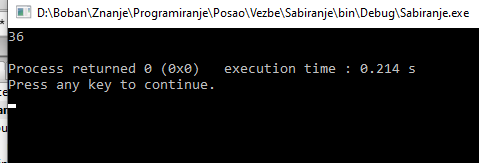
If we would like to combine the output of the text and the number in the output, e.g. if we write "The sum of numbers 14 and 22 is 36", then the format parameter would actually be text with output formats for the output conversion for in this case integers "% d" or "% i". The parameters in the printf function, given after the format, are actually variables whose conversion is done, written in the order from left to right:
printf(“Sum of numbers %d and %d is %d”, a, b, c);
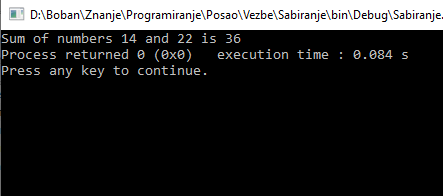
Values for assigning values to variables a and b.
a=14;
b=22;
should be replaced by:
scanf(“%d%d”, &a, &b);
The "&" operator provides the memory address of the data and is used for input and not for output conversion.
Before the scanf command, a printf command must be added to print a message, which tells the user what information to enter.
A complete task code would be:
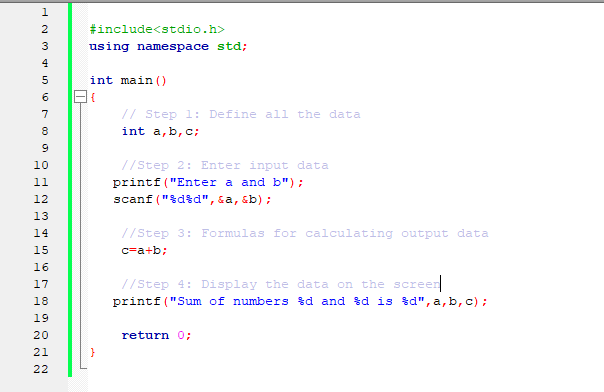
- Enter the radius of the circle and calculate the area
- Load trapeze pages and calculate area.
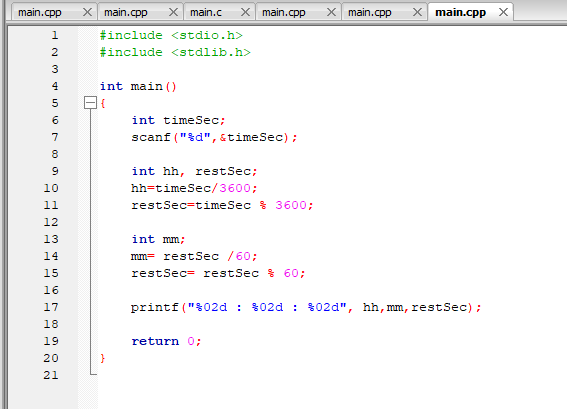
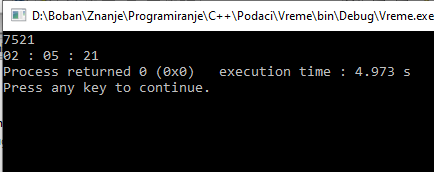
- Load time in seconds and print as hh: mm: ss
Tasks Solutions
Example 1-solutionWe solve the problem in 4 steps:
First, we need to define the information we need: In the program, the user needs to enter the radius, and the program should calculate the area of the circle. To define these data we will give them names and put the data type for real numbers (double). So the first command:
double r,P;
This is where we reserved the memory for two data of the double type we marked with r and with P
The second step is to enable the user to enter a semicolon. We use the method to enterscanf which is in the file stdio.h
We will include this file using the #include directive for inclusion of files, and this is written at the top of the document
#include < stdio.h >There is still a method in this file printf for printing data and text on the console.
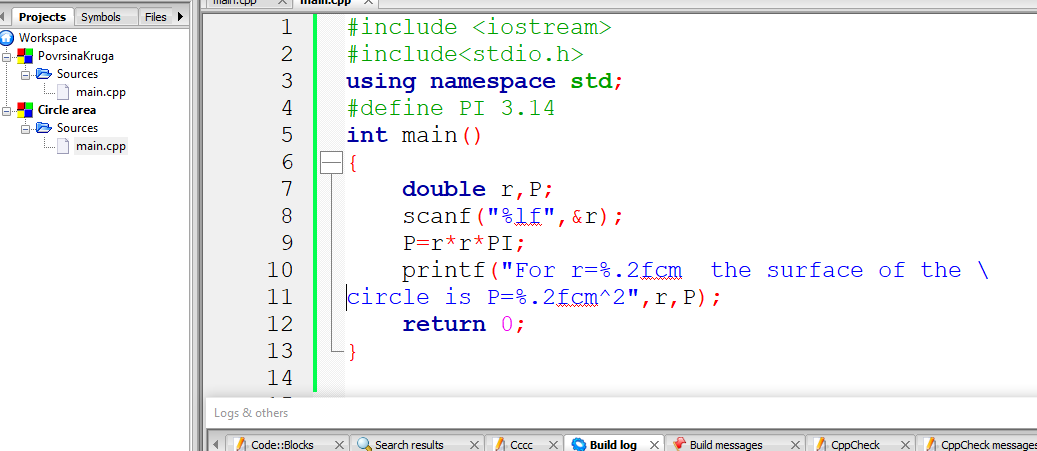
Before typing, we print a message on the console so that the user knows what to enter. For printing, we use the printf method, which actually represents the output conversion. The input conversion is done using the scanf method. This second step is:

Figure 4: Circle area-steps
In step 4, a message with the surface value, which is read from the memory marked in this program with P., is displayed. The %f format for double data is used for the output conversion.
Example 3-solution
The problem is solved in 4 steps:Here the user enters the time in seconds which should be an integer
int timeSek;
scanf(“%d”, &timeSek);
time in seconds and 3600, timeSek/ 3600, and to get how many seconds left, we use "%", ie timeSek% 3600.
Code that does this:
int hh, restSek;
hh = timeSek / 3600;
restSek= timeSek % 3600;
Similarly they would get minutes from the remaining seconds (restSek), but in this case they would take 60 for the divider because 1min = 60 sec;
int mm;
mm = restSek/ 60;
restSek= restSek% 60;
printf(“%02d : %02d : %02d”, hh, mm, restSek);
| Previous |<Basics C |
Next Operators in C >| |
Related articles
Data example in C/C++C Strings
Java programming
Algoritams-prime numbers
Algoritams-arrays of Fibonacci