
INTRODUCTION TO JAVA PROGRAMMING
| The JAVA programming language is a programming language created in 1995 and developed by SUN Microsystem. It was later taken over by Oracle. It is an Object Oriented programming language, platform independent, easy to learn, safe to execute. |
Introduction to JAVA programming-video |
Code once written in the Java programming language can be reused to create new applications. Java programming supports parallel execution in multiple programming threads, so compared to, say, a C programming language, which executes faster than Java if you compare execution in a single thread, a programming language written in Java could execute faster, since in parallel with execution it can accomplish this.
Object oriented programming
Systems in nature consist of objects that communicate with each other and create certain connections. In order to bring the writing of software closer to the systems as they are in nature, the writing of object-oriented languages was approached. Objects in nature have their own identity, attributes, behavior and state. Software-created objects have the same thing. Objects with common properties belong to the same class, where that class is used as a template for creating objects. These common properties of objects, members of that class, are writed in the classes. Methods within these classes that describe the behavior of objects are also created. The current values of variables that are in a class as properties of classes or objects, members of that class represent the "state" of these variables. Read more about this in the "Classes and Objects" lesson.It should be noted that there is a library of ready-made API classes (Application Programming Interface) located within the java JRE, which will be installed on the computer before writing applications in JAVA.
These classes will be used when writing new applications. Well-created classes are also later reused in new applications. So it can be said that JAVA is a reusability feature.
Use of Java
The JAVA programming language is used to develop:- Desktop application
- Writing complex business applications (Enterprise)
- Web application
- Mobile applications
- In robotics
- Embedded systems
- Game
Java releases
Java can usually be downloaded in future releases- Java SE (Java Standard Edition). Used to develop desktop applications
- Java EE (Java Enterprise Edition). Used to develop Enterprise applications and Java web applications
- Java ME (Java Micro Edition). It is suitable for developing mobile applications.
- Java FX. It is used to develop desktop as well as rich internet applications
What is an application?
Suppose we are given the task to write an application that should solve a certain ie. predefined task. There are a number of possible tasks that applications solve, from various calculations, word processing, sound, images, industry process management, artificial intelligence, games and many more examples.When solving these tasks, developers within the project write instructions (commands) in one or more files, which, when the application is completed and used, begin to be executed in an order defined by the developer. By executing these instructions, the program will execute the task set before it, the one for which such a program was written.Those instructions that are written in one of the programming languages, e.g. Java or C ++, should be executed by a processor that understands only machine language (a series of numbers in binary form eg 10001011 10000111 ). This means that there must be a TRANSLATOR, ie. a special program that will translate instructions from a programming language (JAVE) into a machine language. There are two ways to translate programs into different programming languages, using:
- Compiler. In this way, the complete file is translated at once
- Interpreter. It is used to translate instructions one by one, ie. one instruction is translated and then executed, and only then is the next instruction taken, and so on.
The path to creating an application
Source code. Instructions in a programming language (eg JAVA) are written within a text editor, which is usually part of one of the IDE (Integrated Development Environment) programming tools. In the java programming language, the source code is stored in files with the ".java" extension.Executable code. After compiling the program, new files with the extension ".class" are created.
What does it take to create an application in Java?
In order to create a program, ie. application in Java, on a desktop computer, it is necessary to install not only the operating system but also the Java platform: Java JDK (Java Development Kit).The Java platform includes:
- JVM-Java Virtual Machine. A Java virtual machine is just a specification that will be used to provide a public executable file (JRE) execution environment. It should define the class loader, the memory that will be provided when executing applications (java heep and java stack) and the environment for executing executable files.
- A set of software tools that help develop applications that are located on the hard disk as a set of libraries (jar) and other files, which are used during execution, and are used by a java virtual machine.
A Java JRE is sufficient for an application written in Java to run, but to develop an application it is necessary to extend the JRE with:
Development tools so that together it makes JDK or public platform.
It can be downloaded from the oracle website
https://www.oracle.com/java/technologies/downloads/
You need to choose a platform for the appropriate operating system.
Although Java, as a programming language, is platform independent, which means that a program written e.g. on windows OS it can run on both Linux OS and Macintos OS, java JDK, JRE and Virtual Machine are platform dependent. The JVM implementation corresponds to the operating system on which it will be installed.
Launch Java applications from the program line
In the worst case, the source code could be written in any text editor, even Notepad, and then saved somewhere on disk. Assuming that the Java JDK is installed, you could start compiling (call to execute a compiler) from the command line, running the javac program, and assuming that the current folder is changed so that it is actually the root directory of the project. For example. if the name of the file where the source code is located is called Program.java, then the translation command would read:
javac Program.java
After translation, the file Program.class file would be createdThe following command starts the Interpreter and program execution:
java Program
However, there are many tools, ie development environments for JAVA that help to develop the application. In these environments, there is also a text editor for creating source code, a tool for testing programs (execution), a tool for detecting errors (Debug), etc. The most commonly used IDE tools are:
- Eclipse
- Netbeans
- IntelijIDEA
- JCreator
- JBuilder
- XCode(za Macintosh)
Next We learn about:
DATA
Data are subject to processing in programs. Each data has certain properties and data type.
How to provide memory for data, which types of data are used in a report with elementary examples
The data type is determined by the set of specific values that the data can take and the set of operations that can be performed on the data
| Data type | Description | Memory[bit] |
|---|---|---|
| char | Small integer data. Used to store characters. | 16 |
| short | Short integer data | 16 |
| int | Integer data | 32 |
| long | Long integer data | 64 |
| float | This is a data type composed of a number that is not an integer, because it includes a fraction represented in decimal format. | 32 |
| double | Real number in double precision floating-point | 64 |
| boolean | Logical data type | 1 |
Graphical User Interface
In order to make a serious application, it is necessary that it has its own user interface. It actually represents the graphical part of the application. It is considered good programming practice to create applications using MVC (Model View Controler). 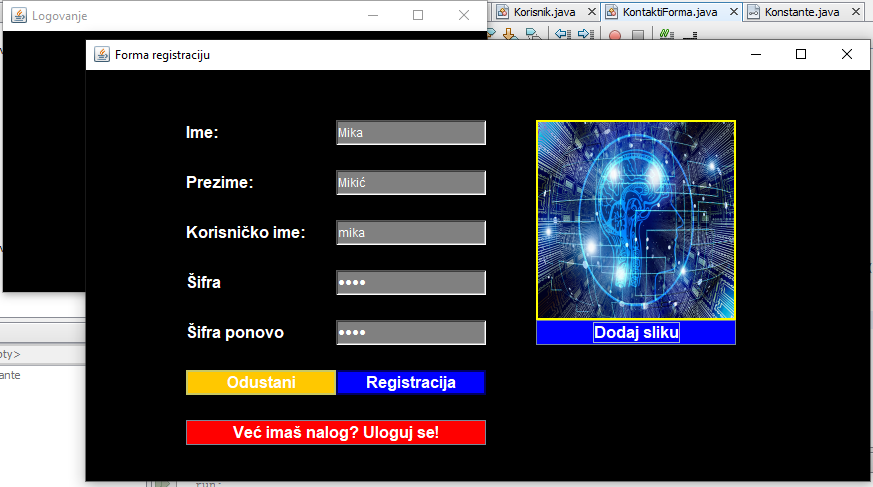
| Next Data in JAVA>| |