
Operators in C languages
In the C programming language, operators are key tools for manipulating data and performing mathematical, logical, and bitwise operations. An operator defines an action that is performed on one or more operands, where the result can be a value change, a comparison, or a logical evaluation. Operators are classified according to the number of operands into unary, binary and ternary. For example, arithmetic operators such as +, -, and * are used for basic mathematical operations, while relational operators enable comparison of values. Understanding operators is the basis for effective C programming.Operator characteristics
- Operators are actions that run over operands, giving a particular result.
- Expressions are arbitrarily complex compositions of operand and operator.
- Operators can be applied to one operand (unary operator) or to two operands (binary operators).
- There is also one operator with three operands, which is ? : (explained later).
Example:
int a = 10, b = 20;int result = (a < b) ? a : b; // the ternary operator returns 10 because a is less than b
Aritmetics operators
They are used for expressions with basic computational operations. The table below gives an overview of arithmetic operators| Operator | Using | Description |
|---|---|---|
| + | op1+op2 | addition of two numbers |
| - | op1-op2 | subtraction two numbers |
| * | op1*op2 | Multiplication of two numbers op1 and op2 |
| / | op1/op2 | Division two numbers |
| % | op1%op2 | Calculates the rest of division of two numbers |

Solution:
scanf(" %lf%lf ", &R1, &R2); //The user enters R1 and R2
Re=R1*R2 / (R1+R2); // The solution obtained is given by the equation
printf("%f",Re);
The rest of the division of two numbers. Operator "%"
Suppose we want to divide two integer values: 7 & 3
If we write 7/3 we get for result 2. The result is an integer because we have divided two integer constants
If we want to get the rest of the division then we would use the operator %
7 % 3 = 1
Example: Load time in minutes and print as mm: ss
Solution: From the data we need the time in seconds (Vr), and at the output for printing minutes (mm) and seconds (ss)scanf(" %d ", &Vr); //The user inputs time in seconds
/*Suppose the user entered during the 132s. Since one minute has 60s,
of these 132s we will convert 2 * 60s in two minutes, and what remains to be put as a second, in this
example it's 132- (2 * 60) = 12s. This calculation can be obtained using the division operator and the remainder of the division, "/" and "%". */
mm=Vr / 60; // mm=132/60=2
ss=Vr % 60; // mm=132%60=12
printf("%2d : %2d",mm,ss);
When the values in an arithmetic operation use an integer value and a real number, the result is a real number. The integer is implicitly converted to a real number before the calculation itself. The table below shows the types of data that are returned from arithmetic operations, based on the types of values. The necessary conversions are made before the operation is performed.
| The data type for the result | Data type for values |
|---|---|
| long | None of the values is float or double (whole number artifacts), a At least one of the operators is long type |
| int | None of the values is float or double (integer arithmetic). No operand is long. |
| double | At least one value is double type |
| float | At least one value is a float type. None is double type |
Unary operators "++", "-"
There are also two operators that allow for a short calculation. These are the operator ++ (increment) that increases the operand by 1 and the operator (decrement) which operand decreases by 1. Both operators can appear in front of the operand (prefix) and behind the operand (postfix). For version prefix, ++ op / - op, the first operand increases by 1, so this result is used further in the expressions. For the postfix version, the first operand is applied to the expression (old value), and only after that value is changed.Relational and conditional operators
The relational operator compares two values and determines the value between them. For example,!! = Returns exactly if two operands are not equal. The following table lists the relational operators:| Operator | Usage | Returns true if |
|---|---|---|
| > | op1 > op2 | op1 is greater than op2 |
| >= | op1 >= op2 | op1 is greater than or equal to op2 |
| < | op1 < op2 | op1 is less than op2 |
| <= | op1 <= op2 | op1 is less than or equal to op2 |
| == | op1 == op2 | op1 is equal to op2 |
| != | op1 != op2 | op1 is not equal to op2 |
An example of relational operators
if (a > b) {printf("a is greater than b");
}This operator compares the values a and b and as a result returns the value true, if the expression a>b is correct, or false, if it is notRelational operators are often used together with logical operators, which are obtained with complex expressions. In C there are the following logical operators:
| Operator | Usage | Returns true if |
|---|---|---|
| && | op1 && op2 | Both op1 and op2 are true. op2 is evaluated only if op1 is true (short-circuit). |
| || | op1 || op2 | Either op1 or op2 is true, or both. op2 is evaluated only if op1 is false (short-circuit). |
| ! | !op | op is false. |
| & | op1 & op2 | Both op1 and op2 are true. Always evaluates both operands (bitwise AND). |
| | | op1 | op2 | Either op1 or op2 is true, or both. Always evaluates both operands (bitwise OR). |
| ^ | op1 ^ op2 | op1 and op2 are different — one is true, the other is false (bitwise XOR). |
Examples of logical operators:
bool x = true;
bool y = false;
bool rezultat = (x && y);  // the result is false because both expressions are not true
Example: For the set values of integer variables a, b, c, determine the values of logical expressions:
a = 4, b = 7, c = 11

a > b
! (a > b && !(b < c))
a != 0 || !(a > (b > c))
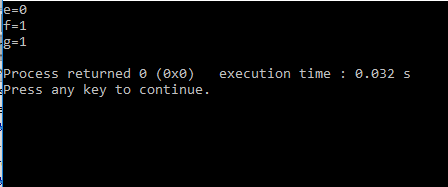
The values of the logical expressions in the C language are in fact integers. This expression evaluates to 1 if the logical expression is true, and 0 if it is false.
If 3 integers are defined with values 4, 7, and 11, the values of the required logical expressions will be:
a > b                  // value 0, because 4 is not greater than 7
! (a > b && !(b < c))  // value 1
! ((4 > 7) && !(7 < 11)) = !((0) && (1)) = !(0) = 1
a != 0 || !(a > (b > c)) // value 1
4 != 0 || (4 > (7 > 11))
(4 != 0) || (4 > (7 > 11))
(1) || (4 > (0))
1 || 1 = 1
The displayed brackets show the order in which the operators are executed. Operators with the highest priority (>, <) are executed first, followed by &&, and finally the negation (!). For example:
// Step by step evaluation:
4 > 7      // 0 (false)
7 < 11     // 1 (true)
0 && 1     // 0
! (0)     // 1
Therefore, a != 0 || !(a > (b > c)) evaluates to 1:
4 != 0 || (4 > (7 > 11))
(4 != 0) || (4 > 0)
1 || 1
= 1
Solution of this example:
// Summary of logical expression values:
a > b                     // 0
! (a > b && !(b < c))     // 1
a != 0 || !(a > (b > c))  // 1
#include <iostream>
using namespace std;

int main()
{
    int a, b, c;
    bool e, f, g;

    a = 4;
    b = 7;
    c = 11;

    // Calculating Logical Expressions
    e = a > b;
    f = !(a > b && !(b < c));
    g = a != 0 || !(a > (b > c));

    // Print the expression value
    cout << "e=" << e << endl;
    cout << "f=" << f << endl;
    cout << "g=" << g << endl;

    return 0;
}
Operators by bit
Bitwise operators allow the execution of bits-level operations within integer data. There are two groups of operators per bits:- operators to perform logical operations between pairs of bits on the same positions within their operands
- shift operators
- ~It performs complementing (negating) the value of its operand by bit. Thus, it converts from state 0 to state 1 and vice versa
- &Logical "and" for bit operations.
- |Logic included "or" for bit operations.
- ^Logic exclusively "or" for bit operations.
- <<It moves the left operand for as many binary places as the right-hand value of the right operand
- >>Moving the left operand for as many binary places to the right is the value of the right operand. Moving to the right of the n position is equivalent to dividing the number with 2 ^ n
Examples for operators by bits
For example. for data type int having 16 bits of memory:- 25 & 5 = 1 0000000000011001 &
0000000000000001
- 25 | 5 = 29 0000000000011001 |
0000000000011101
- 25 ^ 5 = 28 0000000000011001 ^
0000000000011100
- 25 << 2 = 100 0000000000011001 <<2 =
- 25 >> 3 = 3 0000000000011001 &
0000000000000011
Assignmentoperator
The basic operator is the operator =, by which one value is assigned to another. In C, C ++ there are also allocation operators that perform multiple operations at once. Suppose you want to assemble the value of a variable with a number and assign the result to the same variable. You would write: i = i + 2; Abbreviated this can be written using the operator + = as follows: i + = 2; The two previous terms are equivalent. The following table provides some of the operators of this type:| Operator | Using | Equivalent to: |
|---|---|---|
| += | op1 += op2 | op1 = op1 + op2 |
| -= | op1 -= op2 | op1 = op1 - op2 |
| *= | op1 *= op2 | op1 = op1 * op2 |
| /= | op1 /= op2 | op1 = op1 / op2 |
| %= | op1 %= op2 | op1 = op1 % op2 |
| &= | op1 &= op2 | op1 = op1 & op2 |
| |= | op1 |= op2 | op1 = op1 | op2 |
| ^= | op1 ^= op2 | op1 = op1 ^ op2 |
For instance:
int N=28;
N=N<<3;
The starting number 28 will be transformed to number 224 and this value is assigned to the same memory N.
- 28 << 3 = 224 0000000000011100 <<2 =
Difference between relational and logical operators
- Relational operators perform a comparison between two values, and the result of the comparison is a logical value (true or false). For example, is the number a greater than b.
- Logical operators combine or negate logical values. They do not work directly on numeric values like relational operators, but on results that are already true or false.
int b = 20;
int c = 15;
// First we use relational operators to get boolean values
bool condition1= (a < b); // true because 10 is less than 20
bool condition2= (c == 15); // true because c is equal to 15
// We then use logical operators to combine the results
bool finalResult = condition1 && condition2; // true because both conditions are true
The other operators in C, C++
Conditional expression: ? :
Let's look at the following problem:For entered integers a and b, specify a greater number.
We reserve the memory for 3 data, and b and larger than the two will be placed in the new variable maxAB.
int a,b,maxAB;
The user then enters a and b from the console:
scanf("%d%d", &a, &b);
To assign a value of maxAB, two variants are possible:
maxAB = a; if a >= b or
maxAB = b, if a < b
If you put both variants, the first value of the maxAB would be, and later it would change to b and it would always be b.
It is first necessary to ask whether a> b, and if it is true then maxAB = a is executed, otherwise maxAB = b;
For this, the conditional expression is used:
maxAB=(a>b) ? a : b;
Finally, this value should be displayed:
printf("maxAB=%d", maxAB);
SIZEOF operator
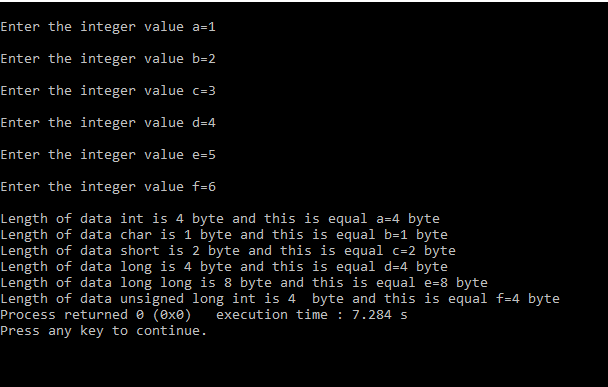
With this operator, the size of the data in bytes can be determined. The following example demonstrates:#include <stdlib.h>
intmain(intargc, char *argv[])
{
charb;
shortc;
longd;
long longe;
unsigned long intf;
printf("\nEnter the integer value a="); scanf("%d", &a);
printf("\nEnter the integer value b="); scanf("%d", &b);
printf("\nEnter the integer value c="); scanf("%d", &c);
printf("\nEnter the integer value d="); scanf("%d", &d);
printf("\nEnter the integer value e="); scanf("%d", &e);
printf("\nEnter the integer value f="); scanf("%d", &f);
printf("\nLength of data int is %d byte and this is equal a=%d bajta", sizeof(int), sizeof(a));
printf("\nLength of data char is %d byte and this is equal b=%d bajta", sizeof(char), sizeof(b));
printf("\nLength of data short is %d byte and this is equal c=%d bajta", sizeof(short), sizeof(c));
printf("\nLength of data long is %d byte and this is equal d=%d bajta", sizeof(long), sizeof(d));
printf("\nLength of data long long is %d byte and this is equal e=%d bajta", sizeof(long long), sizeof(e));
printf("\nLength of data unsigned long int is %d bajta byte and this is equal f=%d bajta", sizeof(unsigned long int), sizeof(d));
return0;
Comma operator ","
Is a binary operator that evaluates its first operand and rejects the result, then estimates another operand and returns this value (and type). The notch operator has the lowest priority of any C operator. Comma acts as an operator and a separatorOther operators
Other operators in the C / C ++ language are given in the following table:| Operator | description of operators |
|---|---|
| [] | Indexing |
| () | call function |
| . | access to the member (element) of the structure |
| -> | access to the member (element) of the structure using pointers |
| *(unary) | access to data by pointers (indirect addressing) |
| &(unary) | variable address |
Operator Priority Table
When there are multiple operators in the expression then higher priority operations are performed first. If operators are of the same priority, then the execution will be left-to-right in most cases (See the column Grouping direction in the table below).The table below describes the order of priorities and association of operators in C / C ++. The advantage of the operator decreases from top to bottom.
| Priority | Number of operands | Grouping Direction: | Operators: |
|---|---|---|---|
| 15 | 2 | -> |
[] () . -> |
| 14 | 1 | -> |
! ~ ++ -- + - * & (tip) sizeof |
| 13 | 2 | -> |
* / % |
| 12 | 2 | -> |
+ - |
| 11 | 2 | -> |
<< >> |
| 10 | 2 | -> |
< <= > >= |
| 9 | 2 | -> |
== != |
| 8 | 2 | -> |
& |
| 7 | 2 | -> |
^ |
| 6 | 2 | -> |
| |
| 5 | 2 | -> |
&& |
| 4 | 2 | -> |
|| |
| 3 | 2 | -> |
?: |
| 2 | 2 | -> |
= += -= *= /= %= &= ^= |= <<= >>= |
| 1 | 2 | -> |
, |
Advanced topic — additional operators and examples
This section adds explanations for bitwise operators, assignment and compound assignment operators,
sizeof, casts and the comma operator. Short examples show typical uses and common pitfalls.
Bitwise operators
Bitwise operators operate bit-by-bit (usually on integer types):
& (AND), | (OR), ^ (XOR), ~ (NOT),
<< (left shift) and >> (right shift). They are commonly used for masking,
testing bits and combining flags. For predictable shift behavior prefer unsigned types.
// example: masking and testing bitsunsignedintflags = 0x5;   // ...0101b// test: is bit 0 set?if (flags & 0x1) { /* bit 0 is 1 */ }

// set bit 2flags |= (1u << 2);

// clear bit 0flags &= ~(1u << 0);

// XOR to toggle selected bitsflags ^= (1u << 1);
Note: Right shifts on signed types can be implementation-defined — prefer unsigned when shifting for predictable behavior.
Assignment and compound assignment operators
Basic assignment is =. Compound assignment operators combine an operation and assignment:
+=, -=, *=, /=, %=, &=, |=, ^=, <<=, >>=. They often avoid repeating the variable name and can be more efficient.
intx = 10;
x += 5; // same as x = x + 5;x &= 0xF; // mask lower 4 bitssizeof, casts and the comma operator
sizeof returns the size (in bytes) of a type or object. Casts use the syntax (type)value.
The comma operator , evaluates the left operand, then the right, and returns the right value — useful in some idioms but reduces readability.
inta = 0;
// print size of int (use %zu for portability)printf("size of int: %zu\n", sizeof(int));

doubled = 3.14;
intdi = (int)d;   // explicit cast: truncates fractional part// comma operator exampleintv = (a = 1, a + 2); // a=1 then v = a+2 => v == 3
Advanced topic — logical vs bitwise operators, promotions and undefined behavior
Difference between logical and bitwise operators
&& and || are logical operators: they treat operands as boolean values and have short-circuit behavior
(the second operand is evaluated only if needed). &, |, ^ are bitwise operators: they operate bit-by-bit
and always evaluate both operands. This difference is a common source of bugs.
inta = 0;
intb = 1;

if (a && (b++ > 0)) {
  // here (b++ > 0) is NOT evaluated because a == 0 -> short-circuit
}
// b remains 1if (a & (b++ > 0)) {
  // here (b++ > 0) IS evaluated; & does not short-circuit
}
// b becomes 2
Integer promotions and usual arithmetic conversions (brief)
Expressions with different integer types follow promotion rules: smaller types (e.g. char, short) are usually promoted to int
(or unsigned int in some cases). Then usual arithmetic conversions determine a common type for the operation.
Mixing signed and unsigned types can lead to surprising results — prefer explicit casts when the intent must be clear.
unsignedshortus = 60000;
inti = -1;
autor = us + i;
// us may be promoted and the result is influenced by unsigned vs signed rules
Undefined behavior: modifying the same variable multiple times in one expression
Expressions that modify and read the same variable without sequencing between those accesses lead to undefined behavior. A classic confusing example:
inti = 1;
i = i++ + 1; // undefined behavior — result not defined by the standard
Write code explicitly and sequentially instead:
inti = 1;
inttmp = i;
i = tmp + 1;    // clear and defined// or simpler formsi++;
i = i + 1; // or i += 1; depending on intent
Tip: avoid complex expressions that modify the same variable multiple times — they are hard to reason about and brittle across compilers/optimizations.
Technical sources — linking suggestions
I recommend adding authoritative references so readers can dig deeper and verify technical details.
Recommended sources
- cppreference (C) — logical operators — detailed page on logical operators in C: cppreference — C logical operators
- cppreference (C) — arithmetic operators — arithmetic operators and notes on integer division: cppreference — C arithmetic operators
- cppreference (C) — bitwise & other operators — bitwise operators and other operator pages: cppreference — C bitwise operators
- cppreference (C++) — operators — comprehensive coverage of operators in C++ (including overloading): cppreference — C++ operators
- cppreference (C++) — operator precedence — operator precedence table (useful for avoiding ambiguous expressions): cppreference — operator precedence
- Integer promotions / implicit conversions — rules that affect mixed-type integer expressions: cppreference — integer promotion (C) • cppreference — implicit conversions (C++)
- ISO/IEC 9899 (C standard) — the official standard for C (formal/authoritative; typically paid): ISO/IEC 9899 (C standard)
- Kernighan & Ritchie — The C Programming Language (K&R) — classic concise reference: K&R — Wikipedia (info & editions)
| Previous |<Data in C++ language |
Next Selection statements>| |
Related articles
Data examplesJava lessons
Mathematical algoritms
Training for test
Matrix