
DATA DICTIONARY - MAPS IN C++
Maps in C++ are collections of data that store data whose values are accessed using a unique key. A map functions as a data dictionary and can be declared as follows:
map<key_type, value_type> map_name;
Consider the following problem:
Assign the names of groups of students in one class. Enter their average grades at the end of the school year. Calculate the class average and determine how many students scored above this average.Solution: we will solve this example using maps, by using the student's name as the key, and placing their success as a value inside the map.
In order to use maps in C++ inside the file, the map header file must be included:
#include < map >
Then you need to declare the map:
map < string, double> average;
We can see that the key types will be string and this refers to student names, while the value types will be double, since the values are actually average grades, so real numbers.Map initialization in c++
One way to populate a map is through initialization. This is the case when we know in advance the data about the students, their names and achievements, i.e. their average grades at the end of the year.
average={
{"Mickael",4.52},
{"Milica",4.78},
{"Nikola",3.89 }
};
{"Milica",4.78},
{"Nikola",3.89 }
Iterations through a c++ map
In each iteration of the loop, the next pair containing both the key and the value (Student's Name and average) is taken. The key is accessed using the first attribute, while the value is accessed using the second attribute.
//printing the data stored inside the map
for(auto keyValuePair: averageMap){
for(auto keyValuePair: averageMap){
cout << keyValuePair.first << " " << keyValuePair.second << endl;
}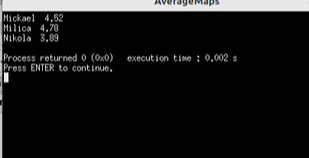
Figure 1: Printing elements in the map - program execution
|
 Image by Peggy und Marco Lachmann-Anke from Pixabay Image by Peggy und Marco Lachmann-Anke from Pixabay |
Iterating and printing map elements
In C++, there are two basic ways to iterate through a map: using a for loop and using an iterator. Both approaches have their advantages and applications, and below are their characteristics and recommendations for use:1. Range-based for loop
This approach is intuitive and makes the code more transparent, especially when working with a map that does not require modification of elements during iteration.map<string, int> competitors= {{"Michael", 3}, {"Ana", 2}, {"Sean", 1}};for (const auto& par : competitors) {
cout << par.first << ": " << par.second << endl;
}Advantages:
- Simple and easy to understand.
- Efficiency: Use const auto& to avoid copying pairs.
- Suitable for cases where direct control over map elements is not required.
- Lack of flexibility when modification of elements or specific positioning is required.
2. Iterators
Iterators allow more flexibility by providing direct access to elements, which can be useful when you need to change the contents of a map or control the flow of iteration.Example:map<string, int> competitors= {{"Michael", 3}, {"Ana", 2}, {"Sean", 1}};
for (auto it = competitors.begin(); it != competitors.end(); ++it) {
cout << it->first << ": " << it->second << endl;
}Advantages:
- Enables changing element values during iteration.
- Provides access to complex operations, such as erasing the current element (it = map.erase(it)).
- Code can become less readable, especially for beginners.
- A more complex approach compared to an extensive loop.
- For iterating through all map elements, both approaches are equally efficient as they have a time complexity of O(n).
- A verbose for loop is often more convenient when you're only working with reading elements, while iterators provide more flexibility for modifications.
Recommendations for use
- Use a for loop when you need to simply iterate through all elements without changing the content.
- Use iterators when you need to change element values, skip certain elements, or delete elements from the map during iteration.
Inserting values into a map in c++
Another method to populate the map is by reading input from the user, when the user is asked to enter the name of the student, as well as the student's grade.Entering a key-value pair can be added to the map at its end with the insert function. Consider the following code:
//Loading a key-value pair into a map
int n;
string name;
double average;
map < string,double > averageMap;
cout << " Enter the number of students" << endl;
cin >> n;
for(int i = 0; i < n; i++){
//Printing the data stored inside the map
for(auto pairKeyValue: average){
int n;
string name;
double average;
map < string,double > averageMap;
cout << " Enter the number of students" << endl;
cin >> n;
for(int i = 0; i < n; i++){
cout << "Enter the name of the student " << endl;
cin >> name;
cout << "Enter the average " << endl;
cin >> average;
averageMap.insert(pair (name,average));
}cin >> name;
cout << "Enter the average " << endl;
cin >> average;
averageMap.insert(pair
//Printing the data stored inside the map
for(auto pairKeyValue: average){
cout << pairKeyValue.first << " " << pairKeyValue.second << endl;
}Entering data into the map, checking if the key value already exists in the map
Entering data into a folder with the operator []
Example:Let's assume that we have a defined map in c++, where the keys represent e.g. participants in the competition (names), and the value is the number of matches played. When entering participants in the for loop, we want to check whether the current participant is already inside the map (key), so if so, increase the number of participants by 1.
It is also necessary to set the initial value of participation to 0 and whether it is necessary. Map:
map<string,int>competitors;Solution:
The [] operator automatically adds the key to the map if it doesn't exist and sets the value to the default for the type (0 for int in this case).#include <iostream>
#include <map>
#include <string>
using namespacestd;
int main() {
map<string, int> competitors;
// Example of competitors input
string entries[] = {"Mark", "Ana", "Mark", "Jack", "Ana"};
for (const string& name : entries) {
competitors[name]++; // Increases the participation count (default value for new keys is 0)
}
// Print the map
for (const auto& par : competitors) {
cout << "Competitors: " << par.first << ", Competitors number: " << par.second << endl;
}
return 0;
}Explanation:
Operator []: If the key (eg "Mark") does not exist in the map, creates it with the default value (0 for int). Then the value is incremented by 1.
Initial value: There is no need to manually set the initial value to 0 because the [] operator does that.Note:
If we use:competitors["NewCompetitor"]++;It adds "NewCompetitor" with a value of 1, even if it was not previously entered.
To avoid this, we use find:auto it = competitors.find("New Competitor ");
if (it != competitors.end()) {
it->second++;
} else {
cout << "Competitor not found!" << endl;
}
Alternative with find:
If you want to avoid automatic key creation, use find:if (competitors.find(name) != competitors.end()) {competitors[name]++;
} else {
competitors[name] = 1;
}
Rewriting from one folder to another c++
The map averageMap2 is declared, which will have the same elements as averageMap. When declaring, pointers to the beginning and end of the first map should be passed.
//copying from one data dictionary (map) to another map
cout << "Map 2: "<< endl;
map < string, double>averageMap2(averageMap.begin(),averageMap.end());
printing(averageMap2);
Here, we have moved the printing of map values to a special printing function, to which a pointer to the map to be printed is passed as a parameter.cout << "Map 2: "<< endl;
map < string, double>averageMap2(averageMap.begin(),averageMap.end());
printing(averageMap2);
void printing(map < string, double> averageMap){
After starting:
//printing the data stored inside the map
for(auto parKeyValue: averageMap){
}for(auto parKeyValue: averageMap){
cout << parKeyValue.first << " " << parKeyValue.second << endl;
}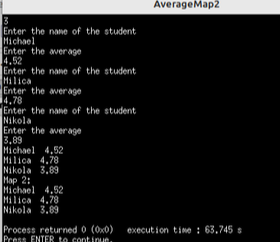
Figure 2: Overwriting elements from one map to another - program execution
Printing values from map using iterator in c++
We define an iterator (cursor) that points to a specific pair within the map and can be easily moved through the map:
map<string, double>::iterator itr;
Writing through the loop would be:
void printing2(map < string, double> averageMap){
//printing the data stored inside the map
map < string, double>::iterator itr;
for(itr = averageMap.begin(); itr !=averageMap.end(); ++itr ){
}map < string, double>::iterator itr;
for(itr = averageMap.begin(); itr !=averageMap.end(); ++itr ){
cout << itr -> first << " " << itr -> second << endl;
}Deleting elements from the map c++
Deleting elements from the map can be done with the erase functionDeleting elements from the map with a certain key value in c++
If we want to delete an element whose key is, for example, the value nameForDelete, it can be done as follows:
//Deleting value from the map with a certain key
string nameForDelete = "Nikola";
averageMap2.erase(nameForDelete);
cout << "After deletion, map 2 will be: " << endl;
printing2(averageMap2);
string nameForDelete = "Nikola";
averageMap2.erase(nameForDelete);
cout << "After deletion, map 2 will be: " << endl;
printing2(averageMap2);
Delete all elements in the map
//Delete elements of all elements from the map
averageMap2.clear();
cout << "After deletion, with the clear command, the number of elements in averageMap2 is " << averageMap2.size();
After deleting averageMap2 will not have a single element, i.e. map size is zero.averageMap2.clear();
cout << "After deletion, with the clear command, the number of elements in averageMap2 is " << averageMap2.size();
Deleting elements in maps: Recommendations and caution
The erase function allows deleting elements from a map using a key, an iterator, or a range of iterators. However, there are a few potential pitfalls to be aware of when using this feature:1. Deleting a non-existent key
If you try to erase a key that doesn't exist in the map, erase won't throw an error, but it will have no effect. In order to avoid unnecessary operations, it is recommended to check the presence of the key beforehand:auto it = my_map.find(key);
if (it != my_map.end()) {
my_map.erase(it);
}2. Deletion during iteration
When erasing elements while iterating through a map, use the return value of erase (a new iterator pointing to the next element) to avoid invalidating the iterator:for (auto it = my_map.begin(); it != my_map.end(); ) {
if (condition) {
it = my_map.erase(it);
} else {
++it;
}
}3. Deleting multiple elements (bulk deletion)
When you want to erase all elements in a given range, use erase with the iterator range:my_map.erase(my_map.begin(), my_map.find("key_as_rank_threshold"));This can be useful for efficiently deleting multiple elements.
4. Impact on performance
The erase function has a complexity of O(logN) for individual elements, while erasing the entire range can be faster because the operations are optimized for larger datasets. It is recommended that you choose an approach depending on the number of elements to delete.
5. Practical advice
When to use find before erase: On critical systems or where there is uncertainty about the presence of a key.
When to use direct erase: When you are sure the key exists or in simple cases.
6. An example of an error
If you are using an iterator that has become invalid after deletion:auto it = my_map.erase(my_map.begin());
cout << it->first; // Correct, the iterator is valid.
Finding values inside a map by key in c++
If the key is known, first the find function returns an iterator that points to the pair whose key was passed to the function. The iterator can then be used to retrieve the value, as shown in the following code:
//Searching map
string key="Michael";
map::iterator it;
it=averageMap.find(key);
cout << endl << it -> first << " have an average:" << it->second;
string key="Michael";
map
it=averageMap.find(key);
cout << endl << it -> first << " have an average:" << it->second;
Sorting map by value in c++
First you need to transfer the elements to a vector:
// Declaring a vector of pairs from a map
vector < pair < string, double > > A;
// Copy key-value pair from Map
// to vector of pairs
for (auto& it : averageMap) {
Then sorting is done with the sort function>vector < pair < string, double > > A;
// Copy key-value pair from Map
// to vector of pairs
for (auto& it : averageMap) {
A.push_back(it);
}
sort(A.begin(),A.end());
cout << " After sorting, the map will be: " << endl;
printing(averageMap);
After executions:cout << " After sorting, the map will be: " << endl;
printing(averageMap);
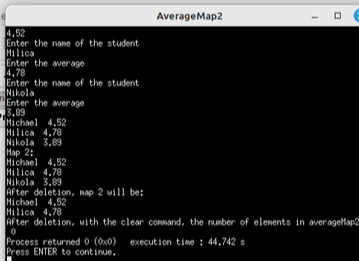
Figure 3: Map sorting-program execution
Passing through a vector with key-value pairs as elements (pair<string,int>) could also be as follows:
sort(A.begin(),A.end());
cout << " After sorting the folder looks: " << endl;
cout << "Sorted vector:" << endl;
for(pair<string,int> par:A) {
cout << " After sorting the folder looks: " << endl;
cout << "Sorted vector:" << endl;
for(pair<string,int> par:A) {
cout << par.first << " "<< par.second << endl;
}EXAMPLE USING MAPS: See example number 11 from the website: Qualifications for district competitions
Sorting the map by value in descending order
Example: The results of 4 quarter-final matches, 2 semi-final matches and the final match of the knockout phase of the tournament are recorded (total 7 matches). The results given in the input are not sorted (for example, the last row in the input does not necessarily mean that the match was played last). Determine the winner and runner-up of the tournament.Assume that the map is already populated with sorted data.In C++, since std::map doesn't directly support sorting by value (because it sorts by key), you can cast the pairs from the map into a vector, sort the vector by value, and then print the first two participants with the highest number of participations. Here is an example of how it can be done:#include <iostream>
#include <map>
#include <vector>
#include <algorithm>
using namespacestd;
int main() {
map<string, int> competitors= {
{"Pet", 5},
{"Ana", 8},
{"Mark", 3},
{"Sean", 7}
};
// Define a map of participants with their participation count
vector<pair<string, int>> competitorsVector(competitors.begin(), competitors.end());
// Sort the vector in descending order based on the count
sort(competitorsVector.begin(), competitorsVector.end(),
[](const pair<string, int>& a, const pair<string, int>& b) {
return a.second > b.second; // Sort in descending order by participation count
});
// Ispis prvih dva učesnika sa najvećim brojem učešća
cout << "The top two competitors with the most participations are:\n";
for (int i = 0; i < min(2, (int)competitorsVector.size()); ++i) {
cout << competitorsVector[i].first << " (" << competitorsVector[i].second << " participation)\n";
}
return 0;
}
Sorting the map by values - continued
The standard std::map in C++ always maintains the order of elements by key. This is useful when sorting by keys is desired, but if you want to sort the map by values, it is necessary to use alternative approaches because std::map does not directly support sorting by values.Sorting by Casting into a Vector of Pairs One of the most commonly used approaches is to cast the elements of a map into a vector of pairs and then use std::sort with a custom comparator:#include <iostream>
#include <map>
#include <vector>
#include <algorithm>
using namespacestd;
int main() {
map<string, int> competitors = {{"Ana", 5}, {"Mark", 3}, {"Ivan", 8}};
// Transfer to a vector
vector<pair<string, int>> vec(competitors.begin(), competitors.end());
// Sort by values
sort(vec.begin(), vec.end(),
[](const pair<string, int>& a, constpair<string, int>& b) {
return a.second > b.second; // Descending order
});
// Print sorted elements
for (const auto& pair : vec) {
cout << pair.first << ": " << pair.second << endl;
}
return 0;
}Useful tips
- Performance: This approach is efficient for smaller data sets, but for larger maps it can be slower because the entire content is copied into the vector.
- Stability: The std::sort function is not stable, meaning that elements with the same values will not necessarily retain their original order.
#include <map>
using namespacestd;
int main() {
multimap<int, string> reversed;
// Converting from a map
map<string, int> competitors = {{"Ana", 5}, {"Mark", 3}, {"Ivan", 8}};
for (const auto& pair : competitors) {
reversed.insert({pair.second, pair.first});
}
// Print sorted elements
for (const auto& pair : reversed) {
cout << pair.second << ": " << pair.first << endl;
}
return 0;
}A note about custom comparators
If you want to use std::map directly with sorted values, you can use a custom comparator, but this requires additional tracking of key-value pairs, which is often impractical.
Recommendation
- For dynamic structures: Use vectors or std::multimap.
- For fixed structures: Converting to a vector and sorting is a simpler approach.
Unordered map
Unsorted maps are used when it is not necessary to take care of the order of the keys, and on the other hand, the speed of access to individual keys in an unsorted map is higher.To use unspecified maps, the following header must be included:
Let's look at the differences between ordered and unordered maps, ie. their advantages and disadvantages:
#include < unordered_map >
map vs unordered_map
Properties for the map:
- Implementation: the map is implemented as a balanced binary search tree (most often a red-black tree).
- Sorting: The keys in the map are always sorted in ascending order.
- Complexity: Insertion, deletion, and element access operations have O(log n) complexity due to the tree structure.
- Iteration order: Iterating through the map will always be in sorted key order.
When used:
- When a sorted storage of key-value pairs is required.
- When logarithmic time complexity of operations is required.
- When iteration order matters.
Properties for unordered_map:
- Implementation: unordered_map is implemented as a hash table.
- Sorting: The keys in unordered_map are not sorted; the elements are arranged based on the result of the hash function.
- Complexity: Insert, delete, and element access operations have an average complexity of O(1), but in the worst case the complexity can be O(n) due to possible hash value collisions.
- Iteration order: Iterating through an unordered_map does not follow any order of keys.
When is it used?
- When faster storage and access to elements is needed (on average).
- When the order of the keys doesn't matter.
- When dealing with large datasets and hash value collisions are minimal or well controlled.
An example of an ordered map
Text: Assign 3 pairs to the map, then print the key-value pairs.Solution:#include <iostream>
#include <map>
using namespacestd;
int main() {
// Create a map to store key-value pairs
map<string, int> pairs;
// Assign 3 key-value pairs to the map
pairs["Alice"] = 10;
pairs["Bob"] = 20;
pairs["Charlie"] = 30;
// Print the key-value pairs
cout << "Key-Value Pairs in the Map:" << endl;
for (const auto& pair : pairs) {
cout << pair.first << ": " << pair.second << endl;
}
return 0;
}
Output:
1: one
2: two
3: three
Explanation:2: two
3: three
- A map stores key-value pairs, where each key is unique.
- Key-value pairs are inserted using the assignment operator.
- A for loop iterates through the map to print each key and its corresponding value.
An example of an unordered map
Text: Assign 3 pairs to an unordered map, then print the key-value pairs.Solution:#include <iostream>
#include <unordered_map>
using namespace std;
int main() {
// Create an unordered_map to store key-value pairs
unordered_map<string, int> pairs;
// Assign 3 key-value pairs to the unordered_map
pairs["Alice"] = 10;
pairs["Bob"] = 20;
pairs["Charlie"] = 30;
// Print the key-value pairs
cout << "Key-Value Pairs in the Unordered Map:" << endl;
for (const auto& pair : pairs) {
cout << pair.first << ": " << pair.second << endl;
}
return 0;
}
Explanation:
- unordered_map stores key-value pairs, but unlike map, it does not maintain any specific order of keys.
- Pairs are inserted using the assignment operator.
- A range-based for loop iterates over the unordered_map to print the key-value pairs.
Examples of use in practice
Maps in C++ are useful for solving a wide range of real-world problems where you need to establish a relationship between a key and a value.1. Counting word frequencies in the text
One of the classic examples of using a map is counting how many times each word appears in a text:#include <iostream>#include <map>
#include <string>
#include <sstream>
using namespace std;
int main() {
string text = "this is a sample text where we count words words are key";
map<string, int> frequencies;
// Splitting the text into words
stringstream ss(text);
string word;
while (ss >> word) {
frequencies[word]++;
}
// Outputting the results
for (const auto& pair : frequencies) {
cout << "Word: " << pair.first << ", Occurrences: " << pair.second << endl;
}
return 0;
}Explanation:
- Input Text: The text string contains a sample sentence for word counting.
- Word Splitting: The stringstream is used to split the sentence into individual words.
- Counting Words: A map stores the frequency of each word, incrementing the count when a word is encountered again.
- Output: The program prints each word alongside its occurrence count.
2. Monitoring student grades
#include <iostream>#include <map>
#include <string>
using namespace std;
int main() {
map<string, double> students;
students["Mark"] = 8.5;
students["Ana"] = 9.2;
students["Ivan"] = 7.8;
// Displaying grade averages
for (const auto& pair : students) {
cout << "Student: " << pair.first << ", Average: " << pair.second << endl;
}
return 0;
}Explanation:
- Data Structure: A map is used to store students' names as keys and their grade averages as values.
- Assignment: The program assigns grades to three students (Marko, Ana, and Ivan).
- Output: Using a for loop, it iterates through the map and prints each student's name and their average grade.
3. Implementation of the telephone directory
The map allows you to easily create a phone book where names are mapped to phone numbers:#include <iostream>#include <map>
#include <string>
using namespacestd;
int main() {
map<string, string> phonebook;
phonebook["Mark"] = "0641234567";
phonebook["Ana"] = "0659876543";
// Searching in the phonebook
string searchName = "Ana";
if (phonebook.find(searchName) != phonebook.end()) {
cout << "Phone number for " << searchName << ": " << phonebook[searchName] << endl;
} else {
cout << "Contact not found." << endl;
}
return 0;
}Explanation:
- Phonebook: A map is used to store names as keys and phone numbers as values.
- Search: The program searches for the contact Ana. If found, it prints her phone number; otherwise, it displays a "Contact not found" message.
- Condition: The find() function checks if the key exists in the map.
Practical application: This structure can be used in contact management applications.
Suggestions for additional extensions
- Add examples for more complex applications, such as implementing leaderboards, voting systems, or inventory management.
- Include visual representations of data using graphics or report libraries (eg, sorted rankings or charts).
Additions: Advanced features and comparison with unordered_map
Function emplace()
The emplace() function allows elements to be inserted into a map directly at their location in memory, often reducing the cost of copying compared to insert. This can lead to better performance, especially when inserting more complex data types. For example:#include <iostream>#include <map>
using namespace std;
int main() {
map<string, int> competitors;
// Inserting using emplace
competitors.emplace("Mark", 5);
competitors.emplace("Ana", 3);
for (const auto& pair : competitors) {
cout << "Competitior: " << pair.first << ", Number of competitors: " << pair.second << endl;
}
return 0;
}Explanation:
- participants: A map is used to store participant names as keys and their number of participations as values.
- emplace: Efficiently inserts key-value pairs into the map.
- Output: Iterates through the map and prints each participant's name and participation count.
Difference compared to insert:
While insert receives an already created pair (or copy), emplace constructs the object directly at the appropriate location, thus avoiding additional copy or move operations.Comparing std::map and std::unordered_mapstd::map:
- Implementation based on a balanced binary tree (eg Red-Black Tree).
- Keeps elements sorted by key.
- Insert, search, and delete operations have logarithmic complexity O(log(n)).
- Suitable when the order of elements is important.
std::unordered_map:
- Hash table based implementation.
- Elements are not sorted.
- Insert, search, and delete operations have an amortized constant complexity of O(1), but can be O(n) in the worst case.
- Suitable when search performance is a priority and order does not matter.
Example comparison:#include <iostream>
#include <map>
#include <unordered_map>
using namespacestd;
int main() {
map<string, int> sortedMap;
unordered_map<string, int> hashMap;
sortedMap["Mark"] = 5;
sortedMap["Ana"] = 3;
hashMap["Mark"] = 5;
hashMap["Ana"] = 3;
// Output
cout << "Sorted map (std::map):" << endl;
for (const auto& pair : sortedMap) {
cout << pair.first << ": " << pair.second << endl;
}
cout << "\nHash map (std::unordered_map):" << endl;
for (const auto& pair : hashMap) {
cout << pair.first << ": " << pair.second << endl;
}
return 0;
}
Explanation:
- sortedMap: Represents a std::map, which keeps its elements sorted by keys.
- hashMap: Represents a std::unordered_map, which organizes its elements in hash table format for faster access.
- Insertion: Both maps store the same key-value pairs ("Marko" -> 5 and "Ana" -> 3).
- Output: The first loop prints elements of the sorted map, and the second loop prints elements of the hash map. Note that the order of elements in std::unordered_map is not guaranteed.
When to use which one?
std::map: When order matters or when you need to iterate through elements in sorted order.
std::unordered_map: When a fast search is needed and the order is not important.
| Previous |<Two dimensional array-matrix |
Next Strings in C/C++>| |