
JAVA DISTANCE LEARNING
Dear visitors, welcome to the distance learning portal.On this page you will find all notices, instructions, plan and program as well as links to posted materials that you will use when learning the JAVA programming language remotely. The content and plans for holding distance lessons will also be set.
Lesson content:
- 18.3.2020 1-4. class, Practicing tasks from loops
Practicing tasks from loops - 25.3.2020 5-8. class, Preparation for the loop control task
- 1.4 i 2. 4. 2020. 9-12. class, Control task
- 8.4 i 9. 4. 2020. 13-16. class, Introduction to JAVA programming
- 15.4 i 16.4. 2020. 17-20. class, Data in JAVA
- 22.4 i 23.4. 2020. 21-24. class, Classes and objects. Object methods
- 29.4 i 30.4. 2020. 25-28. class, Object methods. Static variables and methods
- 6.5 i 7.5. 2020. 29-32. class, Static variables and methods. Data visibility
- 13.5 i 14.5. 2020. 29-32. class, Development of graphic applications in Java
- 20.5 i 21.5. 2020. 33-36. class, Class inheritance in JAVA, Drawing in the window
- 27.5 i 28.5. 2020. 33-36. class, Abstract classes and interfaces, Events in java
- 3.6 i 4.6. 2020. 37-39. class, Animations in JAVA. Timer
- 10.6 i 11.6. 2020. 40-43. class, Designing a graphic application - assignment for evaluation
Date: 8.4(9.4).2020. Topic: Introduction to the JAVA programming language
In today's lesson it is necessary on the side: izprogramiranja.weebly.com/data_in_java.htmlListen to video lessons:
1.-3. video lessons for students who have a computer
1.-6. video lessons for students working on mobile phones with the ANDROID Operating System
Homework:
- The task explained in the 2nd (5th for Android) video lesson: "Creating a simple application"
- The task explained in the 3rd (6th for Android) video lesson: "Data entry in Java"
- Task for independent work: "Enter the side of the cube and calculate the area and volume"
Date: 15.4.(16.4)2020. Topic: Classes and Objects
In today's lesson it is necessary on the page:Classes and ObjectsListen to video lessons:
1. VIDEO 1: Classes and objects in JAVA
Homework:
- The task explained in the 1st video lesson: "Classes and objects"
Note!!!! Do not do a new lesson until you have done the previous lessons and homework!
Date: 22.4.2020. Topic: Classes and objects
Lesson content:In today's lesson it is necessary on the page: Classes and Objects
listen to video lessons:
VIDEO 1: Classes and objects in JAVA
VIDEO 2: Objects and Methods in Java
Do the tasks explained in the video lessons
Homework. The tasks are at the end of the website: Classes and Objects
- Two persons
- Two triangles and a circle
- Cars
Date: 29(30).4.2020. Topic: Classes and objects
Lesson content:In today's lesson it is necessary on the page: Classes and Objects
listen to video lessons:
VIDEO 2: Objects and Methods in Java - repetition
VIDEO 3: Static variables and methods
Do the tasks explained in the video lessons
Homework. The tasks are at the end of the website: Classes and Objects
- Two triangles and a circle
- Cars
- Cube and ball
Date: 6(7).5.2020. Topic: Classes and objectsLesson content:
In today's lesson it is necessary on the page: https://izprogramiranja.weebly.com/klase_i_objekti_java.html
listen to video lessons:
- VIDEO 3: Static variables and methods
- VIDEO 4: Object encapsulation. getters and setters
- VIDEO 5: Visibility of data in class
Homework. The tasks are at the end of the website: https://izprogramiranja.weebly.com/classes_and_objects__in_java.html
5. Prism and methods
Date: 13(14).5.2020. Topic: Creating graphic applications in Java
Lesson content:In today's lesson it is necessary on the page: Graphical User Interface (GUI)
listen to video lessons:
- VIDEO 1: Creating a graphic application - part 1
- VIDEO 2: Making a graphic application - part 2
Do the tasks explained in the video lessons
Homework:
Enter one integer and one real number via the input dialog (InputDialog) and print them on the message dialog (MessageDialog).
Note: Read the work with dialogues on the website: izprogramiranja.weebly.com/graphics_in_java.html
Datum: 20(21).5.2020. Topic 1: Class inheritance. Topic 2: Creating graphic applications in Java
Lesson content:In today's lesson it is necessary on the page: https://izprogramiranja.weebly.com/nasledjivanje_klasa.html
listen to the video lesson:
- VIDEO 1: Class inheritance in JAVA
listen to the video lesson:
- VIDEO: Drawing in the Graphics window
Do the tasks explained in the video lessons
Date: 27(28).5.2020. Topic 1: Abstract classes and interfaces. Topic 2: Events in Java
Lesson content:In today's lesson it is necessary on the page: Abstract classes and interfaces
listen to the video lesson:
- Video 1: Abstract Classes and Interfaces Part 1
- Video 2: Abstract Classes and Interfaces Part 2
listen to the video lesson:
- Video 1: Button click event
Do the tasks explained in the video lessons
Date: 4(5).6.2020. Topic: Animations in Java.
Lesson content:In today's lesson it is necessary on the page: Animations in Java-example
listen to the video lesson:
- Video 1: Timer Animation
- Video 2: Free fall animation
Do the tasks explained in the video lessons
Date: 10(11).6.2020. Topic: Creating complete applications in Java.
Content of the lesson:Creating a graphic application - taskChoose the topic of the task from the ones offered:
1. Drawing on the panel (Snowman)
Create a graphic application in Java that consists of an initial window and a panel on which you need to draw an arbitrary drawing (Draw a snow white, for example) by modifying the paint method according to the task: Drawing in a window2. Create a registration form
Create a form for user registration, and add functionality so that when the button is clicked, the data is displayed on the JTextArea class component.Instruction:
Use video 1 and video 2 from the web page:Graphical User Interface (GUI)
Use methods e.g. textArea.setText("Name="+name); or textArea.append("Name="+name"), to add text to the data display component by first deleting the previous text(setText) or adding it to the existing text(append).
3. Vertical shot
Create a vertical shot animation.Instructions: Use the task "Free Fall Animation" described in video 2 on the page: Animations in Java-example
Add the initial velocity V0 to the falling body, set it to some arbitrary value. Also, change the initial position to be on the ground, ie. H=0 initially. See the animation on the page: https://kosi-hitac.herokuapp.com/vertikalan_Hitac
4. Horizontal shot
Instructions: Use the task "Free Fall Animation" described in video 2 on the page: Animations in Java-exampleAdd movement in the x direction to the falling body, set to some arbitrary value. In the method where y changes, write also the change in x(x=x+dx) where dx (set arbitrarily) is the change in the x coordinate for the change in time dt.
5. A stopwatch
Create an application that represents a stopwatch made in Java based on the following image: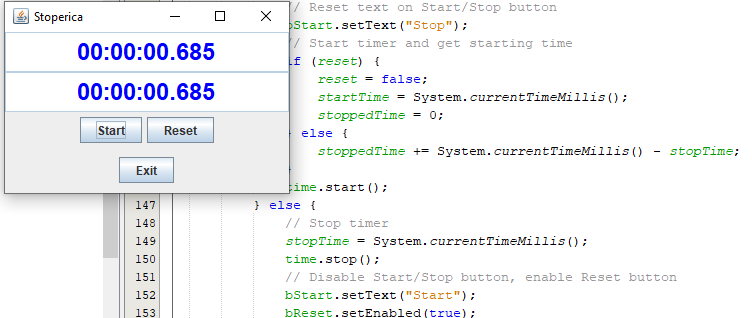
6. Create a calculator
Design a calculator based on the following image: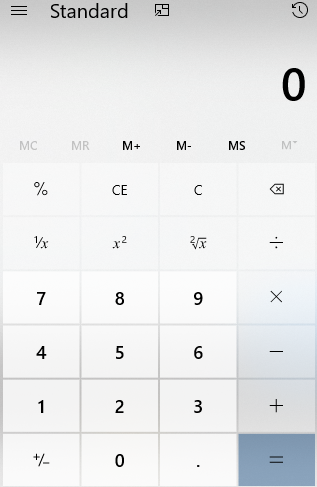 Use everything described in the topic: The visual part of the application
7. Parabolic trajectory animation
Create an animation of an oblique shot similar to the one on the website: https://kosi-hitac.herokuapp.com/kos_HitacInstruction:
Use the task "Free Fall Animation" described in video 2 on the page: Animations in Java-example
Add the initial velocity V0x and V0y to the falling body, set it to some arbitrary value. Also, change the initial position to be on the ground, ie. H=0 initially. See the animation on the page: https://kosi-hitac.herokuapp.com/simulacija_Kos_Hitac
8. Graphical application of your choice
Create an application of your choice, which includes several elements of graphics, animation, drawing, i.e. using everything described in Animations in Java-exampleIt can be a small game, etc.
9. A graphic application based on PPT presentations
To use PPT from Simply Java as an idea for creating an application:
| simplyjava1_03.ppt |
| simplyjava1_06.ppt |
| simplyjava1_09.ppt |
| simplyjava1_16.ppt |