
The Queue
A queue is a basic data structure that belongs to the linear structures and works on the FIFO (First In – First Out) principle. This means that the element that was put into the queue first is also the first one taken out of it.
Because it keeps the order of processing, the queue is often used in programming and algorithms, especially in BFS graph traversal, process simulations and task processing in operating systems.
This lesson explains the basic operations on a queue, its implementation in C++ and its connection with algorithms on graphs and trees.
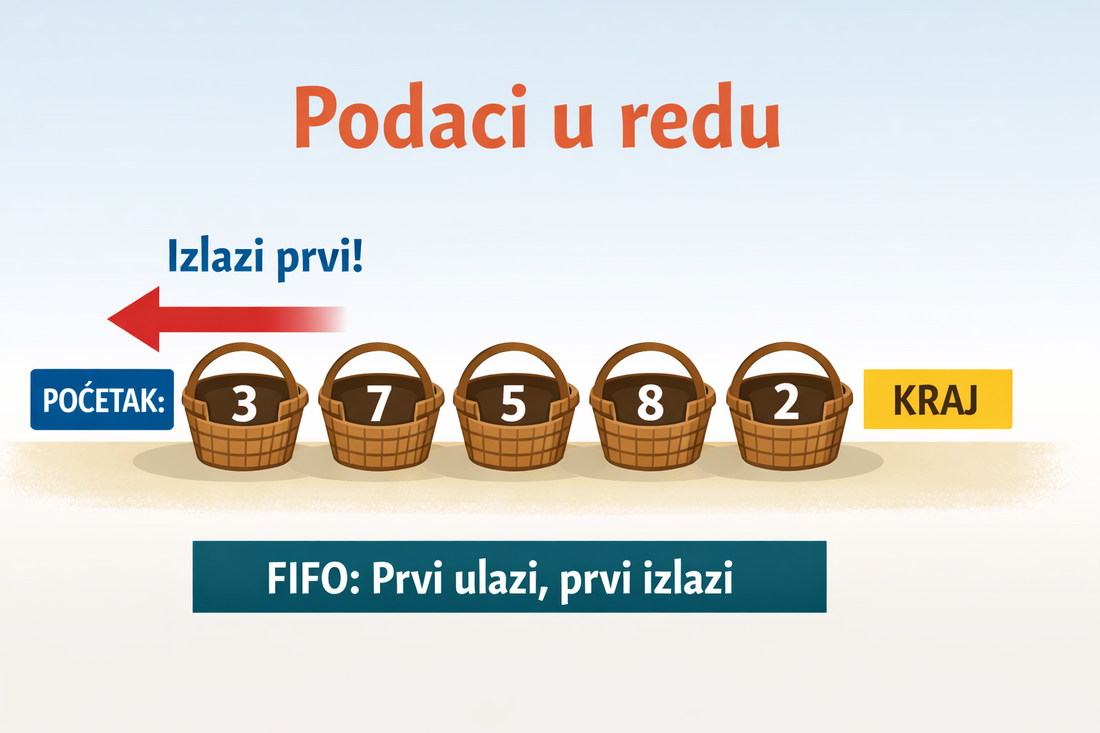
Explanation of the queue picture
The picture shows the data structure queue. The elements in the queue are lined up from the front to the rear of the queue.
New elements are always added to the rear of the queue (the right side of the picture), while elements are removed from the front of the queue (the left side).
The arrow "Leaves first!" shows the direction in which elements are removed from the queue. The element with the value 3 was put into the queue first, so it will be taken out first, no matter how many new elements are added later.
This behaviour is called FIFO (First In – First Out), which means that the elements leave the queue in the same order in which they entered it.
Thanks to this principle, the queue is often used in algorithms such as BFS graph traversal, task processing and process simulations.
The basic idea of a queue
A queue is a data structure that allows elements to be processed only in the order of their arrival. The user has no free access to the elements in the middle or at the end of the queue, but can work only with the element at the front.
Unlike a stack, where you access the last element added, a queue guarantees fair processing of data by the FIFO principle.
An everyday example is a queue in a bank – the person who joins the queue first comes to the counter first, no matter who comes later.
Basic operations on a queue
- enqueue – adding an element to the rear of the queue
- dequeue – removing an element from the front of the queue
- front – access to the first element of the queue
- empty – checking whether the queue is empty
All the basic operations on a queue have the time complexity O(1).
The queue at work through a code example
In this example you follow the execution of simple code, and the state of the queue is shown automatically after every operation. The queue works by the FIFO principle.
1  enqueue(1)
2  enqueue(2)
3  dequeue()
4  enqueue(3)
□ What do you see here?
Every line of code is executed in order.
The queue changes exactly at the moment when
enqueue or dequeue is called.
Elements are added to the rear of the queue and removed from the front.
This way of thinking is the key to understanding:
- the FIFO principle (First In – First Out)
- the BFS algorithm (graph traversal)
- process simulation and task scheduling
An interactive task: guess the output (queue)
Look at the following code that uses a queue. Before you click the button, try to predict the output.
enqueue(10);
enqueue(20);
enqueue(30);
cout << dequeue() << " ";
enqueue(40);
cout << dequeue();
What will be printed?
How to think about it?
A queue works by the principle first in – first out (FIFO).
Every dequeue() removes and returns the element at the front of the queue,
while enqueue() adds an element to the rear of the queue.
A mini comparison task: stack vs queue (visual)
The same sequence of operations is applied to a stack and to a queue. Try to predict the output, then check the result and look at how the structures differ.
add(1)
add(2)
add(3)
print(remove())
add(4)
print(remove())
Note:
- Stack:
add = push,remove = pop - Queue:
add = enqueue,remove = dequeue
Stack (LIFO)
Queue (FIFO)
C++ STL – the concrete methods of std::queue
The C++ standard library (<queue>) has the class std::queue, which implements a queue using an internal structure such as deque or list.
This makes it easy to use a queue without implementing it by hand. The main methods are:
push(x)– adds an element to the rear of the queue (corresponds to enqueue)pop()– removes the element from the front of the queue (corresponds to dequeue, does not return a value)front()– accesses the first element of the queue, without removing itback()– accesses the last element of the queue, without removing itempty()– returnstrueif the queue is emptysize()– returns the number of elements in the queueemplace(...)– constructs an element directly at the rear of the queue (C++11+)swap(q2)– swaps the contents of two queues
Note: std::queue does not support direct access to elements by index and has no iterators, because it is an abstract FIFO structure.
#include <iostream>
#include <queue>
using namespace std;

int main() {
    queue<int> q;

    // Adding elements (enqueue)
    q.push(10);
    q.push(20);
    q.push(30);

    // Access to the first and the last element
    cout << "First: " << q.front() << ", Last: " << q.back() << endl;

    // Removing the element from the front (dequeue)
    q.pop();

    cout << "After pop, the first element: " << q.front() << endl;

    // Checking the size and whether the queue is empty
    cout << "Size: " << q.size() << ", Empty? " << q.empty() << endl;

    return 0;
}
Output:
First: 10, Last: 30
After pop, the first element: 20
Size: 2, Empty? 0
This example shows the practical use of a queue in the C++ STL and connects the abstract operations enqueue/dequeue with the real methods push/pop.
Implementing a queue with an array
A simple implementation of a queue can be made with an array and two indexes: one points to the front of the queue, and the other to its rear.
#include <iostream>
using namespace std;

// The maximum size of the array for the queue
const int MAX = 100;

// The array that keeps the elements of the queue
int arr[MAX];

// The indexes of the front and the rear of the queue
int head = 0, tail = 0;

// Checking whether the queue is empty
bool empty() {
    return head == tail;
}

// Adding an element to the queue (enqueue)
void enqueue(int x) {
    // We add the element to the rear of the queue and move the rear
    arr[tail++] = x;
    // Note: with an ordinary array we do not use modulo, so space can remain unused
}

// Removing the element from the front of the queue (dequeue)
void dequeue() {
    if (!empty()) {
        head++; // We only move the front
        // Note: the element stays in the array, but it is no longer in the queue
    }
}

// Getting the first element of the queue without removing it
int front() {
    return arr[head];
}
Such an implementation can leave unused space in the array, so in practice a circular queue is often used.
A circular queue
In a circular queue the end of the array is "joined" to the beginning, so the space in the array is used more efficiently. The indexes are moved with the modulo operator.
const int MAX = 100;
int arr[MAX];
int head = 0, tail = 0;

// Adding an element to the queue
void enqueue(int x) {
    arr[tail] = x;
    tail = (tail + 1) % MAX; // a move with wrap-around
}

// Removing the element from the front of the queue
void dequeue() {
    head = (head + 1) % MAX; // a move with wrap-around
}
Implementing a queue with a linked list
A queue can also be implemented with a linked list, which removes the limit of a fixed size.
struct Node {
    int val;
    Node* next;
};

Node* head = nullptr; // The first element of the queue
Node* tail = nullptr; // The last element of the queue

// Adding an element to the queue
void enqueue(int x) {
    Node* newNode = new Node{x, nullptr}; // Creating a new node
    if (tail == nullptr) {
        // If the queue is empty, the new node is both the front and the rear
        head = tail = newNode;
    } else {
        tail->next = newNode; // We link the new node to the rear
        tail = newNode;       // We move the rear
    }
}

// Removing the element from the front of the queue
void dequeue() {
    if (head != nullptr) {
        Node* tmp = head;          // We keep the node to delete
        head = head->next;         // We move the front
        delete tmp;                // We free the memory
        if (head == nullptr)       // If the queue is now empty
            tail = nullptr;
    }
}
Uses of a queue
A queue is used very often in algorithms and systems:
- BFS (Breadth-First Search) graph traversal
- Traversing trees level by level
- Process simulations and task scheduling
- Shortest path algorithms in unweighted graphs
The connection with graphs and trees
In BFS graph traversal, a queue is used to keep the nodes that are waiting to be processed. Without understanding how a queue works, it is hard to fully understand the BFS algorithm.
In the lessons about graphs and trees, the queue will be used as the basic helper structure.
Checking understanding: The same sequence of operations on a stack and on a queue gives a different result. Try to notice the difference.
A mini comparison task: stack vs queue
Look at the same sequence of operations, but applied to a stack and to a queue. Before you click the button, try to predict the output.
add(1)
add(2)
add(3)
print(remove())
add(4)
print(remove())
Assume that:
- for the stack →
add = push,remove = pop - for the queue →
add = enqueue,remove = dequeue
Enter the results:
An example task: simulating a queue of processes
Suppose that an operating system uses a queue for processing processes. Every process that arrives is added to the rear of the queue, and the process at the front of the queue gets the right to run.
The processes with the identifiers 1, 2, 3, 4 arrive in the queue in this order.
After that the first two processes from the queue are processed.
Task
Determine the order in which the processes run and the state of the queue after the first two processes have been processed.
Solution
The processes are added to the queue in the order in which they arrive:
- The queue after the processes arrive: 1, 2, 3, 4
The first process to run is process 1, because it was put into the queue first. After that process 2 runs.
- Processes run: 1, 2
- The state of the queue after processing: 3, 4
This example clearly shows the FIFO principle of a queue – the processes run exactly in the order in which they arrived.
An example of a circular queue at work
We will show how a circular queue works when elements are added and removed. The FIFO principle is used, and the indexes are moved modulo MAX.
// A circular queue
#include <iostream>
using namespace std;

const int MAX = 6; // a small size to make it easier to visualise
int arr[MAX];
int head = 0, tail = 0;

// Checking whether the queue is empty
bool empty() { return head == tail; }

// Checking whether the queue is full: one place always stays empty,
// otherwise a full queue would look the same as an empty one (head == tail)
bool full() { return (tail + 1) % MAX == head; }

// Adding an element
void enqueue(int x) {
    if (full()) { cout << "The queue is full!" << endl; return; }
    arr[tail] = x;
    tail = (tail + 1) % MAX;
}

// Removing an element
void dequeue() {
    if (!empty()) head = (head + 1) % MAX;
}

// Printing the current state of the queue
void printQueue() {
    cout << "Queue: ";
    int i = head;
    while (i != tail) {
        cout << arr[i] << " ";
        i = (i + 1) % MAX;
    }
    cout << endl;
}

int main() {
    enqueue(10); printQueue(); // Queue: 10
    enqueue(20); printQueue(); // Queue: 10 20
    enqueue(30); printQueue(); // Queue: 10 20 30
    dequeue(); printQueue();   // Queue: 20 30
    enqueue(40); printQueue(); // Queue: 20 30 40
    enqueue(50); printQueue(); // Queue: 20 30 40 50
    enqueue(60); printQueue(); // Queue: 20 30 40 50 60 (tail has gone round to the beginning)
    return 0;
}
Output:
Queue: 10
Queue: 10 20
Queue: 10 20 30
Queue: 20 30
Queue: 20 30 40
Queue: 20 30 40 50
Queue: 20 30 40 50 60
□ Note:
When the rear reaches MAX, the modulo operator brings it back to the beginning. In this way the whole array is used, without "dead" elements.
One place always stays free: if the queue could fill all MAX places, after the last insertion the rear would come to the front (head == tail) and the full queue would look empty. That is why a queue with an array of MAX elements holds at most MAX − 1 elements.
An example of BFS graph traversal
BFS on a simple graph using a queue. The queue keeps the nodes that are waiting to be processed.
#include <iostream>
#include <queue>
using namespace std;

int main() {
    const int N = 5; // the number of nodes
    int graph[N][N] = {
        {0,1,1,0,0},
        {1,0,0,1,0},
        {1,0,0,1,1},
        {0,1,1,0,1},
        {0,0,1,1,0}
    };
    bool visited[N] = {false};
    queue<int> q;

    int start = 0;
    visited[start] = true;
    q.push(start);

    cout << "BFS traversal order: ";

    while (!q.empty()) {
        int node = q.front(); q.pop();
        cout << node << " ";

        for (int i = 0; i < N; i++) {
            if (graph[node][i] && !visited[i]) {
                visited[i] = true;
                q.push(i);
            }
        }
    }
    cout << endl;
    return 0;
}
Output:
BFS traversal order: 0 1 2 3 4 □ Explanation: – The starting node is put into the queue. – While the queue is not empty: we remove the node from the front and visit its neighbours. – The neighbours that have not been visited yet are added to the queue. – The queue guarantees that the nodes are processed level by level, which is the key to BFS.
Practice tasks — the queue
1. Simulating a queue in a bank
Task text
People with the numbers
5 3 8 2 come to a queue in a bank in this order.
After that the first two people are served.
Print the order in which they were served and the state of the queue after that.
Example
Input:
5 3 8 2

Output:
Served: 5 3
Queue: 8 22. Processing requests (FIFO)
Task text
A sequence of requests arriving at a server is given. The server always processes the request that arrived first. Print the order in which the requests are processed.
Example
Input:
4
10 20 30 40

Output:
10 20 30 403. The first negative number in every window
Task text
An array of n integers and a window size k are given.
For every subarray of length k print the first negative number.
If there is none, print 0.
Example
Input:
8 3
12 -1 -7 8 -15 30 16 28

Output:
-1 -1 -7 -15 -15 0Practice tasks — the queue (competition level)
4. The number of elements in the queue at a given moment
Task text
A sequence of operations on a queue is given:
+ means adding an element to the queue,
and - means removing an element from the queue.
The queue is empty at the beginning.
Determine how many elements remain in the queue after all the operations.
Example
Input:
++-++-

Output:
25. The first unprocessed request
Task text
A sequence of requests and the number k of processed requests are given. Print the ID of the request that will be processed next.
Example
Input:
5 3
10 20 30 40 50

Output:
406. BFS without a graph (spreading a signal)
Task text
An array of length n is given, where 1 marks a signal source
and 0 an unprocessed field.
The signal spreads to the left and to the right every second.
Determine how many seconds are needed for the signal to fill the whole array.
The first line of the input contains n, and the second line the array.
Example
Input:
5
0 0 1 0 0

Output:
27. The minimum number of operations to reach the goal
Task text
A starting value x and a goal y are given. In one move you can:
- increase the number by 1
- double the number
Example
Input:
2 9

Output:
3