
The Stack – a Basic Data Structure
A stack is one of the basic data structures in programming, and it works on the LIFO (Last In – First Out) principle. Understanding the stack is the key to working with recursion, graphs, trees and many algorithms used in practice.
In this lesson we will learn the basic idea of a stack, its operations, ways of implementing it and typical tasks in which a stack is used.
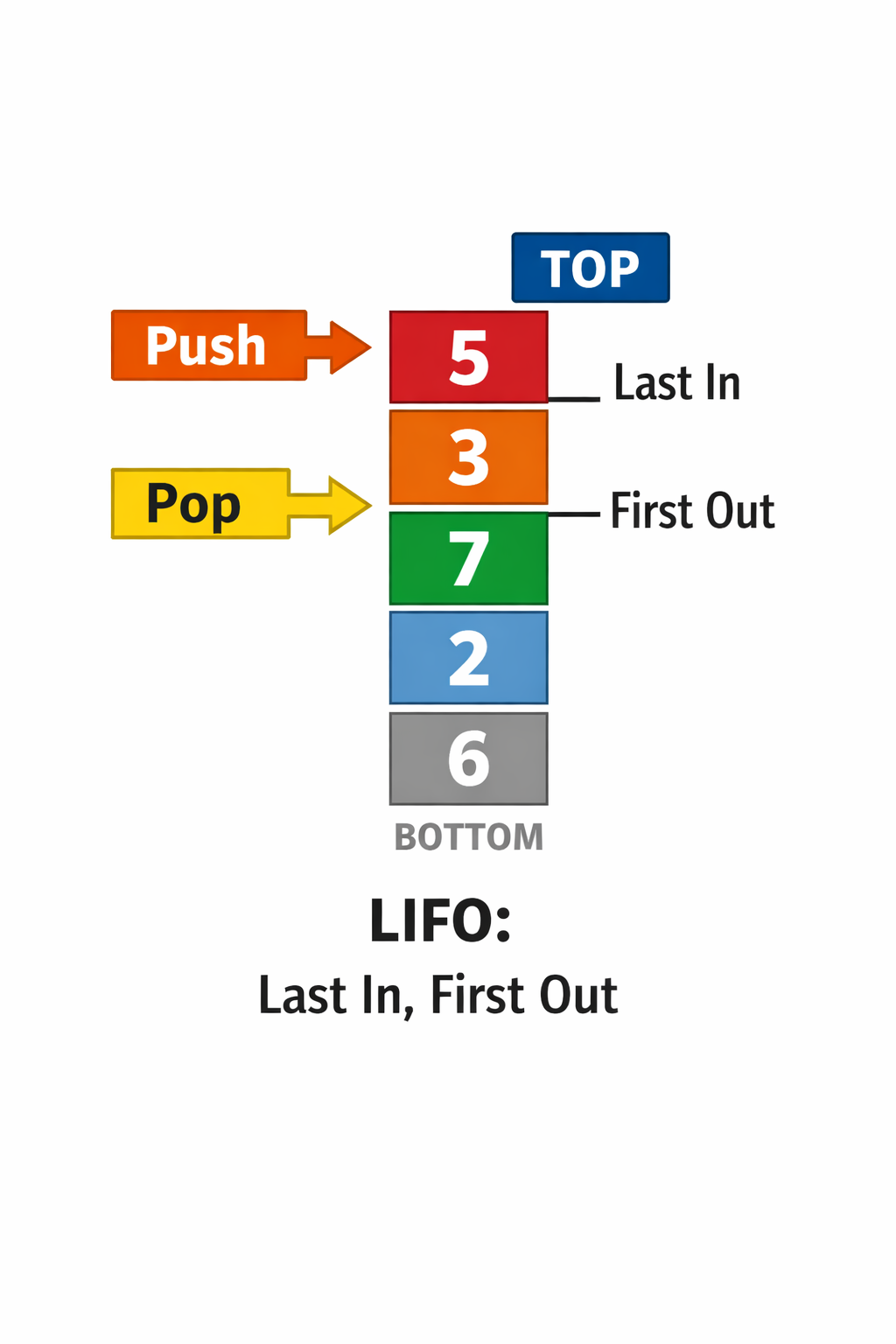
The picture shows the stack data structure and its basic working principle — LIFO (Last In – First Out). The elements are piled one on top of another, like plates in a pile, where you always access only the element on the top.
The right side (or the upper part) of the diagram marks the top of the stack. The operation push adds a new element exactly on that top, while the operation pop removes the element from the top of the stack. You cannot directly access the elements below the top without first removing the elements above them.
This behaviour makes the stack ideal for problems in which the last information added must be processed first, such as: recursive function calls (the call stack), DFS graph traversal, undo/redo operations and checking brackets.
The diagram helps you see why a stack has no arbitrary access to its elements, but strictly controls the order of processing through the LIFO rule.
1️⃣ The basic idea
Definition: LIFO — Last In, First Out. The last element put on the stack is the first one taken off.
Everyday examples:
- Plates in a pile: when you put a new plate on the top, it is the first one you will take off.
- Undo in editors: the last action is undone first.
- Browsers — history (back): the last page visited is on the top.
An animation of a stack at work
A stack works on the LIFO (Last In – First Out) principle. Elements are added and removed only at the top of the stack.
□ Explanation:
The last element we put in (PUSH) is the first one removed (POP).
That is why a stack is used for:
- recursion
- checking brackets
- undo/redo operations
- evaluating expressions
2️⃣ Basic operations
A stack usually supports a few simple operations:
- push(x) — put the element x on the top of the stack.
- pop() — remove and return the element from the top.
- top() / peek() — look at (do not remove) the element on the top.
- is_empty() — check whether the stack is empty.
A note on complexity: all these basic operations work in O(1) time (amortized for push with a vector/growable array).
Errors and edge cases:
- Pop on an empty stack — it should be detected and handled (throw an exception, return a sentinel value, or check is_empty before pop).
- Top on an empty stack — the same, be careful.
Examples in C++ (std::stack)
stack<int> s;

// push – we add an element to the top of the stack
s.push(10);

// top – we read the element on the top (without removing it)
int x = s.top();

// pop – we remove the element from the top
s.pop();
In C++ we use std::stack, which already
implements the LIFO behaviour internally. All the basic operations work in O(1) time.
Examples in Python (a list as a stack)
stack = []

# push – we add an element to the end of the list
stack.append(10)

# top – we read the last element
top_element = stack[-1]

# pop – we remove the last element
stack.pop()
In Python an ordinary list is often used as a stack,
where the end of the list is the top of the stack. The operations append and pop
are efficient and work in O(1) time.
Note: before calling pop() or top(),
you should always check whether the stack is empty, to avoid errors
(access to an element that does not exist).
3️⃣ Implementation (the idea, without too much code)
There are two common implementations:
3.1 With an array / vector
We simply use a dynamic array (e.g. std::vector in C++) and treat the end of the array as the top of the stack.
// push: vec.push_back(x)
// pop:  vec.pop_back()
// top:  vec.back()
// is_empty: vec.empty()
Advantages: very fast (O(1) for the operations), simple.
3.2 With a linked list
Every node points to the previous (or next) one — the top of the stack is the head of the list.
// push(x): create a new node, node.next = head, head = node
// pop(): if head == null -> error; otherwise head = head.next
Advantages: no need to reallocate memory; pop/push are always O(1). Disadvantages: more memory per element because of the pointers.
4️⃣ The stack and recursion
The call stack is a practical implementation of a stack used by the runtime environment:
- Every function call is put on the top of the call stack (a frame with the local variables and the return address).
- When the function finishes, its frame is taken off the top (pop).
Why does DFS "use" a stack? In a recursive DFS implementation, the runtime call stack implicitly keeps the current path and the return points. An iterative DFS implementation uses an explicit stack to simulate the same behaviour.
A short example of tracing calls
The function:
function f(n):
  if n == 0: return
  print(n)
  f(n-1)
  print("return", n)
For the call f(3), the call stack (step by step) looks like this:
- we call
f(3)— we put frame(3) on the stack - inside
f(3)we callf(2)— we put frame(2) - then
f(1), thenf(0) - when
f(0)finishes — pop, we return tof(1), and so on.
This clearly shows the LIFO behaviour: the last frame called is the first one to finish.
Recursion and the call stack
Every recursive function call is placed on the call stack. When the function finishes, its context is removed from the stack.
Example: computing the factorial fact(n)
□ Important:
Recursion uses a stack to remember:
- the values of the parameters
- the local variables
- the place in the code to return to
□ The key difference:
- Stack (LIFO) — the last element put in is removed first
- Queue (FIFO) — the first element put in is removed first
- a stack is used for recursion, undo/redo, parsing expressions
- a queue is used for BFS, waiting simulations, process scheduling
A stack at work through a code example
In this example you follow the execution of simple code, and the state of the stack is shown automatically after every operation.
1  push(1)
2  push(2)
3  pop()
4  push(3)
□ What do you see here?
Every line of code is executed in order.
The stack changes exactly at the moment when
push or pop is called.
This way of thinking is the key to understanding:
- recursion
- the DFS algorithm
- undo/redo mechanisms
An interactive task: guess the output
Look at the following code that uses a stack. Before you click the button, try to predict the output.
push(10);
push(20);
push(30);
cout << pop() << " ";
push(40);
cout << pop();
What will be printed?
How to think about it?
A stack works by the principle last in – first out (LIFO).
Every pop() removes and returns the element from the top of the stack.
5️⃣ Typical tasks
A stack is the key to many classic problems:
- Balanced brackets: we check the order of opening and closing brackets.
- Converting infix → postfix (the Shunting Yard algorithm): for parsing expressions.
- Evaluating postfix (Reverse Polish) expressions: we use a stack for the results of the operations.
- Undo/redo mechanisms and the history of operations.
- Backtracking: we temporarily keep the state and go back (pop) when we have examined a branch.
A mini exercise: checking balanced brackets
The task is to check whether the brackets in a given string are correctly balanced. We use a stack to follow the order of opening and closing brackets.
Rules:
- Every opened bracket must have a matching closed one.
- The brackets must be closed in the correct order.
Input examples:
()[]{} → correct([{}]) → correct([)] → incorrect((() → incorrect
Question: How would we use a stack to check whether the brackets are balanced?
The connection with other lessons
The stack will be used and will appear again in the following topics:
- DFS graph traversal (the implicit call stack or an explicit stack)
- Tree traversal (recursive algorithms)
- Recursion and backtracking (e.g. generating permutations, a sudoku solver)
Conclusion: a stack is a simple but very powerful data structure whose LIFO logic appears in many algorithmic patterns. Understanding the stack helps both with approaching new problems and with working with recursion and graphs.
Practice tasks — the stack
1. Checking brackets
Task text
A string made of the characters (), {} and [] is given.
Check whether the brackets are correctly paired and in the correct order.
If they are — print YES, otherwise NO.
Example
Input:
{[()]}
Output:
YES

Input:
{[(])}
Output:
NO2. Reversing a string with a stack
Task text
A string S is given. Print its reversed version
using a stack as a helper data structure.
Example
Input:
programming
Output:
gnimmargorp3. The next greater element
Task text
An array of n integers is given.
For every element find the first greater element to its right.
If there is none, print -1.
Example
Input:
4
4 5 2 10
Output:
5 10 10 -14. Evaluating a postfix (RPN) expression
Task text
An arithmetic expression written in postfix
(Reverse Polish Notation) is given.
Compute its value.
The operators are +, -, * and /.
Example
Input:
2 3 1 * + 9 -
Output:
-4Practice tasks — the stack in real situations
In the following tasks a stack is used to solve problems that appear in everyday life and in real software systems.
5. Undo operations in a text editor
Task text
A user enters operations in a text editor (strings).
Every new operation is added to the stack.
When the command UNDO appears, the last operation is removed.
At the end print which operations remain.
Example
Input:
write
delete
copy
UNDO
paste
Output:
write delete paste6. Going back through the history of pages
Task text
A user visits web pages (strings).
The command BACK takes the user back to the previous page.
Print the currently open page after every command.
Example
Input:
google
youtube
facebook
BACK
BACK
twitter
Output:
google
youtube
facebook
youtube
google
twitterRelated lessons: