
Restaurant Orders (C#) – Solution
In this task we will create a simple console application that simulates managing orders in a restaurant. The application will allow adding, showing and sorting orders, as well as computing the prices of meals with discounts or extra costs, depending on the payment method and the delivery. Through this task we will learn how to use interfaces, handle exceptions, implement sorting methods using LINQ, and use an indexer to access the elements of a list.
Instructions for solving the task
Instructions for solving the task
- Creating a new project and the basic implementation:
- Open Visual Studio and create a new Console application named "RestaurantApp".
- Create the class Order, which will hold the basic information about an order, such as the guest's name, the meal, the payment method, the order number, the delivery method and the price.
- Implementing the interface IRestaurant:
- Create the interface IRestaurant, which defines three methods:
- AddOrder(Order order) for adding an order to the list, checking whether the number of orders goes over the allowed limit (10).
- MealPrices() for computing and showing the prices of the meals with the corresponding discounts or extra costs.
- ShowOrders() for showing all orders.
- Create the interface IRestaurant, which defines three methods:
- Implementing the class Restaurant:
- Create the class Restaurant, which implements the interface IRestaurant. This class will hold the list of orders and the methods for adding, showing and sorting orders.
- Add methods for sorting the orders by the guest's name and by the meal: first ascending by name, and then descending by meal.
- Also implement an indexer, so that the orders can be accessed like the elements of an array.
- The main class:
- In the main class Program create an instance of the class Restaurant and add a few orders.
- Sort the orders and show them on the screen.
- Demonstrate exception handling when an index or the number of orders goes over the allowed limit.
- Use the indexer to change the order at a given index.
Conclusion
This program is a basic model of managing orders in a restaurant. By implementing an interface and a class for handling exceptions, the program makes it possible to manage many orders, with the possibility of extending it with additional functionality when needed.
The solution of the task in C#
First we will create the class Order, which should be in the file Order.cs:
Order.cs
namespace RestaurantApp
{
    internal class Order
    {
        private string fullName;
        private string meal;
        private string paymentMethod;
        private int orderNumber;
        private bool courierDelivery;
        private double price;

        public Order(string fullName, string meal, string paymentMethod, int orderNumber, bool courierDelivery, double price)
        {
            this.fullName = fullName;
            this.meal = meal;
            this.paymentMethod = paymentMethod;
            this.orderNumber = orderNumber;
            this.courierDelivery = courierDelivery;
            this.price = price;
        }

        public string FullName
        {
            get { return fullName; }
            set { fullName = value; }
        }

        public string PaymentMethod
        {
            get => paymentMethod;
            set => paymentMethod = value;
        }

        public double Price
        {
            get => price;
            set => price = value;
        }

        public bool CourierDelivery { get => courierDelivery; set => courierDelivery = value; }
        public string Meal { get => meal; set => meal = value; }
        public int OrderNumber { get => orderNumber; set => orderNumber = value; }

        public string ChosenDelivery()
        {
            if (CourierDelivery)
            {
                return "Courier";
            }
            else
            {
                return "In the restaurant";
            }
        }

        public override string ToString()
        {
            return $"Name: {FullName}, Meal: {Meal}, payment: {PaymentMethod}, delivery: {ChosenDelivery()}, Price: {Price}";
        }
    }
}
Explanation: This class represents one order with all the necessary attributes. The method ChosenDelivery() returns a text description of the delivery method, and the method ToString() shows the details of the order.
The interface: IRestaurant.cs
namespace RestaurantApp
{
    internal interface IRestaurant
    {
        /* A method that adds orders to the list, making sure
           that the number of orders is never greater than 10 */
        void AddOrder(Order order);

        /* A method that prints the orders */
        void ShowOrders();

        /* A method that prints the price of each order, and the total price of the meals */
        void MealPrices();
    }
}
This interface defines the methods that the class Restaurant must implement, making it possible to add, show and compute the prices of orders.
The exception class: RestaurantException.cs
namespace RestaurantApp
{
    internal class RestaurantException : Exception
    {
        public RestaurantException(string message) : base(message)
        {
        }
    }
}
Inheriting from Exception: The class RestaurantException inherits the class Exception, which means that it is a custom exception type that can be used for specific errors in the application. Inheritance makes it possible to use all the functionality of a standard exception in .NET, such as catching exceptions, showing messages, etc.
A constructor with the parameter message: The constructor of the class RestaurantException receives a string parameter message, which is the error message. This message is passed to the base class Exception with base(message), which makes sure that the message is set correctly and can be shown or logged. The message is printed where the exception is caught (in the catch block in Program), so it is shown exactly once.
The class that processes the orders: Restaurant.cs
namespace RestaurantApp
{
    internal class Restaurant : IRestaurant
    {
        private const int MaxOrders = 10;
        private readonly List<Order> orders;
        private double totalPrice;

        public Restaurant()
        {
            orders = new List<Order>();
        }

        public void MealPrices()
        {
            totalPrice = 0;
            foreach (Order order in orders)
            {
                double price = order.Price;
                if (order.PaymentMethod == "Cash")
                {
                    price *= 0.85;              // a 15% discount for paying in cash
                }
                if (order.CourierDelivery)
                {
                    price += 500;               // the courier delivery costs 500
                }
                Console.WriteLine($"order: {order}, total: {price}");
                totalPrice += price;
            }
            Console.WriteLine($"The total price of the orders: {totalPrice}");
        }

        public void AddOrder(Order order)
        {
            if (orders.Count >= MaxOrders)
            {
                throw new RestaurantException("We do not accept more than 10 orders");
            }
            orders.Add(order);                  // adds the new order
        }

        public void ShowOrders()
        {
            foreach (Order order in orders)
            {
                Console.WriteLine(order);
            }
        }

        public void SortByNameAndMeal()
        {
            var sortedOrders = orders
                .OrderBy(o => o.FullName)
                .ThenByDescending(o => o.Meal)
                .ToList();

            Console.WriteLine("Orders sorted by name and by meal (descending):");
            foreach (var order in sortedOrders)
            {
                Console.WriteLine($"{order.FullName}: {order.Meal}");
            }
        }

        // Sorting by name using IComparer
        public void PrintSortedByName()
        {
            orders.Sort(new OrderComparer());
            foreach (var order in orders)
            {
                Console.WriteLine(order);
            }
        }

        // IComparer for sorting by full name
        public class OrderComparer : IComparer<Order>
        {
            public int Compare(Order? x, Order? y)
            {
                return string.Compare(x?.FullName, y?.FullName);
            }
        }

        // The indexer
        public Order this[int index]
        {
            get { return orders[index]; }
            set { orders[index] = value; }
        }
    }
}
The class Restaurant implements the methods of the interface IRestaurant. The methods AddOrder, ShowOrders and MealPrices make the basic operations on orders possible, while SortByNameAndMeal sorts the list of orders by name and by meal.
- The list of orders (List<Order>): The class Restaurant uses the list orders to store all orders added to the restaurant. This list makes it possible to manage the orders dynamically (adding, searching, sorting, etc.).
- The method AddOrder(Order order): This method adds a new order to the list orders. Before adding, it checks whether there are already 10 orders, and in that case it throws the exception RestaurantException. This guarantees the limit on the maximum number of orders the restaurant can accept.
- The method MealPrices(): This method computes and shows the price of every order, taking into account the payment method and the delivery. The total price of all orders is added up and shown at the end. Different prices are computed under specific conditions (a discount for cash, an extra cost for delivery).
- The method ShowOrders(): This method shows all orders in the restaurant using the method ToString() defined in the class Order. In this way the user can see all the information about the current orders.
- Sorting: The class Restaurant can sort the orders by the guest's name and the meal using the method SortByNameAndMeal(). There is also the method PrintSortedByName(), which uses a custom IComparer to sort by the guest's name.
- The indexer: The indexer (this[int index]) makes it possible to access individual orders by index, like in an array. This allows orders to be changed at a given position.
The main class: Program.cs
namespace RestaurantApp
{
    internal class Program
    {
        static void Main(string[] args)
        {
            // a decimal point (not a comma) in the output, whatever the computer's settings are
            System.Globalization.CultureInfo.CurrentCulture = System.Globalization.CultureInfo.InvariantCulture;
            Restaurant restaurant = new Restaurant();
            try
            {
                restaurant.AddOrder(new Order("Marko Markovic", "Pizza", "Cash", 1, true, 500));
                restaurant.AddOrder(new Order("Jovan Jovanovic", "Pasta", "Card", 2, false, 800));
                restaurant.AddOrder(new Order("Ana Anic", "Salad", "Cash", 3, true, 1450));
                restaurant.AddOrder(new Order("Ana Anic", "Burger", "Card", 4, true, 1500));

                restaurant.SortByNameAndMeal();    // sorting by name and meal

                restaurant.ShowOrders();
                Console.WriteLine("Sorted by the customer's name:");
                restaurant.PrintSortedByName();
                restaurant.MealPrices();
                restaurant[1] = new Order("Petar Markovic", "Wiener schnitzel", "Cash", 5, true, 1800);
                Console.WriteLine(restaurant[1]);
                restaurant[6] = new Order("Tamara Sedlar", "Karadjordje schnitzel", "Card", 6, true, 1900);
                Console.WriteLine(restaurant[6]);
            }
            catch (Exception ex)
            {
                Console.WriteLine(ex.Message);
            }
        }
    }
}
- Creating the Restaurant object: At the beginning of the program an object of the class Restaurant is created, which will be used to work with the orders. This object makes it possible to add, show and process orders.
- Adding orders: Using the method AddOrder(), different orders are added to the restaurant. Every order contains information about the customer's name, the ordered meal, the payment method, the order number, the delivery and the price.
- Sorting orders: After the orders have been added, the method SortByNameAndMeal() is used to sort the orders by the customer's name and the ordered meal. Sorting makes the orders easier to review and the data better organized.
- Showing orders: The method ShowOrders() is used to show all orders in the restaurant. This shows all the information about the orders to the user.
- Sorting by name: The program also uses the method PrintSortedByName() to sort the orders by the customer's name. This method uses a custom comparer for sorting.
- Computing the prices: The method MealPrices() computes the total price of all orders, taking into account the payment method and the delivery. The result is shown to the user, which gives an overview of the costs.
- Changing orders: Using the indexer, the program changes existing orders at specific positions in the list. This gives flexibility in working with the orders. There is no order at index 6 (the list has 4 orders), so this assignment throws an exception.
- Catching exceptions: The program uses a try-catch block to catch all possible exceptions that can occur while working with the orders, such as going over the maximum number of orders or an index outside the list. If an exception occurs, its message is shown to the user.
This program makes the basic operations on restaurant orders possible, including adding, showing, sorting, computing prices and changing orders, all with handling the exceptions that may occur.
Running the program
After running the application, the console shows:
Orders sorted by name and by meal (descending):
Ana Anic: Salad
Ana Anic: Burger
Jovan Jovanovic: Pasta
Marko Markovic: Pizza
Name: Marko Markovic, Meal: Pizza, payment: Cash, delivery: Courier, Price: 500
Name: Jovan Jovanovic, Meal: Pasta, payment: Card, delivery: In the restaurant, Price: 800
Name: Ana Anic, Meal: Salad, payment: Cash, delivery: Courier, Price: 1450
Name: Ana Anic, Meal: Burger, payment: Card, delivery: Courier, Price: 1500
Sorted by the customer's name:
Name: Ana Anic, Meal: Salad, payment: Cash, delivery: Courier, Price: 1450
Name: Ana Anic, Meal: Burger, payment: Card, delivery: Courier, Price: 1500
Name: Jovan Jovanovic, Meal: Pasta, payment: Card, delivery: In the restaurant, Price: 800
Name: Marko Markovic, Meal: Pizza, payment: Cash, delivery: Courier, Price: 500
order: Name: Ana Anic, Meal: Salad, payment: Cash, delivery: Courier, Price: 1450, total: 1732.5
order: Name: Ana Anic, Meal: Burger, payment: Card, delivery: Courier, Price: 1500, total: 2000
order: Name: Jovan Jovanovic, Meal: Pasta, payment: Card, delivery: In the restaurant, Price: 800, total: 800
order: Name: Marko Markovic, Meal: Pizza, payment: Cash, delivery: Courier, Price: 500, total: 925
The total price of the orders: 5457.5
Name: Petar Markovic, Meal: Wiener schnitzel, payment: Cash, delivery: Courier, Price: 1800
Index was out of range. Must be non-negative and less than the size of the collection. (Parameter 'index')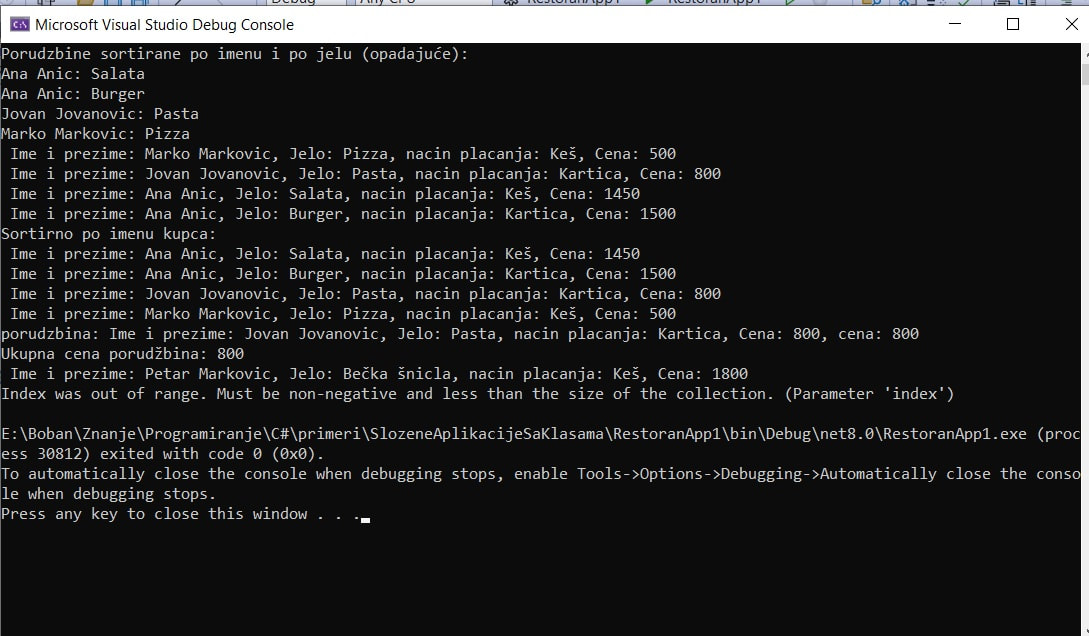
Figure 1: A complex application in C#: managing restaurant orders – running