An advanced example in C#: train passengers
This article shows how to create a complex example in C#, a console application that demonstrates the techniques of object-oriented programming: classes, objects, collections, sorting algorithms, interfaces and exception handling. It also shows how to use LINQ queries and lambda expressions. Let us look at the following example:
Example: Managing passengers on a train
The task is to create a program that manages the passengers on a train. A passenger should have information such as the first name, the last name and the way the ticket was bought. The reservation should be confirmed automatically if the ticket was bought online or at the counter.
The program should allow passengers to board the train, but the train can take at most seven passengers. It should also be possible to display all the passengers on the train, as well as the passengers together with their ticket prices. The ticket price can be reduced by a certain discount (for example 10%) if the ticket was bought online.
In addition, a feature for sorting the passengers by first name or by last name and displaying the results should be implemented.
The program should also handle the errors that can occur, for example when trying to put more passengers on the train than allowed (7 in this example).
Note: You can use generic collections to store the passenger data.
A similar example (task no. 8: Managing orders in a restaurant) can be found on the page: Additional practice examples – Classes and objects
Creating a new project and installing the required additional packages
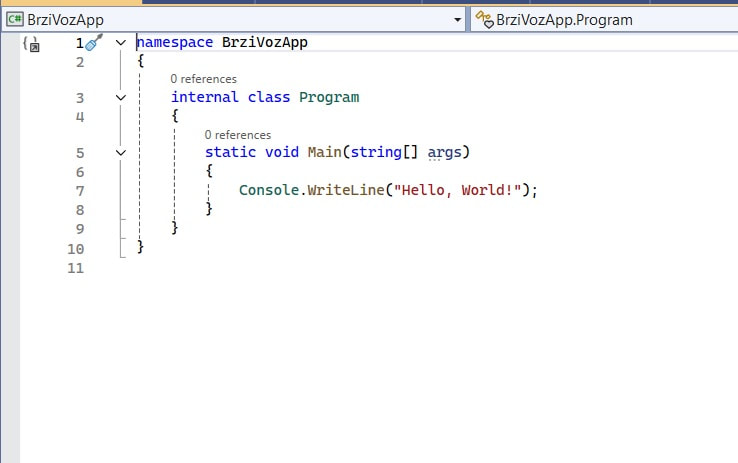
Let us open Visual Studio and create a console application called FastTrainApp!
The Visual Studio screenshots on this page come from the Serbian version of the project, so they show the Serbian names: BrziVozApp (FastTrainApp), IVoz (ITrain), Putnik (Passenger) and Voz (Train).
Description of the example
First we will create the class Passenger, which describes a passenger. As attributes we include what matters for this task: general information about the passenger, the first and last name, then the purchase method (online or counter) and the reservation, that is, whether the passenger has reserved a ticket or not.
To show how interfaces are used and connected to a class, we will create the interface ITrain, in which we will define the required methods that will be implemented in the class, or classes, that we connect to this interface. We will define 3 methods in the interface:
- Board(), which takes an object of the Passenger class as its parameter and must check that the number of passengers does not exceed the limit (7).
- TicketPrice(), which prints the ticket price for each passenger, with or without a discount. The discount is given if the ticket is bought online, and in this example it is 10%. Buying at the counter gives no discount, and the base ticket price is 1500 dinars.
- PassengerList() – prints the passengers who are on the train.
Then we will create the class Train, which contains an array or a list of passengers, the ticket price, and sorting methods: one for sorting by first name and another for sorting by last name. The passengers who have a reservation and bought their ticket "online" will be sorted in descending order. We will also implement an "indexer" for the passengers, so that we can access the list of passengers as if it were an array.
In the main class we will create an instance of the train, create a collection of passengers and sort it in the reverse of the order in which the passengers boarded the train.
Here we still need to do the following. Read the number of passengers. Print the passengers, but make sure that, if the number is over the limit, the application throws an exception with a message saying that the number of passengers has been exceeded, and in that case prints only the first 7 passengers.
Sort the passengers, first by first name and then by last name. Here you can use LINQ queries, lambda expressions or the IComparer interface.
Demonstrate throwing and catching exceptions.
Creating the Passenger class
In the existing project let us add a new class Passenger in the file Passenger.cs and implement it.
If you are not sure how to add a new class, see the article: Creating a simple application in C# Let us add the following attributes: firstName, lastName, purchaseMethod of type string and reservation of type bool. We will also add a constructor with parameters that includes all the parameters except the reservation, because it will be determined by the program.
The class should look as in figure 2.
using System;
using System.Collections.Generic;
using System.Linq;
using System.Text;
using System.Threading.Tasks;

namespace FastTrainApp
{
    internal class Passenger
    {
        private string firstName;
        private string lastName;
        private string purchaseMethod;
        private bool reservation;

        public Passenger(string firstName, string lastName, string purchaseMethod)
        {
            this.FirstName = firstName;
            this.LastName = lastName;
            this.PurchaseMethod = purchaseMethod;
            // Validation for the reservation field
            this.reservation = (purchaseMethod == "online" || purchaseMethod == "counter");
        }

        public string FirstName
        {
            get => firstName;
            set => firstName = value;
        }
        public string LastName
        {
            get => lastName;
            set => lastName = value;
        }
        public string PurchaseMethod
        {
            get => purchaseMethod;
            set {
                purchaseMethod = value;
                reservation = purchaseMethod == "online" || purchaseMethod == "counter";
            }
        }
        // ... the rest of the class is in the next figure
    }
}
Inside the constructor the reservation is validated, that is, its value is true if the purchase method is "online" or "counter".
Next we need to add properties for all the fields of the class and the ToString() method, which is responsible for printing the data. The complete class is shown in figure 3:
using System;
using System.Collections.Generic;
using System.Linq;
using System.Text;
using System.Threading.Tasks;

namespace FastTrainApp
{
    internal class Passenger
    {
        private string firstName;
        private string lastName;
        private string purchaseMethod;
        private bool reservation;

        public Passenger(string firstName, string lastName, string purchaseMethod)
        {
            this.FirstName = firstName;
            this.LastName = lastName;
            this.PurchaseMethod = purchaseMethod;
            // Validation for the reservation field
            this.reservation = (purchaseMethod == "online" || purchaseMethod == "counter");
        }

        public string FirstName
        {
            get => firstName;
            set => firstName = value;
        }
        public string LastName
        {
            get => lastName;
            set => lastName = value;
        }
        public string PurchaseMethod
        {
            get => purchaseMethod;
            set {
                purchaseMethod = value;
                reservation = purchaseMethod == "online" || purchaseMethod == "counter";
            }
        }
        public bool Reservation
        {
            get => reservation;
            set => reservation = value;
        }

        public override string ToString()
        {
            return $"First name: {FirstName}, Last name: {LastName}, Purchase method: {PurchaseMethod}," +
                $" Reservation: {(reservation ? "Confirmed" : "Not confirmed")}";
        }
    }
}
Notice here that the reservation is also validated in the setter of the purchase method property. Also, the ToString() method is an overridden method and is marked with override.
An analysis of the ToString() method. It returns a line of text with the data.
That line uses C# string interpolation to format the string. Here is what happens in each part:
- $: This marks the string as interpolated. In C#, when you put $ before a string, you can insert variables and expressions inside {} directly into the string.
- {FirstName}: Inserts the value of FirstName into the string. It will be replaced with the actual value.
- {LastName}: Like the first name, this will be replaced with the value of LastName.
- {PurchaseMethod}: This part inserts the value of PurchaseMethod into the string.
- {(reservation ? "Confirmed" : "Not confirmed")}: This is the ternary operator. Ternary operators are a short form of an if-else expression.
- reservation: This is the condition. If reservation is true, "Confirmed" is used.
- "Confirmed": This is the value inserted into the string if the condition is true.
- "Not confirmed": This is the value inserted into the string if the condition is false.
Implementing the ITrain interface
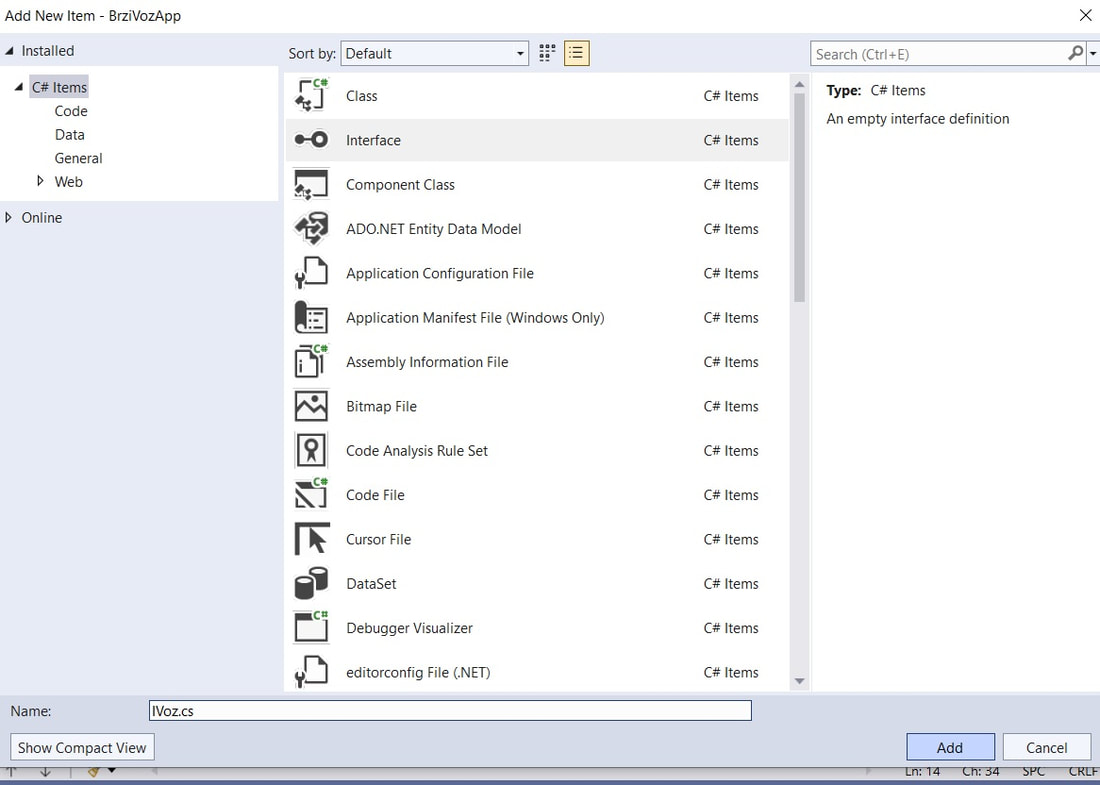
Let us create a new interface called ITrain, as shown in the next figure. Right-click the project name in Solution Explorer on the right, then click Add-> New Item; the dialog (Add New Item) appears, where you choose Interface from the list and click the Add button, see figure 4:
Now let us create 3 methods, as shown in figure 5:
using System;
using System.Collections.Generic;
using System.Linq;
using System.Text;
using System.Threading.Tasks;

namespace FastTrainApp
{
    internal interface ITrain
    {
        //A method for boarding a passenger and checking whether the allowed number of passengers has been exceeded
        void Board(Passenger passenger);

        //A method for printing the list of passengers
        void PassengerList();

        //A method that prints the ticket price for all passengers, depending on the reservation and the purchase method
        void TicketPrice(double price);
    }
}
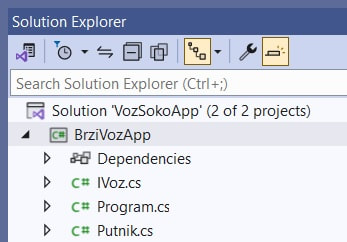
All the files created so far are visible in Solution Explorer, as you can see in figure 6:
Let us create the Train class, but before that we will create a class for handling exceptions, called TrainException, since we will use it in the Train class to check passengers boarding. Let us create the exception class now.
Creating the exception-handling class (TrainException)
TrainException (see figure 7) is a class that inherits the Exception class. This means that TrainException is a custom exception that can be used to signal specific problems in the application.
using System;
using System.Collections.Generic;
using System.Linq;
using System.Text;
using System.Threading.Tasks;

namespace FastTrainApp
{
    internal class TrainException : Exception
    {
        public TrainException(string message)
            : base(message)
        {
            Console.WriteLine(message);
        }
    }
}
Let us break this class down:
internal class TrainException : Exception
The class TrainException inherits the class Exception, which is the base class for all exceptions in C#. When you inherit Exception, you can define your own exceptions that can be caught in try-catch blocks.
A constructor with a string parameter
public TrainException(string message)
    : base(message)
{
    Console.WriteLine(message);
}
- Constructor: The constructor of the TrainException class takes one parameter, message, of type string. This message describes the error or the situation that caused the exception.
- Calling the base class: : base(message) calls the constructor of the base class (Exception) and passes the message to it. This way, when the exception is caught in a catch block, the message will be available through the exception's Message property.
- Console.WriteLine(message);: This line of code displays the message on the console right after the exception is created. This is useful for debugging, but in a real application you may not want exception messages to be shown to users automatically in this way.
In this example, when a situation that requires a specific exception occurs, which will happen in the Train class that we still have to implement, a new TrainException with an appropriate message can be thrown. In a catch block that exception can be caught and handled in a specific way, such as showing a message to the user or writing to a log file.
Implementing the Train class and connecting it to the ITrain interface
Let us create a new file Train.cs, which will contain this class, and make it implement the interface ITrain. The program will report an error until we implement the methods from the interface, that is, give them a body, as you can see in figure 8:
internal class Train : ITrain
{
    // Visual Studio reports error CS0535: 'Train' does not implement interface member 'ITrain.Board(Passenger)'.
    // Clicking the light bulb → Implement interface adds empty methods:
    public void TicketPrice(double price)
    {
        throw new NotImplementedException();
    }

    public void PassengerList()
    {
        throw new NotImplementedException();
    }

    public void Board(Passenger passenger)
    {
        throw new NotImplementedException();
    }
}
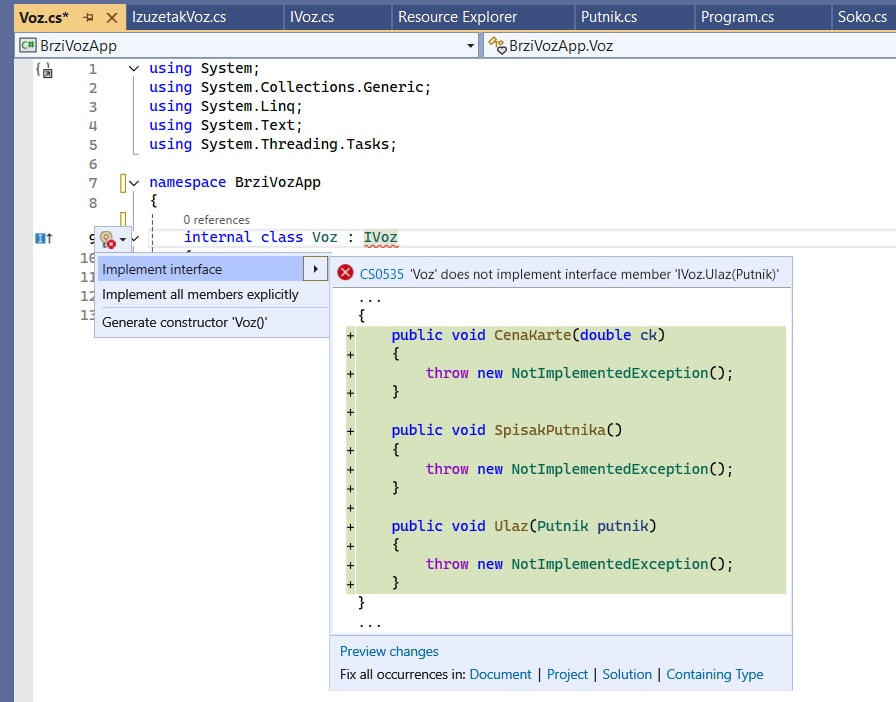
Let us click the light bulb and the offered option to implement the methods from the connected interface. The methods are added and get a body, but the content of the body must be changed, because at the moment it contains the following line, which throws an exception if we try to run the application now:
throw new NotImplementedException();
Creating the list of passengers
We declare the list inside the class and finish creating it in the constructor:
internal class Train : ITrain
{
    List<Passenger> passengers; //Declaring the list of passengers
    private double ticketPrice;

    /*Constructor*/
    public Train()
    {
        ticketPrice = 1500; //The default price
        passengers = new List<Passenger>(); //Finishing the creation of the empty list
    }
}
The Board method
The method Board(Passenger p) should add the passenger passed as the parameter (an object of the Passenger class) to the list. First it checks whether the number of passengers in the list has reached the limit, and if it has, an exception is thrown – this is the chance to use the exception-handling class we made earlier. The method is shown below:
public void Board(Passenger passenger)
{
    if (passengers.Count >= 7)
    {
        /*An exception is thrown and a message is sent*/
        throw new TrainException("There may be at most 7 passengers on the train");
    }
    passengers.Add(passenger); //Adds the passenger to the list
}
The TicketPrice method
This method prints the ticket price for each passenger. To go through the list, the foreach statement is used, which in each pass takes the next passenger from the list and then checks whether that passenger has a reservation and whether the payment method is "online". If so, the price includes a 10% discount; if the ticket is reserved and was paid at the counter, the default price is shown. The method is shown below:
public void TicketPrice(double price)
{
    foreach (Passenger p in passengers)
    {
        if (p.Reservation)
        {
            if (p.PurchaseMethod == "online")
            {
                double discounted = 0.9 * price; //price with a 10% discount
                Console.WriteLine($"Passenger: {p.ToString()}, ticket price with discount: {discounted} dinars");
            }
            else if (p.PurchaseMethod == "counter")
            {
                Console.WriteLine($"Passenger: {p.ToString()}, ticket price: {price} dinars");
            }
        }
    }
}
This class can be seen in the following figures, no. 9 and 10:
namespace FastTrainApp
{
    internal class Train : ITrain
    {
        List<Passenger> passengers;
        private double ticketPrice;

        public Train()
        {
            ticketPrice = 1500;
            passengers = new List<Passenger>();
        }
        public void TicketPrice(double price)
        {
            foreach (Passenger p in passengers)
            {
                if (p.Reservation)
                {
                    if (p.PurchaseMethod == "online")
                    {
                        double discounted = 0.9 * price; //price with a 10% discount
                        Console.WriteLine($"Passenger: {p.ToString()}, ticket price with discount: {discounted} dinars");
                    }
                    else if (p.PurchaseMethod == "counter")
                    {
                        Console.WriteLine($"Passenger: {p.ToString()}, ticket price: {price} dinars");
                    }
                }
            }
        }

        // ... the PassengerList and Board methods are in the next figure
    }
}
The PassengerList method can be seen in figure 10, and it prints the data about the passengers. Here too the foreach statement is used to go through the passengers, and for each passenger the ToString() method defined in the Passenger class is used to print the data.
public void TicketPrice(double price)
{
    foreach (Passenger p in passengers)
    {
        if (p.Reservation)
        {
            if (p.PurchaseMethod == "online")
            {
                double discounted = 0.9 * price; //price with a 10% discount
                Console.WriteLine($"Passenger: {p.ToString()}, ticket price with discount: {discounted} dinars");
            }
            else if (p.PurchaseMethod == "counter")
            {
                Console.WriteLine($"Passenger: {p.ToString()}, ticket price: {price} dinars");
            }
        }
    }
}

public void PassengerList()
{
    foreach (Passenger p in passengers)
    {
        Console.WriteLine(p.ToString());
    }
}

public void Board(Passenger passenger)
{
    if (passengers.Count >= 7)
    {
        throw new TrainException("There may be at most 7 passengers on the train");
    }
    passengers.Add(passenger);
}
Adding an indexer to the class
An indexer in C# lets objects of a class be indexed like arrays. This means that you can access the elements in the class with a syntax similar to array indexing, for example myObject[index].
Implementing an indexer. An indexer is implemented with the keyword this, which is used as a special method for indexing. Here is an example of an indexer in the Train class, which contains a list of passengers, see figure 11:
/*Implementing the indexer*/
public Passenger this[int index]
{
    get
    {
        try
        {
            return passengers[index];
        }
        catch (ArgumentOutOfRangeException ex)
        {
            Console.WriteLine("The index is out of range. " + ex.Message);
            return null;
        }
    }
    set
    {
        try
        {
            passengers[index] = value;
        }
        catch (ArgumentOutOfRangeException ex)
        {
            Console.WriteLine("The index is out of range. " + ex.Message);
        }
    }
}
- The keyword this: In the context of an indexer, this represents the instance of the class and lets the class behave like an array. The parameter index used with this is the index parameter for accessing the elements in the list.
- Getter: The code inside get returns the object with the given index from the list. In this example, if the index is valid (within the range of the list), an object of type Passenger is returned. If it is not, the list throws an ArgumentOutOfRangeException, which is caught here: a message is printed and
nullis returned. - Setter: The code inside set makes it possible to set the value at a specific index. As in the getter, an invalid index is caught and reported with a message.
Sorting methods
To create a method for sorting by first name, we will use a LINQ query for filtering and a lambda expression.
LINQ (Language Integrated Query) is a powerful tool in the .NET framework that lets you query and manipulate data from different sources using the same query language, directly inside C# (or other .NET languages). LINQ simplifies working with data, whether the data is in memory, in a database, in XML documents or somewhere else.
Lambda expressions are a key part of modern programming languages such as C#, and they let you write inline, anonymous functions. In essence, lambda expressions make it possible to define methods without having to create separate methods or classes.
You can read more about this on the page: LINQ queries and lambda expressions in C#
To create the second method, for sorting by last name, we will use the inner class LastNameComparer, which implements the interface IComparer and its method Compare. Let us now look at the code added to the same Train class in figure 12.
internal class Train : ITrain
{
    // ... fields, constructor, methods and indexer from the previous figures

    /*Sorting methods*/
    public void SortByFirstName()
    {
        var sortedPassengers = passengers.Where(p => p.Reservation && p.PurchaseMethod == "online").OrderByDescending(p => p.FirstName).ToList();
        foreach (Passenger p in sortedPassengers)
        {
            Console.WriteLine(p.ToString());
        }
    }
    // A method for sorting by last name using IComparer
    public void PrintSortedByLastName()
    {
        passengers.Sort(new LastNameComparer());
        foreach (var p in passengers)
        {
            Console.WriteLine(p.ToString());
        }
    }

    /*An inner class that implements the comparison interface IComparer*/
    private class LastNameComparer : IComparer<Passenger>
    {
        public int Compare(Passenger x, Passenger y)
        {
            if (x == null || y == null)
            {
                throw new ArgumentException("The objects being compared cannot be null");
            }
            return x.LastName.CompareTo(y.LastName);
        }
    }
} /*End of the Train class*/
Additional explanations
- private class LastNameComparer : IComparer<Passenger>: The class LastNameComparer implements the interface IComparer<Passenger>, which means that it must provide an implementation of the Compare method for comparing objects of type Passenger.
- public int Compare(Passenger x, Passenger y): This is the method from the IComparer<Passenger> interface used to compare two Passenger objects. The method should return:
- 0 if the objects are equal.
- < 0 if the first object is smaller than the second.
- > 0 if the first object is larger than the second.
- if (x == null || y == null): Checks whether either object is null. If so, it throws an ArgumentException, because comparing null objects is neither possible nor meaningful.
- return x.LastName.CompareTo(y.LastName);: If neither object is null, it compares their last names with the string method CompareTo. The CompareTo method returns an integer that shows how one string compares with the other.
The main class
In the main class we will create an instance of the train, create a collection of passengers and sort it in the reverse of the order in which the passengers boarded the train.
The number of passengers has to be read. Print the passengers, but make sure that, if the number is over the limit, the application throws an exception with a message saying that the number of passengers has been exceeded, and in that case prints only the first 7 passengers.
Sort the passengers, first by first name and then by last name. Demonstrate throwing and catching exceptions.
Let us now look at what the main class should look like, in figures 13 and 14:
internal class Program
{
    static void Main(string[] args)
    {
        int passengerCount = 0;
        Train train = new Train();
        // b) Create a collection of passengers and fill it in the reverse of the order in which they came
        List<Passenger> passengers = new List<Passenger> {
            new Passenger("Mark", "Marshall", "online"), new Passenger("Joanna", "Jones", "counter"),
            new Passenger("Anna", "Adams", "online"), new Passenger("Nicholas", "Nichols", "counter"),
            new Passenger("Ivy", "Irving", "online"), new Passenger("Peter", "Peters", "counter"),
            new Passenger("Milly", "Miller", "online"), new Passenger("Victor", "Vaughan", "counter"),
            new Passenger("Tamara", "Thompson", "online"), new Passenger("Milan", "Morris", "counter"),
            new Passenger("Susan", "Sutton", "online")
        };
        passengers.Reverse(); // Reverse the order

        Console.WriteLine("Enter the number of passengers");
        passengerCount = Convert.ToInt32(Console.ReadLine());
        // c) Show at least 7 passengers from the collection boarding
        Console.WriteLine(" 1) Show at least 7 passengers boarding from the collection");
        try
        {
            foreach (var passenger in passengers.Take(passengerCount))
            {
                train.Board(passenger);
            }
        }
        catch (TrainException ex)
        {
            passengerCount = 7;
            Console.WriteLine(ex.ToString());
        }

        // d) Demonstrate all the other methods
        Console.WriteLine(" 2) Show the list of passengers");
        train.PassengerList();
        // ... the rest of the Main method is in the next figure
    }
}
And the second part of the Main method:
internal class Program
{
    static void Main(string[] args)
    {
        // ... the first part of the Main method (figure 13)

        // d) Demonstrate all the other methods
        Console.WriteLine(" 2) Show the list of passengers");
        train.PassengerList();

        // Ticket price with a 10% discount for online reservations
        train.TicketPrice(1500);

        // e) Print the results of a LINQ query or lambda expression
        Console.WriteLine("3) Passengers with an online reservation:");
        var onlinePassengers = passengers
                                .Where(p => p.Reservation && p.PurchaseMethod == "online")
                                .OrderByDescending(p => p.FirstName);
        foreach (var p in onlinePassengers)
        {
            Console.WriteLine(p);
        }

        // f) Print the results of sorting with IComparer
        Console.WriteLine("4) Passengers sorted by last name:");
        train.PrintSortedByLastName();
    }
}
Explanation of the code in the main class
- Initializing the train and the passengers:
- First an instance of the Train class is created, which will represent the train in the application.
- Then a list of passengers is created and filled with instances of the Passenger class with a given first name, last name and purchase method.
- Reversing the order of the passengers:
- The list of passengers is put in reverse order with the Reverse method. This operation simulates the passengers having entered their data in reverse order.
- Entering the number of passengers:
- The user enters the number of passengers who will board the train. This value is stored in the variable passengerCount.
- Adding the passengers to the train:
- The program tries to put the number of passengers the user entered into the list of passengers on the train. If the number of passengers exceeds the allowed maximum, a TrainException is thrown.
- In that case, the program catches the exception, sets the number of passengers to 7, which is the maximum number of allowed passengers, and prints the exception message.
- Printing the list of passengers:
- The list of passengers on the train is displayed with the PassengerList method of the Train class.
- Calculating the ticket price:
- The TicketPrice method of the Train class is used to calculate and display the ticket prices for all passengers. Passengers who made their reservation over the internet get a 10% discount.
- Printing the passengers with an online reservation:
- With a LINQ query, the passengers who have a confirmed reservation and the purchase method "online" are filtered and displayed. These passengers are sorted by first name in descending order.
- Sorting the passengers by last name:
- Using the IComparer interface, the passengers are sorted by last name and the result is printed with the PrintSortedByLastName method of the Train class.
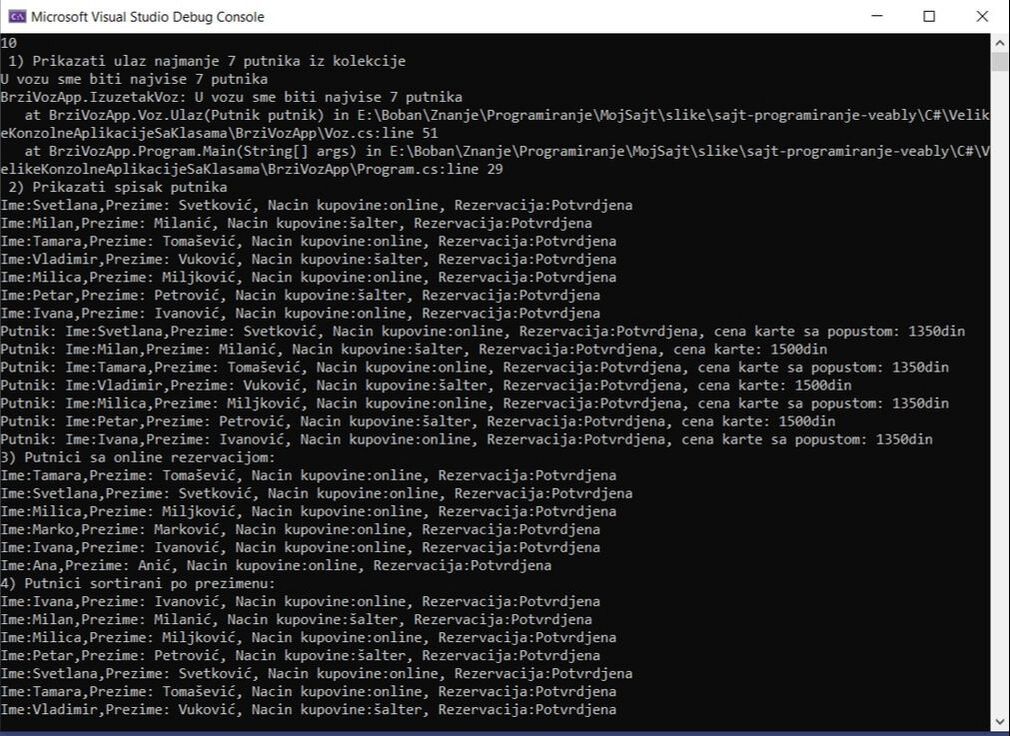
After running the program with the input of 10 passengers, we get:
Program output (input: 10):
Enter the number of passengers
10
 1) Show at least 7 passengers boarding from the collection
There may be at most 7 passengers on the train
FastTrainApp.TrainException: There may be at most 7 passengers on the train
   at FastTrainApp.Train.Board(Passenger passenger)
   at FastTrainApp.Program.Main(String[] args)
 2) Show the list of passengers
First name: Susan, Last name: Sutton, Purchase method: online, Reservation: Confirmed
First name: Milan, Last name: Morris, Purchase method: counter, Reservation: Confirmed
First name: Tamara, Last name: Thompson, Purchase method: online, Reservation: Confirmed
First name: Victor, Last name: Vaughan, Purchase method: counter, Reservation: Confirmed
First name: Milly, Last name: Miller, Purchase method: online, Reservation: Confirmed
First name: Peter, Last name: Peters, Purchase method: counter, Reservation: Confirmed
First name: Ivy, Last name: Irving, Purchase method: online, Reservation: Confirmed
Passenger: First name: Susan, Last name: Sutton, Purchase method: online, Reservation: Confirmed, ticket price with discount: 1350 dinars
Passenger: First name: Milan, Last name: Morris, Purchase method: counter, Reservation: Confirmed, ticket price: 1500 dinars
Passenger: First name: Tamara, Last name: Thompson, Purchase method: online, Reservation: Confirmed, ticket price with discount: 1350 dinars
Passenger: First name: Victor, Last name: Vaughan, Purchase method: counter, Reservation: Confirmed, ticket price: 1500 dinars
Passenger: First name: Milly, Last name: Miller, Purchase method: online, Reservation: Confirmed, ticket price with discount: 1350 dinars
Passenger: First name: Peter, Last name: Peters, Purchase method: counter, Reservation: Confirmed, ticket price: 1500 dinars
Passenger: First name: Ivy, Last name: Irving, Purchase method: online, Reservation: Confirmed, ticket price with discount: 1350 dinars
3) Passengers with an online reservation:
First name: Tamara, Last name: Thompson, Purchase method: online, Reservation: Confirmed
First name: Susan, Last name: Sutton, Purchase method: online, Reservation: Confirmed
First name: Milly, Last name: Miller, Purchase method: online, Reservation: Confirmed
First name: Mark, Last name: Marshall, Purchase method: online, Reservation: Confirmed
First name: Ivy, Last name: Irving, Purchase method: online, Reservation: Confirmed
First name: Anna, Last name: Adams, Purchase method: online, Reservation: Confirmed
4) Passengers sorted by last name:
First name: Ivy, Last name: Irving, Purchase method: online, Reservation: Confirmed
First name: Milly, Last name: Miller, Purchase method: online, Reservation: Confirmed
First name: Milan, Last name: Morris, Purchase method: counter, Reservation: Confirmed
First name: Peter, Last name: Peters, Purchase method: counter, Reservation: Confirmed
First name: Susan, Last name: Sutton, Purchase method: online, Reservation: Confirmed
First name: Tamara, Last name: Thompson, Purchase method: online, Reservation: Confirmed
First name: Victor, Last name: Vaughan, Purchase method: counter, Reservation: Confirmed
The message about the exceeded number of passengers appears twice: the first time from the TrainException constructor, and the second time from ex.ToString() in the catch block, which also prints the call stack (in Visual Studio with file names and line numbers). Part 3) shows all online passengers from the collection (including those who did not board), because the query works on the list passengers in Main, not on the train.
Check your knowledge
Open the quiz
Advanced example: train passengers
1. What must a class that implements the ITrain interface do?
2. Which class does TrainException inherit?
3. What is the indexer in the Train class for?
4. What does $ in front of the string in the ToString() method mean?