
The first program in Python — print() and comments
Welcome to the second lesson! In this lesson we will learn how to make Python print text on the screen with the print() function, how to write comments in the code, and briefly about escape sequences (how to insert a new line, a tab, etc.).
What does print() do?
The print() function shows text (or other values) in the console. You put the text you want to show in quotes:
print("Hello, world!")
print('This is Python.')
You can use double or single quotes — both work, just be careful not to use the same kind of quotes inside them without an escape.
Escape sequences (optional — a short explanation)
Sometimes you want to make a new line or a tab in the text. For that there are escape sequences such as:
\n— a new line\t— a tab\\— printing the backslash character itself\"and\'— escaping quotes inside a string
print("First line\nSecond line")
print("Name:\tIvan")    # the name, then a tab
Comments
Comments are text in the code that tells the computer to ignore the line — they are used to explain the code to people. In Python a one-line comment is written with the # sign.
# This is a comment - the computer will not run it
print("This line will be shown")  # a comment after the code
Short examples
# Greeting program
print("Hello! Welcome to Python.")

# Printing the first and last name
print("First and last name: Ana Marković")

# Several greetings in new lines
print("Hi!\nHow are you?\nToday we are learning Python.")
Mini tasks (try them yourself)
- Greeting
Write a program that prints:Hello, welcome to the programming class! - First and last name
Write a program that prints your first and last name in one line, e.g.Marko Marković - Messages
Write a program that prints two different messages — the first and the second in two different lines (use either twoprint()calls or the escape\n).
Try first without looking at the solution. When you solve the task, run the program and look at the output.
Possible solutions (look after you have tried yourself)
Solution for task 1 — Greeting:
print("Hello, welcome to the programming class!")Solution for task 2 — First and last name:
print("Marko Marković")Solution for task 3 — Messages:
# option A: two print() calls
print("Good day!")
print("We continue learning Python.")

# option B: one print with \\n
print("Good day!\nWe continue learning Python.")
What to pay attention to
- Text to be printed must be in quotes.
- Comments start with
#and do not affect the execution. - Escape sequences change the way the text is printed (e.g.
\nmakes a new line).
Next lesson: arithmetic operations – how Python calculates with numbers.
Multi-line comments in Python
Python has no special symbol for multi-line comments, but we can write them
using three quotes — """ ... """ or ''' ... '''.
Python ignores such text when we use it as a comment.
Here is an example:
"""
This is a multi-line comment.
It can stretch over several lines.
It is used for longer explanations.
"""
print("The program runs after the comment.")
Multi-line comments are useful for:
- longer explanations of the code
- a description of the program at the beginning of the file
- temporarily "switching off" part of the code
Technically, these are actually "multi-line strings" that Python ignores if we do not assign them to a variable, but they are widely used as multi-line comments.
In the next example the part between the triple quotes is "switched off", so only the first print() and the two calculations run:
# Greeting program
print("Hello! Welcome to Python.")

#The multi-line comment is below
"""
# Printing the first and last name
print("First and last name: Ana Marković")

# Several greetings in new lines
print("Hi!\nHow are you?\nToday we are learning Python.")
"""
print(2 + 3 * 4)      # what do you think the result is?
print((2 + 3) * 4)    # parentheses change the order
Hello! Welcome to Python.
14
20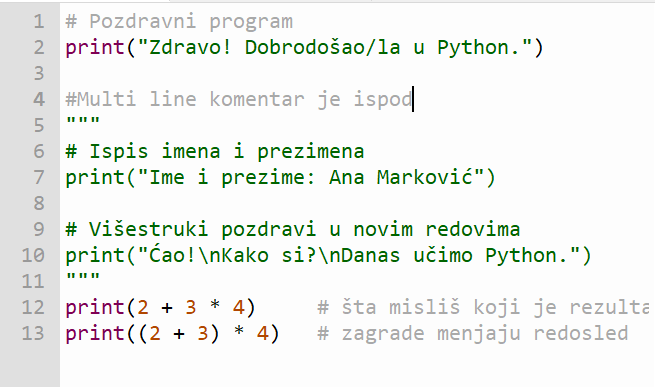
Indentation and whitespace in Python
In Python it is very important how you align the code. Python uses indentation (spaces or tabs) to mark blocks of code. Every statement that is not part of a block must start at the beginning of the line — without blank characters.
The basic rules
- Statements that run directly start at the beginning of the line:
print("This is the first line of code")
print("This is the second line")if, for, def etc.):if True:
print("This line is in the if block")
print("So is this one")
print("This line is outside the if block")print("First line")
print("This line has too many spaces and will cause an error")The role of whitespace in the readability of code
Although Python strictly requires indentation for blocks, blank characters (spaces) also help to organise the code and make it clearer. Properly aligned code is easier to read and maintain.
- Code in blocks (if, for, while, functions) is usually indented with 4 spaces.
- Statements outside blocks start at the margin (without indentation).
- Uniform and consistent use of spaces makes a program clearer.
An example with indentation and empty lines
print("Start of the program")

if True:
    print("This is in the if block")
    print("One more line in the block")

print("End of the program")  # This is outside the block

# Empty lines also help to make the code clearer
Note: empty lines (Enter) do not affect the execution of the code, but they make the program clearer.
Mini tasks for practising indentation
- Write an
ifcondition that checks whether a number is greater than 10 and in the block print the message "The number is greater than 10". - Add an
elseblock that prints "The number is 10 or less". Pay attention to the indentation. - Write a program with three
print()calls, where the first and the third are outside the block, and the second is inside anif Trueblock.
Try to write each task first without copying the solution, check the indentation and run the program.
A short quiz — check your knowledge!
Open the quiz
Quiz: The first program in Python
1. What does the print() function do?
2. How does a comment start in Python?
3. Which escape sequence makes a new line?