
Python — Loops: for and while
1. What are loops?
Loops let us repeat a certain part of the code as many times as we want. Python has two kinds of loops:
- the for loop – when we know in advance how many times we want a block of code to repeat
- the while loop – when we repeat as long as some condition is met
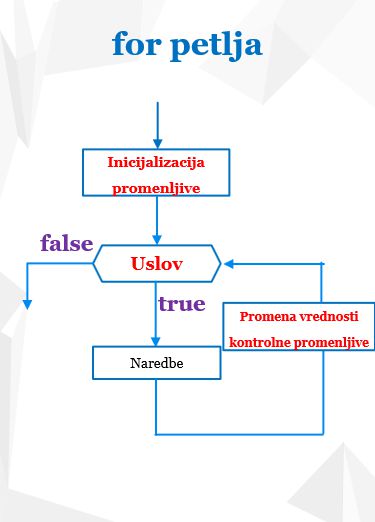
1. Initialising the variable
Before entering the loop, the control variable is defined. In Python this is done in the header of the
for loop itself
(for example the variable i).
2. Checking the condition
The condition decides whether the statements inside the loop will run. If the condition is true, the statements in the loop run. If the condition is false, the loop ends.
3. Running the statements
When the condition is met, the statements in the body of the loop run.
4. Changing the value of the control variable
After every pass through the loop, the value of the control variable changes (it increases or decreases). After that the condition is checked again.
This process repeats until the condition becomes false, when the program continues after the loop.
# An example of a for loop in Python

for i in range(1, 6):
    print(i)
iis the control variablerange(1, 6)gives the range of values from 1 to 5- the loop runs 5 times
- when there are no more values in the range, the condition becomes false and the loop ends
2. The for loop
For is most often used when we want to go through a sequence of numbers or a collection.
for i in range(5):
    print("This is repetition number:", i)
Explanation:
range(5) generates the numbers 0, 1, 2, 3, 4 → 5 repetitions in total.
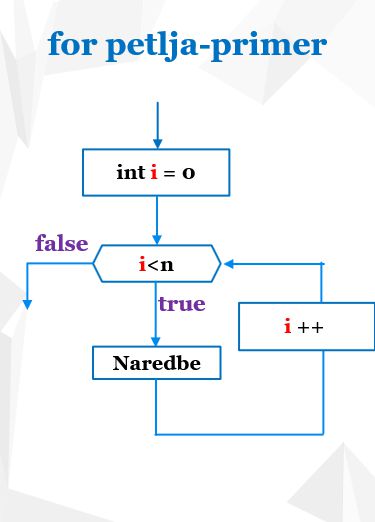
Picture 2 shows a concrete example of how a for loop works. The goal of the algorithm is to run certain statements n times, using the control variable
i.
The task:
Write a Python program that prints the numbers from 0 to n-1, where
n is given in advance.
An explanation of the algorithm (picture 2):
- The control variable
iis set to 0 at the start (i = 0) - The condition
i < nis checked - If the condition is true, the statements in the body of the loop run
- After that the value of the variable
iis increased by 1 (i += 1) - The process repeats until the condition
i < nbecomes false
# The solution in Python

n = 5

for i in range(n):
    print(i)
i = 0matches the initialisation in the picturei < nis built into the functionrange(n)- Python increases
iby 1 automatically in every iteration - the loop runs exactly n times
The for loop and the range() function
In this example we will see how the function range() can be used
with three arguments together with a for loop.
Code example
for number in range(2, 10, 2):
    print(f"{number} ")
An explanation of the code
The function range() has three arguments in this example:
2– the start value (the number we start from)10– the end value (this number is not included)2– the step (how much the number increases in each iteration)
This means that the loop will go through the following values of the variable
number:
2, 4, 6, 8
In every iteration the current value of the variable number is printed
with the function print().
An example of the output
2
4
6
8
What have we learned?
- the for loop lets you go through a sequence of values
range(start, end, step)gives full control over the numbers- this form is useful for going through even numbers
This way of writing code is common in tasks with numbers, filtering values and optimising loops.
A mini Python game — Fill in the code (for loop)
Practise the for loop by filling in the empty parts of the code. Imagine the flow of execution with the diagram in picture 2 (initialisation → condition → statements → increase).
Game 1: Printing the numbers from 0 to 4
Fill in range so that the numbers from 0 to 4 are printed:
for i in ________:
    print(i)
Game 2: Printing the numbers from 1 to 5
Fill in range so that the numbers are printed from 1 to 5:
for i in __________:
    print(i)
Game 3: How many times does the loop run?
Fill in the number so that the message is printed exactly 3 times:
for i in range(_____):
    print("Python")
A for loop through a list
fruits = ["apple", "banana", "orange"]

for item in fruits:
    print("Fruit:", item)
In Python the for loop is very often used to go through the elements of a list.
In this example we have the list fruits that contains names of fruit.
fruits = ["apple", "banana", "orange"]

for item in fruits:
    print("Fruit:", item)
The line fruits = ["apple", "banana", "orange"] defines a list with three elements.
In the for loop, the variable item gets the values from the list
fruits in turn:
- first pass:
item = "apple" - second pass:
item = "banana" - third pass:
item = "orange"
In every pass of the loop the print statement runs, so the result will be:
Fruit: apple
Fruit: banana
Fruit: orange
This way of iterating is typical for Python and allows a simple and readable pass through all the elements of a list, without needing an index.
6) More practical examples and variants
The basic examples with the for loop are a good start, but for a better understanding
it is important to see how loops are used in different situations.
Below are two very common and practical examples.
Example 1: A for loop through a string
In Python a string can be seen as a sequence of characters.
That is why a for loop can go through every character in a string.
text = "Python"

for letter in text:
    print(letter)
The variable letter gets the value of each character of the string
"Python" in turn.
In every pass of the loop one letter is printed.
The result of running the program will be:
P
y
t
h
o
n
This way of iterating is useful when we want to analyse text, count letters or check whether some character appears in a string.
Example 2: A for loop through a list of numbers with conditions
Often we need to process only certain elements of a list.
In that case we can combine the for loop with an if condition.
In the following example we go through a list of numbers and print only the even numbers.
numbers = [1, 2, 3, 4, 5, 6, 7, 8, 9, 10]

for number in numbers:
    if number % 2 == 0:
        print("Even number:", number)
The variable number takes the values from the list numbers in turn.
The condition number % 2 == 0 checks whether the number is even.
If it is, the number is printed.
The result of running the program will be:
Even number: 2
Even number: 4
Even number: 6
Even number: 8
Even number: 10
This approach is very common in practice because it allows filtering data while going through a list, without needing additional data structures.
3. The while loop
The while loop is used when we want a certain part of the code to repeat
as long as some condition is met (True).
Unlike the for loop, with the while loop
we do not have to know in advance how many times the loop will run.
The for loop is most often used when we go through the elements of a collection (a list, a string, a range of numbers), while the while loop is suitable when the repetition depends on a change in the value of a variable or on an external condition.
In other words:
- for – used when we know the number of repetitions or go through a collection
- while – used when the repetition runs while the condition is true
While runs the code as long as a certain condition is true (True).
number = 1

while number <= 5:
    print("Value:", number)
    number += 1
In this example the variable number starts from 1.
The loop runs as long as the condition number <= 5 is met.
After every pass the value of the variable increases by 1.
Important: always make sure that the condition stops at some point — otherwise we get an endless loop!
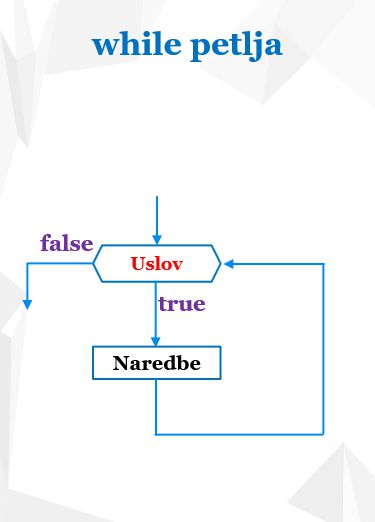
How the while loop works – an explanation of the diagram
The diagram above shows the flow of execution of a while loop.
The loop is always based on checking a condition and repeating
statements while that condition is met.
The order of execution is as follows:
- First the condition is checked.
- If the condition is True, the statements inside the loop run.
- After the statements have run, the program goes back to checking the condition.
- When the condition becomes False, the loop stops and the program continues.
That is why it is very important that some variable changes inside the while loop,
so that the condition becomes false at some point.
Otherwise an endless loop happens.
An example that matches the diagram
In the following example we use a while loop to print the numbers from 1 to 5.
The example follows the logic shown in the diagram directly.
number = 1

while number <= 5:
    print("Value:", number)
    number += 1
Explanation:
- The condition is
number <= 5 - While the condition is true, the block of statements runs
- After every pass, the value of the variable
numberincreases - When
numberbecomes greater than 5, the condition becomes False and the loop ends
Together, this diagram and example clearly show why the while loop
is used when the number of repetitions is not known in advance, but depends on whether a condition is met.
4. The endless while loop
An endless loop is a loop that has no natural end and runs continuously, until the program is stopped by hand or until a statement inside the loop stops it.
With a while loop an endless loop happens when the condition is
always true or when the values that affect the condition never change.
Although it sounds like a mistake, endless loops have a purpose and are used in specific situations, such as:
- programs that are always waiting for user input
- server applications
- games and interactive programs
- working with sensors or devices in real time
An example of an endless while loop
while True:
    print("This loop will run forever (stop it by hand!)")
In this example the condition of the loop is True, which means it is
always met.
That is why the body of the loop runs endlessly and the program never leaves
the loop by itself.
You can stop such a program by hand, for example by pressing Ctrl + C in the terminal.
It is important to stress that endless loops are used only when they are needed on purpose. Otherwise they are the most common beginner mistake and can freeze the program or overload the processor.
5. Combining loops and if conditions – an example
Task
Write a program that goes through the numbers from 1 to 10 and for every number prints whether it is even or odd.
Solution
for i in range(1, 11):
    if i % 2 == 0:
        print(i, "is an even number")
    else:
        print(i, "is an odd number")
An explanation of the solution
The for loop goes through the numbers from 1 to 10.
In every pass, the variable i gets the next value from that range.
The condition i % 2 == 0 checks whether the number is even.
If the condition is met, the first branch of the if statement runs,
otherwise the else branch runs.
This combination of loops and conditions is very common in practice, because it allows making decisions while going through a sequence of data.
6. A practical example: counting down with a while loop
Task
Write a program that asks the user to enter a whole number, and then prints the numbers from that number down to zero, counting backwards. At the end print a message that the countdown is over.
Solution
n = int(input("Enter a number: "))

while n > 0:
    print(n)
    n -= 1

print("The countdown is over!")
An explanation of the solution
The program first asks the user to enter a number and keeps it in the variable n.
The while loop runs as long as the value of the variable n
is greater than zero.
In every pass of the loop the current value is printed, and then
decreased by 1.
When n becomes equal to zero, the condition of the loop is no longer met,
the loop stops and the final message is printed.
This example shows a typical use of the while loop,
when the number of repetitions depends on the change in the value of a variable.
Break and continue – controlling the flow of a loop
The statements break and continue are used to
control the flow of loops (for and while).
They let us change the usual flow of a loop in certain situations.
The break statement
The break statement is used when we want to stop the loop completely,
regardless of whether its condition is still met.
After the break statement runs, the program continues
with the first statement after the loop.
Example: break in an endless while loop
while True:
    entry = input("Enter 'exit' to leave: ")
    if entry == "exit":
        break
    print("Entered:", entry)
This example uses an endless while loop that keeps waiting for
user input.
When the user enters the word exit, break runs
and the loop stops.
This pattern is often used in interactive programs and menus.
The continue statement
The continue statement does not stop the loop; it skips the current pass
and goes straight to the next iteration of the loop.
The code below continue in the body of the loop will not run.
Example: continue in a while loop
number = 0

while number < 10:
    number += 1
    if number == 5:
        continue
    print("Number:", number)
When the variable number gets the value 5,
continue runs, so printing that number is skipped.
All the other numbers are printed normally.
Combining break and continue in a for loop
Example
for i in range(1, 11):
    if i == 3:
        continue
    if i == 8:
        break
    print(i)
In this example:
- when
i == 3, the number is skipped withcontinue - when
i == 8, the loop is stopped withbreak
The result will be the numbers:
1, 2, 4, 5, 6, 7
When to use break and continue?
- break – when we want to end the loop early (e.g. we have found the element we were looking for)
- continue – when we want to skip certain cases but continue the loop
The correct use of these statements makes code more readable and efficient, but they should not be overused, so that the logic of the program stays clear.
Practice tasks: break and continue
In the following tasks you practise using the statements break and
continue in for and while loops.
Try to solve the tasks on your own before you look at solutions
or the next lesson.
Task 1: Stopping a loop
Write a program that prints the numbers from 1 upwards. When the number 7 has been printed, the loop should stop.
Note: use the break statement.
Task 2: Skipping a certain number
Write a program that goes through the numbers from 1 to 15 and prints all the numbers except the number 10.
Note: use the continue statement.
Task 3: Input with a stop
Write a program that keeps asking the user to enter text.
If the user enters the word end, the program should stop.
Note: use an endless while loop and break.
Task 4: Only even numbers
Write a program that goes through the numbers from 1 to 20 and prints only the even numbers.
Note: use continue to skip the odd numbers.
Task 5: Finding a number
Write a program that goes through the list of numbers
[3, 7, 2, 9, 5, 1].
When the number 9 is found, the loop should stop.
Note: use a for loop and break.
Task 6 (challenge): Combining break and continue
Write a program that goes through the numbers from 1 to 20. Skip the numbers divisible by 3, and stop the loop when you reach the number 17.
This task requires combining continue and break
in the same loop.
Tip: first check the condition for break, then the one for continue.
Mini quiz — Loops, break and continue
Click to check whether you understand how for, while,
break and continue work in Python.
Open the quiz
Mini quiz: What is correct?
1. What will happen with the following code?
i = 0
while i < 5:
    print(i)
2. What is the role of the break statement?
3. What does continue do in a loop?
4. What will be printed?
for i in range(1, 6):
    if i == 3:
        continue
    print(i)
5. When is an endless while loop most often used?
Additional tasks with examples of loops
To practise loop ideas further (for, while, break, continue), we recommend that you look at and solve the tasks on the following page:
Although the tasks are written for C and C++, many of them use the same loop principles as Python:
- Printing sequences of numbers, even and odd numbers
- Adding numbers in a range
- Converting units (e.g. Celsius → Fahrenheit)
- Working with conditions inside loops
- Manipulating numbers and calculations in loops
Try to solve each task first in Python using the ideas you have learned in this lesson, and then compare your solution with the way the problem is written in C/C++. This is an excellent way to strengthen your understanding of loops and logic.
Some of the tasks on the page include:
- Printing even numbers in the range from -55 to 55
- Printing the first 100 odd numbers in a table
- Adding even numbers between 10 and 50
- Calculating an average of marks
- Removing zeros from the right side of a number
Click the link above to go to the page with tasks and solutions!
Mini challenges: loops in practice (Python)
Below are mini challenges based on tasks from the page
petlje_u_c_cpp_primeri.
Although they were originally written for C/C++, try to solve them in Python
using what you know about for, while, break and continue.
Mini challenge 1: Even numbers in a range
Task: Print all the even numbers in the range from -10 to 10.
Inspiration: even numbers in a range
for i in range(-10, 11):
    if i % 2 != 0:
        continue
    print(i)
Mini challenge 2: Adding the numbers in an interval
Task: Calculate the sum of all the numbers from 1 to 100.
Inspiration: adding numbers in a loop
total = 0

for i in range(1, 101):
    total += i

print("The sum is:", total)
Mini challenge 3: The average of entered numbers
Task: The user enters numbers until they enter 0. After that print their average.
Inspiration: calculating an average
total = 0
counter = 0

while True:
    number = int(input("Enter a number (0 to stop): "))
    if number == 0:
        break
    total += number
    counter += 1

if counter > 0:
    print("The average is:", total / counter)
else:
    print("No number was entered.")
Mini challenge 4: Counting down
Task: Print the numbers from 10 to 1, and then the message "Start!"
Inspiration: counting backwards
for i in range(10, 0, -1):
    print(i)

print("Start!")
Mini challenge 5 (challenge): Find the first number divisible by 7
Task: Find the first number between 1 and 100 that is divisible by 7 and stop the loop.
Inspiration: using break in a loop
for i in range(1, 101):
    if i % 7 == 0:
        print("The first number divisible by 7 is:", i)
        break
A tip for learning:
Try to solve each task on your own first,
and then compare your Python solution with the logic of the task
on the C/C++ page.
The goal is understanding the algorithm, not only the syntax.
7. What have you learned?
- What loops are and why they are used in programming
- How the for loop works and when it is best to use it
- How to go through:
- lists
- strings
- ranges of numbers
- How the while loop works and how code is repeated based on a condition
- The difference between the for and the while loop
- How an endless while loop happens and when it is used on purpose
- How to stop a loop safely with the break statement
- How to skip part of a loop with the continue statement
- Combining loops with if conditions
- Solving practical problems with loops
- Common mistakes with loops and how to recognise them
- Checking your knowledge through practice tasks and a mini quiz
If you understand everything in this lesson, you have a solid basis for working with iterations and algorithms in Python. In the following lessons you will use these ideas even more often.