
Branching in Python — if, elif, else
In this lesson you will learn how your program can make decisions using conditional statements. Branching lets a part of the code run only if a certain condition is true — which means that the program no longer runs in a straight line from top to bottom, but can choose different paths.
Without branching, every program would do the same thing every time you run it, no matter what the input data is. Thanks to the if, elif and else structures, a program can react to different situations: check the values of variables, compare data, check user input, decide whether to run a certain function, or choose between several possible options.
In other words, branching lets a program make decisions, which is the basic requirement for building intelligent, interactive and useful applications — from simple calculators to complex systems.
1. Logical operators
Before you use branching, it is useful to know the logical operators that let you combine several conditions:
and— both conditions must be trueor— at least one of the conditions must be truenot— negates a condition
Example:
number = 8

if number > 5 and number < 10:
    print("The number is between 6 and 9")
2. The basic if
The simplest form of branching is if. The syntax:
number = 10

if number > 5:
    print("The number is greater than 5")
In the example the message is printed only if the condition number > 5 is true.
3. else — what if the condition is not true
If you want the program to do something else when the condition is not met, use else:
number = 3

if number > 5:
    print("The number is greater than 5")
else:
    print("The number is not greater than 5")
4. elif — several conditions
If you have several possibilities, use elif between if and else:
number = 7

if number > 10:
    print("The number is greater than 10")
elif number > 5:
    print("The number is between 6 and 10")
else:
    print("The number is 5 or less")
5. Mini tasks
- Enter your number and check whether it is positive, negative or zero
- Check whether the entered number is even or odd
- Make a simple quiz: if the user enters the correct answer, congratulate them, otherwise print "wrong"
- Combine logical operators in if conditions (example:
if a > 0 and b < 10:)
This lesson is the basis for making decisions in programs and is used in all more complex projects. Practise the tasks to understand how branching and logical operators work together.
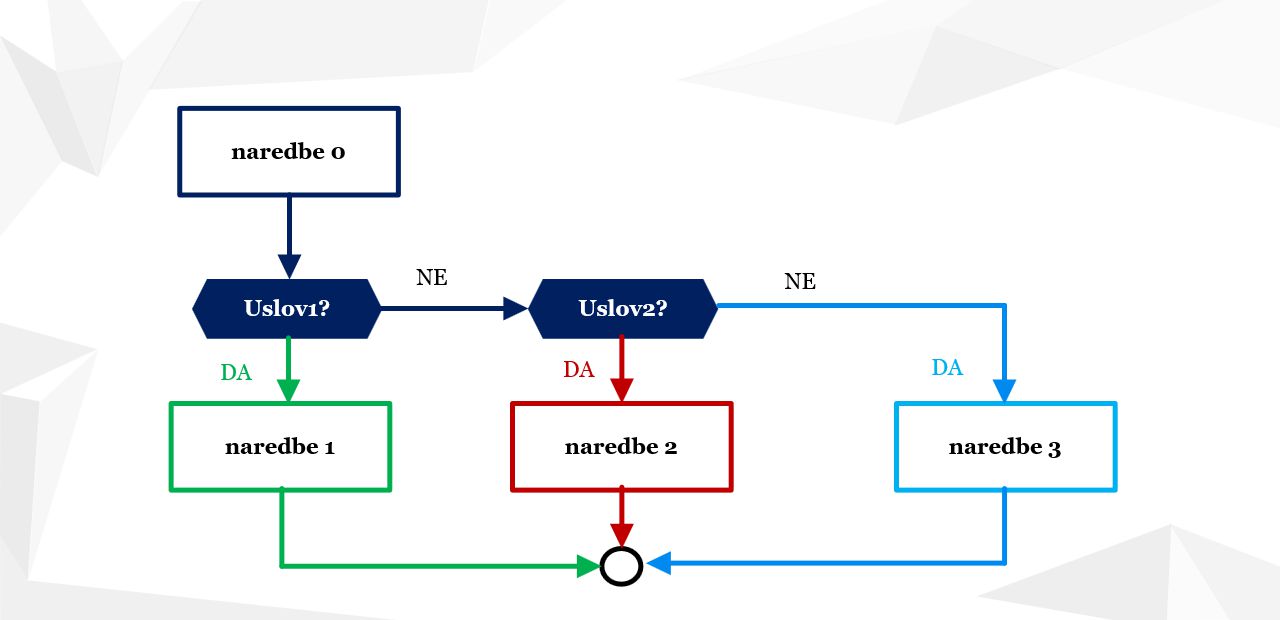
An introduction to branching with several conditions (if – elif – else)
In the previous lesson we met the basic form of branching with the if statement.
However, in real programs we very often need to check several different possibilities,
of which only one is carried out. That is exactly why Python offers the construction
if – elif – else, which is an elegant way to make a program "branch" in several directions.
Picture 1 shows branching with three possible paths: if the first condition is true → the first group of statements runs; if it is not, the second condition is checked; if neither of the previous ones is met → the third, default branch runs. We often meet this model in programs that choose one of several options (menus, categories, marks…).
Example: branching with several elif branches
points = int(input("Enter the number of points: "))

if points >= 90:
    print("Mark: 5")
elif points >= 80:
    print("Mark: 4")
elif points >= 70:
    print("Mark: 3")
elif points >= 60:
    print("Mark: 2")
else:
    print("Mark: 1")
In this example the program chooses one of five possible options.
It is important to understand that the elif branches are checked only if the previous condition was false,
which is exactly the flow shown in Picture 1.
Why use elif and not several if statements?
✓ 1. Logical correctness:
With a series of independent if statements, the program could run several branches at once.
With elif and else, Python guarantees that only one branch will run.
✓ 2. Performance:
When you use elif, Python stops checking as soon as the first true condition is found.
With several if statements in a row, all the conditions would be checked without need.
✓ 3. Readability:
if – elif – else clearly shows that exactly one of several options is chosen.
A series of if statements can be confusing, especially for beginners.
When to use groups of if, and when elif?
- Use
elifwhen the conditions exclude each other (only one branch can run). - Use several
ifstatements only if you want several different branches to run independently.
When you want "a choice of one of several options" in a program, always use the structure
if – elif – else, because it gives the best combination of clarity and correctness.
One more practical example
Let us imagine that we are writing a program that chooses the season from the entered month (as a number 1–12). For example:
month = int(input("Enter a month (1-12): "))

if month == 12 or month == 1 or month == 2:
    print("Winter")
elif month >= 3 and month <= 5:
    print("Spring")
elif month >= 6 and month <= 8:
    print("Summer")
elif month >= 9 and month <= 11:
    print("Autumn")
else:
    print("Invalid month")
Depending on the entered value of the variable month, the program prints the matching season — a demonstration of using if, elif and else in Python.
An introduction to nested branching
In Python we sometimes need to make decisions that depend on several conditions at the same time.
In such situations we use nested branching, which means that inside one if or elif block we can have another if or else block.
For example, we may want to check first whether a number is positive, and then, inside that check, also check whether it is even or odd:
number = int(input("Enter a number: "))

if number > 0:
    if number % 2 == 0:
        print("A positive even number")
    else:
        print("A positive odd number")
else:
    print("The number is zero or negative")
This example shows how we can "nest" one condition inside another, which lets programs make more complex decisions. Below we will see more practical examples in which nested branching is combined with logical operators, loops and functions.
Advanced examples: nested branching and combinations
Example 1: Nested branching with logical operators
number = int(input("Enter a number: "))

if number > 0:
    if number % 2 == 0:
        print("A positive even number")
    else:
        print("A positive odd number")
elif number < 0:
    print("A negative number")
else:
    print("The number is zero")
Example 2: A combination with logical operators and different types
x = input("Enter a value: ")

if x.isdigit() and int(x) > 10:
    print("A number greater than 10")
elif x.isalpha() and len(x) > 3:
    print("Text with more than 3 letters")
else:
    print("It does not meet any condition")
Example 3: if inside loops
numbers = [3, 7, 12, 5, 8]

for number in numbers:
    if number % 2 == 0:
        print(f"{number} is even")
    else:
        print(f"{number} is odd")
3 is odd
7 is odd
12 is even
5 is odd
8 is even
Example 4: if inside a function
def check_mark(points):
    if points >= 90:
        return "Excellent"
    elif points >= 75:
        return "Good"
    elif points >= 50:
        return "Sufficient"
    else:
        return "Insufficient"

print(check_mark(82))
GoodThese examples show the practical use of nested branching, combinations with logical operators, checking types and using if inside loops or functions.
Additional mini tasks / exercises
Task 4: Checking the body mass index (BMI)
Write a program that reads the height (in metres) and the weight (in kilograms), calculates the BMI and prints the category: underweight, normal weight, overweight, obesity.
height = float(input("Enter your height in metres: "))
weight = float(input("Enter your weight in kilograms: "))

bmi = weight / (height ** 2)

if bmi < 18.5:
    print("Underweight")
elif 18.5 <= bmi < 25:
    print("Normal weight")
elif 25 <= bmi < 30:
    print("Overweight")
else:
    print("Obesity")
Task 5: Combining input and logical operators
a = int(input("Enter the first number: "))
b = int(input("Enter the second number: "))
c = int(input("Enter the third number: "))

if a > 0 and b > 0 and c > 0:
    print("All the numbers are greater than zero")
else:
    print("Some of the numbers are not greater than zero")
Task 6: Nested branching in a game
key = input("Do you have a key? (yes/no): ").lower()
lives = int(input("Number of lives: "))

if key == "yes":
    if lives > 0:
        print("You can open the door")
    else:
        print("You do not have enough lives")
else:
    print("You do not have a key")
Task 7: Checking the type of the entered data
value = input("Enter something: ")

if value.isdigit():
    number = int(value)
    if number % 2 == 0:
        print("You entered an even number")
    else:
        print("You entered an odd number")
elif value.isalpha():
    if len(value) > 3:
        print("You entered text longer than 3 letters")
    else:
        print("You entered a short text")
else:
    print("You entered a mixed type of data")
These mini tasks help students practise combining different kinds of conditions, logical operators and nested branching in practical situations.
Choosing a random number in Python
In Python the built-in module random is used to generate random numbers.
Before we can use the functions from this module, we need to import it:
import randomThe most often used function for a random whole number is randint(a, b), which returns a number in the range from a to b, including both ends.
Example: generating a random number between 1 and 100:
import random

random_number = random.randint(1, 100)
print("A random number between 1 and 100 is:", random_number)
You can also use other functions from the random module, such as:
random.choice(numbers)– chooses a random element from a list.random.uniform(a, b)– returns a random decimal number betweenaandb.random.shuffle(numbers)– shuffles the elements of a list randomly.
This is useful for games, simulations, tests and every situation where an element of chance is needed.
Tasks for independent work (harder)
Task 1: A guessing game
Make a program that simulates a number guessing game:
- The program randomly chooses a number between 1 and 50.
- The user enters their guesses.
- The program uses
if/elif/elseto say whether the entered number is too big, too small or correct. - Use nested branching for extra messages (for example a reward for guessing in fewer than 5 attempts).
Task 2: A restaurant menu
Make a program that lets you choose food in a restaurant:
- The user chooses the type of meal: starter, main course, dessert.
- For each choice the user enters extra options (for example a side dish or the size of the portion).
- The program uses nested
ifbranching and logical operators to check whether the choices are valid. - At the end it prints the complete "bill" or a confirmation of the choice.
Task 3: Calculating a discount
Make a program that calculates the price of a product with a discount:
- The user enters the price and the customer category (for example student, pensioner, regular).
- The user can enter a coupon for an extra discount.
- The program uses a combination of
if/elif/elseand logical operators to calculate the final price. - Add a check whether all the inputs are valid (number, category type, coupon).
Task 4: Analysing a list of numbers
Write a program that reads a list of 5–10 numbers and:
- Finds the largest and the smallest number using nested
ifbranching. - Counts how many numbers are even and how many are odd.
- Prints the results in a clear format.
- Add a check whether all the entered data are valid numbers.
Instructions: For each task, first think about the logic and the conditions, make a plan of the branching (if/elif/else), and only then write the program. Focus on combining nested branching, logical operators and input validation.
FAQ / Common mistakes in branching
1. Wrong indentation (IndentationError)
The problem:
number = 5
if number > 0:
print("The number is positive")
Explanation: In Python indentation is required to mark the block of code inside if, elif or else. The print line must be indented:
if number > 0:
    print("The number is positive")
2. A forgotten colon
x = 10
if x > 5
    print("Greater than 5")
Explanation: Every if, elif or else must end with a colon :. Correct:
if x > 5:
    print("Greater than 5")
3. else without an if before it
else:
    print("This will not work")
Explanation: else must follow if or elif. An else on its own causes an error.
4. Several if statements instead of elif
number = 7
if number > 5:
    print("Greater than 5")
if number > 0:
    print("Greater than 0")
Explanation: When separate if blocks are used, both conditions are checked independently. If the goal is to check several alternatives, elif is used:
if number > 5:
    print("Greater than 5")
elif number > 0:
    print("Greater than 0")
else:
    print("Not greater than 0")
This FAQ helps students recognise common mistakes and understand why certain code does not work in Python.
A mini Python game — Fill in the code (branching)
Practise if, elif and else by filling in the empty places. Each game checks your solution.
Game 1: Checking whether a number is positive
Fill in the condition so that the program checks whether the number is greater than 0:
number = 5

if ________:
    print("The number is positive")
else:
    print("The number is not positive")
Game 2: Checking the temperature
Complete the code so that elif checks a temperature between 0 and 20:
t = 12

if t < 0:
    print("Below zero")
elif __________:
    print("Cold")
else:
    print("Warmer weather")
Game 3: A school mark
Complete the else part — it should simply say else::
mark = 5

if mark == 5:
    print("Excellent")
elif mark == 4:
    print("Very good")
______:
    print("Other marks")
Hidden mini quiz — Branching in Python
Click to check your knowledge of branching and logical operators in Python!
Open the quiz
Mini quiz: Have you mastered the lesson?
1. Which operator is used to check equality in an if condition?
2. What will be the result of the following code?
number = 7
if number > 5:
    print("Greater than 5")
else:
    print("Less than or equal to 5")
3. Which line correctly combines if and elif?
4. Which logical operator joins two conditions so that both must be true?
5. What does the following code do?
x = 10
if x % 2 == 0:
    print("Even")
else:
    print("Odd")
6. Which structure is used for more alternatives after the first if?
Hidden mini quiz — Find the mistake in the branching
Click to check whether you can recognise common mistakes in if/elif/else structures!
Open the quiz
Mini quiz: Find the mistake
1. Look at the code. What is the mistake?
number = 5
if number > 0:
print("The number is positive")
2. Look at the code. What is the mistake?
x = 10
if x > 5
    print("Greater than 5")
3. Look at the code. What is the mistake?
else:
    print("This will not work")
4. Look at the code. What is the mistake?
number = 7
if number > 5:
    print("Greater than 5")
if number > 0:
    print("Greater than 0")