
Logical operators and branching
1. What are operators?
Operators in Python are used to perform different operations on values or variables.
There are arithmetic operators (+, -, *, /),
comparison operators (==, !=, >, <, >=, <=),
logical operators (and, or, not), and many others.
2. Logical operators in Python
Logical operators are used to combine or negate conditions. They are key when we want to make decisions in a program, for example in if statements.
- and – returns True if both conditions are true, otherwise False
- or – returns True if at least one of the conditions is true
- not – negates a condition, that is, True becomes False, and the other way round
Combined with comparison operators we can make more complex expressions that check several conditions at once.
3. Examples of use
# example 1
first_number = 5
second_number = 10
print(first_number < second_number and second_number < 20)   # True, both conditions are true

# example 2
temperature = 3
humidity = 7
print(temperature > 5 or humidity < 10)              # True, the second condition is true

# example 3
rain = True
print(not rain)                                         # False, the negation is the opposite value
Note: logical expressions can be more complex too, for example a combination of and, or and not in one expression:
age = 15
has_licence = True
if (age >= 14 and age <= 18) or has_licence:
    print("You may enter")
Here two conditions are combined with and, and then the whole combination with or, which makes complex logical checks possible.
Example:
temperature = 25
humidity = 60

if temperature > 20 and humidity < 70:
    print("It is pleasant outside!")
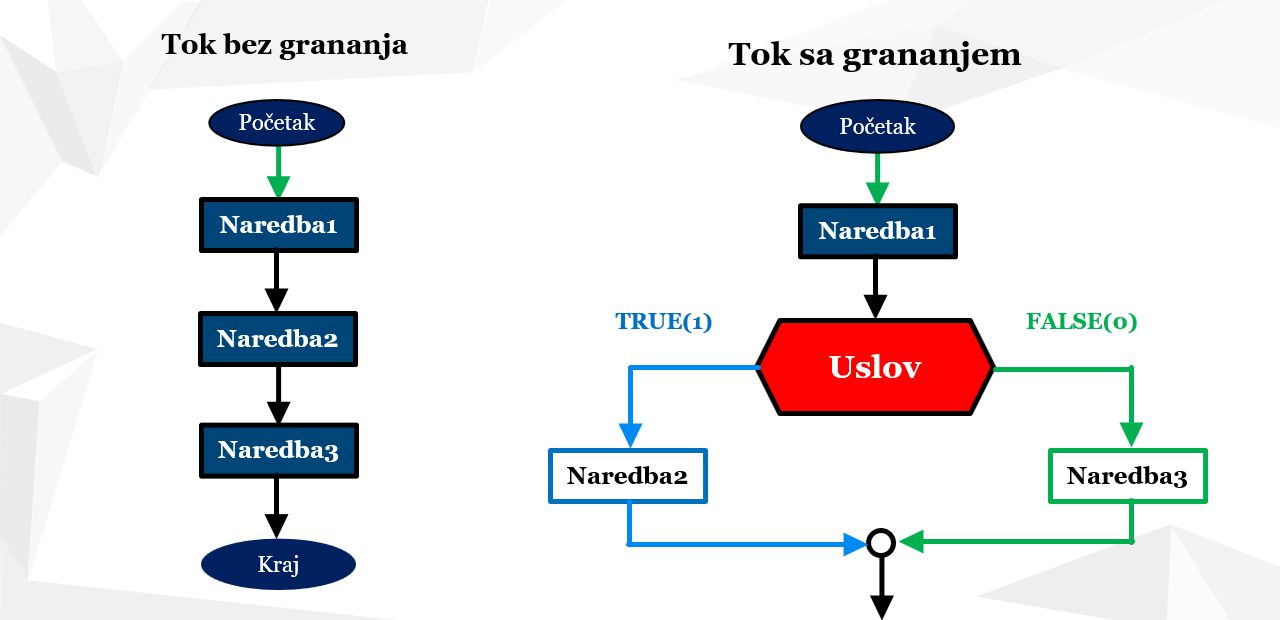
Branching: if / elif / else
1. Introduction: linear flow vs branching
In a simple program without branching, the code runs in order, line by line – we call this a linear flow. Look at the illustration on the left in Picture 1. When we use branching, the program can decide which block of code to run depending on whether certain conditions are met. This adds "branches" to the flow of execution (shown on the right in Picture 1).
Based on the value of a variable or the result of an expression, the program decides where to go next. In Python branching is done with the keywords if, elif and else.
- If the condition in
ifis true, that block runs and the others are skipped. - If it is not true,
elifis checked (there can be several). - If no condition is true, the
elseblock runs (if there is one).
2. Example: check whether a number is even or not
number = 7

if number % 2 == 0:
    print("The number is even")
else:
    print("The number is odd")
This example shows simple branching with two branches: if the number is divisible by 2 (number % 2 == 0), the first block runs, and otherwise (else) the second block.
This is the basis of logical decision making in Python.
3. An example of branching with three branches (a mark)
points = 85

if points >= 90:
    print("Excellent!")
elif points >= 75:
    print("Good")
else:
    print("Needs more effort")
In this example:
- The program first checks whether
points >= 90. It is not, so it moves to the next condition. - The next
elifchecks whetherpoints >= 75. It is true, so the blockprint("Good")runs. - The
elseblock is skipped because the previous condition was already true.
4. Kinds of branching
- Only if: used when we want to run code only if the condition is true. There is no else.
temperature = 5
if temperature < 0:
    print("It is freezing!")
day = "Monday"
if day == "Saturday" or day == "Sunday":
    print("Weekend!")
else:
    print("A working day")
age = 17
has_licence = False

if age >= 18:
    print("An adult")
    if has_licence:
        print("Has a driving licence")
    else:
        print("Does not have a driving licence")
else:
    print("A minor")
points = 92
if points >= 90:
    print("Excellent!")
elif points >= 80:
    print("Very good")
elif points >= 70:
    print("Good")
else:
    print("Needs more effort")
These structures give programs a dynamic flow of execution, so they can make decisions and react to different values of variables.
Truth tables: and, or, not
A truth table shows the result we get for all possible combinations of input logical values
(True / False). It is the fastest way to see how the operators behave.
1) and
| A | B | A and B |
|---|---|---|
| True | True | True |
| True | False | False |
| False | True | False |
| False | False | False |
Intuition: and means "both must" — the result is True only when both sides are True.
2) or
| A | B | A or B |
|---|---|---|
| True | True | True |
| True | False | True |
| False | True | True |
| False | False | False |
Intuition: or means "one is enough" — the result is True as soon as at least one operand is True.
3) not (negation)
| Value | not value |
|---|---|
| True | False |
| False | True |
Intuition: not simply changes True into False and the other way round.
A quick rule to remember
and = "both must" → very strict. or = "one is enough" → very permissive. not = "flip the value" → useful for conditions like "no" or "is not".
3. Mini tasks
- Write a program that checks whether the temperature is above 30°C and prints a message for a hot day.
- A quiz: the program asks questions and marks the correct answers with if / elif / else.
- Make a program that compares two numbers and prints the bigger one.
A complex logical expression — combining several operators
When several logical operators (not, and, or) are combined, Python uses a strictly defined order of evaluation (priority):
- 1. not — the highest priority
- 2. and
- 3. or — the lowest priority
Let us look at the following complex condition:
(x > 10) or (not y == 5) and (z < 0)
Example values:
x = 3
y = 5
z = -2
How does Python evaluate the expression?
- First not is processed:
not y == 5→not True→ False - Then and:
(not y == 5) and (z < 0)→False and True→ False - Finally or:
(x > 10) or False→False or False→ False
The final result:
Complex expression → False
Explanation:
Although the expression looks complex, Python always reads it according to the priority of the operations. If you want to change the order of evaluation, use brackets, as in mathematics:
(x > 10 or not y == 5) and (z < 0)
Changing the brackets changes the logic — so always use them when you want your intention to be completely clear.
An advanced example — a complex expression with several conditions
In more complex situations logical expressions are used to make decisions that depend on several parameters.
In this example we combine several operators (not, and, or) and four logical conditions.
The complex expression:
(not is_admin and failed_logins < 3) or (account_active and verified and not banned)
Example values of the variables:
is_admin = False
failed_logins = 1
account_active = True
verified = False
banned = False
Evaluating the expression — step by step
| Condition | Value | Result |
| not is_admin | is_admin = False | True |
| failed_logins < 3 | 1 < 3 | True |
| (not is_admin and failed_logins < 3) | True and True | True |
| account_active | True | True |
| verified | False | False |
| not banned | banned = False | True |
| (account_active and verified and not banned) | True and False and True | False |
| THE WHOLE EXPRESSION | True or False | True |
The final result:
Complex expression → True
A real use in Python code
Complex logical expressions like this are often used in authentication and access control systems.
# An example of checking whether a user can sign in to the system
if (not is_admin and failed_logins < 3) or (account_active and verified and not banned):
    print("Access allowed")
else:
    print("Access denied")
Explaining the code:
- not is_admin — an ordinary user (not an administrator)
- failed_logins < 3 — not too many failed attempts
- account_active — the account is active
- verified — the user has confirmed their email
- not banned — the account is not blocked
If either of the two big groups of conditions is true, the system allows access. This shows how logical operators work together in complex real situations.
Hidden mini quiz — the logical operators and, or, not
Click to check your knowledge of logical expressions, truth values and branching in Python!
Open the quiz
Mini quiz: Have you mastered logical operators?
1. Which operator has the highest priority in Python?
2. What is the result of the expression True and False?
3. What is the result of the expression not (True or False)?
4. What does the expression (5 > 2) or (3 > 10) return?
5. What is the result of the complex expression:
True or False and False
(Reminder: the priority is not > and > or)
6. What will be printed?
x = 7
print(x > 3 and not (x == 10))
Common mistakes with logical operators in Python
When working with logical operators (and, or, not), beginners often make typical mistakes that are easy to avoid once you understand the real cause. Below are the most common situations and explanations.
1. Forgotten brackets — a wrong result because of priority
Python follows this order of priority:
- not (the highest priority)
- and
- or (the lowest priority)
That is why the following expression may not work the way it looks:
x = 5
print(not x > 3 and x < 10)
Mistake: many people think that not applies to the whole expression x > 3 and x < 10.
The truth: it applies only to x > 3, because not has the highest priority.
Correct:
print(not (x > 3 and x < 10))
2. Using & and | instead of and and or
Python has two groups of operators that look similar but work completely differently:
| Operator | Use |
|---|---|
and, or, not |
logical operations (boolean) |
&, |, ~ |
bitwise operations (working on bits) |
A common mistake:
a = True
b = False
print(a & b)   # it works, but it is not meant for this
Although it works, you should not use & and | in logical conditions — except when you deliberately do bitwise operations.
Correct:
print(a and b)
Note: for NumPy arrays & and | are required — that is a separate topic and does not apply to standard Python.
3. Comparing several values the wrong way
Mistake:
x = 5
if x == 3 or 4 or 5:
    print("OK")
This always returns True, because it is read as:
(x == 3) or (4) or (5)
And the numbers 4 and 5 are treated as True in a logical context.
Correct:
if x == 3 or x == 4 or x == 5:
    print("OK")
Even better:
if x in (3, 4, 5):
    print("OK")
4. "not" and comparisons – readability
It works, but it is harder to read:
if not x == 10:
    print("Not 10")
This is equivalent to:
if x != 10:
Both forms do the same thing (the comparison is done before not), but the first is less readable and can be confusing, especially if there are several conditions.
As simple as possible:
if x != 10:
    print("Not 10")
5. Logical operators return values, not necessarily True/False
This is a common source of confusion:
print("" or "Python")   # Python
print("Hello" and 0)    # 0
The operators and and or return values, not booleans — which can be a problem if you do not expect it.
Solution:
bool("" or "Python") # True
If you need only True/False, use bool() or conditions in an if statement.