
Classes and objects in physics simulations
Classes and objects are the basic concepts of object-oriented programming (OOP) and play a key role in structuring code in a way that is easy to understand, maintain and extend. In physics simulations, these structures let programmers model real physical systems in an efficient and organised way. Classes define templates or blueprints for creating objects, which are concrete instances of those classes.
With classes we can group data (e.g. properties such as mass, position, speed) and functionality (e.g. methods for calculating forces and motion) into one logical unit. This makes code modular, so that different parts of a program can be developed and tested independently, and it allows code reuse, so that the same classes can be used in different parts of a program or even in different projects. For example, a class defined once for modelling a point in space can be used both in simple simulations in a plane and in more complex simulations of forces and motion in a gravitational field.
You can see more about classes and objects, methods, encapsulation, static variables and methods on the page: Classes and objects
Videos in Serbian with English subtitles – turn on subtitles (CC) in the YouTube player.
To reserve memory for an object we use the following pattern:
data_type data_name = new constructor(constructor_parameters);
The name of the class the object belongs to is used as the data type. E.g. if the object belongs to the Scanner class, then the definition of this object, which we will call reader, would be:
Scanner reader = new Scanner(System.in);Software objects imitate objects from nature, so both have:
- Properties
- Behaviour
- State
The class of an object is actually a description of all the objects that belong to it, and those are objects that have the same:
- Properties
- Behaviour – described by methods
By defining an object we have created it according to the description (the class), and it will have the properties and methods listed there:
The Scanner class has some methods, e.g.:
nextInt() - this method takes from standard input the data the user typed on the keyboard and converts it into a whole number.
nextDouble() - this method takes from standard input the data the user typed on the keyboard and converts it into a real number.
Principles of object-oriented programming (OOP)
In object-oriented programming (OOP) there are several basic principles that are key to organising and structuring code:
- Inheritance: It lets you create new classes based on existing ones, so that the new classes can use or extend features that are already defined. For example, in physics we can have a base class Body, from which the specific classes Planet, Star and Satellite are derived.
- Encapsulation: This principle means hiding the internal structure of an object, so that data and methods that should not be used directly outside the object are protected from outside access. For example, the mass of a planet can be a private variable, while public methods are available for calculating the gravitational force or motion.
- Polymorphism: It lets objects of different classes be treated as objects of the base class, while specific methods are called depending on the actual class of the object. For example, in a gravitational system we can have a list of Body objects that contains planets, stars and satellites, and we can call the method for calculating motion, and the right implementation of the method will be called for each kind of body.
These principles make writing code more efficient and flexible, which is especially important in complex physics simulations, where different physical systems and interactions can be modelled in a structured way.
Physics examples with classes and objects
Example 1 – Classes and objects using points in a plane
- Create 3 objects that represent three points in a plane, A, B and C. Move point A to a new position A1.
- Show the coordinates of the points after the move.
Data for the points:
A(2,4)
B(5,-2)
C(-4,2)
A1(1,3)
Notice that all three objects belong to the same class because they have the same properties x and y.
These will be 3 different instances (objects) of the same class
The state of point A will change during the program, but not its properties 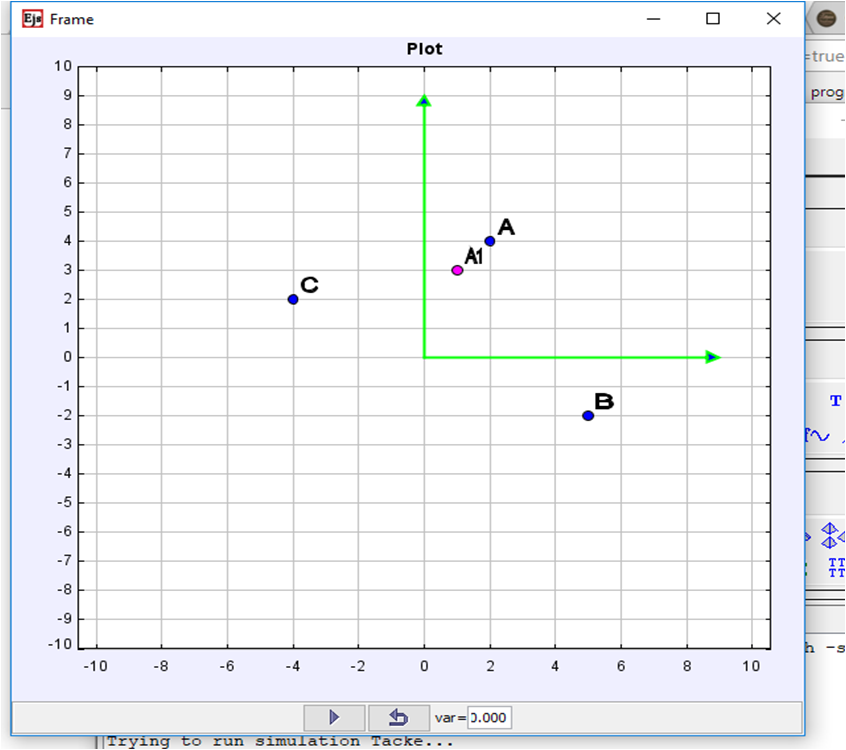
Example 2.1 – Uniform motion
A car moves uniformly towards place B. Create an object that represents the car, if it is known that its starting speed is 4 m/s and its starting position is 5 m from the starting point.
Show the speed and the position at the starting position
calculate the current position after 3 s and show the current data again. How would the data change if the starting speed had been 10 m/s?
Example 2.2 – Uniformly accelerated motion
Change the previous example so that the car moves with uniform acceleration a (entered by the user)
Solution of example 2.1
More varied examples of classes and objects
Besides the example with points in a plane, we can look at a more complex physical system such as a system of planets in a gravitational field. In this case we can define a Planet class that contains properties such as mass, position and velocity, as well as methods for calculating the gravitational force a planet exerts on other planets.
Then we can create several objects of this class, where each object represents one planet in the system, for example Earth, Mars and Jupiter. Each of these planets has its own specific properties, but all the objects use the same methods for calculating their mutual gravitational interactions. This example shows how objects that belong to the same class can model complex interdependencies inside a physical system, making the simulation realistic and flexible.
By using OOP principles, such a program can easily be extended by adding new planets or changing existing ones without significant changes to the rest of the code. This is another example of modularity and code reuse, which are key to successful modelling and simulations in physics.
Inheritance in Java
Inheritance is one of the key principles of object-oriented programming in Java, and it lets you create new classes based on existing ones. This lets common properties and methods be defined in one base class, and those properties are then inherited by derived classes that add or change specific features.
For example, in physics we can define a base class Body that contains properties such as mass, position and velocity, as well as methods for calculating motion. From this base class we can derive more specific classes, such as Planet and Star, which inherit all the properties and methods of the Body class, but can also have their own specific properties and methods. For example, the Star class can have an extra property such as temperature, while the Planet class can have a method for calculating its orbit around a star. Such a class hierarchy allows a modular and flexible program design, where the common code is centralised in base classes, while the specific features are added in derived classes.
You can read more about this on the following page: Inheritance of classes
Tasks for independent work
- Creating a class for a free fall simulation: Define a FreeFall class that simulates the motion of a body under the influence of gravity. Let the class have properties such as starting speed, height and acceleration, and a method that calculates the current position of the body at a given time.
- Creating a class for a harmonic oscillator: Define a HarmonicOscillator class that simulates the oscillations of a body attached to a spring. Let the class have properties such as amplitude, frequency and phase, and a method that calculates the position of the body depending on time.
- Creating a class for simulating a gravitational system: Based on the earlier examples, extend the simulation so that it includes the interactions between several planets in the system, using the previously defined Planet and Star classes.
Branching in a program
In simple examples in the Java programming language, statements were run in one flow, i.e. one after another, to the very end of the program. Sometimes some statements in a program are run only under a certain condition.
For example, let us look at the following problem: For the numbers a and b that are read in, calculate the value of the fraction a/b.
After declaring the variables and the user entering a and b, we come to the part where the fraction needs to be calculated. Can we simply introduce a variable c and calculate c=a/b?
It is known that division by zero is not allowed. This means that before the formula above is written, we must first check whether the condition that b is different from zero is met. If it is, the formula can be written and the result printed. Otherwise, we can either do something else, e.g. print a message that division by zero is not allowed, or do nothing.
We conclude that there are two ways the program can run, or only one, depending on the condition whether b is different from zero or not. This means that the program branches, and the branching is done on the basis of a logical value or expression.
Video lesson
Read more about this on the page Branching in the Java programming language
Branching examples
Example 3.2 – A car race
Three cars start from the starting position with delays of T1>T2>T3 seconds, at speeds v1, v2, v3. Find which car is in first place after the time t>T1
Solution video
Example 3.3 – Catching up with a car
Two cars move at constant speeds v1 [m/s] and v2 [m/s] in the same direction from place A towards place B, and at the starting moment they are at distances s1=5 km and s2=40 km from place A.
Find out whether the first car will catch up with the second one, and when.
Extra examples
Example 3.4 – A volleyball serve
See example 26 (the harder version) and task 13 (the easier version) and the hints at the following link: Branching examples
Check your knowledge
Open the quiz
Quiz: Classes and objects in physics
1. What are the attributes of the Body class in a simulation?
2. What does a method that moves a body by one time step dt do?
3. The advantage of several objects of the same class is:
4. Where are the starting position and speed set?