
Pong in Python — the OOP version and a modular game
the examples in this lesson are written for Processing Python Mode. If you work in the recommended Thonny + py5 environment, most of the code stays the same, and names with a capital letter in the middle are written in lower case with an underscore:
mouseX → mouse_x, noStroke() → no_stroke(). See the table of differences.In the previous lessons we made the Pong game using variables and functions:
Now we move on to a more advanced approach — object-oriented programming (OOP).
What is OOP? (a simple explanation)
OOP is a way of programming where, instead of using only variables and functions, we organise the code into objects.
- The ball is an object
- The paddle is an object
- The player is an object
- properties (attributes) → position, speed
- behaviour (methods) → moving, drawing
Class = a plan (a template)
Object = a concrete instance of that plan
Why use OOP in games?
- the code is organised and easy to follow
- each part of the game has its own logic
- it is easier to add new features
- less duplicated code
1. The Paddle class
class Paddle:
    def __init__(self, x, y):
        self.x = x
        self.y = y
        self.width = 15
        self.height = 80
        self.speed = 0

    def move(self):
        self.y += self.speed
        self.y = constrain(self.y, 0, height - self.height)

    def show(self):
        rect(self.x, self.y, self.width, self.height)
How should you understand this class?
selfmeans "this object"__init__()is called when we create an object- each paddle has its own position and speed
2. The Ball class
class Ball:
    def __init__(self):
        self.reset()
        self.size = 20

    def move(self):
        self.x += self.dx
        self.y += self.dy

        if self.y < self.size/2 or self.y > height - self.size/2:
            self.dy = -self.dy

    def check_collision(self, paddle):
        if (self.x - self.size/2 < paddle.x + paddle.width and
            self.x + self.size/2 > paddle.x and
            self.y > paddle.y and self.y < paddle.y + paddle.height):

            self.dx = -self.dx

            # a little speed-up
            self.dx *= 1.05

    def show(self):
        ellipse(self.x, self.y, self.size, self.size)

    def reset(self):
        self.x = width/2
        self.y = height/2
        self.dx = 5 if random(1) < 0.5 else -5
        self.dy = random(-4,4)
The ball now "knows" how to:
- move
- bounce
- reset itself
3. Creating the objects
left_paddle = None
right_paddle = None
ball = None

score_left = 0
score_right = 0
4. The setup function
def setup():
    global left_paddle, right_paddle, ball

    size(700, 400)
    textSize(24)

    left_paddle = Paddle(30, height/2 - 40)
    right_paddle = Paddle(width-45, height/2 - 40)

    ball = Ball()
5. The main game loop
def draw():
    global score_left, score_right

    background(20)

    # Ball
    ball.move()
    ball.check_collision(left_paddle)
    ball.check_collision(right_paddle)
    ball.show()

    # Paddles
    left_paddle.move()
    right_paddle.move()
    left_paddle.show()
    right_paddle.show()

    # Points
    if ball.x < 0:
        score_right += 1
        ball.reset()

    if ball.x > width:
        score_left += 1
        ball.reset()

    # Score
    text(score_left, width/4, 40)
    text(score_right, width*3/4, 40)
Why is this better than before?
- the main code is shorter
- each object does its own part of the work
- it is easier to add new features
6. Keyboard controls
def keyPressed():
    if key == 'w':
        left_paddle.speed = -6
    if key == 's':
        left_paddle.speed = 6

    if keyCode == UP:
        right_paddle.speed = -6
    if keyCode == DOWN:
        right_paddle.speed = 6


def keyReleased():
    if key in ['w','s']:
        left_paddle.speed = 0

    if keyCode in [UP, DOWN]:
        right_paddle.speed = 0
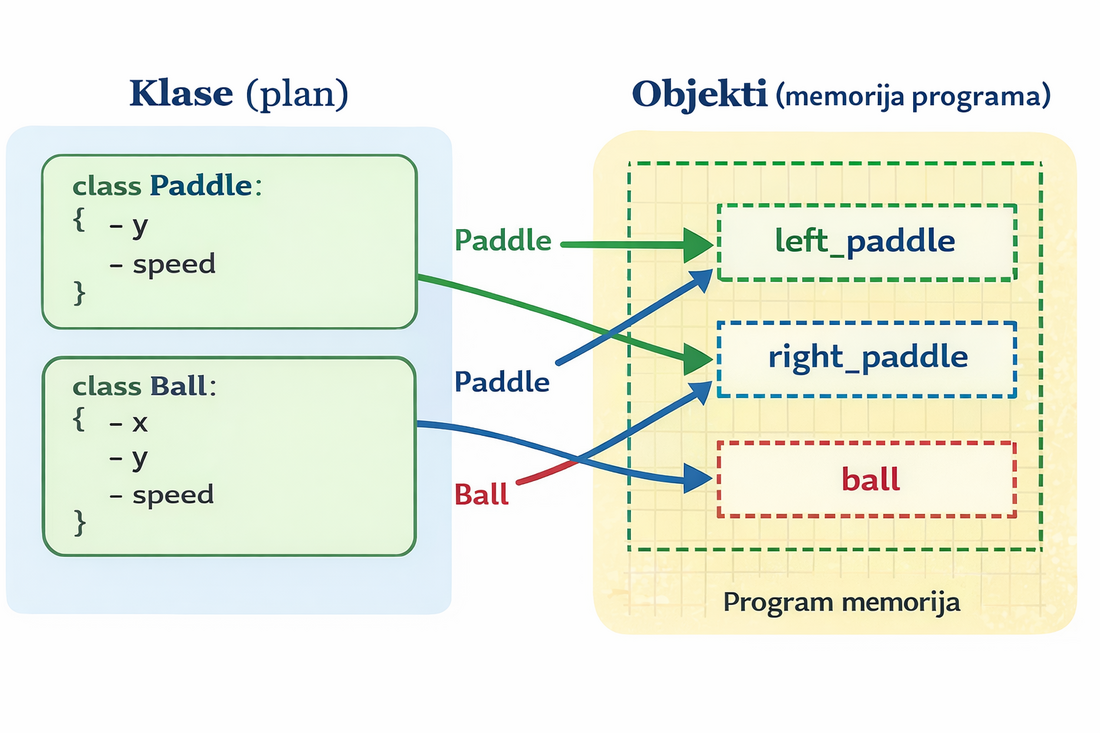
Extra: Understanding OOP (object-oriented programming)
In this lesson we use object-oriented programming (OOP) for the first time. If this seems new to you — that is completely normal.
OOP is a way of writing programs where, instead of using only variables and functions, we organise the code through objects.
- Class = a plan (a template) - Object = a concrete instance of that plan
An example from real life:
- Class: Car
- Objects: BMW, Audi, Tesla
A visual explanation (from the real world)
In the picture (which you saw earlier in the Java part of the tutorial, and in Figure 1) you can see the difference between:
- real objects (a car, a tree, a plane)
- their software models (classes in the program)
In a program each class describes:
- properties (e.g. speed, size)
- behaviour (moving, collisions)
Idea: One class can create many objects (e.g. many cars or many balls in a game).
How is this used in our Pong game?
In this lesson we use two classes:
- Paddle → represents a paddle
- Ball → represents the ball
This means that:
- each paddle has its own position and speed
- the ball has its own movement and collisions
- each object "knows" how to behave
Without OOP: - everything would be in one function - the code would quickly become chaotic With OOP: - the code is divided and easy to follow ✅ - it is easier to add new features - it is used in real games and applications
Connecting with the Java tutorial
If you want an extra explanation of the OOP concept, you can look at the Java part of the site:
Java uses OOP as the basis of the language, so if you want a deeper understanding:
the Java tutorial is an excellent next step
A recommendation for beginners
If this is still hard for you, go back to:
A small OOP challenge
- Add a new class PowerUp (a bonus object)
- Add more balls using the Ball class
- Make an AI opponent as a separate class
This is the next step towards real games.
What did we learn?
- what OOP is and how it works
- how to make classes in Python
- how to organise a game with objects
- how to split the logic into smaller parts
Useful resources for OOP
- An introduction to functions (the basis for OOP)
- Variable scope (global vs local)
- Python classes (official documentation)
- W3Schools — Python classes
If you find OOP hard — that is normal. It is best learnt through projects like this Pong game.
Related lessons
Frequently asked questions
What is OOP in Python?
OOP (object-oriented programming) is a way of organising code with classes and objects. Each object has its own data and functions.
Why use OOP in games?
Games contain many objects such as players, enemies, projectiles and obstacles. OOP lets each of these objects have its own logic.
Is Python Processing good for learning game programming?
Yes. Processing makes drawing graphics and interaction simple, which makes it excellent for beginners in game programming.
How can I extend the Pong game?
You can add an AI opponent, a sound when the ball collides, difficulty levels or graphic effects.
Check your knowledge
Open the quiz
Mini quiz: OOP
1. What is an object?
2. What is self in a class method?